
As an Amazon Associate we earn from qualifying purchases.
- How to Choose a Thunderbolt Cable for Mac and iPad
- 1. Apple Thunderbolt 5 (USB-C) Pro Cable (1 m) — Best for Thunderbolt 5 Macs
- 2. Anker USB-C to USB-C Thunderbolt 4 100W Cable (0.7 m) — Best Short Desk Cable
- 3. Cable Matters Active Thunderbolt 4 Cable (6.6 ft) — Best Long Full-Speed Run
- 4. OWC Thunderbolt 4 Cable (0.72 m) — Best for Apple-Focused Desks
- 5. Belkin Thunderbolt 4 Cable (2 M) — Best Long Cable From a Big Brand
- Frequently Asked Questions
- Conclusion
A plain USB-C charging cable and a certified Thunderbolt cable look identical, but they behave very differently on a Mac or iPad. A charge-only cable may crawl along at USB 2.0 speeds, refuse to drive an external display, or drop a fast SSD down to a fraction of its potential. A certified Thunderbolt cable guarantees a defined data rate, a defined charging ceiling, and DisplayPort video over the same lead, which is exactly what a MacBook, a Mac mini, or a USB-C iPad Pro or iPad Air needs for docks, drives, and monitors.
This guide covers five certified options: one Thunderbolt 5 cable for the newest Macs, and four Thunderbolt 4 cables that suit everything from a tidy desk setup to a long active run across a room. Each pick lists its data speed and charging power plainly, so you can match the cable to your setup instead of guessing from the connector shape.
Disclosure: This article contains affiliate links. If you buy through a link on this page, we may earn a commission at no extra cost to you.
How to Choose a Thunderbolt Cable for Mac and iPad
Check the certification first. Look for Thunderbolt 4, Thunderbolt 5, or USB4 certification from a named brand. Certification is what guarantees the headline speed and power figures, rather than a vague “fast charging” claim.
Match the speed to your gear. Thunderbolt 4 and USB4 cables carry up to 40Gbps, which is plenty for most docks, 4K and 5K displays, and mainstream external SSDs. Thunderbolt 5 raises that to 80Gbps of bidirectional bandwidth, with up to 120Gbps in one direction for display-heavy work, and it matters most with Thunderbolt 5 Macs, docks, and drives.
Respect the length limit. Passive Thunderbolt cables hold full speed up to about 0.8 metres. Longer 2-metre cables that still deliver full 40Gbps are active designs with electronics in the cable, so check that a long cable is explicitly rated for full speed before you buy it for a dock or display.
Confirm the charging ceiling. Thunderbolt 4 cables are rated for up to 100W or, on newer designs, up to 240W. A 100W cable covers a MacBook Air and most MacBook Pro charging through a dock, while a 240W ceiling gives headroom for the hungriest laptops and future chargers.
1. Apple Thunderbolt 5 (USB-C) Pro Cable (1 m) — Best for Thunderbolt 5 Macs

Apple’s own Thunderbolt 5 Pro Cable is the natural first choice for a Mac with Thunderbolt 5 ports. It supports Thunderbolt 5 data transfer up to 120Gbps in display Bandwidth Boost mode and up to 80Gbps bidirectionally, carries up to 240W of charging, and adds DisplayPort 2.1 video output for high-resolution external displays. The black braided jacket resists tangling in a bag, and the 1-metre length suits a laptop-to-dock or laptop-to-drive run on a desk. It also works with Thunderbolt 4, Thunderbolt 3, and USB-C Macs and iPads, negotiating down to whatever the connected device supports, so it stays useful across a mixed Apple setup.
Specs
- Certification: Thunderbolt 5, backward compatible with Thunderbolt 4, Thunderbolt 3, and USB4
- Data transfer: Up to 80Gbps bidirectional, up to 120Gbps with Bandwidth Boost
- Charging: Up to 240W USB-C Power Delivery
- Video: DisplayPort 2.1 output for external displays
- Length: 1 m, black braided design
2. Anker USB-C to USB-C Thunderbolt 4 100W Cable (0.7 m) — Best Short Desk Cable
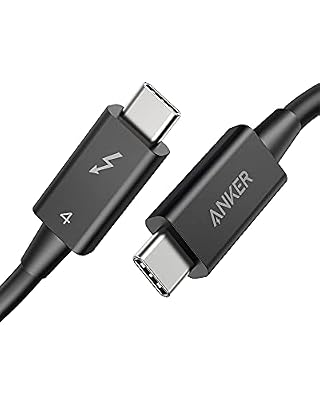
The Anker 765, model A8859, is a compact Intel-certified Thunderbolt 4 cable built for the short hop between a MacBook or iPad Pro and a dock, hub, or external drive. At 0.7 metres it keeps a desk tidy without a coil of spare cable, while still delivering the full Thunderbolt 4 specification: 40Gbps data, up to 100W of charging, and video support for a single 8K display or dual 4K displays through a compatible dock. That 100W ceiling is enough to charge a MacBook Air or a 14-inch MacBook Pro while you work, and the short passive design holds full speed with no compromises.
Specs
- Certification: Thunderbolt 4, Intel certified, USB4 compatible
- Data transfer: Up to 40Gbps
- Charging: Up to 100W USB-C Power Delivery
- Video: Single 8K display or dual 4K displays via a compatible dock or hub
- Length: 0.7 m (2.3 ft)
- Model: A8859
3. Cable Matters Active Thunderbolt 4 Cable (6.6 ft) — Best Long Full-Speed Run

Most passive cables give up full Thunderbolt speed well before two metres, but this Cable Matters cable is an active, Intel Certified design that keeps 40Gbps across its full 6.6-foot length. That makes it the pick for a dock under a desk, a display across a workstation, or an external drive that cannot sit next to your Mac. This listing pairs the 40Gbps data rate with up to 240W of charging and 8K video support, and it remains fully compatible with USB4, Thunderbolt 3, and standard USB-C devices, so the same long lead can serve several roles around a Mac or iPad desk setup.
Specs
- Certification: Thunderbolt 4, Intel Certified, active cable design
- Data transfer: Up to 40Gbps across the full cable length
- Charging: Up to 240W USB-C Power Delivery
- Video: Up to 8K video output
- Length: 6.6 ft (2 m)
- Compatibility: Thunderbolt 4, Thunderbolt 3, USB4, and USB-C devices
4. OWC Thunderbolt 4 Cable (0.72 m) — Best for Apple-Focused Desks

OWC builds its accessories around Mac workflows, and its Thunderbolt 4 cable follows that pattern. The 0.72-metre cable is Thunderbolt certified for 40Gbps data transfer, supports up to 240W of power delivery on this listing, and carries up to 8K video, so one short cable can handle a MacBook or iPad connection to a dock, a fast external SSD, or a display. It is universally compatible with Thunderbolt 4, Thunderbolt 3, USB4, and USB-C hosts and devices, which makes it an easy spare to keep in a laptop bag for whichever machine you are carrying that day.
Specs
- Certification: Thunderbolt 4 certified, USB4 compatible
- Data transfer: Up to 40 Gb/s
- Charging: Up to 240W power delivery
- Video: Up to 8K video capability
- Length: 0.72 m (28 inches)
- Compatibility: Thunderbolt 4, Thunderbolt 3, USB4, and USB-C devices
5. Belkin Thunderbolt 4 Cable (2 M) — Best Long Cable From a Big Brand
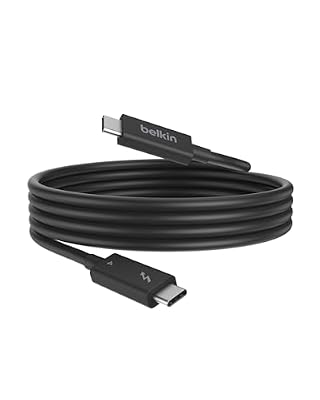
Belkin’s Thunderbolt 4 cable, model INZ002, stretches to a full 2 metres in an active design, so it keeps 40Gbps bandwidth, up to 100W of Power Delivery, and up to 8K video running over a longer reach than a standard passive cable allows. It is Thunderbolt 4 certified and USB4 compliant, and it works with Thunderbolt 3 gear as well, which suits a MacBook Pro desk where the dock or display sits well away from the laptop. If you prefer buying your cables from a long-established accessories brand and you need the extra length without dropping to slower USB speeds, this is the straightforward choice.
Specs
- Certification: Thunderbolt 4 certified, USB4 compliant
- Data transfer: Up to 40 Gbps
- Charging: Up to 100W Power Delivery (PD 3.0)
- Video: Up to 8K video support
- Length: 2 m (6.6 ft), active design
- Model: INZ002
Frequently Asked Questions
Can I use a Thunderbolt cable with any USB-C iPad or Mac?
Yes, as long as the port is USB-C. A Thunderbolt cable plugs into any USB-C port on a Mac or iPad and works for charging, data, and video up to the limits of the device itself. An iPad with a plain USB-C port simply will not reach Thunderbolt speeds, but the cable still functions normally.
Is Thunderbolt 5 worth it if my Mac only has Thunderbolt 4?
A Thunderbolt 5 cable works perfectly with Thunderbolt 4 and Thunderbolt 3 ports at their normal speeds, so it is a sensible buy if you expect to upgrade your Mac later. If you are buying only for a current Thunderbolt 4 setup, a certified Thunderbolt 4 cable gives you the same day-to-day performance.
Why are some 2-metre Thunderbolt cables slower than short ones?
Passive copper cables lose signal integrity over distance, so many long USB-C cables quietly drop to USB 2.0 speeds. The long cables in this guide are active designs, with electronics that preserve the full 40Gbps Thunderbolt signal across the whole 2-metre run.
Will one of these cables charge my MacBook Pro at full speed?
Check the wattage in the Specs list. A cable rated at 100W covers a MacBook Air and most MacBook Pro models through a dock or charger, while the 240W-rated cables here add headroom for higher-draw laptops and newer high-power chargers.
Conclusion
For a Thunderbolt 5 Mac, Apple’s Thunderbolt 5 Pro Cable is the cleanest match, with the highest bandwidth and charging ceiling in this roundup. For most Mac and iPad desks, the short Anker and OWC Thunderbolt 4 cables cover docking, drives, and displays without wasted length, while the active Cable Matters and Belkin cables solve the harder problem of keeping full 40Gbps speed across a 2-metre run. Pick by length and wattage first, and every cable here will outperform an unbranded charge-only lead.




Write Your Review
No reviews yet. Be the first to share your experience!