
As an Amazon Associate we earn from qualifying purchases.
A flat mouse forces your forearm to twist palm-down for hours, and on a Mac desk that strain builds up fast during writing, editing, and spreadsheet work. A vertical mouse turns your hand into a more natural handshake position, which can feel easier on the wrist and forearm through a long day. The challenge for Mac users is compatibility: the best picks pair cleanly over Bluetooth without taking up a USB-C port, work with macOS gestures and settings, and fit your hand size. This guide rounds up five proven vertical mice that work well with MacBooks, iMacs, and Mac mini setups, from compact models for smaller hands to larger, sculpted designs.
Disclosure: This article contains affiliate links. If you buy through a link on this page, we may earn a commission at no extra cost to you.
How to Choose
- Hand size and angle: Match the mouse to your hand first. Compact vertical mice suit small to medium hands, while taller, wider models suit medium to large hands. Most vertical mice sit between a moderate slope and a near-upright handshake angle, so choose the posture that lets your fingers rest on the buttons without stretching.
- Bluetooth for Mac: Prefer native Bluetooth if your Mac has only USB-C ports, so you do not need a receiver and an adapter. Models with a USB receiver still work well on older Macs or through a dock, but check what ports you actually have free.
- Multi-device switching: If you move between a MacBook, an iMac, or an iPad, look for Easy-Switch or multi-channel Bluetooth so one mouse can hop between devices without re-pairing.
- Battery style: Replaceable AA batteries can last many months and are easy to swap, while rechargeable models top up over USB-C. Either is fine, but note the expected life so you are not caught out mid-project.
- Buttons and macOS support: Basic clicking, scrolling, and back and forward buttons work on macOS on most models, but companion apps and programmable buttons vary. Check whether the maker supports its customization software on current macOS before counting on it.
- Click feel and noise: Quiet clicks help in shared offices and on calls, while firmer clicks give clearer feedback for precise editing work.
1. Logitech Lift Vertical Ergonomic Mouse
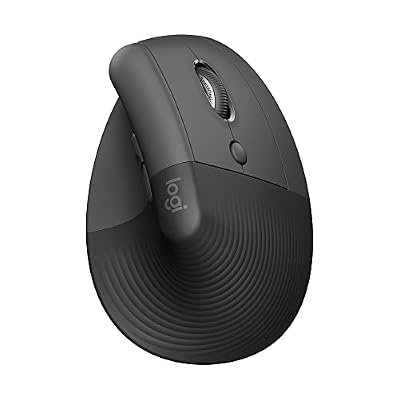
The Logitech Lift is the easiest starting point for most Mac users with small to medium hands. Its upright shape lifts the hand off the desk, the soft textured grip and thumb rest feel comfortable for long sessions, and the quiet clicks and SmartWheel scrolling suit office and home work. It connects over Bluetooth Low Energy or the included Logi Bolt receiver, switches between up to three devices, and customizes through Logi Options+ on macOS, so it fits neatly into a MacBook and iPad workflow.
Specs
- Brand: Logitech
- Model: Lift Vertical Ergonomic Mouse (Graphite)
- ASIN: B09J1TB35S
- Vertical angle: 57 degrees
- Sensor: 400 to 4000 DPI, adjustable
- Connectivity: Bluetooth Low Energy and Logi Bolt USB receiver, up to 3 devices
- Battery: 1 AA battery, up to 24 months
- Weight: 125 g, 6 buttons
Best for: Mac users with small to medium hands who want quiet clicks and simple Bluetooth pairing.
2. Logitech MX Vertical Advanced Ergonomic Mouse

The Logitech MX Vertical is the larger, more premium option for medium to large hands. It uses the same handshake idea in a bigger, more sculpted body, with a high-precision sensor, a top-mounted cursor speed switch, and support for moving content between computers with Logitech Flow. For Mac users who work across a Mac and another machine all day, that multi-computer control and the rechargeable battery make it a strong desk anchor, though its size can overwhelm smaller hands.
Specs
- Brand: Logitech
- Model: MX Vertical Advanced Ergonomic Mouse (910-005447)
- ASIN: B07FNJB8TT
- Vertical angle: 57 degrees
- Sensor: 4000 DPI high-precision optical sensor
- Connectivity: Bluetooth and Unifying USB receiver, up to 3 computers
- Battery: Rechargeable via USB-C, up to 4 months per charge
- Weight: 135 g
Best for: Mac users with medium to large hands who work across multiple computers.
3. Evoluent VerticalMouse 4 Right Mac Bluetooth

Evoluent pioneered the vertical mouse, and this VerticalMouse 4 variant is made specifically for Mac. It connects by Bluetooth with no receiver, so nothing occupies a port on a USB-C MacBook, and its deeply sculpted shape includes an extended lip that keeps your little finger off the desk and a reshaped thumb rest. A pointer speed button with indicator lights lets you change sensitivity on the mouse itself. Note that it is Mac-only and right-handed, and button customization software is no longer provided for current macOS, so it works best with its default functions.
Specs
- Brand: Evoluent
- Model: VerticalMouse 4 Right Mac Bluetooth (VM4RB)
- ASIN: B00BNR76J2
- Connectivity: Bluetooth, Mac only, no USB receiver required
- Controls: 6 mouse controls including two thumb buttons
- Pointer speed: 4 selectable levels with indicator lights
- Battery: 1 AA battery, about 3 months of average use
- Fit: Right hand, medium to large hands
Best for: Mac users with larger right hands who want a purpose-built Bluetooth vertical mouse with no dongle.
4. ProtoArc EM11 NL Ergonomic Vertical Mouse

The ProtoArc EM11 NL is a practical multi-device pick for small to medium hands. It can connect to up to three devices at once through two Bluetooth channels and a USB receiver, so one mouse can serve a MacBook, a desktop, and a tablet. The rechargeable battery tops up over USB-C, the clicks are designed to stay quiet, and a top DPI button makes cursor speed changes quick. As with many third-party mice on macOS, the main strength here is simple plug-and-play use rather than deep software customization.
Specs
- Brand: ProtoArc
- Model: EM11 NL (Black)
- ASIN: B0CX18LHWS
- Connectivity: Bluetooth 5.0 (2 channels) and 2.4GHz USB receiver, up to 3 devices
- Sensor: Optical, 1000 / 1600 / 2400 DPI
- Battery: 500 mAh rechargeable Li-ion, charged via USB-C
- Compatibility: macOS 10.12 or later, plus Windows and Android
- Fit: Right hand, small to medium hands
Best for: Mac users who switch between three devices and want a rechargeable vertical mouse.
5. Kensington Pro Fit Ergo Vertical Wireless Mouse

The Kensington Pro Fit Ergo takes a gentler approach, with a more moderate slope that can feel like an easier transition if a fully upright mouse seems too extreme at first. Its contoured body adds an extended lip for the little finger, a full set of navigation buttons, and plug-and-play wireless through a nano receiver that stores inside the mouse. That receiver needs a USB-A port, so newer MacBook owners will want a dock or adapter, but in return you get very long battery life and KensingtonWorks customization support on macOS.
Specs
- Brand: Kensington
- Model: Pro Fit Ergo Vertical Wireless Mouse (K75501WW)
- ASIN: B07XC8QS5R
- Vertical angle: 46.7-degree contoured slope
- Sensor: 800 / 1000 / 1200 / 1600 DPI
- Connectivity: 2.4GHz wireless via USB nano receiver, up to 20 m range
- Battery: 1 AA battery, up to 1 year
- Buttons: 6 buttons, macOS 10.14 or above
Best for: Mac users who prefer a gentler vertical angle and long battery life via a plug-and-play receiver.
Conclusion
For most Mac users, the Logitech Lift is the balanced default: it fits smaller hands, pairs over Bluetooth, and lasts a long time on one battery. Choose the MX Vertical or the Evoluent VerticalMouse 4 if your hands are larger, the ProtoArc EM11 NL if you juggle three devices, and the Kensington Pro Fit Ergo if you want a milder slope. Whichever you pick, give your hand a few days to adjust to the handshake grip before judging the comfort.





Write Your Review
No reviews yet. Be the first to share your experience!