
As an Amazon Associate we earn from qualifying purchases.
- How to Choose an E-Ink Tablet for Reading and Notes
- 1. Amazon Kindle Scribe (2024) — Best for Kindle Readers
- 2. BOOX Note Air4 C — Best Android E-Ink Tablet
- 3. Kobo Elipsa 2E — Best for Kobo and Library Books
- 4. reMarkable Paper Pro — Best for Focused Writing
- 5. PocketBook InkPad Eo — Best for Wide Format Support
- Comparison and Verdict
- FAQ
- Conclusion
Disclosure: This article contains affiliate links. If you buy through them, we may earn a commission at no extra cost to you.
An e-ink tablet is not a slower iPad. It is a purpose-built reading and writing slate: a glare-free paper-like screen you can read in sunlight, a stylus for marking up books and PDFs, and battery life measured in weeks rather than hours. The five picks below are all dedicated e-ink devices with stylus note-taking built in — no LCD tablets, no reading-only e-readers without a pen, and no phone-sized novelties.
They split by ecosystem and openness. One lives inside the Kindle store, one runs full Android with Google Play, one is built around the Kobo store and library borrowing, one strips everything back to focused writing, and one combines colour e-ink with wide file support. Match the ecosystem first, then choose screen size and colour.
How to Choose an E-Ink Tablet for Reading and Notes
- Ecosystem first: Kindle Scribe reads Kindle books natively, Kobo Elipsa 2E reads Kobo and library books natively, and the Android picks — BOOX and PocketBook — can install Kindle, Kobo and other reading apps side by side. reMarkable sits outside all bookstores and focuses on PDFs, ePub files and your own notes.
- Colour or monochrome: Kaleido 3 colour screens on the BOOX, reMarkable Paper Pro and PocketBook picks suit comics, textbooks and colour highlighting, but monochrome text is still sharper on a dedicated black-and-white panel such as the Kindle Scribe or Elipsa 2E.
- Screen size: A 10.2 to 10.3 inch screen handles PDFs and split reading-and-notes work comfortably. The 11.8 inch reMarkable Paper Pro gives more writing room but is less suited to one-handed reading.
- Notes workflow: Check how notes leave the device. Kindle and Kobo keep handwritten notes inside their own apps and cloud, BOOX and PocketBook export through Android apps and file sharing, and reMarkable syncs through its own Connect service and integrations.
- Front light: Kindle Scribe, BOOX Note Air4 C, Kobo Elipsa 2E and PocketBook InkPad Eo have built-in front lights for night reading. The reMarkable Paper Pro has a reading light as well, kept deliberately dim to preserve the paper feel.
1. Amazon Kindle Scribe (2024) — Best for Kindle Readers

The Kindle Scribe is the natural upgrade for anyone whose library already lives on Kindle. The 2024 model keeps the 10.2 inch Paperwhite display at 300 ppi, adds a smoother writing surface and a Premium Pen that attaches magnetically, and introduces notebook tools that summarise and tidy handwriting. You write directly in many Kindle books, create notebooks with templates, and mark up PDFs sent to the device. It remains a Kindle first and a notebook second, which is exactly the right balance if most of your reading comes from Amazon.
Specs
- Brand: Amazon
- Model: Kindle Scribe (2024, 16GB, Tungsten, Premium Pen)
- ASIN: B0CZ9VFQ2P
- Display: 10.2 inch Paperwhite e-ink, 300 ppi, built-in front light
- Storage: 16GB
- Stylus: Premium Pen included, magnetic attach, built-in eraser
- Connectivity: Wi-Fi, USB-C
2. BOOX Note Air4 C — Best Android E-Ink Tablet

The BOOX Note Air4 C is the most flexible pick here because it runs Android 13 with Google Play, so Kindle, Kobo, Libby and note apps can all live on one colour e-ink screen. Its 10.3 inch Kaleido 3 display shows colour for comics, textbooks and highlighted notes while keeping black-and-white text crisp, and BOOX’s own note app handles layers, shapes and handwriting conversion. A fast refresh mode makes app use and web reference work far more practical than on a closed e-reader. Choose it if you refuse to pick a single bookstore.
Specs
- Brand: BOOX
- Model: Note Air 4 C (Note Air4 C, 6GB RAM, 64GB)
- ASIN: B0DT3Q52PN
- Display: 10.3 inch E Ink Kaleido 3 colour, front light
- Storage: 64GB, 6GB RAM
- System: Android 13 with Google Play
- Stylus: BOOX stylus included, pressure-sensitive
3. Kobo Elipsa 2E — Best for Kobo and Library Books

The Kobo Elipsa 2E pairs a 10.3 inch E Ink Carta 1200 screen with ComfortLight PRO, which adjusts brightness and colour temperature for night writing sessions. The included rechargeable Kobo Stylus 2 lets you write directly on eBooks and PDFs, create notebooks, and export your thinking through integrated cloud services. With 32GB of storage for books and notebooks, OverDrive library borrowing in supported regions, and an exterior made largely from recycled plastic, it is the strongest pick for readers outside the Amazon ecosystem who still want a simple, bookstore-led device.
Specs
- Brand: Kobo
- Model: N605-KU-BK-K-BU (Elipsa 2E)
- ASIN: B0C15G7J3V
- Display: 10.3 inch E Ink Carta 1200 touchscreen, ComfortLight PRO
- Storage: 32GB
- Stylus: Kobo Stylus 2 included, rechargeable, with eraser
- Connectivity: Wi-Fi, Bluetooth, USB-C
4. reMarkable Paper Pro — Best for Focused Writing

The reMarkable Paper Pro is built to do less, better. Its 11.8 inch Canvas Color display is the largest here, with a reading light and a paper-like writing surface paired with the Marker Plus pen and its built-in eraser. There is no app store and no bookstore: you read PDFs and ePub files, write in notebooks organised with folders and tags, convert handwriting to typed text, and sync through reMarkable’s services. For drafting, reviewing documents and distraction-free note-taking, that restraint is the point — just do not buy it expecting a general e-book store experience.
Specs
- Brand: reMarkable
- Model: RM81C-1000NW (Paper Pro Bundle with Marker Plus)
- ASIN: B0DG9ZXWMK
- Display: 11.8 inch Canvas Color e-ink, reading light
- Storage: 64GB
- Stylus: Marker Plus included, built-in eraser
- Connectivity: Wi-Fi, USB-C
5. PocketBook InkPad Eo — Best for Wide Format Support
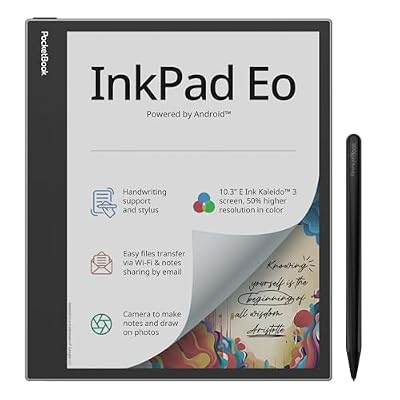
The PocketBook InkPad Eo combines a 10.3 inch Kaleido 3 colour screen with Android 11, a Wacom stylus layer and unusually wide native file support, including EPUB, PDF, MOBI and comic formats without conversion. It adds stereo speakers, a camera for document capture, Bluetooth and a microSD slot on top of 64GB of internal storage, making it a versatile reading and note slate for mixed libraries collected from many sources. PocketBook’s own store is optional rather than central, which suits readers who sideload or use multiple services.
Specs
- Brand: PocketBook
- Model: PB1042-M-WW (InkPad Eo)
- ASIN: B0D1YQB8PJ
- Display: 10.3 inch E Ink Kaleido 3 colour, SMARTlight front light
- Storage: 64GB plus microSD slot, 4GB RAM
- System: Android 11
- Stylus: Stylus included, Wacom touchscreen
Comparison and Verdict
For most iPhone and iPad owners adding a paper-like companion, the Kindle Scribe is the safest first e-ink tablet if your books are on Kindle, and the Kobo Elipsa 2E is its mirror image for Kobo and library readers. The BOOX Note Air4 C wins on openness, running nearly every reading service on one colour screen. The reMarkable Paper Pro is the focused writing tool, and the PocketBook InkPad Eo is the format-flexible colour alternative. All five will feel calm next to an iPad — the decision is which library and notes workflow you want to live in.
FAQ
Can an e-ink tablet replace an iPad for notes?
For handwriting, reading and PDF markup, yes — the stylus experience here is designed for exactly that. For colour-heavy apps, video, fast web browsing or Apple Pencil drawing apps, an iPad remains the better tool, and most owners use the two side by side.
Do these tablets work with the Kindle app?
The Kindle Scribe is a Kindle device itself. The BOOX Note Air4 C and PocketBook InkPad Eo run Android and can install the Kindle app. The Kobo Elipsa 2E and reMarkable Paper Pro do not run the Kindle app, so Kindle books are not readable on them directly.
Is colour e-ink worth it?
Colour helps for comics, textbooks, charts and colour highlighting, and Kaleido 3 screens still show sharp black-and-white text. If you mainly read novels and plain documents, a monochrome model such as the Kindle Scribe or Elipsa 2E is simpler and often easier on battery.
How do handwritten notes get to a computer or iPhone?
Each system differs: Kindle and Kobo sync notes through their own clouds and apps, BOOX and PocketBook can export PDFs and use standard Android sharing and cloud apps, and reMarkable syncs through its desktop and mobile apps with optional integrations.
Conclusion
Start with your library. Kindle readers should shortlist the Scribe, Kobo and library readers the Elipsa 2E, and anyone split across services should look first at the BOOX Note Air4 C or PocketBook InkPad Eo. If writing focus matters more than any bookstore, the reMarkable Paper Pro stands apart. Whichever you choose, you get the core e-ink promise: comfortable long reading sessions and notes that feel like paper, without another glowing LCD competing for your attention.


Write Your Review
No reviews yet. Be the first to share your experience!