
As an Amazon Associate we earn from qualifying purchases.
An iPhone already has the screen, the motion sensors and the app library that virtual reality needs. What it lacks is a way to hold that screen in front of your eyes and split the picture for each eye. That is exactly what a phone-slot VR viewer does: you open the front panel, slide the iPhone in, close it, and the two lenses turn a side-by-side VR video or app into a single immersive image.


This guide covers headsets only, and only the kind that use an iPhone as the display. Standalone headsets with their own screens and processors are a different product category, and so are AR glasses that project an image in front of you. Every pick below is a phone viewer, so the quality you get will always depend partly on the iPhone you put inside it: a larger, sharper display with a gyroscope will look better in any of these shells than an older, smaller phone will.
That framing matters for expectations. A phone viewer will not track your position in a room, and most iPhone VR apps are built around looking around from a fixed point, tapping a touch button, or using a simple Bluetooth remote for video playback. What these headsets do well is 360-degree video, virtual cinema apps, simple games, virtual tours and educational content. The five viewers below cover the main approaches: wide field of view, built-in headphones, a bundled remote, a simple family viewer, and a beginner set designed for kids.
Disclosure: This article contains affiliate links. If you buy through them, we may earn a commission at no extra cost to you.
1. DESTEK V5 VR Headset for Phone
The DESTEK V5 is the most current all-rounder in this group. Its listing is aimed squarely at recent iPhones, naming the iPhone 17, 16, 15, 14, 13, 12 and 11 families, and it pairs a 110-degree field of view with anti-blue-light HD lenses. That wide view is the main reason to pick it: 360-degree video feels noticeably less like looking through a porthole than it does in narrower viewers, and the lens coating is meant to reduce eye strain during longer film sessions.
Fit is generous but not unlimited. DESTEK specifies a maximum phone size of 6.4 by 3.3 by 0.39 inches, so measure your iPhone in its case before ordering; the largest Pro Max models sit close to that limit and a thick case can push a phone over it. At 12 ounces the shell is light, which matters because the phone adds most of the front weight once loaded. The design supports wearing glasses underneath and includes pupillary distance adjustment, so two viewers with different eye spacing can share one headset. Anti-light-leakage shaping around the nose helps keep the image dark in a bright room.
Choose the V5 if your priority is movies and 360 video on a recent iPhone and you want the widest, most up-to-date viewer here. Skip it if your phone in its everyday case exceeds the stated tray dimensions, because no lens quality can compensate for a phone that does not sit flat and centred.
Specs
- :
- ASIN: B0G396S11R
- Brand: DESTEK
- Model: V5
- Field of view: 110 degrees
- Maximum phone size: 6.4 x 3.3 x 0.39 inches
- Weight: 12 ounces
- Lenses: Anti-blue-light HD lenses, supports wearing glasses
- Adjustment: Pupillary distance
- Compatible systems: iOS and Android phones
2. VR EMPIRE VR Headset
The VR EMPIRE headset is the pick for viewers who care about sound as much as picture. It builds stereo headphones into the shell, so you are not juggling separate earbuds under a head strap, and the listing describes low-impedance drivers designed to be driven properly by a phone. It also claims the widest field of view in this guide at 120 degrees, with anti-blue-light lenses in front of the phone screen.
The optical adjustment range is clearly stated: interpupillary distance adjusts from 60 to 70mm, and the focus system accommodates a broad range of eyesight, making this a practical headset to share between family members with different prescriptions. The ultra-thin shell is listed at 397 grams, with a multi-point strap arrangement intended to spread pressure across the head instead of the cheeks, plus face vents to reduce heat build-up and lens fogging. A Bluetooth remote is included for video playback and simple apps.
The size ceiling is the thing to check: the headset is made for smartphones with a length below 6.3 inches. That covers most standard iPhones, but the largest models need measuring, ideally with the case removed as the maker recommends for heat dissipation. Pick the VR EMPIRE if you want an all-in-one viewer with integrated audio and the widest stated view; look elsewhere if your iPhone is one of the longest models.
Specs
- :
- ASIN: B07FTT457L
- Brand: VR EMPIRE
- Model: G04BS (V10 version with controller)
- Field of view: 120 degrees
- Phone fit: Smartphones below 6.3 inches in length
- Interpupillary distance: 60-70mm adjustable
- Audio: Built-in stereo headphones
- Weight: 397 grams (headset body)
- Included: Bluetooth remote controller
3. VR SHINECON VR Headset with Remote Controller

VR SHINECON has sold phone viewers for years, and this model is the traditional, adjustment-heavy design in the group. It takes phones from 4 to 6 inches, which makes it a natural fit for standard-size iPhones rather than the Max models, and it offers both pupil distance and object distance adjustment on the top of the shell. Those two separate adjustments are the reason to buy it: getting the lens spacing and the focus right independently is what turns a blurry novelty into a viewer you can actually watch a film in.
The listing is unusually specific about eyesight, stating support for naked-eye viewing for myopia up to 500 degrees as well as viewing with glasses on. The lenses are described as aspherical with a coating intended to cut wavelength radiation, and the stated field of view is 100 degrees, a little narrower than the DESTEK and VR EMPIRE above but still wide enough for immersive video. A Bluetooth remote controller is bundled for games and video control.
One honest limitation is spelled out by the maker itself: remote support on iPhones is restricted by iOS, and the listing notes the remote applies to older iOS versions, so treat the controller as a bonus rather than the main event on a current iPhone. The headset, the lens adjustment and the fit are the real product here. At 1.25 pounds it is also the heaviest pick in this guide, so it suits seated viewing better than long, active sessions.
Specs
- :
- ASIN: B07HMKC45Y
- Brand: VR SHINECON
- Model: 5647391603
- Field of view: 100 degrees
- Phone fit: 4 to 6 inch phones
- Adjustment: Pupil distance and object distance, independently adjustable per lens side
- Eyesight support: Myopia up to 500 degrees without glasses, or wear glasses
- Connectivity: Bluetooth remote controller
- Weight: 1.25 pounds
4. BNEXT VR Headset
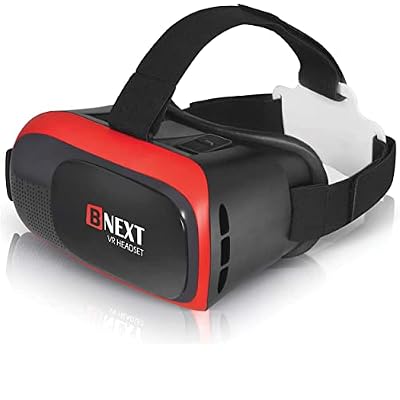
The BNEXT headset is the simple, giftable viewer in this line-up. It is a universal phone-slot design sold for kids and adults, in this case the red version, with a head strap included in the box and a sweatproof finish on the contact surfaces. There are no built-in headphones and no complicated extras; the appeal is a straightforward shell you can hand to a family member, load with an iPhone, and use for 360-degree movies and simple VR games.
BNEXT builds its headsets around comfort touches that matter in a shared viewer: a soft nose piece, breathable foam around the face, an adjustable head strap and an eyesight protection approach that keeps the phone screen at a fixed, comfortable distance from the eyes. Focal and object distance adjustment let each user sharpen the picture for their own vision, which matters in a headset several people take turns with.
Because this is one of the older universal designs, check your phone size carefully before buying. Viewers of this generation were shaped around phones up to roughly the low-six-inch range, so a standard iPhone fits the concept well while the very largest current models may be a squeeze, especially in a case. Choose the BNEXT if you want an uncomplicated, colourful viewer for casual family use and 360 video, and choose one of the wider models above if field of view is your top priority.
Specs
- :
- ASIN: B07Q3NCJYP
- Brand: BNEXT
- Model: SB-147
- Colour: Red
- Compatible devices: Smartphones, including iPhone and Android phones
- Included components: Headstrap
- Special feature: Sweatproof finish
- Intended use: VR gaming and video, 360-degree movies
- Age range: Adults and kids
5. FEEBZ 3D VR Headset for Kids 2.0
The FEEBZ 2.0 is the beginner and kids’ pick, designed to remove the friction that stops first-time users. Its distinguishing feature is a patented built-in action button on the headset itself, so the wearer can interact with apps and videos without removing the phone or relying on a separate controller for every tap. The set is sold as a complete starter kit: the headset, a controller, a cleaning cloth and a fabric carry case are all in the box, along with links to VR apps and videos chosen for beginners and a tutorial link that explains how to get started.
Comfort for younger viewers gets specific attention. FEEBZ fits the 2.0 with larger lenses and face padding intended to make the image feel more immersive while keeping the headset comfortable, and the design needs no batteries of its own, since the iPhone does all the computing and display work. The maker states this model fits more phone models than its earlier version, which helps in households where the spare phone handed to a child changes from year to year.
This is deliberately not the widest or most adjustable headset here; it trades optical range for simplicity. For an adult buying purely for themselves, the DESTEK or VR EMPIRE above are better fits. For introducing children or grandparents to VR on an iPhone, with guided content and everything needed in one box, the FEEBZ 2.0 is the easiest starting point in this guide.
Specs
- :
- ASIN: B0FH5GP44Q
- Brand: FEEBZ
- Model: 3D VR Headset for Kids 2.0
- Manufacturer: DRAY SC LLC
- Special feature: Patented built-in action button, beginner VR apps and video links included
- Included components: Headset, controller, cleaning cloth, fabric case
- Batteries required: No
- Compatible devices: Smartphones, including iPhone and Android phones
- Parcel weight: 430 grams
How to Choose an iPhone VR Headset
Start with size, because it rules out more headsets than any other factor. Measure your iPhone’s length, width and thickness in the case you actually use, then compare those numbers with the tray limits in the listings above. Standard and Pro iPhones fit almost every phone viewer; Pro Max models fit only the viewers with the largest trays, and sometimes only with the case removed. A phone that sits slightly crooked in the tray will never produce a sharp, centred image, no matter how good the lenses are.
Next, think about what you will actually watch. For 360-degree video and virtual cinema, field of view is the headline number: the 110 to 120 degrees claimed by the DESTEK V5 and VR EMPIRE feels more enveloping than a 100-degree viewer. For shared family use, adjustment range matters more, because pupil distance and focus controls are what let different people each get a clear picture. Glasses wearers should confirm either room for frames or enough focus range to view without them, as the SHINECON specifies.
Audio and controls are the third decision. A viewer with built-in headphones, like the VR EMPIRE, is tidier for films; a plain shell works fine with earbuds you already own. On iPhones, manage expectations about remotes: iOS restricts what Bluetooth controllers can do inside apps, so remotes tend to help with video playback rather than full game control. A built-in action button, as on the FEEBZ, is often the most reliable interaction an iPhone viewer offers.
Finally, set the right expectation for the format itself. These headsets show content your iPhone renders in split-screen VR mode: YouTube 360 videos, VR tour and education apps, simple games and virtual cinema players. Your phone’s gyroscope is essential, its screen resolution sets the sharpness ceiling, and sessions are best kept seated and reasonably short, with breaks, especially for children.
FAQ
Do these headsets work with every iPhone?
No. Each viewer has a maximum phone size, and the largest Pro Max iPhones only fit the roomiest trays, sometimes only without a case. Your iPhone also needs a gyroscope for head tracking, which all modern models have. Always compare your phone’s dimensions, in its case, against the tray limits listed for the headset.
Can I use a phone VR headset with glasses?
Often, yes. Some viewers, including the DESTEK V5, are designed to fit over glasses, while others, such as the VR SHINECON, offer enough focus adjustment for many wearers to view without glasses. Check the specific model’s stated eyesight range and allow a little extra tray depth if you plan to keep your frames on.
Why does the Bluetooth remote barely do anything on my iPhone?
That is an iOS limitation rather than a broken remote. Apple restricts controller input in many apps, so on an iPhone a bundled remote usually handles video playback, selection and volume in supported apps, while offering fuller control on Android. A headset’s built-in touch or action button is the more dependable control for iPhone use.
What can I actually watch in an iPhone VR viewer?
Look for content labelled 360, VR or split-screen: 360-degree videos, virtual tours, educational experiences, simple VR games and virtual cinema apps. Ordinary flat videos and games do not become VR just by putting the phone in a headset; the app itself has to render the side-by-side VR view.
Is a phone viewer a good substitute for a standalone VR headset?
It is a different experience at a very different commitment level. A phone viewer is an inexpensive way to enjoy 360 video and simple apps using the iPhone you already own. A standalone headset adds its own display, positional tracking and motion controllers for full games. If your interest is mainly immersive video, a phone viewer covers it; if it grows into gaming, that is when a standalone system makes sense.


Write Your Review
No reviews yet. Be the first to share your experience!