
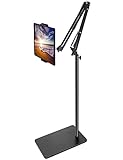
- Top Pick: BluuSuuk Tablet Floor Stand with Double Weight Base, Overhead Bed Phone Mount Height Adjustable Arm Stretchable Stand Holder, Compatible with iPad Mini Air Pro, Galaxy Tab, Kindle, Switch, Cell Phones
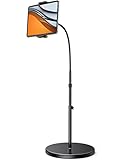
- Best Value: Tablet Floor Stand with 6LB Weight, Overhead Bed phone Stand Angle Height Adjustable Arm Stretchable Stand Holder, Compatible with iPhone iPad Mini Air Pro, Galaxy Tab, Kindle, E-Readers,all Phones
- Premium Choice: Tablet Floor Stand with 5LB Metal Base, Overhead Bed Phone Stand Angle Height Adjustable Holder, Universal Floor Stand Compatible with iPhone iPad Pro Air Mini, Samsung Tab, Kindle, E-Readers…
Floor-standing tablet stands solve one of the most persistent problems iPad owners face: finding a comfortable, truly hands-free viewing angle without cluttering a desk or nightstand. Whether you are following recipes in the kitchen, reading in bed, attending video calls, or watching media from across the room, a quality floor stand positions your device exactly where you need it. The challenge is that the market is saturated with stands that wobble, sag under the weight of larger iPads, or lack the adjustability to work from a reclined or overhead position.
- How to Choose a Floor-Standing Tablet Stand for Hands-Free iPad Viewing
- The Best Floor-Standing Tablet Stands for Hands-Free iPad Viewing Reviewed
- What to Look For in a Floor Stand
- Which One Should You Buy?
- Setting Up for Comfortable Viewing
- Common Mistakes When Buying a Tablet Floor Stand
- Base Weight in Metric Terms
- Frequently Asked Questions
- Final Thoughts
- Related Articles
- Related Guides
This guide covers the best floor-standing tablet stands currently available, focusing on models with heavy bases, adjustable arms, and universal compatibility across iPad Mini, Air, and Pro sizes. We evaluated each stand on stability, reach, height range, ease of adjustment, and how securely it holds larger tablets. Below you will find our top recommendations along with a breakdown of what to look for before you buy.
As an Amazon Associate we earn from qualifying purchases at no extra cost to you.




How to Choose a Floor-Standing Tablet Stand for Hands-Free iPad Viewing
- Base Weight and Stability: Look for a base weighing at least 5 pounds. Heavier bases prevent tipping when the arm is fully extended, especially with larger iPads like the 12.9-inch Pro.
- Arm Reach and Adjustability: Prioritize stands with stretchable or gooseneck arms that extend at least 20 inches. This allows overhead positioning for bed viewing without straining your neck.
- Height Range: Choose a stand with a wide height range, ideally 30 to 55 inches. This ensures comfortable viewing whether you are sitting on a couch, lying in bed, or standing.
- Device Compatibility: Confirm the holder accommodates your specific iPad size. Most quality stands support 4.7 to 13 inches, covering everything from iPad Mini to iPad Pro 12.9.
- Joint Rigidity: Stands with multiple articulation points should have locking knobs or reinforced joints. Without them, heavier tablets will gradually droop and drift out of position.
The Best Floor-Standing Tablet Stands for Hands-Free iPad Viewing Reviewed
BluuSuuk Tablet Floor Stand with Double Weight Base
This stand features a reinforced double-weight base that provides exceptional stability for overhead iPad viewing. The stretchable arm extends smoothly, and the holder securely grips everything from an iPad Mini to a 12.9-inch Pro without wobble.
Tablet Floor Stand with 6LB Weight Base
With a 6-pound weighted base, this stand strikes a strong balance between portability and stability. The angle and height adjustments are straightforward, making it a solid all-around choice for bed, couch, or desk viewing.
Tablet Floor Stand with 5LB Metal Base
This model offers reliable performance at a competitive price point. The 5-pound metal base keeps most iPads steady, though very heavy Pro models may cause slight flex when the arm is fully extended horizontally.
Lamicall Tablet Floor Stand Holder
Lamicall’s gooseneck design provides flexible positioning for 4.7 to 13-inch devices, letting you bend the arm into nearly any configuration. The build quality is dependable, though the gooseneck requires occasional retightening with heavier tablets.
BluuSuuk Tablet Floor Stand with 11LB Stable Base
The 11-pound base on this BluuSuuk model is the heaviest in our roundup, making it the most stable option for large iPads positioned at extreme angles. The swivel holder adds extra versatility for switching between portrait and landscape.
What to Look For in a Floor Stand
A floor stand is a lever with a tablet on one end, which means stability depends on physics more than on looks. These are the factors that separate a stand you trust from one that wobbles.
Base Weight and the Tipping Math
The tablet and the arm that holds it create a turning force at the base equal to their weight multiplied by how far they extend forward. The base resists that force with its own weight multiplied by the distance from its center to its edge. Consider an illustrative case: a large tablet in a case weighing about two pounds, held 14 inches in front of the pole, creates roughly 28 pound-inches of tipping force. A base weighing five pounds with a 6-inch reach to the edge resists about 30 pound-inches, which is a very thin margin before the pole itself is counted. A heavier base or a wider footprint widens that margin quickly, which is why base weight is the single most useful number on a stand listing. The five-pound, six-pound, and eleven-pound base options in this roundup differ mainly on this point.
Holder Width and Case Compatibility
Most holders advertise a range of supported device widths. A 12.9-inch iPad Pro is wide, so a clamp that tops out near the edge of its range may not close around it once a case is added. Look for generous clamp travel, a soft pad that will not mark aluminum, and a design that leaves charging ports reachable.
Height, Tilt, and Joint Design
For comfortable video, the top of the screen should sit near eye level, with the tablet angled slightly back toward your face. Telescoping poles, gooseneck arms, and ball joints each have trade-offs. Goosenecks bend almost anywhere but can droop under a heavy tablet over time. Ball joints lock more firmly yet may need a firm twist to reposition. Check whether the listing mentions rotation between portrait and landscape.
Which One Should You Buy?
| If you… | Choose… |
|---|---|
| Need the largest margin against tipping with a big iPad or a heavy case | BluuSuuk Tablet Floor Stand with 11LB Stable Base |
| Want a wide, weighted footprint without going to the heaviest option | BluuSuuk Tablet Floor Stand with Double Weight Base |
| Want a mid-weight base for a standard-size iPad in a living room | Tablet Floor Stand with 6LB Weight Base |
| Prefer a lighter metal base that is easier to carry between rooms | Tablet Floor Stand with 5LB Metal Base |
| Want a well-known brand name for a general-purpose floor holder | Lamicall Tablet Floor Stand Holder |
The pattern is simple: heavier bases give you stability but make moving the stand a chore, while lighter ones travel easily and demand a shorter arm extension.
Setting Up for Comfortable Viewing
- Assemble on a flat floor. Tighten the pole sections fully before attaching the tablet, because loose joints are the usual cause of drifting.
- Keep the arm short. Position the pole close to your seat and extend the arm only as far as you need, since every extra inch increases the tipping force.
- Angle the screen toward your eyes. A slight backward tilt reduces glare from ceiling lights.
- Route cables with slack. A charging cable pulled tight can drag the arm downward or tip the stand, so leave a loose loop.
- Re-check the clamp. After the first day, tighten the holder again, as padding settles slightly under load.
Common Mistakes When Buying a Tablet Floor Stand
- Judging stability by height alone. A tall stand with a light base is the most likely design to tip, while a shorter one with the same base is much safer.
- Forgetting the weight of the case. Rugged cases and keyboard covers add noticeably to the load, so size the base for the iPad as you will actually use it.
- Placing it on thick carpet. Deep pile lets a narrow base sink unevenly. Look for a flat footprint with non-slip feet.
- Using it near foot traffic. A cable or toe caught on the base can pull the stand over, so place it beside a chair, not in a walkway.
- Expecting a stand to work as a bed mount. Overhead use puts extra strain on the joints. Read the listing for stated load limits and confirm the arm length suits your bed.
Base Weight in Metric Terms
Some listings quote the base in pounds only. This reference converts the figures named in these stand headings and shows how each tends to be used.
| Base listed | Approximate metric weight | Typical use |
|---|---|---|
| 5LB Metal Base | about 2.3 kg | Standard-size iPad, short arm reach, frequent moving |
| 6LB Weight Base | about 2.7 kg | Living room or kitchen with a medium arm extension |
| 11LB Stable Base | about 5 kg | Large iPad Pro in a case, longer arm reach |
The conversion is straightforward, but a number on a label is only part of the picture. A wide, flat footprint resists tipping better than a narrow one of the same weight, so compare the base diameter or width as well.
Frequently Asked Questions
Will these stands hold a 12.9-inch iPad Pro securely?
Yes, all the stands listed support devices up to 13 inches. However, for the 12.9-inch iPad Pro, we recommend the BluuSuuk models with 11-pound or double-weight bases for maximum stability at extended angles.
Can I use these stands for overhead bed viewing?
Yes, each stand featured here is designed with adjustable arms that reach over a bed. Models with stretchable or gooseneck arms offer the greatest reach for positioning your iPad directly overhead while lying down.
Do these stands work with cases on the iPad?
Most holders accommodate thin to moderate cases, but very thick or rugged cases may need to be removed. Check the holder’s clamping width range on the product page to confirm compatibility with your specific case.
Are these stands portable enough to move between rooms?
Yes, all are freestanding and can be relocated easily. However, models with heavier bases like the 11-pound BluuSuuk are less convenient to carry frequently between rooms compared to lighter 5-pound options.
Final Thoughts
For the best overall experience, the BluuSuuk Tablet Floor Stand with 11LB Stable Base offers unmatched stability for large iPads at demanding angles. If you want maximum flexibility at a lower price, the Lamicall Tablet Floor Stand Holder is an excellent gooseneck option. For a middle-ground balance of weight, reach, and value, the Tablet Floor Stand with 6LB Weight Base is a dependable choice that handles most viewing scenarios with confidence.






Write Your Review
No reviews yet. Be the first to share your experience!