
Best apps for taking notes on ipad with apple pencil transform raw ideas into structured digital journals. Finding the perfect software can feel overwhelming due to endless App Store options. This article outlines key criteria to consider and reviews top digital note platforms, helping you select the best solution for your daily workflow.
How to Choose the Right Digital Note Application
Selecting the best apps for taking notes on ipad with apple pencil requires evaluating several critical factors before making a final decision. Users must examine handwriting latency, canvas options, organizational structure, and export formats. Understanding these core elements ensures you invest in a tool that truly enhances daily workflow.
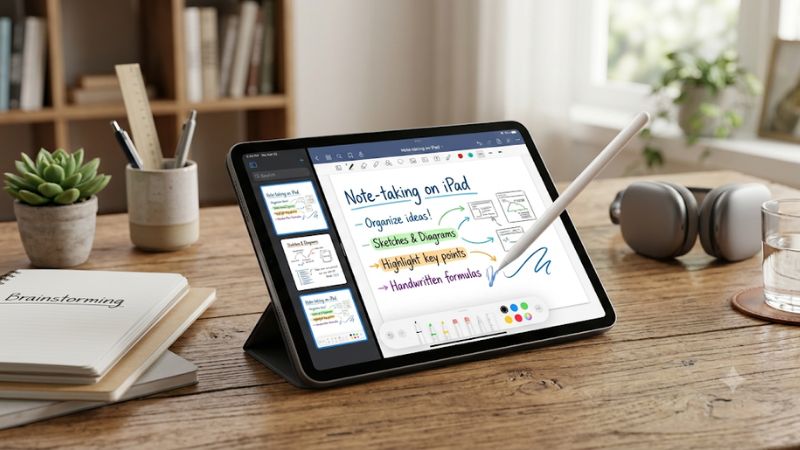
Low Latency and Natural Ink Responsiveness
Precision handwriting relies heavily on immediate screen response and accurate rejection of stray palm touches. Top digital notebooks process stylus movements instantaneously, replicating the natural friction of physical pen on paper. Without reliable palm rejection, accidental marks destroy document layouts and disrupt your writing focus.
Advanced vector engines preserve crisp pen strokes regardless of zoom level or display resolution. High polling rates allow smooth cursive writing without awkward trailing artifacts or sudden stroke skips. Choosing applications that prioritize responsive ink engines guarantees a fluid, frustrating-free note creation experience every day.
Canvas Flexibility and Document Architecture
Document architecture dictates how effectively you manage extensive academic notes or project blueprints. Fixed page formats mimic standard physical legal pads, whereas infinite canvases offer boundless space for expansive mind mapping. Evaluating your personal structural preference prevents future organizational chaos across semester folders.
Nested folder hierarchies combined with tagging mechanisms make document retrieval fast and painless. Exploring the best apps for taking notes on ipad with apple pencil reveals various indexing approaches tailored for students or professionals. Robust search functions that index handwritten text save critical time during intense study sessions.
Cloud Synchronization and Data Security
Seamless cloud integration ensures your vital handwritten records remain accessible across secondary devices. Automatic syncing through services like iCloud, Google Drive, or Dropbox prevents tragic data loss when hardware upgrades occur. Reliable multi-device access transforms static tablet pages into a dynamic mobile knowledge center.
Automated background backup schedules protect confidential study material from sudden app crashes or device damage. Encrypted storage protocols safeguard private research notes while granting immediate access across synced mobile phones. Establishing cloud connectivity provides peace of mind when maintaining huge digital document archives.
Multi Format Exporting and File Sharing
Versatile export settings allow effortless sharing with classmates or team colleagues who lack specialized software. Standard PDF exports preserve custom formatting, vector ink paths, and embedded image attachments cleanly. Choosing software with robust multi-format exporting guarantees seamless collaboration across diverse desktop platforms.
High resolution export capabilities prevent blurriness when printing digital notes or presenting slides. Advanced settings permit exporting flattened documents, editable layers, or annotated graphic files based on team requirements. Flexible exporting ensures your tablet notes translate effectively into professional corporate deliverables.
Top Rated Apps for Taking Notes Reviewed
Reviewing the best apps for taking notes on ipad with apple pencil highlights remarkable software options designed for distinct writing styles. Each platform delivers unique strengths, ranging from fluid handwriting recognition to multimedia embedding. Comparing these applications clarifies which interface aligns with your personal routine.
Notability for Synchronized Audio Recording
Notability excels at combining real-time audio recording with synced handwriting playback for comprehensive lectures. As you review recorded audio, written strokes light up in perfect synchronization with spoken words. This unique functionality helps university students capture complex classroom discussions without missing vital information.
The dual-page view feature allows users to reference textbook scans while actively writing summaries side by side. However, the application requires a recurring subscription model for full feature access, which may deter budget conscious users. Despite cost considerations, its reliable vector engine remains a top choice for academic success.
Goodnotes for Classic Binder Organization
Goodnotes mimics physical stationery by organizing digital pages into customizable virtual binders and journals. The platform provides extensive template libraries, including dot grid pages, planner layouts, and musical staves. Its powerful search engine converts handwritten script into searchable digital text with impressive accuracy.
Users seeking the best apps for taking notes on ipad with apple pencil often favor Goodnotes for its realistic pen physics. The customizable toolbar keeps favorite writing utensils, highlighters, and lasso tools easily accessible. While large file libraries can slow sync times slightly, its organizational depth remains industry leading.
Nebo for Intelligent Script Conversion
Nebo stands out by employing sophisticated artificial intelligence to transform sloppy handwriting into clean formatted text instantly. Interactive gestures allow users to erase words by scratching over them or split lines with simple vertical strokes. This intuitive gesture control streamlines document editing without switching tool modes.
When researching the best apps for taking notes on ipad with apple pencil, Nebo appeals to users requiring math equations and diagrams. Its interactive math solver computes complex formulas directly on canvas. Although canvas customizability is somewhat rigid compared to rivals, its raw conversion speed remains completely unmatched.
Apple Notes for Fast System Integration
Apple Notes delivers zero friction note creation integrated directly into the iPad operating system at no extra charge. Instant Quick Notes launch immediately with a quick swipe from the corner using your digital pencil. The native platform provides immediate stroke responsiveness, shape smoothing, and zero background processing delays.
While Apple Notes lacks specialized binder structures, its deep system integration offers effortless iCloud backup across Apple hardware. Built-in document scanning and password protection make it ideal for quick daily captures without setup hassle. It represents an exceptional option for users desiring fast, free, built-in tablet journaling.
| Application Name | Standout Feature | Primary User Base | Pricing Structure | Platform Sync |
| Notability | Audio Sync Playback | College Students & Researchers | Annual Subscription | iCloud & WebDAV |
| Goodnotes | Custom Binder Layouts | Traditional Writers & Planners | One-time / Annual | iCloud & Google Drive |
| Nebo | Interactive AI Conversion | STEM Students & Engineers | One-time Purchase | Multi-platform Cloud |
| Apple Notes | Instant Corner Gestures | Everyday iPad Users | Completely Free | Native iCloud Sync |
Frequently Asked Questions and Expert Tips
Addressing common questions regarding the best apps for taking notes on ipad with apple pencil clarifies technical details before buying. Users often wonder about stylus compatibility, subscription costs, and backup security. Examining these frequent inquiries ensures you select software that fits your budget and daily setup.
Are Paid Note Apps Better Than Free Alternatives
Free platforms like Apple Notes offer solid essential features, including low latency, shape recognition, and basic sketch tools. For casual journal keeping or quick meeting notes, built-in options deliver incredible performance without added expense. They integrate seamlessly across iOS without requiring secondary account setup.
However, specialized paid applications provide advanced features such as vector scaling, audio sync, and custom PDF template imports. Academic power users and working professionals usually find that paid upgrades save considerable time over time. Evaluating your specific workload determines if premium features justify investment.
Does Screen Protector Texture Improve Writing Control
Matte screen covers create tactile friction that mimics the traditional feel of pencil gliding across textured paper. This added resistance improves stroke control, reducing hand fatigue during extended writing sessions on slick glass. Many artists and students consider matte films essential for achieving authentic handwriting styling.
When utilizing the best apps for taking notes on ipad with apple pencil, matte covers improve control but wear down nibs faster. Furthermore, textured surfaces slightly reduce display clarity and screen brightness during media consumption. Balancing tactile handwriting precision against screen vibrancy helps decide if matte covers fit you.
Can Handwritten Notes Be Searched and Text Converted
Modern note platforms leverage optical character recognition to index handwritten script automatically in the background. This technology enables instant searching across thousands of handwritten pages using keywords in the search bar. Even messy handwriting styles become fully searchable over time as handwriting algorithms adapt.
Indexed handwritten text can also be converted into standard typography for formal reporting or email distribution. This capability eliminates tedious manual retyping after lectures or brainstorming sessions conclude. Premium note applications preserve structural layout during conversion, ensuring document formatting stays intact.
How Do Digital Planners Function Within Note Apps
Digital planners operate as hyperlinked PDF templates imported directly into note applications for daily scheduling. Tapping hyperlinked tab headers allows instant navigation between monthly calendar overviews and detailed daily agenda pages. Users write directly over the template using digital ink without destroying underlying graphics.
Importing custom digital planners allows users to combine artistic journaling with functional time management tools. You can insert decorative stickers, task checklists, and color coded events while preserving endless page additions. Leveraging preformatted PDF planners transforms standard note software into a complete life organization hub.
Final Thoughts
Finding the best apps for taking notes on ipad with apple pencil depends on your personal organizational style and workflow demands. Whether you prioritize real-time audio sync, binder organization, or AI conversion, top software elevates digital note taking. Choose the application that fits your daily routine and start writing today.
As an Amazon Associate we earn from qualifying purchases at no extra cost to you.














Write Your Review
No reviews yet. Be the first to share your experience!