
For most everyday photography, both iPhone and Samsung Galaxy phones take excellent pictures, so the better choice usually comes down to the look you like, the focal lengths you use, the apps and services you already live in, and which specific models you can afford. iPhones are often praised for a consistent, natural-leaning style and for video. Samsung phones are often praised for flexible zoom options and for tuning images toward brighter, punchier color. Those are tendencies, not guarantees, and they change with each generation.
- Quick decision table: which approach fits which photographer
- Image processing and color style
- Lenses, sensors and zoom
- Low light and night photography
- Video, stabilization and editing
- Ecosystem, software updates and accessories
- A worked example: choosing by habit
- Common myths about phone cameras
- Who should pick which: use-case summary
- What to check before you buy
- Related guides
- Frequently asked questions
This comparison explains the factors that actually separate the two approaches, offers a decision table, and walks through an example of choosing by habit. It is compiled from published specifications and common reviewer commentary rather than from our own camera work, and it avoids claims about particular models. When you are down to two phones, look at the manufacturers’ current spec pages and real sample images, and treat any specification in a seller listing as a claim to verify.
Quick decision table: which approach fits which photographer
| If you mostly… | Lean toward | Why |
|---|---|---|
| Shoot casual photos and share them quickly | Whichever ecosystem you already use | Sharing and backup are smoother within one family |
| Want long-range zoom for travel, sports or wildlife | Compare telephoto specs on exact models | Optical zoom varies a lot by model |
| Record a lot of video | Compare stabilization, frame rates and editing apps | Video workflows depend on software |
| Prefer a natural, neutral color look | Check samples from both | Color tuning differs by model and settings |
| Like to tweak manual settings and shoot RAW | Check each phone’s pro mode and RAW support | Controls and file formats differ |
| Are on a tight budget | Compare mid-range and previous-generation phones | Last year’s flagship can beat a new budget phone |
Image processing and color style
A phone photo is not a raw capture; it is a computed image. Both companies combine several frames, adjust exposure region by region, and apply color and sharpening choices before you see the result. Those choices define a brand’s look. One tends to feel more neutral and true to the scene, and the other often leans toward brighter and more saturated results, though this varies by model and software update.
Because the difference is partly taste, the most reliable test is to compare the same scene from both phones: a face in shade, a sunset, a plate of food, a night street. Check skin tones, highlights in bright skies and shadow noise. Some phones let you pick a different style or turn down sharpening, which can narrow the gap.
Lenses, sensors and zoom
Specifications such as megapixels and aperture numbers are easy to compare but do not tell the whole story. Sensor size, lens quality and software processing all affect results. A higher megapixel count can help with cropping and detail in good light, but it does not guarantee better photos in dim conditions.
Zoom deserves special attention. Optical zoom, using a real telephoto lens, preserves detail. Digital zoom crops and enlarges, so detail drops. Some models use a mix of lenses and sensor cropping to offer intermediate zoom steps. If you shoot distant subjects often, compare the zoom ranges stated in each listing and look at sample shots at those distances. If you rarely zoom beyond a portrait distance, extra telephoto reach may not justify the price.
Low light and night photography
Night modes on both platforms combine multiple exposures to brighten dark scenes and reduce noise. The differences appear in how they balance brightness and realism. An aggressive night mode can make a scene look brighter than it felt, while a conservative one preserves mood but may look darker. Neither is objectively right.
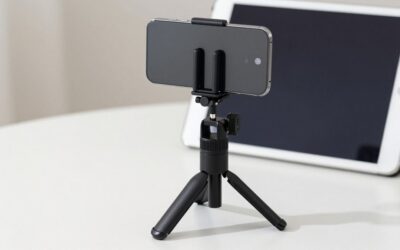
When you evaluate low-light samples, look at moving subjects. Long combined exposures can blur people or traffic, and some phones handle this better than others. Also check how lights and signs render: haloing, flare and blown highlights are common weak points in any phone camera. A steady hand or a small tripod helps on any phone.
Video, stabilization and editing
Video is often where buyers feel the largest practical differences. Look at the maximum resolution and frame rates, stabilization options, microphone quality, and the editing apps available on each platform. Some creators prefer iPhones because many editing apps and accessories are built around them, while others prefer Android phones for flexibility, file handling and open options for third-party tools.
Think about the full workflow: how footage moves to your computer, where it is backed up, and which format your editor prefers. If you plan to edit on a tablet or laptop, compatibility within one brand’s devices can save time. If you mostly post short clips straight from the phone, built-in editing and sharing tools matter more than specification sheets.
Ecosystem, software updates and accessories
A camera is only one part of a phone purchase. Photo libraries, cloud storage plans, messaging, smartwatches, earbuds and family sharing all work best within one ecosystem. If your family shares photos in a shared album tied to one platform, switching might break that habit. Likewise, a case, lens attachment or mount collection might not carry over.
Software support is the other long-term factor. Check each maker’s stated update policy for the exact model, since the number of years of updates varies by model and region. Longer support helps camera features and security stay current. If you protect your phone with a case or rig, accessories such as an iPhone case for underwater photography are worth considering, although accessory availability is usually broader for the more common models.
A worked example: choosing by habit
This example uses made-up weights to show a method, not a verdict. Imagine a photographer who spends about half of their shooting time on casual family photos, 20 percent on travel landscapes, 20 percent on video clips for social media, and 10 percent on distant subjects such as kids’ sports. Their household already shares photos in one ecosystem, and they replace phones every three years.
Step one is to give each factor a rough importance. Family photos and sharing (50 percent) suggest staying within the current ecosystem unless there is a strong reason to move. Video (20 percent) calls for checking stabilization and the editing app. Distant subjects (10 percent) mean a quick check of the telephoto range on the finalist models. Travel landscapes (20 percent) need decent dynamic range, which both brands handle well.
Step two is to compare finalists on those weighted factors, using the manufacturer spec pages and sample galleries. If two phones are close, the switching cost and software support period become tie-breakers. For another model-level view, our direct comparison of the iPhone 16 Pro Max and Samsung Galaxy S25 Ultra cameras shows how this kind of analysis plays out for two specific flagships.
Common myths about phone cameras
More megapixels does not automatically mean better pictures; processing, sensor size and lens quality count too. A phone with more lenses is not always better either, since a lens you rarely use adds little. Another myth is that one brand always wins in low light. Results change with every generation, and a software update can alter how a phone processes images, for better or worse.
It is also easy to over-credit the phone and under-credit the photographer. Clean the lens, hold steady, tap to set focus and exposure, and think about light before pressing the shutter. In many comparisons, those habits make a larger difference than the gap between two good cameras.
Who should pick which: use-case summary
If your photos are mostly family moments, pets and holidays, shared with people on the same platform, stay in your current ecosystem and choose the best camera you can afford within it. If you enjoy zooming into distant detail or want more control over the look of an image, put extra weight on lens specifications and pro-mode options. If video is your focus, prioritize stabilization, microphone quality and the apps you will edit with. And if you are undecided, buy from a retailer with an easy return window, shoot the same weekend scenes with the phone you are considering and your current one, and keep the one whose pictures you actually enjoy looking at.
What to check before you buy
- Exact model names and storage sizes, since camera hardware can differ within a family
- Stated optical zoom ranges for each lens
- Video resolution, frame rate and stabilization options
- RAW or pro-mode support, if you edit photos seriously
- Storage: photo and video files grow quickly, and many phones lack a card slot
- Battery life under camera-heavy use, according to published reviews
- Software update commitment and warranty terms
- Return window, so you can compare real photos from your own routine
- Accessory availability, including cases, lens kits and mounts
If a listing makes strong claims about camera specifications, cross-check them with the manufacturer. Spec claims in listings are seller claims, and typos or ambiguous wording do occur, especially on refurbished or third-party listings.
Related guides
- Magsafe Car Mounts For Iphone Dashboard And Vent
- Fitbit Vs Apple Watch For Tracking Sleep
- Apple Iphone Prices And Deals
Frequently asked questions
Which takes better photos, iPhone or Samsung?
There is no single winner, because it depends on the specific models and on what you shoot. Phones from both companies produce excellent results in good light, and the differences show up in color style, zoom, low-light processing and video. Compare sample photos from the exact models you are considering, shot in conditions you care about, and decide which look you prefer.
Is Samsung better for zoom?
Higher-end Samsung models have often emphasized long-range zoom through dedicated telephoto lenses, while recent iPhones have also added telephoto options, so the gap depends on the models. Check the listing for the stated optical zoom ranges and remember that digital zoom crops the image and loses detail. Zoom matters mostly for sports, travel and wildlife photos.
Which is better for video, iPhone or Samsung?
Both offer strong video, and many creators value iPhones for consistent footage and a mature app ecosystem, while Samsung offers high-resolution recording options and flexible controls on some models. The best choice depends on your editing software, stabilization needs and where you share. Look at specs for frame rates, resolution, stabilization and any pro video modes on the exact phones.
Does the camera matter more than the ecosystem?
For many people the ecosystem matters as much as the camera. Photo libraries, messaging, cloud storage, smartwatches, earbuds and family sharing all work best inside one family of devices. Switching brands means moving data and apps, and sometimes repurchasing accessories. Weigh the cost and effort of switching against any camera advantage before you decide.
Do I need a flagship phone for good photos?
Not necessarily. Mid-range phones from both makers can capture very good everyday photos, especially in daylight. Flagships tend to add better low-light processing, extra lenses, more stable video and longer software support. If you mostly share on social media or print small photos, a mid-range model may be enough. Compare sample images before you spend more.


Write Your Review
No reviews yet. Be the first to share your experience!