
- Top Pick: LULULOOK Magnetic Stand for iPad Pro 13-inch (M4)
- Runner-up: KUXIU X36 Magnetic Arm Stand for iPad Pro 12.9-inch
- Also consider: Benks Infinity Pro Magnetic iPad Stand
A magnetic iPad stand skips clamps and cradles entirely: the iPad snaps onto a plate that matches the magnet array already built into the back of the iPad Pro and iPad Air, so docking and removal take a second and nothing grips the screen edges. The five stands below are compared on the published details that decide daily use: which iPad generation the plate is cut for, how the stand adjusts, whether it charges, and how much desk space the base or arm takes up.
One boundary applies to the whole category. Magnetic plates are generation-specific, because Apple moved the magnet layout when the iPad Pro was redesigned in 2024. A plate cut for the M4 and M5 models does not align with a 2018 to 2022 iPad Pro, and the older plates do not fit the current models, so the compatibility line in each Specs block is the first thing to check.
As an Amazon Associate, we earn from qualifying purchases.
Quick Answer
For most current iPad Pro owners, the LULULOOK rotating stand is the balanced pick: a foldable aluminum body and a plate that spins a full circle for sharing and video calls. The KUXIU arm lifts the screen highest, the Spigen adds charging for the 11-inch Pro, the Benks suits pre-2024 models, and the MOFT folio is the portable option.
How to Choose a Magnetic iPad Stand
Match the plate to your iPad generation
This is the decision that makes or breaks the purchase. Stands for the iPad Pro 11-inch and 13-inch with M4 or M5 chips use the current magnet layout, while stands for the 2018 to 2022 iPad Pro and the iPad Air 4 and 5 use the earlier one, and the two do not interchange. The Benks below is an older-layout stand, the LULULOOK and Spigen are current-layout stands, and the KUXIU covers the earlier 12.9-inch Pros. Check your exact model in Settings before ordering, not just the screen size.
Rotation, tilt and height
A rotating plate matters if the iPad gets shared across a desk, turned between portrait notes and landscape video, or used for calls. The LULULOOK and Benks both spin 360 degrees, the Benks from its round base and the LULULOOK at the plate. Height is a separate axis: desk stands hold the iPad just above the surface, while the KUXIU’s three-segment arm raises it up to about 24 inches for standing desks, kitchen counters and drawing at eye level.
Charging through the Smart Connector
Most magnetic stands are passive: they hold the iPad and nothing more. Charging models such as the Spigen feed power through the Smart Connector contacts on the iPad’s back edge while it sits on the plate, which leaves the USB-C port free for a drive, a hub or an audio interface. If the iPad lives on the stand all day, that convenience is the main reason to step up to a charging model.
Cases and the magnet grip
Magnetic plates are rated for a bare iPad or a thin magnetic-compatible case. Thick rugged cases weaken the grip enough that the iPad can slide or detach, and folio covers folded behind the iPad break the contact entirely. If your iPad wears a heavy-duty case, a clamp stand from a different category is the honest answer, and the Who Should Skip section below covers that case.
A safety note on powered stands
One powered stand is excluded from this roundup on recall grounds. Belkin’s Auto-Tracking Stand Pro, model MMA008, was recalled in November 2025 (CPSC recall 26-090) because its built-in battery can overheat. None of the five picks below is that product, and four of the five have no battery at all.
The 5 Best Magnetic iPad Stands
1. LULULOOK Magnetic Stand for iPad Pro 13-inch (M4)

The LULULOOK is the desk stand to beat for the current 13-inch iPad Pro. Its magnetic plate rotates a full 360 degrees, so the iPad turns from landscape documents to portrait calls without lifting it off the stand, and the aluminum body folds flat when the desk needs clearing. The plate is cut for the M4 generation’s magnet layout, with matching versions sold for the other sizes, so order the one named for your exact iPad.
Specs
– Compatibility: iPad Pro 13-inch (M4), per LULULOOK
– Rotation: 360 degrees at the magnetic plate, per LULULOOK
– Body: foldable aluminum, per LULULOOK
– Charging: none, passive stand
– Attachment: magnetic plate matched to the M4 magnet layout
– Tier: Premium
Choose it for rotation and a fold-flat body on a current iPad Pro. Skip it if your iPad is a 2022 or earlier model, because the plate will not align.
2. KUXIU X36 Magnetic Arm Stand for iPad Pro 12.9-inch

The KUXIU X36 is the height pick. Three arm segments of about 8 inches each let the iPad hover up to roughly 24 inches above the desk, higher than a fixed desk stand can reach, and the mounting plate uses a 102-magnet arrangement that mirrors the Magic Keyboard’s grip. It suits standing desks, counters and anyone who draws or presents at eye level. This original X36 is a passive stand; KUXIU’s separate Pro Max line adds charging and is a different set of listings.
Specs
– Compatibility: iPad Pro 12.9-inch, 3rd to 6th generation, per KU XIU
– Arm: three segments of about 8 in each, up to about 24 in of reach
– Plate: 102-magnet arrangement, per KU XIU
– Body: aluminum alloy, folds for storage, per KU XIU
– Charging: none, passive stand
– Tier: Premium
Choose it when screen height is the problem to solve. Skip it for an M4 or M5 iPad Pro, whose magnet layout this plate predates.
3. Spigen Magnetic Wireless Charging Stand for iPad Pro 11-inch (M5/M4)
The Spigen is the charging pick for the smaller Pro. The iPad docks magnetically and charges through its Smart Connector contacts while docked, so the USB-C port stays open for accessories during long desk sessions. The stand is a fixed desktop form rather than an arm, sized at 9.75 x 10.21 x 2.45 inches, and the plate fits only the 11-inch iPad Pro with M4 or M5 chips. Owners of the 13-inch or any older Pro need a different pick from this list.
Specs
– Compatibility: iPad Pro 11-inch (M4 and M5) only, per Spigen
– Charging: built-in, delivered through the Smart Connector contacts while docked
– Dimensions: 9.75 x 10.21 x 2.45 in, per Spigen
– Attachment: magnetic plate matched to the current magnet layout
– Form: fixed desktop stand
– Tier: Premium
Choose it if the 11-inch Pro lives on your desk and a free USB-C port matters. Skip it for any other iPad size or generation.
4. Benks Infinity Pro Magnetic iPad Stand
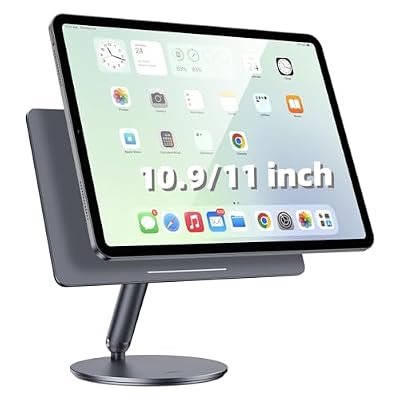
The Benks Infinity Pro serves the large installed base of pre-2024 iPads. Its base rotates 360 degrees, the arm tilts for drawing and viewing angles, and the whole stand folds down to about 12 x 6.3 x 1.4 inches in its 12.9-inch form, at about 860 grams. Benks rates the plate for the iPad Pro 12.9-inch and 11-inch from 2018 to 2022 and the iPad Air 4 and 5, and states plainly that it does not fit the 2024 iPad Pro, which is the kind of honesty worth rewarding.
Specs
– Compatibility: iPad Pro 12.9-inch and 11-inch (2018 to 2022), iPad Air 4 and 5, per Benks
– Not compatible: iPad Pro 2024 models, per Benks
– Rotation: 360 degrees at the base, per Benks
– Folded size: about 12 x 6.3 x 1.4 in (12.9-inch version), per Benks
– Weight: about 860 g (12.9-inch version), per Benks
– Tier: Mid-range
Choose it for a 2018 to 2022 Pro or an Air 4 or 5 that needs rotation and tilt. Skip it for any 2024 or later iPad Pro.
5. MOFT Dynamic Folio Case for iPad Pro 12.9-inch
The MOFT Dynamic Folio is the travel pick: a folio case that is also the stand. Its origami fold produces more than 20 viewing angles, including a raised floating position for drawing and note-taking, and because the stand is the case, there is nothing extra to pack or leave behind. The trade is adjustment range: a folio cannot match the height of the KUXIU arm or the spin of the LULULOOK plate, and this size fits the 12.9-inch iPad Pro only.
Specs
– Compatibility: iPad Pro 12.9-inch, per MOFT
– Form: folio case that folds into a stand
– Angles: more than 20 origami positions, per MOFT
– Attachment: magnetic snap-on folio
– Carry: doubles as the everyday case, nothing extra to pack
– Tier: Budget
Choose it if the iPad moves between home, office and travel and the stand must travel with it. Skip it if you need real height or one-hand rotation at a fixed desk.
Who Should Skip Magnetic iPad Stands
Skip this category if your iPad lives in a thick rugged case, because the magnet grip through heavy material is not reliable and no plate change fixes that. Skip it if your iPad is a standard iPad or iPad mini without the Pro and Air magnet layout these plates are cut for, since fit is model-specific rather than universal. Skip it if you need the iPad locked down in a public or retail setting, where a fixed clamp mount is the right tool. And skip the charging models if your iPad only visits a desk briefly; a passive stand plus the cable you already own does the same job.
Frequently Asked Questions
Do magnetic iPad stands work with a case on the iPad?
With the right case, yes. Thin cases built with a magnetic back panel pass the grip through and are the intended pairing. Thick rugged cases and folio covers folded behind the iPad weaken or block the contact, and makers rate their plates for a bare iPad or a magnetic-compatible case only.
Will a magnetic stand charge my iPad?
Only if it is a charging model. Of these five, just the Spigen charges, feeding power through the Smart Connector contacts while the iPad is docked. The LULULOOK, KUXIU, Benks and MOFT are passive: they hold the iPad, and charging still means a USB-C cable.
Can a magnetic stand damage the iPad or the Apple Pencil?
The plates use the same magnet array Apple builds into the iPad for its own Smart Folio and Magic Keyboard, so docking is the use the magnets were designed for. The Pencil still charges and attaches on the iPad’s edge as normal, because the stand grips the back, not the Pencil rail.
Which of these stands is best for drawing?
For long drawing sessions, the KUXIU arm, because height and reach matter more than rotation when the iPad must sit at eye level over a desk. For sketching on the move, the MOFT folio’s raised floating angle is the practical pick, since it is already on the iPad.
Final Verdict
Buy on magnet layout first and adjustment second. The LULULOOK is the all-rounder for the current 13-inch iPad Pro, the Spigen is its charging counterpart for the 11-inch, and the KUXIU wins on height for the earlier 12.9-inch Pros. The Benks covers the 2018 to 2022 Pro and Air generations with rotation and an honest compatibility list, and the MOFT folio is the one that travels. Confirm your iPad’s exact generation before ordering, because with magnetic stands the plate either matches your model or it does not work at all.


Write Your Review
No reviews yet. Be the first to share your experience!