
As an Amazon Associate we earn from qualifying purchases.
Disclosure: This article contains affiliate links. If you buy through a link on this page, we may earn a commission at no extra cost to you.
A Mac Studio pulls its cooling air in through the ring of vents in its base, and it is not a machine you can casually open up to clean. Dust that gets past that intake settles on the fans and heatsink, so the smart move is to stop it outside the case. Dust protection for a Mac Studio comes in a few different forms: filter stands that sit under the machine and screen the intake air, enclosed cases that seal it away completely when it is stored or travelling, mounts that lift it off a dusty desk surface, and cut-to-fit filter material you trim to the base yourself. The five picks below cover each approach, and every one fits the standard Mac Studio chassis shared by the M1, M2, M3, and M4 generations.
How to Choose a Mac Studio Dust Cover
Start with how your Studio lives. If it runs all day on a desk, a filter stand is the only option that protects it while it works, because a fabric slip-over cover can only be used when the machine is off and cool. Check how the filter is cleaned: washable PVC mesh rinses under a tap, sponge filters need periodic replacement, and foam sheet material is cut fresh from a roll. If your Studio travels or sits unused for long stretches, an enclosed hard case keeps dust out entirely and protects against knocks at the same time. Whatever you choose, never block the base intake with dense, unbreathable material while the machine is running, and never use oil-treated filter foam on a computer — the oil mist coats internal parts and makes dust stick harder.
1. Spigen LD202 Filter Case Stand for Mac Studio

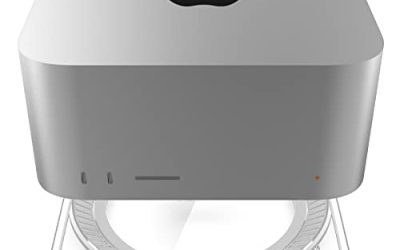
The Spigen LD202 is the closest thing to a purpose-built dust cover that still lets you use your Mac Studio normally. The clear stand slips under the machine and screens the bottom intake with a built-in PVC filter, so air reaches the vents only after passing through the mesh. The filter detaches and rinses clean under water, which makes upkeep a two-minute job instead of a teardown. Rubberised silicone padding keeps the Studio from sliding when you plug cables in, and the transparent PMMA and acrylic body leaves the aluminium design visible rather than hiding it under fabric. It is indexed to the Studio’s base, so check the fit tab at the rear when you first set the machine down on it.
Specs
- Compatibility: Mac Studio M1 Max, M1 Ultra, M2 Max, M2 Ultra, M3 Ultra, and M4 models
- Material: PMMA, acrylic, and PVC
- Filter: Built-in PVC filter, detachable and washable
- Dimensions: 9.84 x 11.02 x 1.02 inches
- Weight: 7.8 ounces
- Model: LD202
- ASIN: B0B24PTMRF
2. RLSOCO Hard Case for Mac Studio

When a Mac Studio is off, in storage, or on the move, a sealed case is the most complete dust cover of all — nothing drifts in, and nothing scratches the finish. The RLSOCO hard case is moulded around the Studio’s exact footprint, with a high-density foam interior cut for the machine and a clamshell zip that runs around three sides for easy loading. The EVA shell shrugs off splashes and bumps in a bag, and there is a separate compartment area for the power cord and a mouse. Because every Mac Studio generation shares the same external dimensions, one case fits an M1 Max bought at launch or a current M4 model. It is sold as the case only, so it is purely a storage and transport solution, not something you run the computer inside.
Specs
- Compatibility: Mac Studio M1 Max, M1 Ultra, M2 Max, M2 Ultra, M3, and M4 models
- Shell: Hard EVA shell
- Interior: High-density custom foam cutout
- Closure: Three-sided clamshell zip
- Water resistance: Water-resistant exterior
- Contents: Case only
- ASIN: B0B38SDJ5F
3. IFCASE Aluminum Mount for Mac Studio

Dust settles downward and pools on horizontal surfaces, so getting a Mac Studio off the desk entirely is a legitimate dust strategy. This IFCASE bracket mounts the Studio under a desk, on a wall, or on a VESA mount, holding it in an aluminium frame with an anti-scratch inner lining so the finish is not marked. The open design leaves airflow, ports, the power button, and the SD card slot unobstructed, and the machine sits up away from desk-level dust, spills, and clutter. It is the most installation-heavy pick here — it ships with screws and needs a solid mounting surface — and it is a complement to a filter rather than a filter itself, so pair it with clean surroundings for the best result.
Specs
- Compatibility: Mac Studio M1, M2, M3, and M4 Max and Ultra models
- Material: Aluminium with anti-scratch inner lining
- Mounting: Under desk, wall, or VESA
- Model: IFCASE-MacStudio-Mount-Black
- Dimensions: 22.71 x 16.79 x 4.7 cm (package)
- Weight: 422 g
- ASIN: B0B6W4CR59
4. DustEnd G3 Premium Filter Material

If you already own a plain stand, or you want filtration finer than a built-in mesh, DustEnd G3 is the material Mac Studio owners in enthusiast forums reach for. It comes as a long, self-adhesive strip of fine purification filter that you trim with scissors and stick to the underside of a stand or directly around the Studio’s base, sealing the gap that looser stands leave open. One strip yields enough material for many changes, so when a section loads up with dust you peel it off and cut a fresh piece instead of washing and waiting. Owners who have fitted it under a filter stand report no meaningful temperature penalty, but check your fan behaviour after fitting, and replace the material when it visibly greys rather than letting a clogged filter starve the intake.
Specs
- Type: Self-adhesive fine filter material, cut to fit
- Dimensions: 950 x 155 x 5 mm
- Application: Trim to size for Mac Studio base or filter stand
- Adhesive: Self-adhesive backing
- Use: Dry use only; replace when loaded with dust
- ASIN: B011EIIS5K
5. Uni Filter BF-1 Fine Foam Sheet

The BF-1 is the old-school option: a sheet of 65-PPI open-cell polyurethane foam, originally sold for motorsport air filters, that Mac Studio owners cut into a pad for the machine to sit on. The Studio’s own weight compresses the foam into a perimeter seal, forcing intake air through the fine cells, which trap dust across a much larger area than the intake ring itself — and a larger filter area means a longer interval between cleanings. One 12 x 16 inch sheet makes several pads. Two cautions matter. First, use the foam completely dry: the filter oil sold for engine use must never go near a computer, a point Mac Studio owners repeat often. Second, the foam adds resistance, so monitor temperatures after fitting and use a single layer.
Specs
- Type: Open-cell foam filter sheet, cut to fit
- Dimensions: 12 x 16 x 5/8 inches
- Density: 65 PPI fine foam
- Model: BF-1
- Manufacturer part: 82-0001
- Use: Dry use only; do not apply filter oil
- ASIN: B000ONZT5E
Verdict
For a Mac Studio that works at a desk every day, the Spigen LD202 is the easiest recommendation: it filters the intake continuously and its screen simply rinses clean. Add DustEnd G3 underneath it if your room is genuinely dusty and you want a finer, disposable layer. Choose the RLSOCO case if your Studio is stored or carried between locations, the IFCASE mount if clearing the desk matters as much as dust, and the Uni Filter BF-1 sheet if you prefer a cheap, custom-cut foam pad you can remake in minutes. Whichever route you take, the goal is the same — clean the cover, not the computer.







Write Your Review
No reviews yet. Be the first to share your experience!