
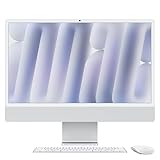
Choose the Mac mini M4 if you already own a good monitor, keyboard and mouse, or you want the most Mac performance per dollar: it uses the same M4 chip with a 10-core CPU and 10-core GPU, in a 5 x 5-inch box that usually costs a fraction of the iMac. Choose the iMac M4 if you want an all-in-one with a sharp 24-inch 4.5K Retina display, built-in camera, microphones and speakers, and a matching keyboard and mouse in the box, with only one power cable on the desk.
Performance between the two configurations compared here is close, because both run the M4 with 10 CPU and 10 GPU cores. The differences are the display, the included accessories, memory and storage, and price. The base Mac mini with 16GB and 256GB typically sells around $550–$800, while the iMac configured with 24GB and 512GB usually lands around $1,800–$2,000.
As an Amazon Associate we earn from qualifying purchases at no extra cost to you.


Quick answer: Our top pick in 2026 is the Chip — our #1 rated choice. See the full ranked comparison, alternatives and buying advice below.
Head-to-head specs
| Spec | Mac mini M4 (16GB / 256GB) | iMac M4 (24GB / 512GB) |
|---|---|---|
| Chip | M4, 10-core CPU, 10-core GPU | M4, 10-core CPU, 10-core GPU |
| Unified memory | 16GB | 24GB |
| Storage | 256GB SSD | 512GB SSD |
| Display | None (bring your own) | 24-inch 4.5K Retina (4480 x 2520) |
| Camera / mics / speakers | None built in | 12MP Center Stage camera, mic array, six-speaker system |
| Thunderbolt ports | 3 (rear) plus 2 front USB-C | 4 |
| Other ports | HDMI, Gigabit Ethernet, headphone jack | Headphone jack; Ethernet on the power adapter in this tier |
| Size | About 5 x 5 x 2 inches | 24-inch all-in-one |
| Keyboard and mouse | Not included | Included, color-matched |
| Typical price | About $550–$800 | About $1,800–$2,000 |
Performance: closer than the price gap suggests
Both machines run Apple’s M4 with the same core counts, so single-task speed in apps like Safari, Pages, Lightroom, Final Cut Pro or Xcode is very similar. The iMac’s extra 8GB of memory (24GB vs 16GB) helps when you keep many browser tabs open, edit large photo libraries, run virtual machines, or use on-device Apple Intelligence features alongside other heavy apps. Sixteen gigabytes is comfortable for most home and office work in 2026; 24GB adds headroom for creative workloads and future macOS updates.
Thermals differ slightly. The Mac mini has a small fan and can sustain long workloads well. The iMac is extremely thin, which is impressive but leaves less room for cooling. For everyday tasks you will not notice; for long video exports, both stay usable.
Display: the biggest real difference
The iMac’s 24-inch 4.5K Retina panel packs about 218 pixels per inch, so text looks print-sharp at normal viewing distance. Matching that with a Mac mini means buying a high-density monitor. A 27-inch 4K display (about 163 PPI) is the common budget pairing and looks good, though not quite as crisp. True 5K 27-inch displays match the iMac’s sharpness but can cost as much as the Mac mini itself or more.
The flip side: with the Mac mini you choose the size. Want a 32-inch screen, an ultrawide, or two monitors? The M4 Mac mini can drive two external displays, while the iMac adds one external display alongside its built-in screen.
Total cost of ownership
| Setup | Approximate total | Notes |
|---|---|---|
| Mac mini M4 (16/256), existing monitor and peripherals | About $550–$800 | Lowest cost path |
| Mac mini M4 + 27″ 4K monitor + keyboard and mouse | Roughly $900–$1,300 | Still well under the iMac |
| Mac mini M4 + 5K display + Apple keyboard and mouse | Often $2,000+ | Matches iMac sharpness |
| iMac M4 (24/512) | About $1,800–$2,000 | Everything included |
If you upgrade the Mac mini to 24GB and 512GB to match the iMac’s memory and storage, its price rises, but the combined cost with a good 4K monitor usually still lands below the iMac.
Ports and expandability
The Mac mini is the more practical desk hub: three Thunderbolt 4 ports, HDMI, Gigabit Ethernet on the back, plus two USB-C ports and a headphone jack on the front, so plugging in a thumb drive or headphones is easy. The iMac’s four Thunderbolt ports are all on the back, which is tidy but less convenient for frequent plugging. Neither machine has user-upgradable memory or storage, so buy the capacity you need. Fast external SSDs over Thunderbolt or USB-C are an inexpensive way to add space on either.
Who should buy which
- Students and budget buyers with a monitor: Mac mini M4.
- Families wanting one simple shared computer in the kitchen or study: iMac M4. One cable, built-in camera for video calls, and nothing to configure.
- Remote workers on daily video calls: iMac M4, unless you already own a good webcam and microphone.
- Developers, creators and multi-monitor users: Mac mini M4, possibly upgraded to more memory, paired with your preferred displays.
- Anyone upgrading from an older Intel iMac: either works; the iMac is the like-for-like replacement, the mini saves money if you keep a separate display.
Quick answers
Is 256GB enough on the Mac mini?
For web, email, documents and streaming, yes, especially if you keep photos in iCloud. If you edit video, store a large music library or install many creative apps, 256GB fills quickly. An external SSD is a cheaper fix than Apple’s internal upgrade, but internal storage is faster and always attached, so creators should weigh the upgrade at purchase.
Can the iMac be used as a monitor for another computer later?
Recent iMacs do not support a traditional target display mode for other computers, so plan on it remaining an all-in-one for its whole life. That is one reason some buyers prefer the Mac mini plus a separate monitor that can outlive the computer.
Which holds value better?
Both Macs keep resale value well. The Mac mini’s lower starting price makes it easier to sell and replace later, while the iMac bundles a display you would otherwise reuse with the next computer.
Final recommendation
For value and flexibility, the Mac mini M4 is the easy recommendation: the same 10-core M4 performance in a tiny box at a far lower price. The iMac M4 earns its premium if you want a beautiful 4.5K display, good built-in camera and speakers, and a clean all-in-one setup with more memory and storage out of the box. Decide based on what is already on your desk.
Ready to decide? Our #1 pick for 2026 is the Chip.
Live price & availability on Amazon.



Write Your Review
No reviews yet. Be the first to share your experience!