
As an Amazon Associate we earn from qualifying purchases.
Disclosure: This article contains affiliate links. If you buy through them, we may earn a commission at no extra cost to you.
An iPhone or iPad that charges slowly rarely tells you why. The charger may not be negotiating the voltage you expect, a cable may be dropping power, or a power bank may deliver far less capacity than its label suggests. A USB power meter sits inline between charger and device and shows the answer in real time: voltage, current, watts, and, on better models, the charging protocol, the power profiles a charger offers, and the identity chip inside a USB-C cable.
For Apple users, that matters more than ever. Modern iPhones, iPads, and MacBooks all charge over USB-C Power Delivery, and the difference between a healthy fast charge and a sluggish one is invisible without a meter. The five picks below cover the full range, from a rugged everyday checker to a lab-grade protocol analyzer, and each one can help you separate a faulty charger from a faulty cable in minutes.
How to Choose a USB Power Meter
Start with connectors. If you only test modern Apple gear, a USB-C-only meter is cleanest and adds the least bulk. If you still have USB-A chargers, power banks, and Lightning-era accessories to check, choose a model with USB-A, USB-C, and ideally Micro-USB inputs so one tool covers everything.
Check the voltage and current range next. Basic charging checks need coverage up to 20V, but newer high-power adapters use USB PD Extended Power Range up to 48V. A meter rated to 50V and 6A will handle even large laptop-class chargers, while a 20V meter is fine for phones and tablets only. Make sure the range matches the biggest charger you plan to test.
Decide how deep you want to go. Simple inline meters show volts, amps, and watts at a glance and pass data and video through, which is enough to confirm fast charging. Mid-range meters add capacity and energy totals in mAh and Wh, which is how you verify a power bank honestly. Advanced analyzers add protocol detection, PDO profile reading, e-marker cable reading, ripple graphs, data logging, and PC software for anyone diagnosing negotiation failures.
Finally, think about the display and build. A bright colour screen with large digits is easier to read on a desk, an orientation button helps when cables force the meter upside down, and a rugged housing matters if the meter will live in a toolkit rather than a drawer.
1. ChargerLAB POWER-Z KM003C
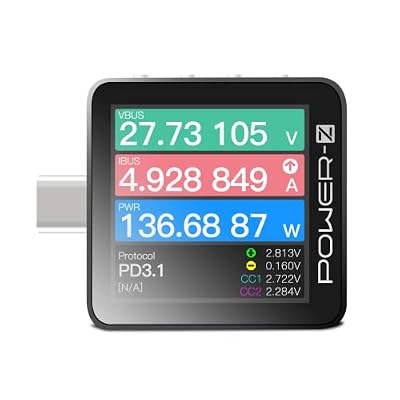
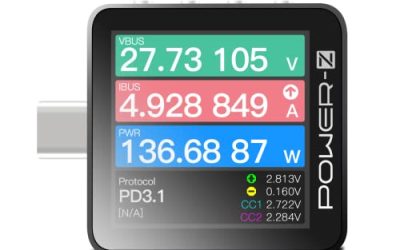
The KM003C is the meter charger reviewers and engineers reach for when a simple watt reading is not enough. It works as a power meter, a USB PD protocol analyzer, and a cable checker in one tiny aluminium body. Connect it to a PC through its separate HID port and its software logs the actual negotiation between charger and device, reads the PDO profiles a charger advertises, triggers protocols including PPS, and reads the e-marker chip inside a USB-C cable so you can confirm its power rating and USB version. It can also help spot counterfeit Apple chargers and cables. The 1.54-inch colour display, four side buttons, and gravity rotation make it usable standalone, away from a computer.
Specs
- Brand: ChargerLAB
- Model: POWER-Z KM003C
- Connectors: USB-C in and out, plus USB-C HID port for PC connection
- Voltage range: 0-50V
- Current range: 0-6A
- Display: 1.54-inch IPS colour display
- Features: PD 3.2 protocol analysis, PDO and e-marker reading, protocol triggering, PC logging software, ripple measurement
- ASIN: B0BJ24PVNJ
Best for: Serious Apple users and technicians who want protocol-level proof of why a charger or cable behaves the way it does.
2. FNIRSI FNB58

The FNB58 is the most versatile workbench meter in this group. It accepts USB-A, USB-C, and Micro-USB, so it can test everything from an old USB-A brick to a current USB-C fast charger without adapters. Its 2.0-inch colour screen shows voltage, current, power, capacity, and energy, plus real-time curves and ripple that reveal an unstable charger at a glance. It detects and triggers fast-charge protocols, reads cable e-marker information and cable resistance, and the Bluetooth version can log to an app or PC for longer charge tests. Firmware updates keep its protocol support current.
Specs
- Brand: FNIRSI
- Model: FNB58
- Connectors: USB-A, USB-C, and Micro-USB
- Voltage range: 4-28V
- Current range: 0-7A
- Display: 2.0-inch colour LCD
- Features: PD and QC detection and triggering, e-marker and cable resistance checks, ripple and curve display, Bluetooth logging on Bluetooth version
- ASIN: B0BJ253W31
Best for: Hobbyists and repair benches that test a mix of USB-A and USB-C chargers, cables, and power banks.
3. Klein Tools ET920

The ET920 takes a different approach: instead of a rigid stick, it uses short flexible cable leads for USB-A and USB-C, so it puts less strain on ports and is easier to position on a crowded desk. It measures and displays voltage, current, capacity, energy, and calculated resistance at the same time, monitors continuously for long charge sessions, stores up to ten readings for comparison, and flags voltage or current overloads. It needs no batteries because it draws power from the source under test. The rugged, pocket-sized housing is built for tool bags and job sites rather than careful desk use.
Specs
- Brand: Klein Tools
- Model: ET920
- Connectors: USB-A and USB-C on flexible cable leads
- Voltage range: 3-20V DC
- Current range: 0.05-3A on USB-A, 0.05-5A on USB-C
- Display: High-resolution LCD
- Features: Simultaneous voltage, current, capacity, energy and resistance display, 10-reading memory, overload detection, no batteries needed
- ASIN: B07GXZHPVR
Best for: Users who want a tough, simple USB-A and USB-C meter for everyday charger and cable checks at home or on site.
4. DROK USB Power Meter

This DROK meter is a straightforward LCD tester for USB-A and USB-C sources. It shows voltage and current clearly, tracks the capacity delivered to a power bank or phone, and supports QC 2.0 and QC 3.0 fast charging through its ports. That combination makes it handy for two classic jobs: confirming whether a charger is delivering its expected fast-charge output, and checking how much charge a power bank actually accepts or delivers over a full cycle. It is not a protocol analyzer, and it does not pretend to be — it is a quick, readable gauge for routine checks.
Specs
- Brand: DROK
- Model: 200357
- Connectors: USB-A and USB-C
- Voltage range: 4-24V
- Current range: Up to 5A
- Display: LCD voltage and current display
- Features: Capacity measurement for power bank testing, QC 2.0 and QC 3.0 support, charger and cable speed testing
- ASIN: B07FL5Y821
Best for: Budget-minded checks of charger output and power bank capacity without extra menus or software.
5. YOJOCK USB C Tester
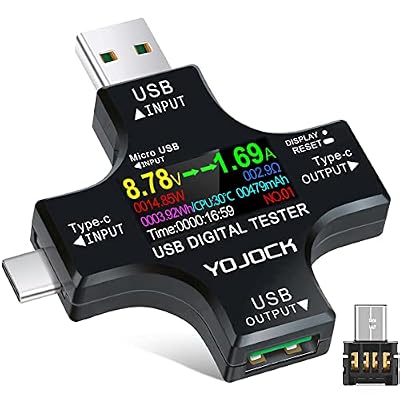
The YOJOCK 2-in-1 tester covers both USB-C and USB-A testing in a compact body with an upgraded IPS colour screen. It measures voltage, current, capacity, energy, power, temperature, resistance, and charging time, and cycles through eight display interfaces with a single button so you can choose between a simple large readout and a detailed data view. An included adapter widens its compatibility with older ports, and built-in protections include over-voltage, over-current, and under-voltage warnings with automatic cut-off. It supports PD and QC fast charging, making it suitable for checking iPhone fast charging as well as laptop chargers within its range.
Specs
- Brand: YOJOCK
- Model: J7-C 2-in-1 USB C Tester
- Connectors: USB-C and USB-A, with adapter included
- Voltage range: 3.6-32V
- Current range: 0-8.0A as listed for the tester range, with in-line measurement up to 5.1A in the product description
- Display: IPS colour display with 8 display interfaces
- Features: Voltage, current, power, capacity, energy, temperature, resistance and time measurement, over-voltage and over-current protection, PD and QC support
- ASIN: B09T3KHBFL
Best for: Apple users who want one affordable colour-screen meter for both USB-C fast chargers and older USB-A accessories.
Tips for Testing Chargers Accurately
Test one variable at a time. Keep the same cable and device, swap only the charger, and note the negotiated voltage and watts after the first minute, once charging has settled. Then keep the charger and swap only the cable. A drop that follows the cable points to the cable; a drop that follows the charger points to the charger.
Use a device with a low battery for fast-charge tests. iPhones and iPads reduce charging power sharply as the battery fills and when the device gets warm, so a near-full or hot device can make a healthy charger look weak. Note the battery level and temperature conditions alongside every reading.
For power banks, run a full discharge through the meter and compare the delivered Wh, not just the mAh figure. Watt-hours account for voltage conversion losses and give a fairer picture of real capacity than a headline mAh rating measured at cell voltage.
Remember that the meter itself sits in the path. Very long or thin extra cables added just to fit a meter can add resistance and lower the reading slightly, so keep the test setup as short and direct as the job allows.
Verdict
For most iPhone and iPad owners, the FNIRSI FNB58 offers the best balance: it tests USB-A and USB-C, reads protocols and cables, and logs long sessions without reaching analyzer money. Choose the ChargerLAB POWER-Z KM003C if you want the deepest diagnosis available, including PD message analysis and e-marker reading on a PC. The Klein Tools ET920 is the rugged everyday pick, the DROK is the simple LCD gauge for charger and power bank checks, and the YOJOCK is the colourful all-rounder for mixed old and new gear. Any one of them beats guessing — once you can see the volts and amps, slow charging stops being a mystery.

Write Your Review
No reviews yet. Be the first to share your experience!