
As an Amazon Associate we earn from qualifying purchases.
- 1. DJI Mic 2 — Best for Sound Quality and Backup Recording
- 2. Rode Wireless GO II — Best Versatile Dual-Channel System
- 3. Hollyland Lark M2 — Best Lightweight Combo Kit
- 4. Rode Wireless Micro Lightning — Simplest Plug-and-Play for Older iPhones
- 5. DJI Mic Mini — Best Ultralight Kit for Long Shooting Days
- How to Choose a Wireless Microphone System for iPhone
- Comparison at a Glance
- FAQ
- Conclusion
Your iPhone shoots excellent video, but its built-in microphones pick up room echo, wind, and every sound between you and the phone. A wireless microphone system fixes that by putting a small transmitter close to your mouth and sending clean audio to a receiver that plugs straight into your iPhone. The five kits below all work with iPhone through a Lightning or USB-C receiver, a USB-C digital connection, or a phone adapter in the box, and they cover everything from solo vlogging to two-person interviews.
Disclosure: This article contains affiliate links. If you buy through them, we may earn a commission at no extra cost to you.
1. DJI Mic 2 — Best for Sound Quality and Backup Recording

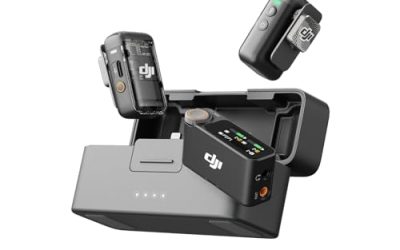
The DJI Mic 2 is the kit to choose when you want the safety net of internal recording as well as a direct iPhone connection. Its receiver connects to a phone with the included mobile adapter, and the transmitters can also link to compatible devices over Bluetooth. Intelligent noise cancelling helps in busy streets, while 32-bit float internal recording protects loud moments from clipping.
Each transmitter clips on or attaches magnetically, stores recordings internally, and works at long range in open space. The charging case keeps the full set together and topped up for a full day of shooting, making this a strong pick for interviews, travel filming, and client work where you cannot reshoot a take.
Specs
- Brand: DJI
- Model: Mic 2 (2 TX + 1 RX + Charging Case)
- ASIN: B0CFZX734J
- Transmitters: 2 clip-on transmitters with built-in microphones
- Connection to iPhone: Receiver with mobile phone adapter, plus Bluetooth to compatible devices
- Key features: Intelligent noise cancelling, 32-bit float internal recording, charging case
2. Rode Wireless GO II — Best Versatile Dual-Channel System

The Rode Wireless GO II is a dual-channel system with two transmitters and one receiver, built for creators who move between iPhone, camera, and computer. It uses Series IV 2.4GHz digital transmission, offers on-board recording on the transmitters, and connects to phones digitally over USB-C, with a Lightning cable available separately for older iPhones.
That flexibility is its main strength. Record two people at once, split or merge the channels in post, and keep the transmitter recordings as a backup if the wireless link drops. If you film interviews on your iPhone one day and on a camera the next, this is the most adaptable system in this roundup.
Specs
- Brand: Rode
- Model: Wireless GO II
- ASIN: B08XFQ6KP9
- Transmitters: 2 transmitters with built-in microphones and lavalier inputs
- Connection to iPhone: USB-C digital output, Lightning cable sold separately
- Key features: Dual-channel receiver, on-board recording, 2.4GHz Series IV transmission
3. Hollyland Lark M2 — Best Lightweight Combo Kit

The Hollyland Lark M2 stands out for how small its transmitters are. Each one weighs only a few grams, clips or magnetically attaches to clothing, and is easy to hide on camera. The combo version is especially useful for iPhone owners because it includes phone receivers for both Lightning and USB-C alongside a camera receiver, so one kit covers an older iPhone, a newer iPhone, and a camera.
Audio is captured in high-fidelity format, noise cancelling can be toggled from the transmitter, and the charging case extends total use across a long shooting day. Choose the Lark M2 if discretion and cross-device coverage matter more to you than internal backup recording.
Specs
- Brand: Hollyland
- Model: Lark M2 Combo
- ASIN: B0D927BQQT
- Transmitters: 2 button-sized transmitters with built-in microphones
- Connection to iPhone: Lightning receiver and USB-C receiver included, plus camera receiver
- Key features: Noise cancelling, high-fidelity audio, charging case, mono and stereo modes on camera receiver
4. Rode Wireless Micro Lightning — Simplest Plug-and-Play for Older iPhones

The Rode Wireless Micro Lightning is built for one job: plug the receiver into an iPhone with a Lightning port and start recording. There are no cables, no pairing menus, and no separate app required for basic use. The two transmitters pair automatically with the receiver, and Intelligent GainAssist manages levels so speech stays balanced without manual gain setting.
It is the smallest and simplest system here, with a pocket-sized charging case that extends battery life for a weekend of short shoots. The trade-off is focus: this Lightning version is for iPhone only, so it will not suit a newer USB-C iPhone or a camera setup. For Lightning iPhone owners who want zero setup, that focus is the point.
Specs
- Brand: Rode
- Model: Wireless Micro Lightning
- ASIN: B0DFXP4PYF
- Transmitters: 2 transmitters with built-in microphones
- Connection to iPhone: Lightning receiver plugs directly into iPhone
- Key features: Automatic pairing, Intelligent GainAssist, charging case
5. DJI Mic Mini — Best Ultralight Kit for Long Shooting Days

The DJI Mic Mini shrinks the wireless formula down to transmitters that weigh about ten grams each, yet still delivers detailed audio, noise cancelling, and automatic limiting to prevent clipping. The receiver ships with a USB-C mobile phone adapter for newer iPhones, and a Lightning adapter is available for older models, while the transmitters can also connect directly to compatible DJI devices.
Battery life with the charging case is the headline for travel and event work, stretching across multiple days of intermittent filming. If the full Mic 2 feels like more system than you need, the Mic Mini gives you the same plug-into-iPhone workflow in a lighter, simpler package.
Specs
- Brand: DJI
- Model: Mic Mini (2 TX + 1 RX + Charging Case)
- ASIN: B0DDL8WGH5
- Transmitters: 2 ultralight transmitters with built-in microphones
- Connection to iPhone: Receiver with USB-C mobile phone adapter, Lightning adapter sold separately
- Key features: Two-level noise cancelling, automatic limiting, charging case
How to Choose a Wireless Microphone System for iPhone
Start with your port. iPhone 15 and later models use USB-C, while earlier models use Lightning. Buy the receiver version that matches your phone, or choose a combo kit like the Lark M2 that includes both. A receiver that plugs straight in is faster to use than a camera-style receiver that needs a cable and a separate adapter.
Next, count your speakers. Solo creators can save size and setup time with a compact phone-first kit, but interviews and podcasts need two transmitters and a dual-channel receiver. Then check the safety features that matter for your work: internal recording protects against dropouts, automatic limiting and gain control help beginners, and noise cancelling helps outdoors but should not replace a windscreen in strong wind.
Finally, think about battery and other devices. A charging case matters if you shoot away from power, and a camera receiver matters if the same kit must also serve a mirrorless camera or a computer. Match the kit to the phone and the second device you actually own, not to a setup you might buy later.
Comparison at a Glance
For pure simplicity on a Lightning iPhone, the Wireless Micro Lightning wins. For the broadest device coverage in one box, the Lark M2 Combo wins. For backup recording and post-production control, the Mic 2 and the Wireless GO II lead, with the GO II favouring cross-device flexibility and the Mic 2 favouring phone and DJI-ecosystem use. For the lightest carry over long days, the Mic Mini is the pick.
FAQ
Do wireless microphones work with the iPhone Camera app?
Yes. When a receiver is recognised as an audio input, the Camera app and most filming apps record from it automatically. Test a short clip before an important shoot, and check playback with headphones to confirm the wireless system, not the built-in microphone, was used.
Which receiver do I need, Lightning or USB-C?
Match the receiver to your iPhone port. Lightning fits iPhone 14 and earlier, and USB-C fits iPhone 15 and later. Combo kits that include both receivers are useful if your household or team uses both generations.
Can I record two people at the same time?
Yes, all five systems above include two transmitters. Use one transmitter per person, keep each microphone at a similar distance from the mouth, and check whether your app records both channels or mixes them together.
Do I still need a windscreen outdoors?
Yes. Noise cancelling reduces steady background sound, but wind hitting the capsule causes distortion that software cannot fully remove. Use the furry windscreens supplied with the kit whenever you film outside.
Will these systems work with a case on my iPhone?
A slim case is usually fine, but a thick case can stop a plug-in receiver from seating fully. If the receiver feels loose or the phone does not recognise it, remove the case or use the extension approach recommended by the manufacturer for that kit.
Conclusion
The best wireless microphone system for iPhone is the one that matches your port, your speaker count, and your backup needs. Choose the DJI Mic 2 for internal recording and polished phone audio, the Rode Wireless GO II for maximum flexibility across devices, the Hollyland Lark M2 for a discreet combo kit, the Rode Wireless Micro Lightning for effortless plug-and-play on older iPhones, or the DJI Mic Mini for the lightest long-day carry. Any of them will make your iPhone video sound dramatically clearer than the built-in microphones alone.
Write Your Review
No reviews yet. Be the first to share your experience!