
As an Amazon Associate we earn from qualifying purchases.
- 1. Synology DiskStation DS223 — Best All-Round Time Machine NAS
- 2. QNAP TS-264 — Best Performance Pick for Busy Households
- 3. WD My Cloud EX2 Ultra — Best Simple Setup
- 4. Asustor Drivestor 2 Pro AS3302T — Best Value With 2.5GbE
- 5. Buffalo LinkStation 220 — Best Ready-to-Run With Drives Included
- How to Choose a NAS for Mac Home Backups
- FAQ
- Conclusion
Disclosure: This article contains affiliate links. If you buy through them, we may earn a commission at no extra cost to you.
A USB drive plugged into one Mac only protects that one Mac, and only while it stays connected. A NAS drive on your home network solves both problems: every Mac in the house can back up to the same box over Wi-Fi or Ethernet, Time Machine runs automatically in the background, and a two-bay unit with mirrored drives keeps your backups alive even if one hard drive fails.
For Mac households, the details that matter are native Time Machine support over SMB, a backup app or share you can dedicate to each Mac, RAID 1 mirroring for redundancy, and software that stays updated. The five drives below are all proper two-bay NAS systems suited to home backup duty. They range from a drives-included, set-and-forget option to faster models with 2.5GbE networking and room to run extra apps alongside your backups.
1. Synology DiskStation DS223 — Best All-Round Time Machine NAS

The DS223 is the straightforward recommendation for most Mac homes. DiskStation Manager makes Time Machine setup simple: you create a shared folder, enable the Bonjour and SMB services, set a quota so one Mac cannot fill the whole volume, and then point each Mac at the share. After that, hourly backups happen without anyone thinking about them.
Hardware is modest but well matched to backup work. The quad-core processor and 2GB of memory handle several Macs backing up at once, plus file sharing and photo organization through the built-in apps. With two bays in a mirrored array, a single drive failure does not touch your backup history, and scheduled snapshots add a second layer of protection against accidental deletion.
Choose the DS223 if you want the most polished software experience and a NAS that can also serve as a family file and photo hub.
Specs
- Brand: Synology
- Model: DiskStation DS223, 2-Bay, Diskless
- CPU: Realtek RTD1619B quad-core 1.7 GHz
- Memory: 2GB DDR4
- Drive bays: 2 x 3.5-inch SATA, hot-swappable
- Networking: 1 x Gigabit Ethernet
- RAID: Synology Hybrid RAID, Basic, JBOD, RAID 0, RAID 1
- ASIN: B0BRNBVTJK
2. QNAP TS-264 — Best Performance Pick for Busy Households

The TS-264 is the power option in this group. Its Intel processor, generous memory, and dual 2.5GbE ports mean Time Machine backups finish faster and overlap less with other work, which matters in a house where several Macs, media streaming, and large photo libraries all compete for the network at the same time.
The QTS software includes a dedicated backup station and supports Time Machine for multiple Macs, each with its own account and quota. Two M.2 slots let you add SSD caching later, and the extra headroom means the box can also handle media serving or light virtualization without slowing down backups. Wired to a 2.5GbE switch, initial full backups — the long first run that copies everything — are noticeably quicker than on gigabit-only models.
Choose the TS-264 if your household has three or more Macs, large libraries, or you simply want the fastest backup target here.
Specs
- Brand: QNAP
- Model: TS-264-8G-US, 2-Bay, Diskless
- CPU: Intel Celeron N5095 quad-core, up to 2.9 GHz
- Memory: 8GB DDR4
- Drive bays: 2 x 3.5-inch SATA, plus 2 x M.2 PCIe slots
- Networking: 2 x 2.5GbE ports
- RAID: JBOD, RAID 0, RAID 1
- ASIN: B0BLJ97L82
3. WD My Cloud EX2 Ultra — Best Simple Setup

The My Cloud EX2 Ultra in diskless form is for buyers who already have drives, or who want to pick their own NAS-rated drives and keep the enclosure side simple. Setup through the My Cloud dashboard is the least technical in this roundup: connect the unit to your router, create user accounts, and enable Time Machine backup for your Macs.
Under the hood it covers the backup essentials well. RAID 1 mirroring protects against a single drive failure, the dual USB ports let you attach an external drive for a second, offline copy of the NAS itself, and scheduled backups keep everything hands-off once configured. Performance is gigabit-class rather than cutting-edge, which is fine for overnight Time Machine runs.
Choose the EX2 Ultra if ease of setup matters more than app ecosystems or multi-gigabit networking, and you are comfortable adding your own drives.
Specs
- Brand: WD
- Model: My Cloud EX2 Ultra, Diskless, WDBVBZ0000NCH
- CPU: Marvell ARMADA 385 dual-core 1.3 GHz
- Memory: 1GB DDR3
- Drive bays: 2 x 3.5-inch SATA, diskless
- Networking: 1 x Gigabit Ethernet
- RAID: RAID 0, RAID 1, JBOD, spanning
- ASIN: B01AWH05KK
4. Asustor Drivestor 2 Pro AS3302T — Best Value With 2.5GbE

The Drivestor 2 Pro AS3302T stands out for putting a 2.5GbE port on an affordable home NAS. If your Mac connects through a wired dock or your home network already runs faster-than-gigabit gear, that port shortens both the first full Time Machine backup and large restores.
The ADM operating system supports Time Machine backups for multiple Macs, snapshot protection on supported volumes, and an easy backup app for folders you want copied on a schedule as well. Tool-free drive trays make installation quick, and the three USB ports are useful for attaching an external drive as an extra backup layer or for one-touch copying.
Choose the AS3302T if you want faster wired transfers without stepping up to a performance-tier NAS, and you are happy with a smaller app catalogue than the two leaders offer.
Specs
- Brand: Asustor
- Model: Drivestor 2 Pro AS3302T, 2-Bay, Diskless
- CPU: Realtek RTD1296 quad-core 1.4 GHz
- Memory: 2GB DDR4
- Drive bays: 2 x 3.5-inch SATA
- Networking: 1 x 2.5GbE port
- RAID: RAID 0, RAID 1, Single, JBOD
- ASIN: B08ZD7R72P
5. Buffalo LinkStation 220 — Best Ready-to-Run With Drives Included
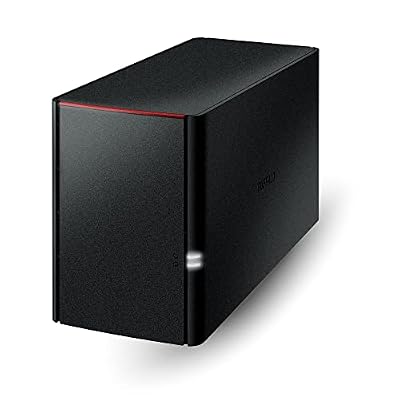
The LinkStation 220 is the only pick here that arrives with drives already fitted. This 4TB version pairs two 2TB drives and is set up for mirrored storage, so you unbox it, connect it to your router, turn on Time Machine support, and start backing up — no separate drive shopping or tray installation.
Buffalo explicitly supports Time Machine for multiple Mac computers, which suits a whole-home backup role: one share per Mac keeps each backup separate and easy to manage. The hardware is deliberately basic, with a lightweight processor and memory sized for file sharing and backup rather than apps or containers, and that focus keeps the interface simple for non-technical households.
Choose the LinkStation 220 if you want a backup appliance, not a project, and prefer a single purchase that is ready the day it arrives. Note that in mirrored mode the usable space is half the raw capacity, so plan backup sizes accordingly.
Specs
- Brand: Buffalo
- Model: LinkStation 220 LS220D0402, 4TB, Drives Included
- CPU: Marvell ARMADA 370 dual-core 800 MHz
- Memory: 256MB DDR3
- Drive bays: 2, with 2 x 2TB drives included
- Networking: 1 x Gigabit Ethernet
- RAID: RAID 0, RAID 1, JBOD
- ASIN: B00JY4QD4A
How to Choose a NAS for Mac Home Backups
Start with capacity. A practical rule is to give Time Machine at least twice the storage of the Mac drives it protects, so backup history has room to breathe. A household with two laptops usually lands on a mirrored pair of mid-size NAS drives; photographers and video editors should size up from there.
Next, insist on two bays and RAID 1. A single-bay backup drive is only one failure away from losing the very data you were protecting. Mirroring does not replace an off-site or external copy, but it removes the most common home failure — one tired hard drive — from the equation.
Networking speed shapes the experience more than processor speed for pure backup duty. Gigabit Ethernet is adequate for overnight incremental backups. A 2.5GbE model, such as the QNAP or Asustor picks above, earns its keep during the first full backup and during full-system restores, provided your Mac is wired through a compatible switch and adapter or dock.
Finally, check the software routine: per-Mac quotas, snapshot support, automatic firmware updates, and a health dashboard that warns you early about a degrading drive. Set up alerts during the first week, not after the first failure.
A quick comparison of the five picks:
- Easiest software and best all-rounder: Synology DS223
- Fastest, for many Macs and heavy libraries: QNAP TS-264
- Simplest diskless setup: WD My Cloud EX2 Ultra
- Fast networking for less: Asustor Drivestor 2 Pro AS3302T
- Ready to run with drives included: Buffalo LinkStation 220
FAQ
Does Time Machine work with any NAS?
No. The NAS needs to offer a Time Machine-compatible SMB share. All five drives in this guide support Time Machine backups from Mac computers, but you should still enable the dedicated Time Machine setting in the NAS software rather than pointing Time Machine at a generic folder.
Should I use RAID 1 for Time Machine backups?
Yes, for a home backup target RAID 1 is the sensible default. It mirrors every backup across both drives, so one drive can fail without losing your backup history. Remember that RAID is redundancy, not a complete backup strategy — keep an additional copy of irreplaceable files elsewhere.
How much NAS space does each Mac need?
Plan for at least one and a half to two times the used storage of each Mac. More space means Time Machine keeps older versions for longer before pruning them. Use per-Mac quotas on the NAS so one large Mac cannot crowd out the others.
Can several Macs back up to the same NAS at once?
Yes. Each Mac gets its own backup share or account, and the NAS handles the jobs in parallel. In busy households, a model with more memory or a 2.5GbE connection keeps simultaneous first backups and restores from dragging.
Do I need to buy drives separately?
For the diskless models — the Synology, QNAP, WD, and Asustor picks — yes. Choose NAS-rated drives of equal size for a mirrored array. The Buffalo LinkStation 220 in this guide includes its drives, which is its main convenience advantage.
Conclusion
For most Mac households, the Synology DS223 is the balanced choice: mature Time Machine support, mirrored two-bay protection, and software that non-technical family members can live with. Step up to the QNAP TS-264 when speed and simultaneous backups matter, or to the Asustor AS3302T when you want 2.5GbE on a tighter budget. The WD My Cloud EX2 Ultra keeps diskless setup as simple as it gets, while the Buffalo LinkStation 220 removes setup almost entirely by including its drives. Whichever you pick, the important step is the same: put it on the network, turn on Time Machine for every Mac in the house, and let backups become automatic.


Write Your Review
No reviews yet. Be the first to share your experience!