
As an Amazon Associate we earn from qualifying purchases.
A good camera drone is only half the experience. The other half lives on your iPhone: the live preview you frame shots with, the map and battery warnings you rely on in flight, and the editor you use to trim and share clips before you even get home. The best drones with iPhone apps make that connection feel invisible, pairing a capable camera in the air with an iOS app that is stable, clear, and quick to learn.
This guide focuses on camera drones, not toy drones without cameras and not accessories sold on their own. Every pick below flies with a dedicated iPhone app for live view, settings, and flight control, shoots real photo and video, and suits a different kind of pilot. A travel creator who wants the strongest image quality in a folding body will want something different from a beginner who wants GPS help and a forgiving learning curve, or a runner who wants a self-flying camera that follows without a controller in hand. Read the app notes as carefully as the camera notes, because the app is what you will touch on every single flight.
Disclosure: This article contains affiliate links. If you buy through them, we may earn a commission at no extra cost to you.
1. DJI Mini 4 Pro (DJI RC 2)

The DJI Mini 4 Pro is the easiest recommendation for most iPhone owners who want serious aerial images without carrying a large drone. It folds small, stays in the sub-249g class, and still records 4K HDR video with a gimbal that keeps horizons level in wind. Omnidirectional vision sensing helps it spot obstacles in more directions than earlier mini drones, which matters when you are backing up for a reveal shot or orbiting a subject near trees.
On the iPhone side, the DJI Fly app is the control centre when you fly with a phone-connected controller, and it is also where you review, download, and edit footage. Live view is sharp, camera settings such as resolution, frame rate, and colour profile are easy to reach, and QuickShots and MasterShots give beginners automated moves that look deliberate rather than random. Firmware prompts, flight records, and no-fly-zone information all live in the same place, so pre-flight checks become a habit rather than a chore.
Choose this model if image quality, obstacle sensing, and portability matter most and you plan to fly often. It is less ideal if you want a fully hands-free, palm-launched camera with no controller workflow at all, which is where the DJI Neo below takes a different approach.
Specs
- Brand: DJI
- ASIN: B0CFF1SJ3P
- Camera: 4K HDR video, high-resolution stills
- Weight class: Under 249 g
- Stabilisation: 3-axis mechanical gimbal
- Sensing: Omnidirectional vision sensing
- App: DJI Fly for iOS
- Flight features: QuickShots, MasterShots, ActiveTrack-style subject tracking, Smart Return to Home
2. DJI Neo Three-Battery Combo

The DJI Neo takes almost the opposite approach to the Mini 4 Pro. It is a tiny, propeller-guarded drone built around palm takeoff, subject tracking, and QuickShots you can start with a button press, often without unfolding a controller at all. When you do want manual control and a live view, you connect through the DJI Fly app on your iPhone, turning the phone into the controller and screen.
That app link is what makes the Neo fit this guide rather than being just a novelty. In the app you can preview the 4K UHD camera feed, adjust shots, use virtual controls, and download clips for quick editing and sharing. The three-battery combo suits its style of flying: lots of short, spontaneous flights at a park, on a walk, or during a family outing, rather than one long survey of a landscape. Built-in propeller guards also make those close, low flights feel less stressful for new pilots.
Pick the Neo if you want the lightest, simplest route to follow-me clips and social-ready video, and you are happy to trade the Mini-series camera headroom and wind performance for convenience. If you mainly shoot wide landscapes in gusty coastal conditions, a larger mini drone will serve you better.
Specs
- Brand: DJI
- ASIN: B0DDS1368S
- Camera: 4K UHD video, stabilised video
- Weight: About 135 g
- Design: Built-in propeller guards, palm takeoff
- Control: Controller-free modes plus DJI Fly app control on iPhone
- App: DJI Fly for iOS
- Flight features: Subject tracking, QuickShots, follow modes
3. Potensic ATOM SE GPS Drone

The Potensic ATOM SE is a practical step into GPS camera flying for beginners who want help staying oriented. It folds down, stays under 249 g, and pairs a 4K EIS camera with GPS positioning, auto return, and a dedicated remote that connects to your phone. The Potensic app on iPhone provides the FPV live view, flight telemetry, map information, and camera controls, so you are not flying blind or guessing about battery and distance.
In the air, the ATOM SE emphasises steadiness and reassurance over cinematic extras. Electronic image stabilisation smooths the 4K footage, brushless motors help in a breeze, and GPS return gives new pilots a clear safety net if the signal drops or the battery runs low. The expansion-style kit with two batteries extends total flying time across a morning out, which is useful while you are still learning and may spend part of each flight simply practising framing.
Consider the ATOM SE if you want GPS, a conventional controller-plus-iPhone setup, and a forgiving first camera drone for travel and family video. Skip it if a mechanical 3-axis gimbal and the most polished low-light video are your top priorities, because electronic stabilisation is a different compromise.
Specs
- Brand: Potensic
- ASIN: B0BFWS4N4T
- Camera: 4K EIS camera, 12MP-class stills with Sony CMOS sensor class hardware
- Weight class: Under 249 g
- Transmission: Long-range FPV transmission to the controller and phone
- Motors: Brushless
- App: Potensic app for iOS, with Lightning, USB-C, and Micro adapter cables for the remote
- Flight features: GPS auto return, multiple flight modes, follow and waypoint-style functions
4. HOVERAir X1 Drone with Camera (Black Combo)
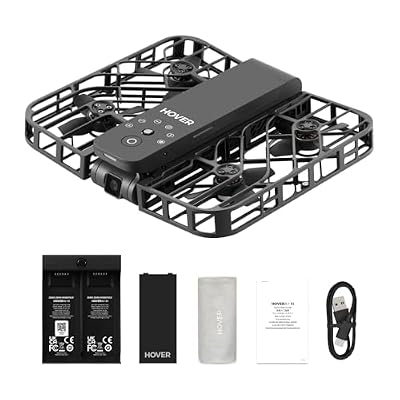
The HOVERAir X1 is a self-flying camera first and a traditional drone second. It folds flat, weighs about 125 g, launches from your palm, and follows pre-set intelligent flight paths such as Hover, Follow, Zoom Out, and Orbit without you steering every second. For runners, cyclists, hikers, and vloggers who film themselves, that hands-free design is the whole point.
The iPhone connection comes through the Hover X1 app. The listing notes compatibility with iOS devices and using the app for real-time previews of the camera feed, plus a Manual Control mode when you do want to direct the flight yourself. Video tops out at 2.7K with HDR options at lower resolution, supported by triple stabilisation, and footage is stored on internal storage rather than a removable card, which simplifies the workflow but means you should offload clips to your iPhone regularly.
Choose the X1 if solo, follow-me content matters more than long-range manual flying. It is not the pick for pilots who want GPS mapping, long transmission distances, or full manual camera control on every flight. Think of it as a flying tripod and cameraman for short, close scenes, not as a landscape survey tool.
Specs
- Brand: HOVERAir
- ASIN: B0CDCFGF1V
- Camera: Up to 2.7K video, HDR video capture, 12MP-class stills
- Weight: About 125 g
- Design: Enclosed, foldable frame, palm takeoff
- Storage: Internal storage
- App: Hover X1 app for iOS, live preview and Manual Control mode
- Flight features: Follow Me, Hover, Zoom Out, Orbit, Bird’s Eye and other intelligent flight paths
5. Ruko F11GIM Drone

The Ruko F11GIM suits beginners who want a larger, more conventional GPS drone and a longer session from two batteries. Its 4K camera sits on a 2-axis gimbal with electronic image stabilisation, and the drone uses GPS for auto return home, position hold, and beginner-friendly assistance. The phone connects at the controller for the Ruko app experience on iPhone, giving you the live FPV view, flight status, and camera controls on a screen you already know how to use.
Compared with the sub-249 g models above, the F11GIM feels less like a pocket travel accessory and more like a dedicated weekend kit. That extra size helps it cope in wind, with a stated focus on wind resistance for outdoor flying, and the two-battery bundle is aimed at fewer interruptions while you practise orbits, reveals, and return-to-home drills. As with any larger drone, check the registration and Remote ID rules that apply where you live before your first flight.
Look at the F11GIM if you want GPS confidence, a gimbal-assisted 4K camera, and a controller-plus-iPhone workflow at the more accessible end of the market. Pass on it if pocketable weight and the quietest, most discreet travel setup are essential, because the mini models in this list are easier to carry every day.
Specs
- Brand: Ruko
- ASIN: B08FJ79PW2
- Camera: 4K EIS camera
- Stabilisation: 2-axis gimbal plus electronic image stabilisation
- Motors: Brushless
- Batteries: 2 batteries included in the listed configuration
- App: Ruko app for iOS with FPV live view via the controller connection
- Flight features: GPS auto return home, Follow Me, wind resistance focus, FAA Remote ID compliance noted in the listing
How to Choose Drones with iPhone Apps
Start with the app, not just the camera. Download the companion app listing before you buy and confirm your iPhone model and iOS version are supported. Check whether the drone needs the phone physically connected to the controller with a cable, whether it can fly controller-free with app control as a backup, and whether footage downloads over Wi-Fi or only by cable or card. Those small workflow details decide whether you will actually edit and share what you shoot.
Next, match the camera system to your subjects. A mechanical 3-axis gimbal, as on the Mini 4 Pro, gives the smoothest pans and the most reliable horizon in wind. A 2-axis gimbal plus electronic stabilisation, as on the Ruko, is a step down in smoothness but still workable for learning. Electronic stabilisation alone, as on the ATOM SE, keeps weight and complexity low. The HOVERAir X1 and DJI Neo prioritise tracking and convenience, so judge them on how well they follow and frame you, not on long-range landscape specs.
Then think honestly about weight and rules. Drones under 249 g are easier to travel with and, in many places, face simpler registration requirements, but rules vary by country and by use, and Remote ID and local restrictions can still apply. Always check the current rules for where you will fly, respect no-fly zones shown in the app, and never treat an app map as a substitute for local law.
Battery strategy matters more than a single headline flight time. A combo with extra batteries, like the Neo three-battery kit or the two-battery Potensic and Ruko kits, usually gives a better real outing than one long claimed flight, because wind, hovering, and video recording all shorten sessions. Look for clear battery warnings in the app, a reliable return-to-home trigger, and a charging setup you can manage from a car or a power bank when travelling.
Finally, consider how you will use the footage. If you post quickly, an app with built-in trimming, templates, and direct download to the iPhone, such as DJI Fly, saves real time. If you edit on a computer, prioritise clean file access, higher-resolution modes, and a flatter colour option where available. The best drone is the one whose app workflow fits the way you already use your iPhone.
FAQ
Do all of these drones need an iPhone to fly?
No. Most models here fly with a dedicated controller, and the DJI Neo and HOVERAir X1 can fly automated paths with no controller at all. The iPhone app adds live preview, settings, maps, manual control on some models, and downloading and editing, so you will get much more from the drone with your phone connected.
Which iPhone app does each drone use?
DJI models use DJI Fly. Potensic models use the Potensic app, HOVERAir uses the Hover X1 app, and Ruko uses the Ruko app. Install the correct app before your first flight, allow the location and local network permissions it requests for flight information, and update the drone firmware at home rather than at the flying site.
Can I edit drone video directly on my iPhone?
Yes. All of these ecosystems let you move clips to the iPhone and trim or share them, and DJI Fly includes its own light editing tools. For longer projects, many pilots still offload the full-resolution files to a computer, but for same-day sharing the phone workflow is the fastest route.
Are sub-249 g drones exempt from all rules?
No. Weight can simplify registration in some regions, but airspace restrictions, privacy rules, altitude limits, and Remote ID requirements can still apply depending on the drone and where you fly. Check the rules in your country and in the app before every new location.
What should I check on my first flight with a new app?
Confirm the compass and GPS status in the app, set a sensible return-to-home altitude that clears nearby obstacles, check the battery level and home point on the map, and practise return-to-home in an open area. Keep the first flights short, low, and close while you learn how that specific app presents warnings.
Write Your Review
No reviews yet. Be the first to share your experience!