
Mid-song is the worst moment to go hunting through nested menus. A solo performer has one hand on the chords and an audience waiting, so the screen becomes the band manager: it is where styles get swapped, songs get queued and parts get muted. A responsive touch display turns those jobs into single taps, and that is why the screen — not the voice count — is often the deciding purchase for a working one-person band. The trade-off sits elsewhere, in key count, speaker power and how deep the onboard library runs.
All three keyboards below are 61-key arranger workstations whose Amazon listings name a touch screen, and each one suits a different solo act. Yamaha’s PSR-SX900 leads on live control extras, Korg’s Pa1000 brings a colour TouchView interface with sampling room, and Yamaha’s PSR-SX700 covers the same touch workflow at the lighter end of the line. Every specification quoted comes from the model’s Amazon listing, so you can match the screen and feature claims directly against the product page.
Quick Picks
As an Amazon Associate we earn from qualifying purchases.
| Product | Best for | Key spec from title |
|---|---|---|
| Yamaha PSR-SX900 | Solo acts wanting the fullest touch-based live control set | 61-key arranger keyboard with touch screen |
| Korg Pa1000 | Performers who want a 7-inch colour touchscreen and sampling room | 61-key professional arranger, 7-inch TFT touchscreen |
| Yamaha PSR-SX700 | Players stepping into touchscreen arrangers | 61 keys, 7-inch colour touch screen |
How to Choose
Screen size and what you can reach by touch
Not every colour display is a touch display, so confirm the listing actually says touch screen before anything else. Then judge the size: a 7-inch panel leaves room for style lists, mixer pages and song data to stay readable at arm’s length on a dark stage. Think about which tasks the screen takes over — selecting voices, balancing parts, opening the playlist — and which jobs still sit on physical buttons. The strongest setups mix both: touch for browsing and setup, hardware controls for anything you must hit while both hands are busy playing.
Managing styles, songs and set lists live
A one-person band runs a set the way a DJ runs a night: order matters, and dead air kills the room. Look for a playlist or songbook system that stores your running order, registrations that rebuild an entire song setup from one press, and quick ways to restart or reset a style when timing slips. One listing below names a style section reset for exactly that rescue job; another leans on a chord looper so the accompaniment can cycle while you solo. Match those tools to the way your own set actually flows.
Voices, styles and room to grow
Library depth decides how long the board stays useful. Count the voices and styles the listing states, but also look for expansion memory, because community and commercial style packs are how arrangers stay current with new repertoire. Sampling capacity matters to a smaller group of players — those who load their own sounds or regional instruments — and one keyboard here lists hundreds of megabytes for user samples. If your act depends on specific genres, ethnic content or backing tracks, verify the listing names the formats and storage you need rather than assuming they are standard.
Speakers, outputs and the rest of the rig
Unlike the big flagship boards, mid-range arrangers usually carry built-in speakers, which changes your rig maths: home practice needs nothing extra, while a function gig still wants a line out to a PA. Check the listing for connector types — USB and MIDI for computer work, jack outputs for the desk, a headphone socket for quiet rehearsal. Weight belongs in this decision too, because a solo act carries everything alone; the listings state dimensions and, in one case, a weight you can plan a case and stand around.
The 3 Best Options
Yamaha PSR-SX900 Arranger Keyboard

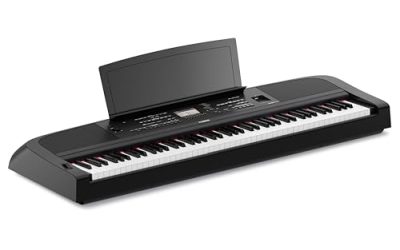
Yamaha’s flagship of the PSR-SX line is the most completely equipped touchscreen option here. Its Amazon listing names the touch screen among the model’s special features, alongside a chord looper, a joystick controller for pitch and modulation, and a vocal harmony function — a combination aimed at singing solo performers who run the whole show from one panel. The listing also describes a style section reset that returns the accompaniment to beat one with a single touch, which is the kind of rescue control you appreciate the first time a request throws your timing. Dimensions and weight are stated on the page, so case planning is straightforward.
Specs
- 61 keys
- Colour touch screen, listed among the model’s special features
- Chord Looper
- Joystick controller
- Vocal harmony function
- Dimensions: 40.04 x 16.97 x 5.47 inches, as listed
- Weight: 31.5 pounds, as listed
- Connectors listed: 3.5mm jack, 6.35mm jack, MIDI USB, USB
Best for: Singing solo performers who want Yamaha’s deepest touch-based control set in a 61-key board.
Watch out for: The PSR-SX900 has been succeeded in Yamaha’s line, so check which sellers hold stock on the listing and confirm the unit is new with full warranty before ordering.
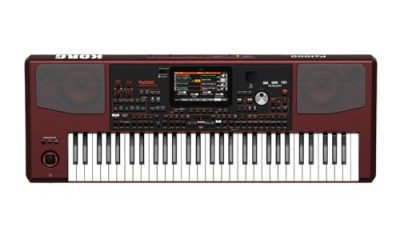
Korg Pa1000 61-Key Professional Arranger

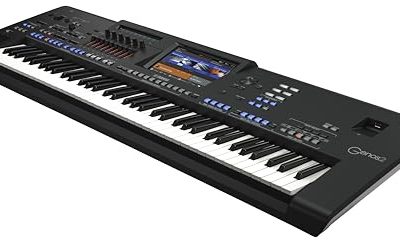
Korg’s Pa1000 approaches the touchscreen brief from the sound-library side. The listing describes a 7-inch TFT colour touchscreen that also opens up KAOSS-style MIDI and effects control, giving a solo player direct ways to bend a performance without stopping it. Under the screen sits the substance: more than 420 styles and 1,700 sounds according to the listing, plus 600MB of storage for your own samples — the largest user-sampling room named in this roundup. For entertainers whose sets lean on custom sounds, regional content or heavily produced arrangements, that combination of touch navigation and sample space is the Pa1000’s clear argument.
Specs
- 61 keys
- 7-inch TFT colour touchscreen
- More than 420 styles, as listed
- 1,700 sounds, as listed
- 600MB of storage for user samples, as listed
- KAOSS-style MIDI and effects control via the touchscreen
- Model: PA1000
Best for: Solo acts that load their own samples and want Korg’s touch interface over a deep sound library.
Watch out for: Verify the seller and the exact listing contents before buying, and confirm the sample memory figure matches the current listing — marketplace pages for this model vary.
Yamaha PSR-SX700 Arranger Keyboard

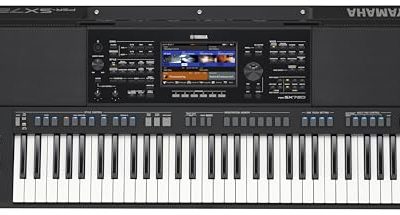
The PSR-SX700 is the entry point into this touchscreen trio, and its Amazon listing shows how much of the flagship workflow survives the step down. The description names a 7-inch colour touch screen with assignable functions, a joystick controller, playlist and registration tools for fast set-up, and a mic/guitar input for singing or collaborating. Content counts are stated plainly: 986 voices including 131 Super Articulation voices, 400 accompaniment styles, and 400MB of onboard memory for expansion data. For a one-person band that wants the modern touch interface and Yamaha’s style library without flagship depth everywhere else, this is the balanced pick.
Specs
- 61 keys
- 7-inch colour touch screen, as listed
- 986 voices, including 131 Super Articulation voices
- 400 styles, as listed
- 400MB onboard memory for expansion data
- Joystick controller
- Mic/guitar input
- Model: PSRSX700
Best for: Players moving up to a touchscreen arranger who want Yamaha’s workflow and style library in the mid-level model.
Watch out for: Stock of this model fluctuates as newer PSR-SX generations circulate, so confirm availability, seller and warranty on the listing at the time you order.
Which One Fits Your Situation
You front the act and sing every song
Take the PSR-SX900. Its listing names a vocal harmony function and a chord looper, so your voice gets support and your left hand gets freedom at the same time. The touch screen keeps style changes to a tap between verses, and the joystick covers the pitch and modulation work that world and pop styles demand from a single controller.
Your set depends on custom or regional sounds
The Pa1000 is built for you. Its listing’s 600MB of user sample storage is the figure that matters, backed by 1,700 sounds and more than 420 styles before you load anything of your own. The 7-inch touchscreen doubles as a KAOSS-style control surface, which suits performers who reshape effects and MIDI parts live rather than simply triggering arrangements.
You are buying your first touchscreen arranger
Start with the PSR-SX700. It keeps the 7-inch colour touch screen, the playlist tools and the mic/guitar input that define the modern one-person-band workflow, with a library sized for working sets rather than archives. You learn the same operating habits as the flagship SX900, so a later upgrade feels like a continuation rather than a restart.
You play small rooms without a PA
Built-in speakers make these 61-key boards self-contained in a way the big flagships are not, so any of the three can cover a café or care-home set on its own. Choose by library and workflow: the SX900 for control depth, the Pa1000 for samples, the SX700 for the lighter all-round package — and still confirm speaker details on the listing you order from.
Common Mistakes
- Assuming every colour display is a touchscreen — some arranger screens are display-only, so check the listing wording.
- Comparing voice counts while ignoring the set-list and registration tools you will touch every song.
- Ordering a succeeded model from an unfamiliar seller without confirming the unit is new and warrantied.
- Forgetting that a touch panel is hard to use with gloves or in bright sunlight on outdoor stages.
- Buying for sampling features you will never load, while skimping on the style library you use nightly.
Frequently Asked Questions
Does a touchscreen actually help during a live set?
Yes, in specific ways. Browsing styles, opening a playlist and adjusting part levels are all faster as direct taps than as menu dives, and those are exactly the jobs that fall between songs. It does not replace physical controls for playing — sliders, buttons and pedals still handle the mid-song work — which is why the strongest boards combine a touch panel with real hardware controls.
Are 61 keys limiting for one-person-band work?
Less than most buyers fear. Arranger playing centres on chord control plus melody, and 61 keys covers that layout for the majority of popular repertoire, especially with octave shift buttons on hand. Players with piano-heavy sets or wide two-handed arrangements will feel the ends of the board sooner, and they are the ones who should step up to a 76-key model instead.
Can these keyboards record my performances?
Each platform here is built to capture songs and arrangements, and the listings describe song and style tools for building your material on the board itself. The details — file formats, storage and audio versus MIDI capture — differ by model, so check the listing for the exact recording features named before you rely on one for demo work.
Which screen is biggest in this roundup?
All three listings describe 7-inch-class colour touch panels: the Pa1000 names a 7-inch TFT touchscreen, and the PSR-SX700 lists a 7-inch colour touch screen, while the PSR-SX900’s listing confirms a colour touch screen among its special features. With sizes this close, judge the interface layout and the physical controls around the screen rather than the diagonal alone.


Write Your Review
No reviews yet. Be the first to share your experience!