
As an Amazon Associate we earn from qualifying purchases.
- 1. iFixit Pro Tech Toolkit
- 2. iFixit Essential Electronics Toolkit
- 3. Kaisi Professional Electronics Opening Pry Tool Repair Kit (20-Piece)
- 4. Kaisi 32 in 1 Professional Electronics Screen Opening Pry Tool Repair Kit
- 5. Klein Tools 32717 Precision Screwdriver Set with Case
- How to Choose an iPhone Repair Tool Kit
- Frequently Asked Questions
Disclosure: This article contains affiliate links. If you buy through them, we may earn a commission at no extra cost to you.
Opening an iPhone is a precision job. The two pentalobe screws beside the Lightning or USB-C port, the tri-point screws holding the battery connector bracket, the adhesive sealing the display, and the tiny ribbon cables inside all demand tools made for the task. A regular screwdriver set will strip screws, crack glass, or damage connectors. The kits below are built around the drivers and opening tools iPhone repairs actually need: pentalobe and tri-point bits, plastic spudgers, opening picks, suction cups, and fine tweezers.
1. iFixit Pro Tech Toolkit

Specs
- :
- ASIN: B01GF0KV6G
- Brand: iFixit
- Model: IF145-307-4
- Precision bits: 64 (4 mm format, S2 steel)
- Total pieces: 87
- Driver: Aluminum magnetic driver handle with swivel cap, plus flexible extension
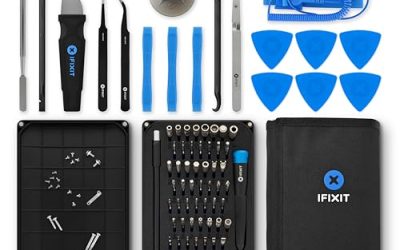
- Opening tools: Spudger, halberd spudger, metal spudger, Jimmy, 3 opening tools, 6 opening picks, small suction cup
- Tweezers: Nylon-tipped reverse tweezers, angled ESD tweezers, blunt ESD tweezers
- Extras: Anti-static wrist strap, magnetic pad
- Storage: Tool roll with removable bit case and sorting-tray lid
The iFixit Pro Tech Toolkit is the most complete kit in this roundup, and it earns that position by covering every stage of an iPhone repair in one roll. The 64-bit driver set includes the pentalobe bits that open the iPhone case, the tri-point bits for internal brackets, and Phillips, Torx, Torx security, flathead, hex, and JIS bits for the rest of the fasteners found inside Apple hardware. The bits are made from S2 steel, which holds its edges well against small, tightly torqued screws, and the magnetic driver handle keeps tiny screws from rolling away during a repair.
The opening tools are where this kit separates itself from a plain screwdriver set. The suction cup lifts the display away from the body once the pentalobe screws are out, the plastic opening picks slide around the edge to cut through display adhesive, and the Jimmy and spudgers handle the stubborn seams and delicate ribbon connectors. Three different tweezers cover holding cables in place, placing small screws, and handling connectors without static discharge. An anti-static wrist strap and a magnetic pad round out the setup for anyone working on a battery or logic board.
This is the kit for someone who plans to repair iPhones more than once, or who also works on iPads, game controllers, and other small electronics. It costs more than the compact options below, and its size makes it a bench kit rather than something to carry in a pocket, but nothing else here matches its range. If you want one purchase that covers screen swaps, battery replacements, charging port work, and camera repairs, this is the one to get.
2. iFixit Essential Electronics Toolkit

Specs
- :
- ASIN: B0964G2Y7S
- Brand: iFixit
- Model: IF145-348-5
- Precision bits: 16 (4 mm format, S2 steel)
- Driver: Magnetized aluminum driver handle
- Opening tools: Spudger, Jimmy, iFixit opening tool, 6 opening picks, suction handle
- Tweezers: Angled precision tweezers
- Bit types: Phillips 000, 00, 0, 1; Pentalobe P2, P5; Flathead 1, 2.5, 4 mm; Torx T4, T5; Torx Security TR6, TR8, TR10; Tri-Point Y000; SIM eject bit
- Storage: Magnetized case with built-in sorting tray in the lid
The Essential Electronics Toolkit is the compact sibling of the Pro Tech Toolkit, and it is the better choice for most iPhone owners who only need to open a phone occasionally. Its 16 bits are a deliberately small selection, but they include the exact ones iPhone repairs call for: Pentalobe P2 and P5 for the case screws, the Tri-Point Y000 bit for the battery connector bracket, and Phillips and Torx bits for the remaining internal fasteners. A SIM eject bit is included as well.
Despite its size, the kit does not skip the opening tools. It comes with a spudger for disconnecting battery and display cables, a Jimmy for prying, an opening tool and six opening picks for working around the display edge, and a suction handle for lifting the screen. The angled precision tweezers handle small connectors and screws, and everything packs into a magnetized case with a sorting tray built into the lid, so screws stay organized while the phone is open.
The trade-off is scope: with only 16 bits, this kit will not cover every fastener in every device, and it lacks the extra tweezers, wrist strap, and flexible extension of the Pro Tech Toolkit. For a straightforward screen or battery replacement on an iPhone, though, it has everything the job requires in a case small enough to keep in a drawer. It is the sensible pick for a first repair kit.
3. Kaisi Professional Electronics Opening Pry Tool Repair Kit (20-Piece)

Specs
- :
- ASIN: B015CMAJVK
- Brand: Kaisi
- Model: FBA_Kai-2779 (K-1282N)
- Pieces: 20
- Screwdrivers: 0.8 and 1.2 pentalobe, 1.2 Phillips, 2.0 flathead
- Spudgers: Ultrathin steel spudger, metal spudger, 2 blue plastic spudgers, 3 nylon fiber spudgers
- Opening tools: 3 triangle paddles, capacitive screen separating tool, screen film squeegee, PVC suction cup
- Tweezers: 2 ESD-safe tweezers
- Extras: SIM card tray opener, cleaning cloth
The Kaisi 20-piece kit is built around the opening phase of a repair, which is the part where most iPhone damage happens. Its strength is the variety of pry tools: steel spudgers for leverage on stubborn seams, nylon fiber spudgers that will not scratch the frame or display, triangle paddles for working around the screen edge, and a capacitive screen separating tool for lifting glued panels. The PVC suction cup gives a grip on the display glass, and the squeegee helps with screen protector application once the repair is finished.
The kit also includes the screwdrivers an iPhone screen or battery swap needs, with 0.8 and 1.2 pentalobe drivers for the case screws plus Phillips and flathead drivers. Two ESD-safe tweezers are included for handling connectors and small parts without static damage, and a SIM tray opener and cleaning cloth round out the set.
This kit suits someone who already owns a precision driver set and needs dedicated opening tools, or someone tackling a screen replacement where prying and separating are the main challenge. It is not a complete standalone driver set, so it pairs best with a bit kit for jobs that involve many internal screws. For opening iPhones safely, however, its pry tool selection is hard to beat at its size.
4. Kaisi 32 in 1 Professional Electronics Screen Opening Pry Tool Repair Kit

Specs
- :
- ASIN: B07MJ1PJL3
- Brand: Kaisi
- Pieces: 32
- Screwdrivers: 0.8 and 1.2 pentalobe, 1.2, 1.5 and 2.0 Phillips, 2.0 flathead, T5 and T6 Torx (8 total)
- Spudgers: Ultrathin steel spudger, metal spudger, 2 blue plastic spudgers, 3 nylon fiber spudgers
- Opening tools: 3 triangle paddles, 4 plastic cards, capacitive screen separating tool, screen film squeegee, rubber suction cup
- Tweezers: 2 ESD-safe tweezers
- Extras: Double-sided adhesive tape, carving knife, SIM card tray opener, cleaning cloth, cleaning brush
The Kaisi 32-in-1 kit takes the opening-tool focus of the 20-piece Kaisi set and adds a fuller screwdriver selection, making it a more complete standalone option. Eight screwdrivers cover the pentalobe sizes iPhones use, plus Phillips, flathead, and Torx drivers for internal fasteners. That is enough to get through a screen or battery replacement without reaching for another set.
The opening tools are generous: steel and nylon spudgers, triangle paddles, plastic cards for slicing through adhesive, a capacitive screen separating tool, and a rubber suction cup for lifting the display. Two ESD-safe tweezers handle connectors and screws, and the kit adds practical finishing touches that the smaller Kaisi set lacks, including double-sided adhesive tape for resealing a screen, a carving knife, and a cleaning brush alongside the cloth.
This is a good middle-ground kit. It does not have the bit variety or the build quality of the iFixit sets, and it has no case with a sorting tray, so keeping tiny screws organized takes more care. But for the money it covers the full sequence of an iPhone screen or battery job, from removing the pentalobe screws to resealing the display, in a single 32-piece set. It suits occasional repairers who want one affordable kit rather than two specialized ones.
5. Klein Tools 32717 Precision Screwdriver Set with Case

Specs
- :
- ASIN: B08DRVM38X
- Brand: Klein Tools
- Model: 32717
- Precision bits: 39
- Bit types: Phillips 000, 00, 0, 1, 2, 3; Pentalobe P2, P5; Tri-Wing Y000, Y0, Y1; Torx T3, T4, T6, T7, T8, T9, T10, T15; Torx tamperproof T5; Hex, slotted, square, triangle, spanner, stand-off
- Driver: Reversible barrel, standard on one end and extra-long on the other, with magnets for bit and fastener retention
- Handle: Cushion-grip handle with spin cap
- Storage: Compact carrying case with stay-shut latch
The Klein Tools 32717 is a driver-first kit from a brand known for professional hand tools, and it is the only pick here built specifically around Apple products. Its 39 bits include Pentalobe P2 and P5 for iPhone case screws and Tri-Wing Y000 for the battery connector bracket, alongside a broad range of Phillips, Torx, hex, slotted, and specialty bits. The bits are heat-treated for strength, and extra-long bits reach fasteners buried deeper inside a device.
The driver itself is the standout feature. The reversible barrel is standard length on one side and extra-long on the other, so it reaches recessed screws without a separate extension. Magnets inside the barrel hold the bit in place and pick up tiny screws, while the spin cap and cushion-grip handle give the fine control that small fasteners need. Everything fits in a compact case with a latch that stays shut in a tool bag.
What this kit does not include is opening tools: there is no spudger, suction cup, or opening pick, so it is not a complete iPhone repair kit on its own. Pair it with one of the Kaisi opening kits above and you have a strong combination: Klein drivers for every fastener and Kaisi pry tools for the screen. On its own, it suits someone who already has opening tools and wants a properly made driver set that covers Apple fasteners.
How to Choose an iPhone Repair Tool Kit
Start with the job you plan to do. A screen or battery replacement needs three things: pentalobe drivers to open the case, pry tools and a suction cup to separate the display, and tweezers for the connectors. A kit that covers all three, like the iFixit Pro Tech Toolkit or the Kaisi 32-in-1, is a complete purchase. A driver-only set like the Klein 32717 needs a companion opening kit.
Check the bit list before buying. The two bits that matter most for iPhones are Pentalobe P2 for the case screws and Tri-Point Y000 for the battery bracket. Every kit in this roundup includes at least one of them, and the iFixit kits include both. If a kit lists neither, it is not really an iPhone kit.
Consider how often you will repair. A compact set like the iFixit Essential Electronics Toolkit is enough for one or two repairs. If you plan to fix phones for family and friends, or work on other small electronics too, the larger Pro Tech Toolkit pays for itself in range. Whichever kit you choose, work on a clean surface, keep screws organized by step, and disconnect the battery before touching any other connector.
Frequently Asked Questions
Do I need a pentalobe screwdriver to open an iPhone?
Yes. The two screws beside the charging port on every modern iPhone are pentalobe screws, and a standard Phillips or flathead driver will not fit them. Any kit in this roundup that lists Pentalobe P2 will open the case.
Can I use these kits on an iPad too?
The drivers and pry tools work on iPads, and the iFixit kits in particular are made for tablets as well as phones. iPad displays use more adhesive and a larger screen, so a suction cup and extra opening picks help, and the job takes more patience than an iPhone screen swap.
Are the plastic spudgers really necessary?
They are the safest way to disconnect battery and display cables and to separate adhesive without scratching the frame or shorting a connector. Metal tools have their place for leverage, but plastic spudgers should be the first tool you reach for inside the phone.
What should I do with the screws I remove?
Keep them in order, grouped by the step you removed them from, ideally in a magnetic tray or a sorting case like the one in the iFixit kits. iPhone screws vary in length by a fraction of a millimeter, and putting a long screw in a short hole can damage the logic board.




Write Your Review
No reviews yet. Be the first to share your experience!