
As an Amazon Associate we earn from qualifying purchases.
- 1. Lamicall Magnetic Finger Phone Ring Holder for MagSafe — Best Simple MagSafe Ring
- 2. EWA MagOne 3rd Gen Phone Grip Stand with Finger Strap — Best Soft Loop Grip
- 3. Case-Mate Magnetic Phone Ring Holder and MagSafe Stand — Best Collapsible Grip Ring
- 4. Spigen NanoPop (MagFit) Phone Grip for MagSafe — Best Adjustable Ring from a Case Maker
- 5. Lamicall Cell Phone Ring Finger Stand (Adhesive) — Best for Non-MagSafe iPhones and Cases
- How to Choose the Right Phone Grip for Your iPhone
- FAQ
Modern iPhones are large, smooth, and slippery. A glass back and a screen that stretches close to every edge leave little for your fingers to hold, especially when reaching across a keyboard with one thumb, taking a photo at arm’s length, or reading in bed. That is why phone grips for iPhone have become such a practical everyday accessory. A good grip gives you a secure loop, disc, or ring to hold, reduces the strain of stretching your hand around a wide phone, and often doubles as a small stand for video calls and watching clips at a desk.

This guide covers five distinct grips and ring holders made for iPhone. Four attach magnetically through MagSafe, so you can snap them on for the day and remove them for wireless charging or for a cleaner pocket profile. One uses adhesive, which suits older iPhones without MagSafe and cases that are not magnetic. We have deliberately left out wrist straps and lanyards, which solve a different problem, and full mounts for cars, bikes, and desks. Everything here is a grip first: something that lives on the back of your phone and helps you hold it more securely.
When you compare options, think about how you hold your phone. A metal ring suits people who like to hook a finger through a loop and want a firm kickstand. A soft loop or strap is gentler for long reading sessions and smaller hands. The picks below cover each style from different makers, so you can match the grip to your hand and your case.
Disclosure: This article contains affiliate links. If you buy through them, we may earn a commission at no extra cost to you.
1. Lamicall Magnetic Finger Phone Ring Holder for MagSafe — Best Simple MagSafe Ring
If you want the classic ring-holder experience without adhesive and without any extra bulk, the Lamicall Magnetic Finger Phone Ring Holder is the straightforward place to start. It snaps directly onto a MagSafe iPhone or a MagSafe-compatible case, and the metal ring flips out so you can slip a finger through it for one-handed use or prop the phone up on a table. The Misty Black finish keeps it understated, and because it is magnetic rather than stuck on, you can remove it in a second before placing your iPhone on a MagSafe charger or a charging stand.
The appeal here is simplicity. There is no wallet compartment, no strap to thread, and no complicated hinge. The ring rotates for portrait reading or landscape video, and it folds flat enough that the phone still slides into most pockets. For commuters, for parents taking one-handed photos, and for anyone who has nearly dropped a large Pro Max model while reaching across the screen, that simple loop makes a noticeable difference. Just remember that magnetic grips need a magnetic surface: a bare MagSafe iPhone or a MagSafe case works, while a thick non-magnetic case will weaken the hold.
Specs
- :
- Brand: Lamicall
- ASIN: B0B79ZKDPQ
- Model: RS06, Misty Black
- Attachment: MagSafe magnetic snap-on
- Grip type: Metal finger ring with kickstand function
- Compatibility: iPhone 12 through iPhone 17 series, including Pro, Pro Max, Mini, and Air models, and MagSafe cases
- Rotation: Ring rotates for portrait and landscape use
Choose this one if you want a removable MagSafe ring that does one job well, you prefer metal over silicone, and you like the option to take the grip off completely for charging.
2. EWA MagOne 3rd Gen Phone Grip Stand with Finger Strap — Best Soft Loop Grip
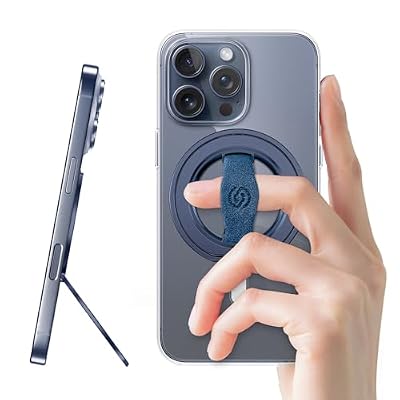
The EWA MagOne, now in its third generation, takes a different approach to the same problem. Instead of asking you to hook a finger through a hard metal ring, it combines a magnetic ring holder base with a soft finger strap loop. You slide a finger under the strap to hold the phone, which spreads the pressure across your finger instead of concentrating it on a thin metal edge. For long reading sessions, e-books, news feeds, and video calls, many people find that softer contact point more comfortable, especially in cold weather when metal rings can feel harsh.
The MagOne is also removable and MagSafe-compatible: snap it on when you leave the house, take it off for wireless charging or a completely flat back. The base works as a kickstand, and the rotating design lets you turn the loop to suit your left or right hand. The blue version adds a bit of colour, and the loop can feel more secure for smaller hands that struggle to reach around a large iPhone. As with every MagSafe grip, pair it with a MagSafe case for the strongest connection.
Specs
- :
- Brand: EWA
- ASIN: B0DG4RRV5Z
- Model: MagOne 3rd Gen, Blue
- Attachment: MagSafe-compatible magnetic, removable
- Grip type: Ring holder with soft finger strap loop and kickstand
- Compatibility: iPhone 12 through iPhone 17 series
- Rotation: Rotating base for adjustable grip and stand angles
Choose this one if metal rings dig into your finger, if you read or browse for long periods in one hand, or if you want a loop that feels secure without feeling rigid.
3. Case-Mate Magnetic Phone Ring Holder and MagSafe Stand — Best Collapsible Grip Ring

Case-Mate’s Magnetic Phone Ring Holder is for people who like the idea of a grip that can become almost invisible when they do not need it. The ring is thin and collapsible, so it folds down close to the back of the phone for pocketing and storage, then pulls out when you want a hand hold or a stand. The Twinkle Diamond finish is the most decorative option in this guide, which will either be exactly why you buy it or a reason to look at the plainer picks above. Under the styling, though, the function is the same serious job: a MagSafe grip that helps you keep hold of a large, expensive phone.
Because it is magnetic and removable, this grip fits the same routine as the other MagSafe picks. Leave it on for texting, photos, and propping the phone up for a kitchen video, then remove it for MagSafe charging at night. The collapsible ring works as a stand for FaceTime calls where you need the front camera at a steady angle. It suits buyers who resisted grips in the past because they looked bulky: this one is designed to look like part of the phone’s style while still giving you extra control one-handed.
Specs
- :
- Brand: Case-Mate
- ASIN: B0B88Y9V2T
- Model: Magnetic Phone Ring Holder, Twinkle Diamond
- Attachment: MagSafe magnetic, removable
- Grip type: Thin collapsible ring, grip and stand in one
- Compatibility: MagSafe iPhones including iPhone 13 through iPhone 17 Pro Max models, and MagSafe cases
- Design: Collapsible ring that folds close to the phone back
Choose this one if appearance matters as much as grip, if you want a ring that folds down neatly, or if you share the phone with someone who prefers a slimmer, less industrial-looking accessory.
4. Spigen NanoPop (MagFit) Phone Grip for MagSafe — Best Adjustable Ring from a Case Maker
Spigen is best known for its cases, and the NanoPop (MagFit) grip shows that case-maker thinking. It is a MagSafe phone grip with an adjustable ring holder, designed to work cleanly with MagSafe iPhones and magnetic cases rather than fighting against them. The Black Sesame colourway matches the playful two-tone styling of Spigen’s NanoPop case line, but you do not need a NanoPop case to use it; any MagSafe-compatible case or a bare MagSafe iPhone provides the magnetic surface it needs.
The adjustable ring is the key detail. You can set the angle for holding, then reposition it as a stand, rather than accepting a single fixed position. That helps if you switch between portrait scrolling and landscape video, or between holding the phone low for typing and higher for photos. The firm loop also reduces the pinky-under-the-phone habit that leaves many heavy users with an aching little finger. Remove it for wireless charging, as with the other magnetic picks.
Specs
- :
- Brand: Spigen
- ASIN: B0DHHZVYY7
- Model: NanoPop (MagFit), Black Sesame
- Attachment: MagSafe magnetic snap-on
- Grip type: Adjustable phone holder ring, grip and stand
- Compatibility: iPhone 12 through iPhone 17 series and MagSafe or magnetic cases
- Adjustment: Ring adjusts for different hold and viewing angles
Choose this one if you already trust Spigen cases, if you want an adjustable rather than fixed ring, or if you like your grip and case to share a coordinated design language.
5. Lamicall Cell Phone Ring Finger Stand (Adhesive) — Best for Non-MagSafe iPhones and Cases
Not every iPhone has MagSafe, and not every favourite case is magnetic. The adhesive Lamicall Cell Phone Ring Finger Stand covers that gap. This silver metal ring sticks to the back of a phone or a smooth case, giving you a rotating finger ring and kickstand without any magnets at all. It is a sensible pick for older models such as iPhone XR-era phones and earlier, for budget cases without a magnetic ring built in, and for anyone who tried a magnetic grip and found their particular case simply would not hold it securely enough.
The trade-offs are honest. Adhesive means commitment: treat it as semi-permanent, and position it carefully the first time, low enough to balance the phone as a stand but high enough to reach with your finger. The back is no longer flat for wireless charging, so wired charging becomes the routine. In return, you get a hold that does not depend on magnet strength, a metal ring that rotates a full circle and flips out as a kickstand, and a slim profile for almost any phone size. It performs best on smooth, flat cases; textured, silicone, or curved backs are poor surfaces for any adhesive grip.
Specs
- :
- Brand: Lamicall
- ASIN: B07FYH55JS
- Model: RS02-US-S, Silver
- Attachment: Adhesive pad, stick-on
- Grip type: Metal finger ring with kickstand function
- Compatibility: iPhone models including 15 and 16 series, XR, and other smartphones with a smooth flat back or case
- Rotation: 360-degree rotation with flip-out ring
Choose this one if your iPhone or your case has no MagSafe, if you prefer a grip that cannot be knocked off magnetically, or if you want a low-profile ring for an older phone you plan to keep using.
How to Choose the Right Phone Grip for Your iPhone
Start with attachment. If your iPhone supports MagSafe, meaning an iPhone 12 or later, a magnetic grip is usually the most flexible choice. You can remove it for MagSafe charging, swap it between cases, and take it off entirely for formal occasions or for a slimmer pocket feel. If your phone or case is not magnetic, choose adhesive, and accept that placement is a one-time decision worth measuring before you stick it down.
Next, match the grip style to your hand. Metal rings such as the Lamicall and Spigen picks give the firmest hook for a single finger and make the best kickstands. A soft strap loop such as the EWA MagOne spreads pressure and suits long, relaxed holding. A collapsible ring such as the Case-Mate pick suits people who want the grip to disappear when it is not in use. Think about your little finger, too: if it currently props up the bottom edge of your phone all day, almost any ring or loop that moves the load to a stronger finger will feel like relief.
Then check your case honestly. Magnetic grips need a MagSafe case or a bare MagSafe phone; a thick wallet case, a case with a metal plate in the wrong place, or a very rugged non-magnetic case will undermine them. Adhesive grips need the opposite: a smooth, flat, hard surface. Silicone and heavily textured cases defeat most adhesives. If you change cases often, a magnetic grip you can move between MagSafe cases is the lower-friction option.
Finally, consider charging and stands. Every magnetic grip here should come off for MagSafe charging, which takes a second and quickly becomes habit. If you watch landscape video, prioritise a ring that rotates to a useful angle. If you mostly need portrait FaceTime, check that the ring props the phone upright without tipping.
FAQ
Do MagSafe grips work through a phone case?
They work through MagSafe-compatible cases, which contain their own magnetic ring that passes the connection through. Through a regular non-magnetic case the hold is usually much weaker, and through thick or wallet-style cases it may not hold safely at all. When in doubt, use a MagSafe case or attach the grip to a bare MagSafe iPhone.
Will a phone grip stop me dropping my iPhone?
No grip can guarantee that, but a ring, loop, or strap gives your hand a positive hold instead of relying only on friction against glass and metal. That makes slips less likely during one-handed reaching, photography, and crowded commuting, and it reduces the hand fatigue that often leads to drops in the first place.
Can I use wireless charging with a grip attached?
With magnetic grips, the simple routine is to remove the grip before placing the phone on a MagSafe or wireless charger, then snap it back on afterwards. With an adhesive grip, the ring stays in place, so wireless charging can be unreliable or blocked depending on the ring position and charger. Wired charging works with any grip in this guide.
Where should I position an adhesive ring grip?
Place it near the centre of the lower half of the phone or case, test the position with your holding hand before pressing the adhesive down firmly, and check that the phone balances when the ring is used as a stand in both portrait and landscape. A position that feels slightly low for holding often makes the most stable stand.
Are ring holders better than disc-style pop grips?
Neither is universally better. Rings give a firmer single-finger hook and usually a stronger stand. Disc-style grips can feel more natural to pinch between two fingers and can be more comfortable for some hands. The best choice is the style you will actually keep on the phone every day.



Write Your Review
No reviews yet. Be the first to share your experience!