
As an Amazon Associate we earn from qualifying purchases.
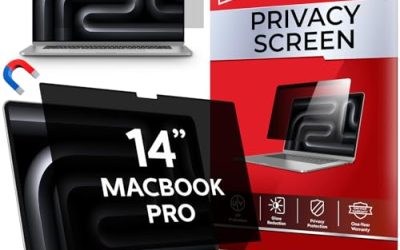
- 1. SightPro Magnetic Privacy Screen for MacBook Pro 14 Inch — Best Overall for MacBook Pro 14
- 2. Kensington MP136 Magnetic Privacy Screen for MacBook Air 13.6 Inch — Best for MacBook Air 13.6
- 3. IPROKKO Magnetic Privacy Screen for MacBook Air 13.6 Inch — Best With a Camera Cover
- 4. Mamol Privacy Screen for MacBook Air 15 Inch — Best for the Larger Air
- 5. Kensington MagPro Elite Magnetic Privacy Screen for MacBook Pro 16 Inch — Best for MacBook Pro 16
- How to Choose Privacy Screens for MacBook
- FAQ
Working from a train seat, a cafe table, or a shared office makes your MacBook display easy for a neighbour to read. Email, banking pages, client files, and messages are all visible at a glance unless you narrow the viewing angle. That is exactly what privacy screens for MacBook are built to do: a microlouver filter keeps the picture clear for the person sitting directly in front of the screen, while anyone viewing from the side sees a darkened, unreadable panel.
This guide covers only magnetic, removable filters made specifically for MacBook models. That scope matters. A permanent adhesive film is a different purchase — it stays on, can bubble during fitting, and is awkward to remove when you want to share your screen with a colleague. A magnetic filter snaps onto the bezel, comes off in seconds, and can live in a storage folder in your laptop sleeve between uses. We have also excluded iPad protectors and iPhone films entirely, because their sizes, camera cutouts, and mounting systems do not transfer to a MacBook.
The five picks below cover the 13.6-inch and 15-inch MacBook Air and the 14-inch and 16-inch MacBook Pro. Before choosing, confirm your exact model identifier — printed on the underside of the MacBook — and your chip generation, because a filter cut for one generation rarely fits another perfectly, even when the diagonal size looks the same.
Disclosure: This article contains affiliate links. If you buy through them, we may earn a commission at no extra cost to you.
1. SightPro Magnetic Privacy Screen for MacBook Pro 14 Inch — Best Overall for MacBook Pro 14

SightPro’s magnetic filter for the 14-inch MacBook Pro is the most straightforward recommendation in this roundup for owners of Apple’s smaller Pro laptop. It is cut for the 14.2-inch Liquid Retina XDR display fitted to MacBook Pro models from 2021 onward, covering the M1 Pro and M1 Max machines through the later M2, M3, and M4 generations listed by the maker. The listed compatible model identifiers include A2442, A2779, A2918, A2992, and A3112, so cross-check that list against the number on your own MacBook before ordering.
Attachment is the headline feature. The filter uses a patented magnetic design that snaps onto the top of the display frame, so there are no adhesive tabs to position and no film to smooth down. That makes it genuinely practical to remove the filter for colour-sensitive work or for showing a colleague a presentation, then snap it back on when you return to a public workspace. The package includes a storage folder to protect the filter in a bag, plus a cleaning cloth and reusable double-sided adhesive as an alternative mounting option.
The filter offers both a glossy and a matte side, so you can choose between a sharper image in controlled lighting and a lower-glare finish under bright lights. Like every microlouver filter, it will also dim the screen slightly head-on — raising brightness a notch is normal.
Specs
- Brand: SightPro
- Model: SP-PSM14MP21 / PFNAP011
- Fit: MacBook Pro 14 inch, 2021 onward, M1 to M5 Pro and Max generations as listed by the maker
- Compatible model identifiers: A2442, A2779, A2918, A2992, A3112, and later listed identifiers
- Display size: 14.2 inches
- Attachment: Magnetic snap-on, patented design; alternative adhesive included
- Finish: Glossy and matte sides
- Included: Privacy filter, storage folder, cleaning cloth
2. Kensington MP136 Magnetic Privacy Screen for MacBook Air 13.6 Inch — Best for MacBook Air 13.6

Kensington is a long-standing name in laptop privacy filters, and the MP136 applies that experience to the current 13.6-inch MacBook Air. It is designed for the MacBook Air generations from 2022 onward with M2, M3, and M4 chips, which share the notched 13.6-inch Liquid Retina display. If your Air is the earlier wedge-shaped M1 model with a 13.3-inch screen, this filter is not the right cut — check your model year carefully.
The MP136 is part of Kensington’s MagPro Elite magnetic approach: the filter attaches to the MacBook’s magnetic frame rather than relying on adhesive strips that leave residue or lose grip over time. That matters on the Air in particular, because the lid is thin and light, and owners tend to open and close it constantly through a working day. A filter that can be lifted off and reattached without fuss fits that pattern of use well.
Kensington positions this filter for office and travel use, with an anti-glare surface and blue light reduction alongside the privacy narrowing. The anti-glare finish suits the bright spaces where the Air is often used — airport lounges, classrooms, and co-working desks.
Specs
- Brand: Kensington
- Model: K55424WW (MP136)
- Fit: MacBook Air 13.6 inch, 2022 to 2024, M2, M3, and M4
- Attachment: Magnetic, MagPro Elite design
- Features: Anti-glare finish, blue light reduction, removable and reusable
- Display size: 13.6 inches
3. IPROKKO Magnetic Privacy Screen for MacBook Air 13.6 Inch — Best With a Camera Cover

IPROKKO’s filter targets the same 13.6-inch MacBook Air generation as the Kensington above, but it adds a detail that some buyers specifically look for: a built-in camera cover as part of a 2-in-1 design. The listing describes it as a magnetic privacy screen protector with a camera cover for the MacBook Air 13.6 and 13-inch sizes covering 2022 to 2025 models with M2, M3, and M4 chips, with the A2681 model identifier given for the 2022 machine. If covering the FaceTime camera when it is not in use is part of your privacy routine, having that function integrated into the filter is more convenient than adding a separate sliding cover.
The filter is removable and reusable, with a matte anti-glare finish and blue light filtering. The matte surface helps in two ways: it softens reflections from windows and ceiling lights, and it makes fingerprints and smudges less obvious than on a glossy filter — useful if you remove and reattach the filter often and handle it by its edges and face.
Because the 13.6-inch Air design spans several chip generations, listings often group them together, but still confirm your exact model identifier before buying. If you value the integrated camera cover, the IPROKKO is the more feature-complete of the two Air options here.
Specs
- Brand: IPROKKO
- Model: A2681-2022 Model
- Fit: MacBook Air 13.6 inch and 13 inch, 2022 to 2025, M2, M3, and M4
- Attachment: Magnetic, removable
- Features: Integrated camera cover, matte anti-glare finish, blue light filtering
- Display size: 13.6 inches
4. Mamol Privacy Screen for MacBook Air 15 Inch — Best for the Larger Air

The 15-inch MacBook Air is easy to overlook in accessory roundups, because many filters are only cut for the smaller Air and Pro sizes. Mamol’s filter is made specifically for the 15-inch Air, covering models from 2023 onward with M2, M3, M4, and M5 chips as listed by the maker. The compatible model identifiers given include A2941, A3114, A3241, and A3448, which correspond to the successive 15-inch Air generations — again, match your own identifier to that list rather than relying on screen size alone.
Like the other picks here, this is a magnetic, removable design rather than a permanent film. That suits the 15-inch Air well: leave the filter in its sleeve for split-screen work at home, and snap it on only in shared spaces. The filter combines privacy narrowing with an anti-glare finish and blue light reduction. If you own the larger Air, this is the purpose-built option here, rather than a near-fit generic panel.
Specs
- Brand: Mamol
- Fit: MacBook Air 15 inch, 2023 onward, M2, M3, M4, and M5 as listed by the maker
- Compatible model identifiers: A2941, A3114, A3241, A3448
- Attachment: Magnetic, removable
- Features: Anti-glare finish, blue light filtering
- Display size: 15 inches
5. Kensington MagPro Elite Magnetic Privacy Screen for MacBook Pro 16 Inch — Best for MacBook Pro 16

For the largest MacBook Pro, Kensington’s MagPro Elite filter is the established choice. This version, part number K58371WW, is made for the 16-inch MacBook Pro from 2021 and newer, covering the M1 Pro and M1 Max originals and the M2 generation machines listed by Kensington, including the 2023 MacBook Pro 16-inch models. The 16-inch Pro has been through several chip updates with a consistent display design, so checking your year and chip against the maker’s list remains the right first step.
The MagPro Elite name describes the mounting system: the filter attaches seamlessly to the MacBook Pro’s magnetic frame, requiring no adhesives. On a machine as large and as expensive as the 16-inch Pro, avoiding adhesive tabs and sticky strips is a real advantage — there is nothing to peel off the bezel and nothing to reapply when the filter is removed for colour-critical editing or for connecting with a small group around the screen.
Kensington designs this range for professional deployment, with a precise fit and a limited viewing angle that keeps work private in open-plan offices and on flights. This is our second Kensington pick, reflecting how central the brand is to this category.
Specs
- Brand: Kensington
- Model: K58371WW, MagPro Elite Magnetic Privacy Screen
- Fit: MacBook Pro 16 inch, 2021 and newer, M1 and M2 generations as listed by the maker
- Compatible devices listed: MacBook Pro 16-inch 2021 M1, MacBook Pro 16-inch 2023 M2, and related Pro and Max models
- Attachment: Magnetic, attaches to the MacBook Pro magnetic frame, no adhesives required
- Display size: 16 inches
How to Choose Privacy Screens for MacBook
Start with fit, because nothing else matters if the filter is cut for the wrong machine. Apple sells MacBooks in 13.6-inch, 14.2-inch, 15-inch, and 16.2-inch display sizes that look similar in photos but differ in bezel shape, corner radius, and camera notch. Find your model identifier — printed on the bottom case or available from the serial number lookup — and match it to the identifier list in the product listing, not just to the headline size. A filter that is slightly too large can interfere with closing the lid, while one that is slightly too small leaves an exposed strip of readable screen at the edge.
Next, decide on mounting. Every pick in this guide is magnetic and removable, which we recommend for most owners. Magnetic filters are the right choice if you share your screen often, do colour-sensitive work part of the time, or travel with the filter stored separately. Permanent adhesive films can sit flatter, but they are a one-way decision: removal usually ends their useful life, and fitting them without dust or bubbles takes patience. If a listing offers both magnetic attachment and optional adhesive tabs, as the SightPro does, treat the adhesive as a backup rather than the main method.
Consider the finish. Matte, anti-glare sides reduce reflections and hide fingerprints, at the cost of a slight softening of the image. Glossy sides keep text and images looking sharper in dim or controlled light but reflect more in bright rooms. Reversible filters that offer one side of each give you both options, so think about where you actually work: a bright, window-heavy space points to matte, while a dim office points to glossy.
Understand what privacy a filter does and does not provide. A microlouver filter narrows the viewing angle, typically so the screen darkens beyond roughly thirty degrees from centre. It does not stop someone sitting directly behind you from reading over your shoulder, it does not encrypt anything, and it does not protect the data on the machine itself. Pair it with sensible habits: lock your screen when you step away, use a password manager rather than visible notes, and be thoughtful about opening sensitive documents in crowded places at all.
Finally, check whether the lid still closes fully with the filter attached, whether a storage folder is included, and whether the filter clears the camera notch on your generation.
FAQ
Will a privacy screen stop people behind me from reading my MacBook?
No. Privacy filters narrow the side viewing angle, so people to your left and right see a darkened screen. Someone directly behind you, looking along your own line of sight, can still read the display. Position yourself with a wall behind you for sensitive work in public.
Do magnetic privacy screens damage the MacBook display?
A correctly fitted magnetic filter attaches to the bezel magnets and rests against the screen without adhesive, so it should not damage the display. Keep both the screen and the filter clean before attaching, since grit trapped between them can mark the surface, and store the filter flat in its folder when it is off the machine.
Can I close my MacBook with the filter still attached?
Most magnetic filters for current MacBook models are thin enough for the lid to close, but this varies by model and filter thickness. Check the listing for your exact generation, and never force the lid — if it resists, remove the filter and carry it in its storage folder instead.
Why does my screen look dimmer with a privacy filter on?
Microlouver filters block some light by design, including a portion of the light travelling straight toward you. Increasing the display brightness slightly is the normal adjustment. If you do colour-critical work, remove the filter for that task and reattach it afterwards.
Is a 13-inch filter close enough for a 13.6-inch MacBook Air?
No. The 13.6-inch Air uses a different display and notch design from earlier 13.3-inch models, so a filter cut for the older size will not align with the bezel or camera. Always match the model identifier in the listing to your own MacBook.

Write Your Review
No reviews yet. Be the first to share your experience!