
Best keyboard cases ipad air transform your tablet into a versatile powerhouse for daily work, school, or creative projects. Finding the ideal combination of tactile feedback, durable protection, and sleek design can be overwhelming with so many options available. This comprehensive guide helps you select the top keyboard solution for your lifestyle.
How to Choose the Right Keyboard Case
Selecting the ideal accessory for your tablet requires careful consideration of several technical features and ergonomic factors. You must evaluate how you plan to use your device daily, whether for heavy typing or light media browsing. Understanding these core criteria ensures you spend your money wisely on a setup that fits your needs.
Key Travel and Typing Comfort
Key travel refers to the distance keys move downward when pressed, directly impacting your typing speed and overall comfort. Short travel distance often feels mushy and leads to frequent typos during long writing sessions. Look for scissor-mechanism switches that provide tactile feedback and satisfying response with every single keystroke you make.
Proper spacing between keycaps is equally vital to prevent hand fatigue when drafting lengthy documents or emails. Backlit keys are also a major advantage if you frequently work in low-light environments or during late nights. Selecting a well-spaced layout with adjustable backlighting transforms your tablet into a functional laptop replacement.
Connectivity and Battery Performance
Modern keyboard cases connect via integrated Bluetooth connectivity or direct magnetic pins built into the tablet itself. Smart connection systems draw power directly from the device, eliminating the need for separate charging cables or batteries. Bluetooth options require periodic charging but often offer long battery life lasting several months per charge.
Consider whether you prefer instant pairing without battery management or the flexibility of wireless setups. Direct smart connections reduce latency significantly, making them ideal for fast typists who demand instant responsiveness. Evaluate your daily routines to decide which power method offers the maximum convenience for your workflow.
Portability and Protection Level
A reliable case must shield your expensive tablet against accidental drops, scratches, and daily wear and tear. Heavy rugged options offer maximum impact resistance but add noticeable bulk and weight to your lightweight device. Slim folio designs maintain a minimalist profile while still shielding the screen and back panel from surface scratches.
Determine if you value maximum drop protection or effortless portability when carrying your setup in a backpack. Some models feature detachable keyboards, allowing you to strip away extra weight when you simply want to read. Striking the right balance between structural defense and sleek mobility keeps your tablet safe without burdening you.
Top Picks for Every User Type
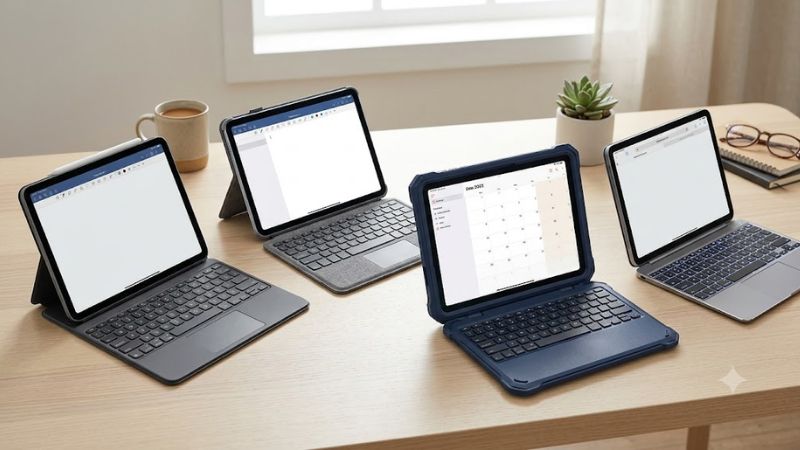
Finding the ideal keyboard companion depends heavily on your budget, functional demands, and aesthetic preferences. We evaluated the leading market contenders based on build quality, trackpad responsiveness, and real-world durability. The following featured selections represent the top performing options currently available for purchase.
| Model Name | Connection Type | Trackpad Included | Stand Adjustability | Primary Advantage |
| Premium Floating Stand | Smart Connector | Yes | Infinite Angle | Desktop Ergonomics |
| Versatile Folio Combo | Smart Connector | Yes | Flexible Kickstand | Detachable Keyboard |
| Portable Slim Shell | Bluetooth | No | Fixed Angle | Lightweight Value |
| Heavy Rugged Guard | Bluetooth | No | Multi-Position | Maximum Defense |
| Compact Travel Mate | Bluetooth | Yes | Dual Angle | Travel Portability |
Premium Floating Stand Option
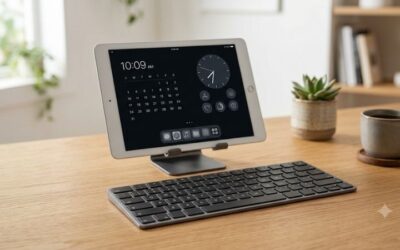
This flagship floating cantilever option is tailored specifically for professionals who demand an uncompromising laptop experience. The rigid structural hinge allows continuous angle adjustment, offering exceptional viewing comfort on any desk surface. Its integrated multi-touch trackpad delivers smooth navigation, precise cursor control, and effortless gesture support.
On the downside, the high price tag and added physical weight make it less appealing for casual users. The open side design also leaves tablet edges somewhat exposed during accidental drops on hard surfaces. Nevertheless, unmatched typing luxury and premium aluminum construction make it an excellent choice for serious office work.
Versatile Folio Combo Selection
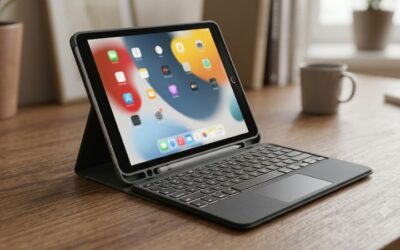
This versatile folio solution suits students and mobile workers who require adaptable protection and flexible viewing angles. Featuring a fully detachable keyboard module, it quickly transforms from a workstation into a standalone media tablet. A sturdy kickstand supports multiple angles for sketching with a digital pencil or watching videos comfortably.
However, the flexible kickstand requires a larger surface footprint, making it somewhat awkward to use directly on your lap. The keys feel slightly softer compared to rigid options, though responsiveness remains solid for daily typing tasks. Its durable fabric exterior resists stains and offers complete edge protection for reliable travel safety.
Portable Slim Shell Companion
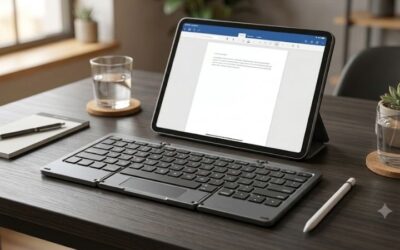
Designed for minimalist travelers on a strict budget, this sleek shell case delivers essential utility without excessive bulk. The quiet island style keys offer comfortable typing for quick note taking, writing emails, and social posting. Long battery life ensures months of reliable service on a single charge through standard connection cables.
The absence of a trackpad means you must rely on touch screen navigation or external pointing accessories. Additionally, the fixed viewing angle limits ergonomic flexibility when working under harsh overhead lighting conditions. It remains an outstanding budget selection for users seeking basic key input and scratch protection without heavy costs.
Heavy Rugged Guard Armor
Built for outdoor workers, field technicians, and rugged environments, this heavy guard offers extreme shock resistance. The hard outer shell absorbs heavy impacts while sealed port covers block out dust, moisture, and debris. Integrated pencil storage securely holds your stylus while charging, preventing loss during active transportation in the field.
The trade-off is substantial added weight and a thick frame that compromises the original slim profile. Typing feel is functional rather than luxurious, requiring slightly firmer pressure to actuate individual keys accurately. It is best suited for demanding conditions where drop protection takes priority over sleek aesthetics.
Compact Travel Mate Solution
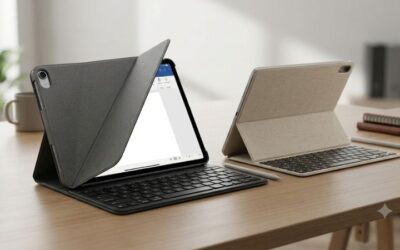
This compact travel setup caters to digital nomads who prioritize lightweight packing and versatile everyday functionality. It features a responsive built-in trackpad that supports standard navigation gestures for quick document editing. Magnetic attachment points keep the cover securely closed inside crowded commuter bags, protecting the display screen thoroughly.
While compact dimensions make travel easy, the slightly cramped layout may require a short adjustment period. Key travel is somewhat shallower than full-size desktop alternatives, which might tire heavy typists over time. Despite these minor limitations, its balance of features makes it an ideal travel companion for busy professionals.
Frequently Asked Questions
Understanding the finer details of compatibility, maintenance, and features helps you avoid common purchasing mistakes. Many buyers wonder about pencil compatibility, battery longevity, and trackpad functionality before making their final choice. These clear answers address the most frequent inquiries from prospective customers looking for advice.
Do All Cases Support Stylus Charging?
Most modern keyboard covers feature dedicated cutouts or magnetic channels designed specifically for Apple Pencil attachment. These thoughtful design choices allow your stylus to snap magnetically into place and charge wirelessly without removing the case. Always verify that your chosen model leaves the top edge exposed for seamless charging capability.
Cheaper generic models may cover the charging strip completely, preventing magnetic docking and wireless power delivery altogether. Using an incompatible case forces you to remove the shell every time your digital pencil needs power. Selecting a purpose-built enclosure ensures your stylus remains fully charged and securely held during daily transit.
How Does a Trackpad Enhance Productivity?
An integrated trackpad allows you to control a precise screen cursor without constantly lifting your hands to touch the display. This capability streamlines text selection, spreadsheet navigation, and multitasking between open applications seamlessly. It replicates a traditional laptop workflow, significantly speeding up document editing and professional communication tasks.
Without a trackpad, you must frequently reach across the keyboard to tap small buttons or highlight specific text passages. This repetitive physical motion disrupts your typing rhythm and can cause minor wrist strain over extended work periods. Choosing a model with multi-touch trackpad support creates a far more comfortable work environment.
Is Bluetooth or Smart Connector Better?
Smart Connector technology relies on physical contact points to transmit power and data simultaneously without battery consumption. This eliminates bluetooth pairing headaches, lag time, and the continuous need to recharge an internal accessory battery. It provides an immediate connection the moment your tablet snaps into position against the back panel.
Bluetooth models require manual pairing and battery charging, but they offer greater placement flexibility away from the device. They are often significantly cheaper to manufacture, making them popular among budget conscious shoppers worldwide. For seamless reliability without charging worries, Smart Connector technology remains the superior operational choice.
How Do You Clean Keyboard Accessories?
Regular maintenance keeps key switches working smoothly and prevents grime buildup on protective outer fabric surfaces. Use a soft microfiber cloth lightly dampened with water or mild rubbing alcohol to wipe down exterior materials. Compressed air cans effectively remove dust, crumbs, and debris trapped beneath individual keycaps without damaging sensitive electronics.
Never spray liquid cleaners directly onto keycaps or internal connector pins to prevent moisture penetration and electrical shorting. Avoid harsh chemical solvents that can strip away protective coatings or discolor synthetic leather and soft fabrics. Consistent gentle cleaning preserves both functional performance and physical appearance over years of continuous use.
Final Thoughts on Choosing Your Case
Investing in the best keyboard cases ipad air upgrades your tablet into a complete mobile workstation tailored to your needs. Consider your daily typing habits, portability requirements, and budget limits before making a decision. Pick the ideal model today to enjoy improved productivity, ergonomic comfort, and reliable defense everywhere you go.
As an Amazon Associate we earn from qualifying purchases at no extra cost to you.










Write Your Review
No reviews yet. Be the first to share your experience!