
Our Short List of 3


All 5 Picks at a Glance
| Product | Specs | Action |
|---|---|---|
| 1. Yamaha PSR-SX920 – Best For Chord Looper and Multitrack Demo Capture | Check price on Amazon | |
| 2. Korg Pa5X 61 – Best For Large Touchscreen and Deep Sample-Based Arranging | Check price on Amazon | |
| 3. Korg Pa1000 – Best For Touchscreen Sample Editing and Vocal Processing | Check price on Amazon | |
 4. Yamaha PSR-SX720 – Best For Touchscreen Arranging Below the SX920 Tier | Check price on Amazon | |
 5. Korg Pa700 – Best For Touchscreen Workflow With Built-In Speakers | Check price on Amazon |
As an Amazon Associate we earn from qualifying purchases.
- Quick Picks
- How We Selected These Picks
- 1. Yamaha PSR-SX920 – Best For Chord Looper and Multitrack Demo Capture
- 2. Korg Pa5X 61 – Best For Large Touchscreen and Deep Sample-Based Arranging
- 3. Korg Pa1000 – Best For Touchscreen Sample Editing and Vocal Processing
- 4. Yamaha PSR-SX720 – Best For Touchscreen Arranging Below the SX920 Tier
- 5. Korg Pa700 – Best For Touchscreen Workflow With Built-In Speakers
- Buying Guide: What to Look For
- Comparison Table
- FAQ
- Final Verdict
Disclosure: This article contains affiliate links. If you buy through links on this page, we may earn a commission at no extra cost to you. Product availability on Amazon US can change; check the product page for current details before ordering.
Song demo production on an arranger means sketching progressions, testing style sections, shaping sounds, and capturing a playable arrangement without moving every idea to a computer first. A touchscreen helps by putting sound selection, style control, and editing under direct touch.
These five picks all have touchscreens confirmed in manufacturer specifications, with 61 keys each. They differ in demo tools, sample and expansion support, and display size. One Yamaha model lists a Chord Looper and multitrack recorder. Korg models emphasize touchscreen sample and style editing. One Yamaha model uses import-only expansion, flagged below.
Quick Picks
| Product | Best For | Key Spec | ASIN |
|---|---|---|---|
| Yamaha PSR-SX920 | Chord Looper and multitrack demo capture | 7-inch TFT touch screen, Chord Looper, 16-track recorder | B0D94QQ7XP |
| Korg Pa5X 61 | Large touchscreen, deep sample-based arranging | 8-inch TouchView, 4 GB User PCM, 160-voice polyphony | B0B4T498NW |
| Korg Pa1000 | Touchscreen sample editing, vocal processing | 7-inch TouchView, 300 MB compressed User PCM | B075L7G89G |
| Yamaha PSR-SX720 | Touchscreen arranging below SX920 tier | 7-inch TFT touch screen, 1 GB expansion memory | B0D94PRWV6 |
| Korg Pa700 | Touchscreen workflow with built-in speakers | 7-inch TouchView, 128 MB compressed User PCM, speakers | B075DFV156 |
How We Selected These Picks
Picks come from touchscreen arrangers with Amazon US availability verified at time of writing and touchscreen support confirmed in manufacturer specifications. Priority went to touchscreen workflow, arrangement and capture tools, style and sound editing, and sample or expansion support.
Only touchscreen models were included. Korg models provide User PCM sampling and import, the Yamaha PSR-SX920 provides import-only expansion prepared on a computer, and the Yamaha PSR-SX720 lists expansion memory without an onboard sampling claim in pool specifications.
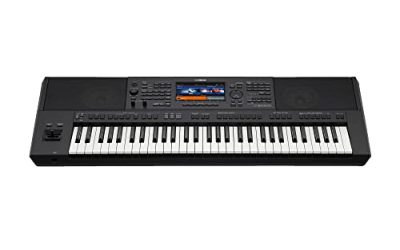
1. Yamaha PSR-SX920 – Best For Chord Looper and Multitrack Demo Capture
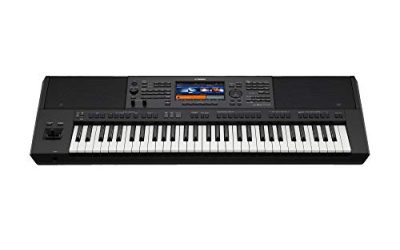
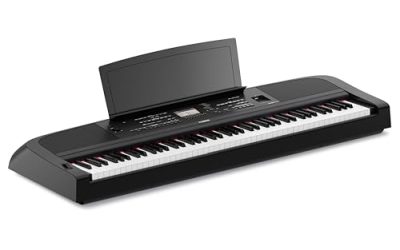
The Yamaha PSR-SX920 centers demo production on capturing progressions and building multitrack sketches on the keyboard, with 61 keys, 1,587 Voices plus 63 Drum and SFX Kits and 480 XG Voices, 575 Styles, 128-note polyphony, and a 7-inch TFT touch screen.
Chord Looper supports looping progressions while testing melodies, and a 16-track recorder supports layered capture. Expansion memory is approximately 2 GB with approximately 4 GB internal memory for custom content prepared with Yamaha Expansion Manager. Sampling support is import-only, with no onboard live sampling or WAV multisample editor.
Pros
– 7-inch TFT touch screen, Chord Looper, 16-track recorder
– 1,587 Voices and 575 Styles for demo arranging
– Approx. 2 GB expansion memory for prepared sounds
Cons
– Import-only, no onboard live sampling
– Custom sounds require computer preparation
– No onboard WAV multisample editor
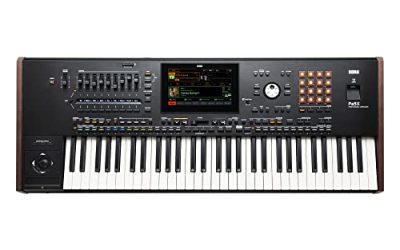
2. Korg Pa5X 61 – Best For Large Touchscreen and Deep Sample-Based Arranging
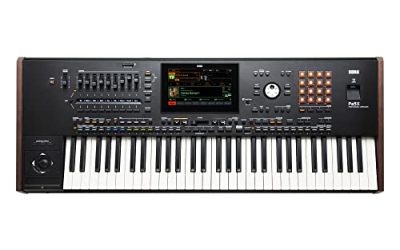
The Korg Pa5X 61 suits demo production using custom sampled sounds and detailed touchscreen editing, with 61 semi-weighted keys with aftertouch, the EDS-XP engine, 160-voice polyphony, and an 8-inch Wide capacitive TouchView TFT display, the largest touchscreen here.
User PCM capacity is 4 GB (8 GB linear compressed), loading KORG, WAV, AIFF, and SoundFont files for instruments, kits, and loops in demo arrangements. The unit weighs 33.2 lb, and speakers require the optional PaAS bar, so monitoring needs external speakers, headphones, or that bar.
Pros
– 8-inch TouchView touchscreen, largest here
– 4 GB User PCM for sample-based demos
– Semi-weighted keys with aftertouch, 160-voice polyphony
Cons
– Heavy at 33.2 lb
– Speakers need optional PaAS bar
– More complexity than simpler demo workflows
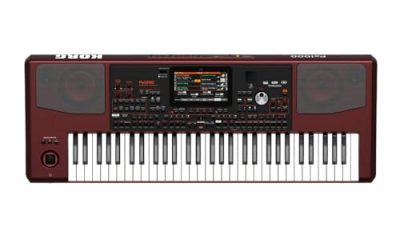
3. Korg Pa1000 – Best For Touchscreen Sample Editing and Vocal Processing
The Korg Pa1000 fits demo work combining touchscreen arranging, sample editing, and vocals, with the EDS-X engine, 1,700 sounds, 420+ Styles, a 7-inch Wide capacitive TouchView TFT display, TC-Helicon processing, and Defined Nuance Control.
Sampling provides 300 MB compressed User PCM (600 MB linear) loading KORG, WAV, AIFF, and SoundFont files with Full Edit and Time Slice for shaping samples and slicing loops. Memory sits below flagship class, but touchscreen editing keeps demo sound design on the keyboard.
Pros
– 7-inch TouchView touchscreen with sample editing
– 300 MB compressed User PCM, Full Edit, Time Slice
– TC-Helicon processing for vocal demos
Cons
– Memory below flagship Pa5X class
– Needs preparation time for libraries
– More editing complexity than basic demo capture
4. Yamaha PSR-SX720 – Best For Touchscreen Arranging Below the SX920 Tier
The Yamaha PSR-SX720 provides touchscreen arranging below the SX920 tier, with 61 keys, a 7-inch TFT Color Wide VGA LCD (800 x 480) with touch screen, 1,377 Voices plus 56 Drum and SFX Kits and 480 XG Voices, and 1 GB expansion memory.
Expansion memory supports custom demo content, with smaller capacity than the SX920. Pool specifications do not list onboard sampling, a Chord Looper, or a recorder track count for this model, so follow the product page for capture details, monitoring, and storage for your setup.
Pros
– 7-inch TFT touch screen (800 x 480)
– 1,377 Voices for demo arranging
– 1 GB expansion memory for custom content
Cons
– Smaller expansion memory than SX920
– No onboard sampling claim in pool specifications
– Confirm demo capture details on product page
5. Korg Pa700 – Best For Touchscreen Workflow With Built-In Speakers
The Korg Pa700 combines touchscreen demo workflow with built-in 2 x 25W speakers for self-contained sketching, with the EDS-X engine, 1,700+ sounds, 370+ Styles, 128-note polyphony, and a 7-inch Wide capacitive TouchView TFT display.
Sampling provides 128 MB compressed User PCM (256 MB linear) loading KORG, WAV, AIFF, and SoundFont files for custom demo kits and loops, with built-in speakers for immediate playback. Keys are velocity-sensitive without aftertouch, and memory is the smallest among the Korg models here.
Pros
– 7-inch TouchView touchscreen, built-in 2 x 25W speakers
– User PCM sampling with WAV, AIFF, SoundFont loading
– 1,700+ sounds, 370+ Styles, 128-note polyphony
Cons
– Velocity-only keys, no aftertouch
– Smallest Korg sample memory here
– Large libraries need memory management
Buying Guide: What to Look For
Touchscreen Size and Workflow
Display sizes here are 7-inch on four models and 8-inch on the Pa5X 61. Larger screens show more editing detail at once. All five use touch for selection and editing, speeding up demo building. Match screen size to how much detailed editing you plan on the keyboard.
Demo Capture and Arrangement Tools
The PSR-SX920 lists Chord Looper and a 16-track recorder for layered capture. Other models support demo building through touchscreen style and sound editing, with Korg models adding sample editing. Confirm capture tools on the product page, since pool specifications list recorder details only where manufacturers state them.
Expansion and Sample Support
Korg models provide User PCM from 128 MB compressed to 4 GB, loading WAV, AIFF, SoundFont, and KORG files. The PSR-SX920 provides approximately 2 GB expansion import, and the PSR-SX720 lists 1 GB expansion memory. Choose User PCM for onboard editing, or expansion import for prepared libraries.
Compatibility and Setup Notes
Confirm file formats, computer needs, and monitoring before building demo libraries. Korg imports use WAV, AIFF, SoundFont, and KORG files. Yamaha expansion follows Expansion Manager workflows. Check speaker needs, including the Pa5X bar and Pa700 built-in speakers, and keep backups separately.
Comparison Table
| Feature | PSR-SX920 | Pa5X 61 | Pa1000 | PSR-SX720 | Pa700 |
|---|---|---|---|---|---|
| Keys | 61 | 61 semi-weighted, aftertouch | 61 | 61 | 61 velocity-sensitive |
| Touchscreen | Yes, 7-inch TFT | Yes, 8-inch TouchView | Yes, 7-inch TouchView | Yes, 7-inch TFT, 800 x 480 | Yes, 7-inch TouchView |
| Demo tools listed | Chord Looper, 16-track recorder | Touchscreen editing | Touchscreen editing, TC-Helicon | Touchscreen arranging | Touchscreen workflow |
| Sample/expansion | Approx. 2 GB expansion, import-only | 4 GB User PCM | 300 MB compressed User PCM | 1 GB expansion memory | 128 MB compressed User PCM |
| Voices/styles | 1,587 Voices, 575 Styles | EDS-XP engine | 1,700 sounds, 420+ Styles | 1,377 Voices | 1,700+ sounds, 370+ Styles |
| Polyphony | 128-note | 160-voice | Not listed | Not listed | 128-note |
| Speakers | Check page | Optional PaAS bar | Check page | Check page | 2 x 25W built-in |
FAQ
Which touchscreen arranger fits song demo production without a computer?
The PSR-SX920 lists Chord Looper and a 16-track recorder for on-keyboard capture. Korg models support touchscreen style and sample editing for building demos. The PSR-SX920 still needs a computer for custom expansion sounds, so check needs per model.
Does touchscreen size change demo workflow?
Larger screens show more parameters at once. The Pa5X 8-inch display suits detailed editing, while 7-inch displays cover selection and editing with more paging. All five use touch for faster demo building.
Can touchscreen arrangers use custom samples in demos?
Korg models load WAV, AIFF, SoundFont, and KORG files into User PCM for demo parts. The PSR-SX920 imports prepared expansion content, and the PSR-SX720 lists expansion memory for custom content. Confirm formats and memory before building demo libraries.
Final Verdict
Choose the Yamaha PSR-SX920 for Chord Looper and multitrack demo capture, the Korg Pa5X 61 for the largest touchscreen and sample memory, and the Korg Pa1000 for touchscreen sample editing with vocal processing. Choose the Yamaha PSR-SX720 for touchscreen arranging below the SX920 tier, and the Korg Pa700 for touchscreen workflow with built-in speakers.
Write Your Review
No reviews yet. Be the first to share your experience!