
Holding an iPad up for a long video call or a recipe tires hands and wrists fast, and a wobbly stand only makes it worse. A good stand for an older user does the holding instead: it sits steady on the table, tilts with a gentle push, and keeps the screen at a comfortable height without fiddly knobs or tools.
The five stands below were chosen for exactly that kind of ease: each adjusts without tools, holds tablets up to 13 inches, and stays put while the screen is tapped. One soft lap option is included for armchair and bed reading.
As an Amazon Associate, we earn from qualifying purchases.
Quick Answer
The Lamicall foldable stand with a rotating heavy-duty base is the best overall pick because it turns toward any chair and folds flat for storage. The Lisen stand is the simplest budget cradle, the AboveTEK kiosk stand stays planted on one counter, the Ugreen dual-rod stand adds eye-level height, and the Lamicall pillow stand is the softest choice for lap and bed use.
Our Top Picks
1. Lamicall Adjustable iPad Stand for Desk – Premium

This Lamicall stand is the easiest of the five to live with day to day. Its heavy-duty metal base keeps a large iPad steady while the screen is tapped, and the whole cradle rotates a full circle, so the screen can turn from the person cooking toward the person sitting at the table without lifting the stand. Dual-axis adjustment changes height and viewing angle, and the slim frame folds flat when not needed.
Setup is simple: unfold it, set the angle, and place the iPad in the cradle. There are no screws to tighten and no clamp to squeeze, which matters for hands that prefer a gentle push over a firm grip. It fits devices from 4.7 to 13 inches, so it works with an iPad mini just as well as with a 12.9-inch iPad Pro.
Specs
- Rotating base turns a full circle for sharing the screen
- Dual-axis adjustment for height and viewing angle
- Heavy-duty metal base resists tipping during taps
- Ultra-slim foldable frame for storage and travel
- Fits tablets and phones from 4.7 to 13 inches
- ASIN: B0FP9GJBMV
2. Lisen iPad Stand Holder – Budget

The Lisen stand is a single folding cradle with a weighted alloy base and almost nothing to learn. The iPad rests in the holder, the tri-fold arm adjusts height and angle with a gentle push, and the base rotates a full circle, so the screen can turn toward the reader without lifting the stand. Silicone pads keep the tablet from slipping and protect the tabletop.
For a senior who wants a stand that simply stays on the kitchen counter or the bedside table, this is the least demanding option. It holds devices from 4.7 to 12.9 inches, including the iPad Pro 11 and 12.9, the iPad Air and mini, and the standard 10.2 and 9.7-inch models, and it works in portrait for reading as well as landscape for video calls. The joints can be re-tightened over time if they ever loosen.
Specs
- Weighted alloy base resists tipping during taps
- Tri-fold arm adjusts height and angle by hand
- Base rotates a full circle for sharing the screen
- Silicone non-slip pads protect the tablet and tabletop
- Folds flat for storage and travel
- Fits tablets from 4.7 to 12.9 inches, including iPad Pro 12.9
- ASIN: B0CST4CYVH
3. AboveTEK Retail Kiosk iPad Stand – Mid-range

The AboveTEK stand is built like a shop counter display, which suits a fixed spot in a senior household. Its heavy base stays planted on the kitchen counter, the folding arm turns the screen a full circle, and the tablet switches between portrait and landscape in a second. A quick-release button opens the grip, so no squeezing or prying is needed to take the iPad out.
This is the pick for an iPad that lives in one place, such as the kitchen, where recipes and video calls happen at the same counter daily. It fits screens from 6 to 13 inches, including the iPad Pro, Air, and mini, and once it is set, the angle holds firm while the screen is tapped.
Specs
- Heavy base stays planted on a counter or desk
- Rotating base and folding arm turn the screen a full circle
- Switches between portrait and landscape in seconds
- Quick-release button opens the grip without squeezing
- Fits iPad screens from 6 to 13 inches
- ASIN: B073WHV11Z
4. Ugreen 360 Degree Rotating Tablet Stand – Premium
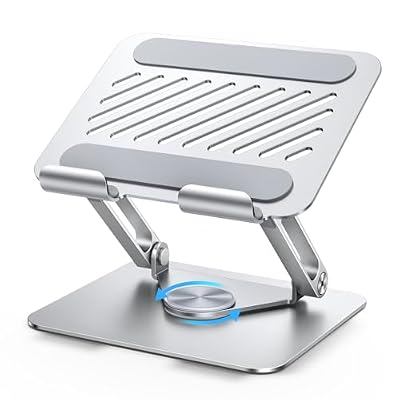
This Ugreen stand is built for eye-level viewing. Two support rods raise the iPad higher than a simple cradle does, and the rotating base turns the screen toward the viewer without moving the whole stand. That height matters for video calls, where a low screen forces the neck down, and for reading at a table, where a raised screen is easier on the eyes.
The aluminum build and dual-rod design keep the tablet steady at height, and the angle adjusts to suit sitting upright or leaning back in a chair. It fits the iPad Pro 13, 12, and 11, plus the iPad Air and mini.
Specs
- Rotating base turns the screen without moving the stand
- Dual-rod support raises the iPad toward eye level
- Aluminum build for a steady hold at height
- Adjustable angle for upright or relaxed seating
- Fits iPad Pro 13, 12, and 11, Air, and mini
- ASIN: B0DGXKF4G8
5. Lamicall Tablet Pillow Stand – Mid-range

Not every iPad session happens at a table. This Lamicall pillow stand is a soft lap cushion with a built-in holder, made for reading or watching in an armchair, on the sofa, or in bed. The tablet rests at one of four viewing angles, and a pocket on the side keeps reading glasses or a stylus close at hand.
Because it is soft and light, it is easy to lift with one hand and comfortable to rest on the lap for a long session. There are no hard edges, no metal frame, and nothing to adjust with force. It fits tablets and phones from 4 to 13 inches, including the iPad Pro 12.9 and 11, the iPad Air, and the iPad mini.
Specs
- Soft pillow cushion for lap, sofa, and bed use
- Four viewing angles for reading and watching
- Side pocket for glasses or a stylus
- Lightweight and easy to lift with one hand
- Fits tablets from 4 to 13 inches, including iPad Pro 12.9
- ASIN: B0D1KKCGFD
How to Choose
Start with where the iPad will sit
A tabletop stand suits the kitchen counter, a desk, or a dining table, where a firm base and a raised screen matter most. A pillow stand suits the armchair, sofa, or bed, where softness and lap comfort matter more. Many households end up with one of each: a firm stand for calls and recipes, a soft one for evening reading.
Check the base before the features
Stability is the first thing to check, ahead of rotation or folding. A wide, weighted base resists tipping when the screen is tapped, which is the most common way a stand fails in daily use. Look for a base wider than the cradle, rubber pads underneath, and enough weight that the stand does not slide when the iPad is placed in it.
Look for adjustment that needs no grip strength
The best senior-friendly stands adjust with a gentle push rather than a stiff knob. Hinges should move smoothly and then hold their position, so the angle can be changed with one hand and stays where it is put. Avoid stands that need a tool for everyday angle changes, and clamps that must be squeezed hard to open.
Match the size to the iPad
All five picks here hold tablets up to 13 inches, which covers every current iPad, from the mini to the 12.9-inch Pro. Still, check the fit if the iPad wears a thick folio or rugged case, since a deep cradle hook is needed for a cased tablet. If the case is very thick, a stand with a wide open cradle, such as the Lamicall pillow stand, is the safer choice.
Keep the controls in view
A stand that raises the screen to eye level makes video calls more comfortable and keeps the camera at a natural angle. For reading, a lower angle with the screen tilted back is often more restful. A stand with both height and tilt adjustment covers both uses without a second purchase.
Who Should Skip
Seniors who mainly use their iPad handheld for short sessions, such as checking messages around the house, will get little use from a desk stand. A stand is also the wrong buy for someone who needs the iPad mounted to a bed frame or wheelchair, since these tabletop and lap stands are not clamps or mounts.
Anyone who needs a stand with built-in charging should look at a charging dock instead, as none of these five picks charges the iPad. If the iPad is used mostly outdoors or on the move, a rugged case with a built-in kickstand may serve better than a separate stand.
Frequently Asked Questions
What is the best iPad stand for a senior with arthritis?
A stand that adjusts with a gentle push and needs no knobs or tools is best. The Lamicall rotating stand and the Lisen stand both adjust with a gentle push, and the Lamicall pillow stand needs no adjustment force at all, since the tablet simply rests in the cushion at a chosen angle.
Will these stands hold a 12.9-inch iPad Pro?
Yes, all five picks hold tablets up to 13 inches, which includes the 12.9-inch iPad Pro. The wider bases on the Lamicall rotating stand and the Ugreen dual-rod stand are the most reassuring choices for the largest iPad, especially when the screen is tapped often.
Can a senior set up these stands without help?
Yes. None of the five needs tools or assembly: the tabletop stands unfold or simply sit on the desk, and the pillow stand is ready straight out of the box. Just place the iPad in the cradle and nudge it to a comfortable angle.
Is a pillow stand or a desk stand better for reading in bed?
A pillow stand is better for reading in bed because it rests softly on the lap and moves with the reader, while a desk stand can slide or tip on soft bedding. For bedtime reading, the Lamicall pillow stand is the pick here; for daytime calls at a table, choose a firm desk stand.
Final Verdict
For most seniors, the Lamicall rotating stand is the best single purchase: its heavy base stays put, its screen turns toward any chair, and it folds away when not in use. Pair it with the Lamicall pillow stand for evening reading, covering the iPad at the table and in the armchair alike. The Lisen stand is the right choice when a low budget matters most, the AboveTEK stand suits an iPad that lives on one kitchen counter, and the Ugreen dual-rod stand suits anyone who wants a taller screen for video calls.
Whichever pick fits, choose the stand with the widest base and the gentlest adjustment, and the iPad becomes easier to see, tap, and enjoy.
Product and ASIN Reference
| Product | ASIN |
|---|---|
| Lamicall Adjustable iPad Stand for Desk | B0FP9GJBMV |
| Lisen iPad Stand Holder | B0CST4CYVH |
| AboveTEK Retail Kiosk iPad Stand | B073WHV11Z |
| Ugreen 360 Degree Rotating Tablet Stand | B0DGXKF4G8 |
| Lamicall Tablet Pillow Stand | B0D1KKCGFD |




Write Your Review
No reviews yet. Be the first to share your experience!