
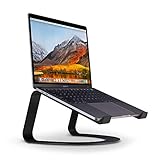
The Twelve South Curve has become one of the most recognizable MacBook stands for a reason: it lifts your laptop into a sculptural arc that puts the screen at eye level while leaving the entire underside open to airflow. After weeks of daily use with a 14-inch MacBook Pro and an external keyboard, it is clear the Curve is aimed at people who run their Mac in a fixed desk setup rather than shuffling it around all day.
This review covers the flagship matte black Curve, then looks at how the adjustable Curve Flex, the compact Curve SE, and the vertical BookArc alternatives fit different desks and budgets. If you have been fighting neck strain or a hot chassis, a stand is one of the cheapest upgrades you can make.
As an Amazon Associate we earn from qualifying purchases at no extra cost to you.




⚡ Save on Your Next PC — Amazon Prime
Prime members get fast free shipping on the systems above, plus early access to Prime Day & Black Friday PC deals. New members get a 30-day free trial.
Watch: Review: Twelve South Curve Stand for MacBook — Video Review
Design & Build
The Curve is a single piece of powder-coated aluminum bent into a smooth curve, with silicone pads on the feet and the two forward arms that cradle the laptop. At around $60 it feels premium and completely stable; a 14-inch Pro does not wobble even when you tap the trackpad hard. The matte black finish resists fingerprints and matches Space Black and Space Gray Macs well. The fixed height raises the screen roughly six inches, which is ideal when paired with an external keyboard but too tall for typing on the built-in one.
Performance
Where the Curve earns its keep is thermals. By suspending the laptop in open air, it lets heat escape from all sides instead of trapping it against a desk. During a sustained export the chassis ran noticeably cooler than lying flat, and the fans spun up later. Cable management is clean because the open frame lets you route Thunderbolt and power cables straight down. The trade-off is that the fixed geometry means you must commit to an external keyboard and mouse, and the footprint takes up real desk depth.
Pros & Cons
- Rock-solid one-piece aluminum construction that never wobbles
- Excellent passive cooling thanks to a fully open underside
- Raises the display to a healthy ergonomic height
- Premium matte finish that hides fingerprints
- Fixed height requires an external keyboard and mouse
- Large desk footprint compared with folding stands
- Not designed to travel or fold flat
Alternatives to Consider
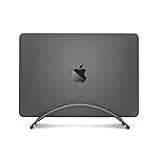
If you want adjustability, the Twelve South Curve Flex around $80 folds flat and lets you dial in height and angle, making it far better for travel and shared desks. For a budget lift, the Curve SE near $17 delivers the same silhouette in a lighter package. If desk space is tight, the vertical BookArc or BookArc Flex stores the MacBook upright in clamshell mode, and the UGREEN vertical stand is an inexpensive way to reclaim space when you run a single external monitor.
Frequently Asked Questions
Will the Curve fit a 16-inch MacBook Pro?
Yes. The arms are sized to hold laptops up to 17 inches, so a 16-inch Pro sits securely. Heavier machines actually feel more planted because of the stand’s low center of gravity.
Do I need an external keyboard to use the Curve?
Practically, yes. The fixed six-inch lift puts the built-in keyboard at an uncomfortable angle, so the Curve is designed for use with a separate keyboard and pointing device.
Does the Curve actually help with overheating?
It helps meaningfully. Elevating the laptop exposes the whole underside to air, so heat dissipates faster and fans engage later during heavy tasks. It is passive cooling, not a fan, but the effect is real.
Is the Curve or the Curve Flex better?
Choose the Curve for a permanent desk setup where stability and looks matter most, and the Curve Flex if you value adjustable height, angle, and the ability to fold it for travel.
Verdict
The Twelve South Curve is a superb fixed-position stand that improves posture and cooling in equal measure, and its build quality justifies the price for anyone running a docked MacBook all day. If you never move your setup, buy the standard Curve; if you travel or share a desk, spend a little more on the Curve Flex for the flexibility.

Write Your Review
No reviews yet. Be the first to share your experience!