
Apple’s own Magic Keyboard turns an iPad Pro into a laptop replacement, but its price can rival a decent tablet on its own. The good news for 2026 is that a wave of budget-friendly keyboards now deliver most of what makes typing on the iPad Pro great, from folio cases with trackpads to featherweight Bluetooth slabs, for a fraction of the cost.
This roundup gathers the best value keyboards for the iPad Pro across sizes and styles, whether you want a full protective case with keys or a slim wireless board you pair only when you need it. Here is what to look for and which options give you the most typing for your money.
As an Amazon Associate we earn from qualifying purchases at no extra cost to you.





⚡ Save on Your Next PC — Amazon Prime
Prime members get fast free shipping on the systems above, plus early access to Prime Day & Black Friday PC deals. New members get a 30-day free trial.
Watch: Top 5 Budget-Friendly Keyboards for iPad Pro in 2026 — Video Review
How to Choose
- Case-integrated vs. standalone: A keyboard case protects the iPad and props it up, while a standalone Bluetooth keyboard is lighter and works with any stand.
- Trackpad or not: A built-in trackpad brings desktop-style cursor control; skip it to save weight and money if you prefer touch.
- Exact size match: iPad Pro keyboards are size-specific, so confirm the model fits your 11-inch, 12.9-inch, or 13-inch Pro precisely.
- Backlighting and battery: Backlit keys help in dim rooms; rechargeable batteries that last weeks are worth prioritizing.
- Typing feel: Look for well-spaced keys with real travel so long writing sessions stay comfortable.
The Best Picks Reviewed
OMOTON Ultra-Slim Bluetooth Keyboard
At around $18 the OMOTON ultra-slim is the budget standout for anyone who wants a light, standalone keyboard to pair with an iPad Pro, Air, or mini. It is pocketable, pairs quickly over Bluetooth, and works with any stand or Sidecar setup, making it perfect for occasional typing without adding a bulky case.
Harvopu Case with Keyboard for iPad Air 13 and Pro 12.9
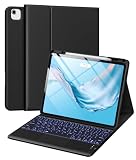
Around $38 the Harvopu keyboard case delivers the folio experience on a budget, combining a protective shell, a stand, and a detachable or built-in keyboard for the 12.9-inch class iPad Pro. It is the value pick for turning the iPad into a compact laptop for writing and email.
EIP Magnetix Keyboard for iPad Air 11 and Pro 11
The EIP Magnetix near $70 targets the 11-inch iPad Pro and Air with a magnetic design that mimics the premium floating-cantilever look for far less. It offers solid key feel and a secure attachment, a strong middle-ground option for 11-inch Pro owners who want a polished setup.
LENRICH Keyboard Case for iPad Pro 12.9
At about $70 the LENRICH case fits the 12.9-inch iPad Pro across several generations and typically adds a trackpad and backlit keys, bringing near-laptop functionality at well under Apple’s price. The trackpad makes cursor work in iPadOS smooth, and the case protects the tablet all around.
OMOTON Upgraded Rechargeable Wireless Keyboard
The upgraded OMOTON around $21 is a rechargeable, portable standalone keyboard that improves on the ultra-slim with longer battery life in a compact body. It is ideal for travelers who want a dependable, inexpensive board to carry alongside a folio stand.
Frequently Asked Questions
Do budget keyboards work as well as Apple’s Magic Keyboard?
They cover the core typing experience well and cost far less, though the Magic Keyboard still leads on build quality, its floating hinge, and a premium trackpad. For most writing and email, a budget keyboard case or Bluetooth board is more than enough.
Should I get a keyboard case or a standalone keyboard?
Choose a keyboard case if you want protection and an all-in-one laptop-style setup, or a standalone Bluetooth keyboard if you value low weight and flexibility to pair with any stand. Cases add bulk; standalone boards need a separate stand.
Do I need a trackpad on my iPad keyboard?
A trackpad adds desktop-style cursor control that speeds up editing and multitasking in iPadOS. If you mostly type and tap the screen, you can skip it to save weight and money, but many find the trackpad worth having.
Will any iPad Pro keyboard fit my model?
No. iPad Pro keyboards are size-specific, so you must match the keyboard to your exact 11-inch, 12.9-inch, or 13-inch model and generation. Always check the listing’s compatibility before buying.
Final Thoughts
You do not need to spend Magic Keyboard money to get a great typing setup on the iPad Pro in 2026. A slim OMOTON Bluetooth board covers occasional use, while budget keyboard cases from Harvopu, LENRICH, and EIP add trackpads and protection for a laptop-like experience. Match the keyboard to your exact model, decide whether you want a trackpad, and enjoy comfortable typing for a lot less.

Write Your Review
No reviews yet. Be the first to share your experience!