
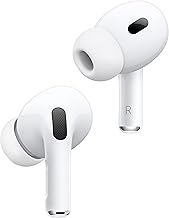
- Top Pick: Apple AirPods Pro 3 Wireless Earbuds, Active Noise Cancellation, Live Translation, Heart Rate Sensing, Hearing Aid Feature, Bluetooth Headphones, Spatial Audio, High-Fidelity Sound, USB-C Charging
- Best Value: Apple AirPods Pro 3rd Gen – Right Replacement AirPod (A3063) – White (Renewed)
- Premium Choice: 5 Pairs Replacement Ear Tips for AirPods Pro 3 (Medium-White) | (5 Size Medium)Silicone Ear Tips with Cleaner kit,Noise Reduction Holewith & Built-in dust Guard Screen
The AirPods Pro 3 deliver excellent sound and active noise cancellation, but like any wireless earbuds they can occasionally drop connection, fail to pair, or play audio in only one ear. Most of these issues are quick to fix once you know where to look, and rarely point to a hardware fault.
This guide walks you through the most common AirPods Pro 3rd Gen connectivity problems and their step-by-step solutions. From Bluetooth hiccups to charging-case quirks, these fixes will get your earbuds working smoothly again, and we note when a replacement part or tip may be the real culprit.
As an Amazon Associate we earn from qualifying purchases at no extra cost to you.



![Proof Labs 4 Pairs for AirPods Pro 3 Ear Hooks Covers [Added Storage Pouch] Anti Slip Ear Tips Accessories Compatible with Apple AirPods Pro 3rd Generation (White)](https://m.media-amazon.com/images/I/61uxOFBfmfL._AC_UY218_.jpg)

⚡ Save on Your Next PC — Amazon Prime
Prime members get fast free shipping on the systems above, plus early access to Prime Day & Black Friday PC deals. New members get a 30-day free trial.
Watch: How to Troubleshoot Common AirPods Pro 3rd Gen Connectivity Issues — Video Review
Fixing Bluetooth Pairing Problems
If your AirPods Pro 3 will not connect, start by putting them in the case, opening the lid near your iPhone, and holding the setup button on the back until the light flashes white to re-pair. If they still fail, go to Settings, Bluetooth, tap the info icon next to your AirPods, choose Forget This Device, then set them up fresh. This clears corrupted pairing data that causes most connection failures.
Solving Audio Cutouts and Dropouts
Intermittent audio usually stems from Bluetooth interference or a low battery. Move away from crowded WiFi routers, microwaves, and USB 3 devices that share the 2.4GHz band. Make sure both earbuds and the case are charged, and toggle Bluetooth off and on. If dropouts persist only in one location, interference is almost always the cause rather than the AirPods themselves.
Fixing Sound in Only One Ear
When audio plays in just one earbud, first clean both earbuds and the case contacts, since debris can block charging and pairing. Place both in the case for 30 seconds to resync, then remove them. If one earbud consistently fails, a worn or wrong-size ear tip can also affect the fit sensor — swapping in fresh tips like a certified replacement set often restores balanced playback and proper seal.
Resetting to Firmware Defaults
For stubborn issues, a full reset usually helps. With the AirPods in the case and lid open, press and hold the setup button for about 15 seconds until the status light flashes amber then white. This resets them to factory defaults, clearing firmware glitches. Reconnect afterward, and keep the case charged so firmware updates install automatically in the background.
Tips
- Keep your iPhone and AirPods firmware current, since updates fix many connectivity bugs.
- Clean the earbuds, mesh, and case contacts regularly with a dry soft brush to prevent charging and sensor issues.
- Use the correct ear-tip size for a proper seal, which improves both sound and automatic ear detection.
- Disable Automatic Ear Detection temporarily if you get false pause or one-ear behavior while troubleshooting.
Frequently Asked Questions
Why do my AirPods Pro 3 keep disconnecting?
The usual causes are Bluetooth interference, a low battery, or corrupted pairing data. Re-pairing after choosing Forget This Device resolves most persistent disconnects.
How do I reset my AirPods Pro 3?
Place them in the case, open the lid, and hold the setup button for about 15 seconds until the light flashes amber then white, then reconnect them to your device.
Why is sound only coming from one AirPod?
Clean the earbuds and case contacts, resync by placing both in the case, and check the ear-tip fit. A dirty contact or wrong-size tip is often to blame rather than a hardware failure.
Can worn ear tips affect connectivity?
Indirectly, yes. A poor seal from worn or wrong-size tips can trigger the fit sensor and cause playback or ear-detection issues, so fresh replacement tips often help.
Conclusion
Most AirPods Pro 3 connectivity problems come down to pairing glitches, interference, or dirty contacts, and nearly all are solved with a re-pair, a clean, or a full reset. Keep your firmware updated, use the right ear tips, and maintain the earbuds regularly. With these steps, your AirPods Pro 3 should stay reliably connected for music, calls, and everything in between.
Write Your Review
No reviews yet. Be the first to share your experience!