
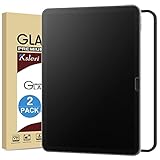
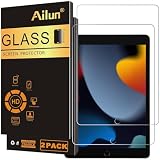
- Top Pick: Ksleri 2 Pack Matte Glass Screen Protector for iPad A16 11 Inch (2025 11th Generation) / iPad 10th Generation 10.9” 2022 (Not Privacy) Anti Glare Anti Fingerprint Tempered Glass with Alignment Frame
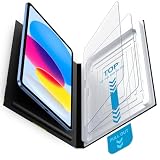
- Best Value: Mothca Matte Glass Screen Protector for iPad 11-inch A16 2025 (11th Generation) / iPad 10th Generation 10.9-inch 2022 Anti-Glare & Anti-Fingerprint Tempered Glass (Not Privacy) with Alignment Frame
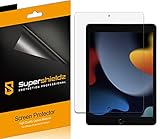
- Premium Choice: Supershieldz (3 Pack) Anti-Glare (Matte) Screen Protector Designed for iPad Air 11 inch (M4/M3/M2, 2026/2025/2024)
If you’ve ever tried to read on your iPad outdoors or under harsh overhead lighting, you know the frustration of glare turning your screen into a mirror. Anti-glare matte screen protectors solve this by diffusing light before it hits your eyes, dramatically reducing reflections and making the display far more comfortable to use for extended periods. They also help mask fingerprints and smudges, which is a persistent issue on glossy iPad glass whether you’re drawing, reading, or taking notes.
- How to Choose an Anti-Glare Matte Screen Protector for iPad
- The Best Anti-Glare Matte Screen Protectors for iPads Reviewed
- What to Look For in a Matte iPad Protector
- Which One Should You Buy?
- Step-by-Step Installation
- Common Mistakes When Buying an Anti-Glare Protector
- Matching Matte Strength to Where You Use the iPad
- Frequently Asked Questions
- Final Thoughts
- Related Articles
- Related Guides
This guide covers the best matte screen protectors available across current iPad models, including the new iPad A16 (11th Generation), iPad 10th Generation, iPad Air (M4/M3/M2), and the classic 10.2-inch iPad. We focus on products that genuinely cut glare without turning your screen into a grainy mess—because not all matte films are created equal.
As an Amazon Associate we earn from qualifying purchases at no extra cost to you.




How to Choose an Anti-Glare Matte Screen Protector for iPad
- iPad Model Compatibility: Always verify your exact iPad model and year before buying, as sizes and camera cutouts differ between generations. A protector made for the iPad 10th Generation won’t properly fit an iPad Air M2, even though both are around 11 inches.
- Glass vs. Film: Tempered glass matte protectors offer better scratch resistance and a feel closer to the bare screen, while PET film options are thinner and often more affordable in multi-packs. Glass is generally preferable if you draw or write frequently with Apple Pencil.
- Installation Method: Look for kits that include alignment frames or installation trays—they take the guesswork out of positioning and dramatically reduce the chance of misalignment or dust bubbles. Spray-wet installations are messier and less beginner-friendly.
- Clarity Tradeoff: All matte protectors introduce some level of grain or texture, but the best ones keep it minimal. Read reviews specifically mentioning screen clarity and color accuracy, especially if you do photo editing or consume video content on your iPad.
- Fingerprint Resistance: A quality matte coating should repel oils effectively, not just claim to. The oleophobic layer on better protectors keeps smudges manageable and makes wiping the screen clean with a microfiber cloth noticeably easier.
The Best Anti-Glare Matte Screen Protectors for iPads Reviewed
Ksleri Matte Glass Screen Protector (iPad A16 / iPad 10th Gen)
This two-pack combines tempered glass construction with an alignment frame for a straightforward, bubble-free install. It effectively cuts glare and resists fingerprints without introducing excessive graininess, making it a solid all-around choice for the latest iPads.
Mothca Matte Glass Screen Protector with Alignment Frame
Mothca’s matte glass delivers a smooth, paper-like texture that Apple Pencil users will appreciate. The included alignment frame makes installation foolproof, and glare reduction is strong without overly dulling the display’s vibrancy.
Supershieldz Matte Screen Protector for iPad Air 11-inch (M4/M3/M2)
Supershieldz’s three-pack is the value pick for iPad Air owners, offering reliable glare reduction at a low per-protector cost. The film applies cleanly and provides a subtle matte finish that’s ideal for reading and general productivity work.
Supershieldz Matte Screen Protector for iPad 10.2-inch (9th/8th/7th Gen)
Specifically sized for the classic 10.2-inch iPad, this three-pack gives you spares for when dust inevitably sneaks in during installation. The anti-glare finish is effective and fingerprint resistance holds up well over time.
Mothca 2-Pack Matte Glass with Quick Installation Tray
The matte tempered glass has a pleasant texture for writing and resists smudges better than most competitors in this price range.
What to Look For in a Matte iPad Protector
Matte protectors all promise the same thing, less glare, but they differ in how they get there and what they cost you in clarity.
Texture, Sharpness, and the Grain Effect
A matte finish works by scattering reflected light across a slightly rough surface. The same roughness also scatters some of the light coming out of the display, which is why text can look a touch softer and white backgrounds may show a faint sparkle or grain. Finer etching keeps more sharpness but reflects more light, and coarser etching blocks glare better while looking grainier. If you read mostly text, a finer matte is usually the better balance; if you work in bright rooms, a stronger matte makes sense.
Glass Versus Film
Matte glass protectors are usually rated around 9H, a pencil-hardness scale used in marketing rather than a precise scientific measure, so read it as a sign of scratch resistance rather than a guarantee against cracks. Films are thinner and easier to replace but offer less impact protection. Glass adds a little thickness, which can slightly change how an Apple Pencil feels, while film tends to feel closer to bare glass.
Model Fit and Install Aids
The iPad lineup includes several screen sizes that are close but not interchangeable: the 11-inch iPad A16, the 10.9-inch and 11-inch models, and the 10.2-inch models with a home button. Cutouts and edge widths differ, so always match the exact generation. Alignment frames and installation trays reduce the biggest risk, which is crooked placement, and are worth having if this is your first protector.
Which One Should You Buy?
| If you… | Choose… |
|---|---|
| Own an iPad A16 or 10th generation and want a protector with a guide frame | Mothca Matte Glass Screen Protector with Alignment Frame |
| Own an iPad A16 or 10th generation and prefer a straightforward matte glass option | Ksleri Matte Glass Screen Protector (iPad A16 / iPad 10th Gen) |
| Want a spare in case the first attempt fails or a family member shares the model | Mothca 2-Pack Matte Glass with Quick Installation Tray |
| Use an iPad Air 11-inch and want a matte layer | Supershieldz Matte Screen Protector for iPad Air 11-inch (M4/M3/M2) |
| Own an older 10.2-inch iPad with a home button | Supershieldz Matte Screen Protector for iPad 10.2-inch (9th/8th/7th Gen) |
Step-by-Step Installation
- Clean the screen. Use the wipes included in the box, then remove remaining lint with the dust sticker.
- Work in a low-dust room. A bathroom after a hot shower is a common trick because airborne dust settles.
- Fit the alignment frame or tray. Seat it over the iPad so the cutouts line up with the camera and speakers.
- Peel and lower the protector. Touch only the edges, let one side stick first, and then release the rest slowly.
- Smooth out bubbles. Push from the center to the edges with a card. Tiny bubbles often vanish over a day as the adhesive settles.
Common Mistakes When Buying an Anti-Glare Protector
- Expecting no loss of clarity. Every matte surface trades some sharpness for glare control. If you edit photos or check color accuracy, a glossy protector or none may suit you better.
- Buying the wrong generation. Camera positions and corner radii differ across iPad generations, and a protector for the A16 will not necessarily suit older 10.2-inch models.
- Ignoring the display type. Higher-end iPads use laminated displays with their own coatings, while base models use a different construction, so a matte layer may look different from one model to another.
- Applying in a hurry. A single piece of dust leaves a visible bump, and removing glass can chip the edge. Take the time to prepare the screen.
- Using it with the wrong case. Some cases with raised edges press against the protector and lift its corners. Make sure both products are designed to coexist.
Matching Matte Strength to Where You Use the iPad
| Setting | Best match | Trade-off |
|---|---|---|
| Near a sunny window or outdoors | Stronger matte | More visible grain on white backgrounds |
| Office with overhead lighting | Medium matte | Slight softening of fine text |
| Dim room or bedtime reading | Light matte or glossy | Little glare to remove, so clarity matters more |
| Sketching with an Apple Pencil | Medium matte | Added friction that some people like and others find scratchy |
Because matte textures are rarely described in numbers, use the product description and owner comments as your guide, and be prepared to accept a small trade in sharpness.
If you switch between reading and drawing, remember that a protector is easy to replace, so starting with a medium texture and adjusting later is a sensible approach.
Frequently Asked Questions
Do matte screen protectors reduce screen sharpness?
Yes, slightly. The diffusing layer that reduces glare also softens fine details, producing a subtle grain effect. Higher-quality glass protectors minimize this, but if pixel-level sharpness is critical, a glossy protector may be the better tradeoff.
Will an anti-glare protector affect Apple Pencil performance?
It actually improves it for most users. The matte texture provides a paper-like drag that many artists and note-takers prefer over the slippery feel of bare glass. Just be aware that some protectors wear down Pencil tips faster than others.
Can I reapply a matte screen protector if I mess up the installation?
It depends on the material. Film protectors can sometimes be lifted and repositioned if you catch the mistake quickly. Tempered glass protectors are generally single-attempt—once adhesive touches the screen, repositioning risks dust contamination and poor adhesion.
Are matte protectors harder to keep clean than glossy ones?
No, the opposite is usually true. Matte coatings are designed to repel oils and hide fingerprints, so they actually stay looking cleaner between wipe-downs. A quick pass with a microfiber cloth handles most smudges.
Final Thoughts
For most iPad A16 or 10th Generation owners, the Ksleri Matte Glass and Mothca Matte Glass with Alignment Frame are the strongest picks—they combine tempered glass durability, easy installation, and effective glare reduction without sacrificing too much clarity. iPad Air users should look to the Supershieldz three-pack for excellent value, while 10.2-inch iPad owners are well served by Supershieldz’s dedicated option for that model.


Write Your Review
No reviews yet. Be the first to share your experience!