
Our Short List of 3

- Best for: Most homes that want Wi-Fi 6, four wired ports, and simple app setup.
- Wi-Fi 6 (802.11ax), dual band
- AX1800 speed class, up to 1,201 Mbps on 5 GHz and up to 574 Mbps on 2.4 GHz
- One Gigabit WAN port and four Gigabit LAN ports
- Four external antennas

- Best for: Small homes and flats that need Wi-Fi 6 for up to 20 devices.
- Wi-Fi 6 (802.11ax), dual band
- AX1800 speed class, up to 1,200 Mbps on 5 GHz and up to 600 Mbps on 2.4 GHz
- Coverage up to 1,500 sq ft for up to 20 devices
- One Gigabit WAN port and four Gigabit LAN ports

- Best for: Households that want stronger built-in security and the option to extend coverage with AiMesh.
- Wi-Fi 6 (802.11ax), dual band
- AX1800 speed class, up to 1,201 Mbps on 5 GHz and up to 574 Mbps on 2.4 GHz
- One Gigabit WAN port and four Gigabit LAN ports
- Four external antennas
All 4 Picks at a Glance
| Product | Specs | Action |
|---|---|---|
| TP-Link Archer AX21 |
| Check price on Amazon |
| NETGEAR Nighthawk R6700AX |
| Check price on Amazon |
| ASUS RT-AX1800S |
| Check price on Amazon |
 TP-Link Archer AX10 |
| Check price on Amazon |
A low-cost router is not really about chasing the biggest number on the box. The real decision is how much coverage, capacity, and wired connectivity your household actually needs, and which corners you can accept to keep the outlay modest. A router that is too weak will leave a back bedroom with a faint signal, while a router built for a large house wastes money on range and capacity that a small flat will never use.
This guide is for renters replacing a provider-supplied gateway, families streaming in the evening, and anyone working from home on video calls. Each pick below is drawn from its Amazon listing, using the wireless standard, speed class, coverage, device count, and ports stated there, so you can compare the four models on the same terms.
Quick Picks
As an Amazon Associate we earn from qualifying purchases
| Product | Best for | Key spec from title |
|---|---|---|
| TP-Link Archer AX21 | Most homes | Wi-Fi 6, AX1800, dual band |
| NETGEAR Nighthawk R6700AX | Small homes and flats | Wi-Fi 6, AX1800, up to 1,500 sq ft, 20 devices |
| ASUS RT-AX1800S | Security and software features | Wi-Fi 6, AX1800, AiProtection Classic, AiMesh |
| TP-Link Archer AX10 | Lowest-cost Wi-Fi 6 entry | Wi-Fi 6, AX1500, dual band |
How to Choose
Match the router to your internet plan
A router cannot deliver more speed than the plan feeding it, so start with the connection coming into your home rather than the speed class on the box. If your plan tops out below a gigabit, a gigabit WAN port is enough, and every router in this guide carries one. A plan above a gigabit is a different story, because a gigabit WAN port caps the wired connection at that ceiling, and you would need a multi-gigabit port instead. Check the plan details in your provider account before you shop, then pick a router whose WAN port matches it. Spending on wireless speed your plan cannot feed is the most common way a low-cost purchase turns into a disappointing one.
Count devices and rooms before you choose speed class
Speed classes such as AX1500 and AX1800 describe combined theoretical link rates across both bands, not the speed any single device will see. What matters more is how many devices share the network and how far the signal must travel. A household with two phones, a laptop, and a television can live happily on AX1500, while a home with a dozen phones, tablets, smart speakers, and cameras benefits from AX1800 and the Wi-Fi 6 features that share airtime more efficiently. Count the rooms between the router and the farthest device, because each wall and floor weakens the signal, and a router in a central spot covers more ground than a faster one tucked in a corner.
Check the wired ports on the back
Wireless speed gets the attention, but the ports on the back decide how stable gaming, video calls, and large downloads will feel. A wired connection avoids the interference and signal loss wireless links suffer through walls, so a console, a desktop computer, or a streaming box plugged into a gigabit LAN port will hold a steadier connection than the same device on Wi-Fi. Count the devices you would wire up, then check the router has enough gigabit LAN ports for them, plus one spare. All four routers here offer four gigabit LAN ports, which covers a television, a console, and a computer, but a household with more wired gear should count carefully before buying.
Look past the headline speed at security and software
Two routers with the same AX1800 label can feel very different to live with, because the software behind them decides how easy setup is and how the network is protected. WPA3 encryption, a guest network, and parental controls shape everyday use more than a small difference in headline speed, so check the listing for them. Some models add a security suite that needs a subscription after a trial, while others include their protection without an ongoing fee, so read the listing to see what stays free. A clear phone app turns setup into a simple job, and mesh support lets you add a second unit later instead of replacing the router when you move to a larger home.
The 4 Best Options
TP-Link Archer AX21
- Best for: Most homes that want Wi-Fi 6, four wired ports, and simple app setup.
- Wi-Fi 6 (802.11ax), dual band
- AX1800 speed class, up to 1,201 Mbps on 5 GHz and up to 574 Mbps on 2.4 GHz
- One Gigabit WAN port and four Gigabit LAN ports
- Four external antennas
Most homes that want Wi-Fi 6, four wired ports, and simple app setup.
No 6 GHz band and no multi-gigabit port, so a plan above a gigabit will be capped at the gigabit WAN port.
The Archer AX21 is the most balanced pick in this guide, pairing current Wi-Fi 6 with a straightforward feature set that suits a typical household without asking for a premium outlay. Its dual-band design keeps phones, laptops, and streaming devices on the faster 5 GHz band while older gadgets and smart home gear use the 2.4 GHz band, and its four antennas help the signal reach rooms away from the router. Setup runs through the Tether app, and EasyMesh support means a compatible extender can join the network later if a dead spot appears.
Watch out for: No 6 GHz band and no multi-gigabit port, so a plan above a gigabit will be capped at the gigabit WAN port.
NETGEAR Nighthawk R6700AX
- Best for: Small homes and flats that need Wi-Fi 6 for up to 20 devices.
- Wi-Fi 6 (802.11ax), dual band
- AX1800 speed class, up to 1,200 Mbps on 5 GHz and up to 600 Mbps on 2.4 GHz
- Coverage up to 1,500 sq ft for up to 20 devices
- One Gigabit WAN port and four Gigabit LAN ports
Small homes and flats that need Wi-Fi 6 for up to 20 devices.
The stated device count and coverage suit smaller households, and NETGEAR Armor needs a paid subscription after the trial ends.
The Nighthawk R6700AX is built for smaller spaces, and its listing states coverage for up to 1,500 square feet with up to 20 connected devices, which fits flats and modest houses rather than large multi-floor homes. Its four-stream Wi-Fi 6 design shares the connection across phones, laptops, and streaming boxes, while the Nighthawk app handles setup and everyday management from a phone. Four gigabit LAN ports give wired devices a stable link, and the router works with most cable, fibre, DSL, and satellite providers on plans up to a gigabit.
Watch out for: The stated device count and coverage suit smaller households, and NETGEAR Armor needs a paid subscription after the trial ends.
ASUS RT-AX1800S
- Best for: Households that want stronger built-in security and the option to extend coverage with AiMesh.
- Wi-Fi 6 (802.11ax), dual band
- AX1800 speed class, up to 1,201 Mbps on 5 GHz and up to 574 Mbps on 2.4 GHz
- One Gigabit WAN port and four Gigabit LAN ports
- Four external antennas
Households that want stronger built-in security and the option to extend coverage with AiMesh.
No 6 GHz band and no USB port, so there is no way to share a drive or printer directly from the router.
The ASUS RT-AX1800S stands out in this group for its software, offering subscription-free network security and a full set of controls at a low-cost entry point into Wi-Fi 6. AiProtection Classic runs in the background without an ongoing fee, parental controls help manage what younger household members can reach online, and a built-in VPN lets you reach your home network securely when you are away. AiMesh support is a genuine bonus here, because a second compatible ASUS unit can extend coverage later instead of forcing a replacement when your home grows.
Watch out for: No 6 GHz band and no USB port, so there is no way to share a drive or printer directly from the router.
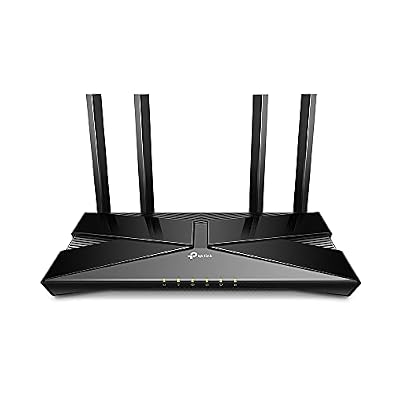
TP-Link Archer AX10
- Best for: Small households and first-time buyers who want the lowest-cost route to Wi-Fi 6.
- Wi-Fi 6 (802.11ax), dual band
- AX1500 speed class, up to 1,201 Mbps on 5 GHz and up to 300 Mbps on 2.4 GHz
- One Gigabit WAN port and four Gigabit LAN ports
- Four fixed antennas
Small households and first-time buyers who want the lowest-cost route to Wi-Fi 6.
The 2.4 GHz band is slower than on the AX1800 models, so older devices and distant smart home gear may feel the difference.
The Archer AX10 is the simplest way into Wi-Fi 6 in this guide, offering the current wireless standard and full gigabit ports in a plain, no-frills package. Its AX1500 rating is lower than the AX1800 models above, yet it still covers the everyday mix of browsing, streaming, and video calls in a small household, and its four antennas and Beamforming help the signal reach the next room. If your plan is modest and your device count is low, this is the router that spends the least while still giving you Wi-Fi 6, WPA3 security, and app-based setup.
Watch out for: The 2.4 GHz band is slower than on the AX1800 models, so older devices and distant smart home gear may feel the difference.
Which One Fits Your Situation
A small flat with a handful of devices
Pick the TP-Link Archer AX10. A flat with a few phones, a laptop, and a television does not need AX1800 capacity, and the AX10 delivers Wi-Fi 6, gigabit ports, and WPA3 security at the lowest outlay in this guide. Its four antennas cover a compact layout well, and the money saved can go toward a better placement spot or a longer Ethernet cable for a wired device.
A family home with evening streaming and video calls
Pick the TP-Link Archer AX21. Its AX1800 rating and Wi-Fi 6 airtime sharing handle the evening rush, when a television streams, a laptop runs a video call, and several phones compete for the same connection. Four gigabit LAN ports let you wire the television or console for a steadier link, and EasyMesh support leaves room to add coverage later if a bedroom proves too far from the router.
A renter replacing a provider-supplied gateway
Pick the NETGEAR Nighthawk R6700AX. Its listing states coverage for up to 1,500 square feet and up to 20 devices, which matches most rented flats and small houses, and the Nighthawk app keeps setup short enough to finish on moving day. It works with most providers on plans up to a gigabit, so it can move with you to the next flat instead of being tied to one provider.
A household that wants stronger security without a subscription
Pick the ASUS RT-AX1800S. AiProtection Classic is included without an ongoing fee, parental controls are built in, and the built-in VPN gives secure access to the home network from outside. AiMesh support also means coverage can grow with a second unit, making this the pick for buyers who care as much about the software as the wireless speed.
Common Mistakes
- Buying the fastest speed class on the shelf while ignoring the internet plan, so the router is capped by a slower connection anyway.
- Placing the router behind a television, inside a cabinet, or on the floor, where furniture and walls weaken the signal before it reaches the next room.
- Forgetting to count wired devices, then discovering there are too few gigabit LAN ports for a console, a television, and a computer.
- Assuming a security suite stays free, when some models only include a trial and need a paid subscription afterwards.
- Choosing a router with no mesh support, then having to replace the whole unit instead of adding a second one when coverage falls short.
Frequently Asked Questions
Is Wi-Fi 6 worth it on a low-cost router?
Yes, because Wi-Fi 6 shares airtime more efficiently when several devices are online at once, which is exactly the situation in a busy household. It also brings WPA3 security and better handling of smart home gadgets, so even a low-cost Wi-Fi 6 router is a meaningful step up from an older Wi-Fi 5 unit. The gains show most clearly when phones, laptops, and streaming boxes compete at the same time.
Do I still need a modem with one of these routers?
Yes, in most homes. These are routers only, so they need a modem or a fibre terminal to bring the internet into the house, connected by an Ethernet cable to the WAN port. Some provider gateways combine a modem and a router in one box, and the new router can replace the routing part while the gateway is set to bridge mode or replaced by a standalone modem.
How many devices can a low-cost router handle?
It depends on the model and on what those devices are doing. The Nighthawk R6700AX in this guide states support for up to 20 devices, while the other models are built for a similar small-household load. A dozen phones, tablets, and smart gadgets browsing and streaming will be fine, but dozens of cameras and sensors plus heavy streaming may need a stronger router.
Where should I place the router for the best coverage?
Place it in a central, open spot at waist height or higher, away from thick walls, metal shelves, and large appliances. A hallway shelf or a table in the middle of the home usually beats a living-room corner, and keeping it out of a cabinet lets the signal spread in every direction. If one room still struggles, move the router a metre or two toward it before buying extra hardware.





Write Your Review
No reviews yet. Be the first to share your experience!