
As an Amazon Associate we earn from qualifying purchases.
- 1. Moshi ClearGuard MB Keyboard Cover
- 2. iBenzer Macaron Series Keyboard Cover MKC01BK
- 3. Green Onions Supply GOS Keyboard Cap Pro for MacBook Air 13.6-Inch
- 4. TIPPY TYPE Raised Keyboard Cover for Long Nails
- 5. Soonjet Premium Ultra Thin Keyboard Cover Protector
- How to Choose a MacBook Keyboard Cover
- Frequently Asked Questions
Disclosure: This article contains affiliate links. If you buy through them, we may earn a commission at no extra cost to you.
A keyboard cover is a small accessory that earns its keep every day. It sits between your fingers and the keys, catching dust, crumbs and the odd splash before they reach the keyboard, and it keeps the key legends from wearing shiny with use. The catch is fit: MacBook keyboards change shape between generations, so a cover made for one model can sit wrong on another. The five covers below are each tied to the exact MacBook models they fit, from older 13-inch and 15-inch Pros to the current M-series Air and Pro machines. Match your model number, found in Apple menu, About This Mac, before ordering.
1. Moshi ClearGuard MB Keyboard Cover

Specs
- :
- ASIN: B001QKI2DA
- Brand: Moshi
- Fits: MacBook Pro 13-inch, 15-inch and 17-inch models, US layout
- Material: Thermoplastic urethane
- Thickness: 0.1 mm
- Part number: 99MO021901
Moshi ClearGuard MB is the thinnest cover in this roundup and the one that feels closest to typing on bare keys. At 0.1 mm, the form-fitted urethane film is almost invisible once laid over the keyboard, and because it is not silicone it does not have the slightly tacky, rubbery feel that puts some typists off silicone skins. The backlight still shines through clearly, and the key legends stay fully visible.
The cover is washable and reusable. When it picks up finger oil or dust, it can be rinsed with mild soap and water, dried, and laid back on the keyboard. Two thin adhesive strips help it stay in place during use. That washability matters for a film this thin, since a disposable cover at this thickness would be a false economy.
ClearGuard MB suits owners of older 13-inch, 15-inch and 17-inch MacBook Pro models who want protection they can forget about while typing. It is a film rather than a moulded skin, so it adds no cushioning to the keystroke, which is exactly what touch typists tend to prefer. Confirm the US layout before ordering, since keyboard layouts differ by region and the fit is layout-specific.
2. iBenzer Macaron Series Keyboard Cover MKC01BK
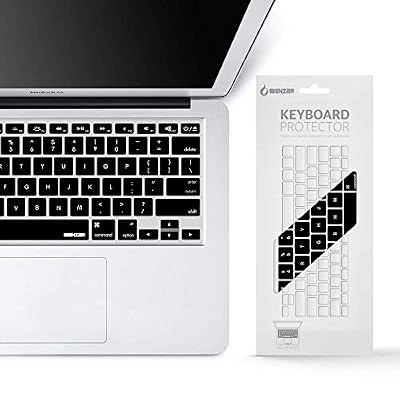
Specs
- :
- ASIN: B00V8NF94U
- Brand: iBenzer
- Fits: MacBook Pro 13-inch, 15-inch and 17-inch with or without Retina display, MacBook Air 13-inch, and iMac wireless keyboard
- Material: Silicone
- Model number: MKC01BK
- Colour: Black
The iBenzer Macaron Series cover is a classic silicone skin, and its appeal is breadth of fit. One cover is listed for MacBook Pro 13-inch, 15-inch and 17-inch models with or without a Retina display, plus the 13-inch MacBook Air and the iMac wireless keyboard, which makes it a practical choice for households with more than one older Mac. The soft silicone drapes over the keys and gives a gentle, grippy typing surface.
Silicone has a real advantage against spills. The skin forms a continuous sheet over the keyboard, so a knocked-over drink has to get past the cover before it reaches the keys. It also muffles key noise slightly, which can be welcome in a shared room or a library. The black finish keeps the look understated on a space grey or black keyboard.
This cover suits anyone running an older MacBook who wants simple, full-coverage spill and dust protection at a modest outlay. Because silicone skins are thicker than urethane films, the typing feel changes a little, with a softer landing on each keystroke. If you type all day and prefer a firmer feel, the Moshi film above may suit you better, but for general protection the iBenzer is a dependable pick.
3. Green Onions Supply GOS Keyboard Cap Pro for MacBook Air 13.6-Inch

Specs
- :
- ASIN: B0CN6NKGQP
- Brand: Green Onions Supply
- Fits: MacBook Air 13.6-inch with M2 chip, model A2681
- Material: Ultra-thin film
- Thickness: 0.03 mm
- Pack: 2 pack
- Layout: US layout with Touch ID support
Green Onions Supply takes the thin-film idea further than anyone else here. The Keyboard Cap Pro is a 0.03 mm full-cover film, roughly a third of the thickness of the Moshi cover, and it is designed to sit over the whole keyboard area of the 13.6-inch MacBook Air with M2 chip, model A2681, without a punch hole over Touch ID. The film needs no glue, so it lifts off cleanly and can be wiped and reused.
At this thickness the cover is effectively invisible in use. The keys keep their travel and their feel, the backlight comes through unchanged, and the film adds a wipeable barrier against dust, moisture and the slow shine that builds up on frequently used keys. The two-pack means a spare is on hand when the first film eventually needs replacing.
This is the pick for MacBook Air 13.6-inch owners who want the lightest possible protection and are willing to trade the cushioning of a silicone skin for a near-zero change in typing feel. The fit is specific to the M2 Air, model A2681, so check the model number on the back of your MacBook before ordering rather than relying on screen size alone.
4. TIPPY TYPE Raised Keyboard Cover for Long Nails

Specs
- :
- ASIN: B0DCQT17PQ
- Brand: TIPPY TYPE
- Fits: MacBook Pro 14-inch, MacBook Pro and MacBook Air models
- Material: Silicone
- Design: Raised keys
- Colour: Matte Black
TIPPY TYPE solves a problem most keyboard covers ignore: typing with long nails. Standard flat skins force long nails to strike the cover at an awkward angle, which is uncomfortable and can snag. This cover uses raised silicone keys that give nails room to move, so typing stays comfortable and the nails themselves are protected from chipping against the keys.
Beyond the raised design, it works like any good silicone cover, shielding the keyboard from dust, crumbs and splashes while softening key noise. The matte black finish suits the current MacBook Pro look, and the listing covers MacBook Pro 14-inch as well as other MacBook Pro and MacBook Air models, so it is worth checking the exact compatible list against your model before ordering.
This cover suits anyone with long, acrylic or gel nails who types on a MacBook every day, as well as gamers who want a slightly more defined key feel than a flat film gives. If your nails are short, a flat cover will feel more natural, but for long-nail typists the raised profile is the difference between tolerating a cover and actually keeping it on.
5. Soonjet Premium Ultra Thin Keyboard Cover Protector

Specs
- :
- ASIN: B0C6LZQW4W
- Brand: Soonjet
- Fits: MacBook Pro 14-inch and 16-inch, 2021 to 2026, M1 to M5 Pro and Max chips; MacBook Air 13-inch and 15-inch, M2 to M5 chips
- Material: Thermoplastic polyurethane (TPU)
- Thickness: 0.11 mm
- Layout: US ANSI
Soonjet covers the widest range of current MacBooks in this roundup. A single listing spans MacBook Pro 14-inch and 16-inch models from 2021 through 2026 with M1 to M5 Pro and Max chips, and MacBook Air 13-inch and 15-inch models with M2 to M5 chips, all in the US ANSI layout. That breadth makes it a safe default when you know the screen size and chip family but want one cover that is listed for the current generation.
The cover is made from thermoplastic polyurethane at 0.11 mm, a middle ground between the ultra-thin films and full silicone skins. It is thin enough to keep the typing feel close to the bare keyboard while still giving a real barrier against dust and spills, and the TPU construction resists tearing better than a very thin film. A Touch ID cutout keeps the fingerprint sensor usable.
This is the pick for owners of a current-generation MacBook Pro 14-inch or 16-inch, or a recent MacBook Air, who want one cover with a clearly documented fit across the M-series years. As always, verify the model number against the listing, since Apple has shipped several generations at the same screen sizes.
How to Choose a MacBook Keyboard Cover
Start with the model number, not the screen size. Two MacBook Pros can share a 14-inch display and still have different keyboards, and the same is true of the 13-inch Air across its M1 and M2 generations. Find the model number in Apple menu, About This Mac, or on the back of the machine, and match it to the cover listing before ordering.
Next, choose the material for how you type. Ultra-thin films in urethane or TPU change the feel the least and keep the backlight crisp, which suits fast touch typists. Silicone skins add cushioning, muffle noise and give the strongest spill barrier, but they soften the keystroke and can attract dust. Raised silicone designs are a niche worth considering only if you type with long nails.
Finally, remember the lid rule. Apple warns against leaving material between the keyboard and the display when a MacBook is closed, since the clearance is tight and pressure can mark the screen. Remove the cover before closing the lid, especially with thicker silicone skins, and wipe the cover regularly so trapped grit does not scratch the keys.
Frequently Asked Questions
Do keyboard covers fit all MacBook models?
No. Keyboard layouts and key spacing change between generations, so a cover must be matched to the exact model number and layout. Screen size alone is not enough.
Will a keyboard cover affect typing?
Thin films change the feel very little, while silicone skins soften each keystroke and can slow fast typists slightly. Most people adjust within a day or two.
Can I leave a keyboard cover on when I close my MacBook?
It is better to remove it. Apple advises against leaving covers in place when the lid is closed, because the tight clearance can transfer pressure or marks to the display.
How do I clean a keyboard cover?
Lift it off, wash it with mild soap and water, let it dry fully, and lay it back on the keyboard. Silicone and urethane covers are both washable and reusable.
A good keyboard cover is invisible in daily use and only noticed when it saves the keyboard from a spill or a scratch. Pick the one that matches your exact MacBook model, choose film for the lightest touch or silicone for the strongest protection, and remove it before closing the lid.




Write Your Review
No reviews yet. Be the first to share your experience!