
Our Short List of 3

- Best for: iPhone 11 owners doing their first battery swap.
- Capacity: 3110 mAh
- Energy: 11.91 Wh
- Voltage: 3.83 V
- Fits: iPhone 11 models A2111, A2221, A2223

- Best for: iPhone 8 Plus owners keeping a large older phone in daily use.
- Capacity: 2691 mAh
- Energy: 10.28 Wh
- Voltage: 3.82 V
- Fits: all iPhone 8 Plus models

- Best for: iPhone 6s owners reviving an older phone for light duty.
- Capacity: 1715 mAh
- Voltage: 3.82 V
- Cell type: Lithium-ion
- Fits: iPhone 6s models A1633, A1688, A1700
All 3 Picks at a Glance
| Product | Specs | Action |
|---|---|---|
| iFixit Battery Compatible with iPhone 11 – Repair Kit |
| Check price on Amazon |
| iFixit Battery Compatible with iPhone 8 Plus – Fix Kit |
| Check price on Amazon |
| iFixit Battery Compatible with iPhone 6s – Repair Kit |
| Check price on Amazon |
When an iPhone starts shutting down with charge still showing, or the battery health figure in Settings has dropped well below its original level, a spare battery can mean two very different things. A power bank clips on or plugs in and tops the phone up from outside. A spare battery in the repair sense is a fresh lithium-ion cell fitted inside the phone, replacing the worn one. This guide covers the second kind: internal replacement batteries that you install by opening the phone, disconnecting the old cell, and seating a new one in its place.
The three kits below all come from iFixit, the repair brand with the clearest model-by-model kits on Amazon, and each one is a Fix Kit: the battery plus the drivers, prying tools, and adhesive the job needs. One fits the iPhone 11, one fits the iPhone 8 Plus, and one fits the iPhone 6s. Check the model number in Settings before ordering, because a battery made for one iPhone does not fit another.
Quick Picks
As an Amazon Associate we earn from qualifying purchases
| Product | Best for | Key spec from title |
|---|---|---|
| iFixit iPhone 11 Battery Fix Kit | The newest phone in this guide | 3110 mAh cell for iPhone 11 |
| iFixit iPhone 8 Plus Battery Fix Kit | A larger older phone | 2691 mAh cell for iPhone 8 Plus |
| iFixit iPhone 6s Battery Repair Kit | The oldest phone in this guide | 1715 mAh cell for iPhone 6s |
How to Choose
Match the kit to the exact iPhone model
Every pick in this guide fits one iPhone model and no other, so the model number matters more than the phone name. Find it in Settings, under General and then About, and compare it with the listing before you order. An iPhone 11 battery does not fit an iPhone 11 Pro or an iPhone 11 Pro Max, an iPhone 8 battery does not fit an iPhone 8 Plus, and an iPhone 6s battery does not fit an iPhone 6s Plus. The cells differ in size, shape, and connector position, and forcing the wrong cell into place can damage the logic board. If the model number on the listing does not match the model number on the phone, keep looking.
Choose a Fix Kit, not a bare battery
A bare battery on its own is only half the job, because opening an iPhone needs drivers and prying tools that most households do not own. All three picks here are Fix Kits, which means the box holds the battery plus the pentalobe and tri-point drivers, a suction cup, opening picks, a spudger, tweezers, and fresh adhesive strips for the battery and the display. Buying those tools one by one usually costs more than the kit difference, and a missing driver in the middle of a repair leaves the phone open on the table. A kit also gives you the adhesive the phone needs to close up properly again.
Read capacity figures with care
The honest capacity for a replacement cell is the capacity of the original battery, and all three kits in this guide match the original figure for their model. Claims far above the original capacity in the same physical footprint deserve doubt, because a lithium-ion cell cannot hold several times the energy of the original in the same space. Very high-capacity third-party cells can also confuse the battery health reading in Settings, so the phone may show an odd figure even when the cell itself works well. A kit that matches the original milliamp-hour figure keeps the phone behaving the way it did when it was new.
Judge your own comfort with opening a phone
Replacing an iPhone battery is a moderate repair that usually takes between thirty minutes and two hours, and a first attempt often takes longer. Discharge the old battery below 25 percent before you start, work on a clean surface that does not conduct static, and keep every screw in order, because screws of different lengths sit side by side and a long screw in a short hole can pierce the logic board. If the old battery is swollen, warm, or punctured, stop and take the phone to a repair shop instead. A damaged lithium-ion cell can catch fire, and that risk is not worth taking at home.
The 3 Best Options
iFixit Battery Compatible with iPhone 11 – Repair Kit
- Best for: iPhone 11 owners doing their first battery swap.
- Capacity: 3110 mAh
- Energy: 11.91 Wh
- Voltage: 3.83 V
- Fits: iPhone 11 models A2111, A2221, A2223
iPhone 11 owners doing their first battery swap.
this kit does not fit the iPhone 11 Pro or the iPhone 11 Pro Max, which use different cells.
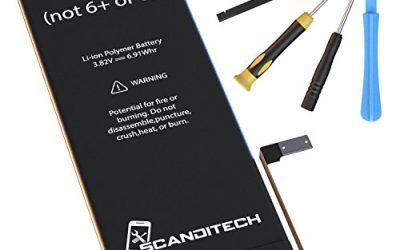
This is the pick for the newest phone in this guide, and it is also the most complete starting point for a first battery swap. The cell matches the original iPhone 11 battery at 3110 mAh, so the phone should behave the way it did when it was new, and the Fix Kit form means the drivers, suction cup, picks, spudger, tweezers, and adhesive strips all arrive in the same box. iFixit publishes a photo-by-photo guide for this exact repair, which walks through the pentalobe screws, the display opening, the battery connector, and the adhesive pull tabs in order.
Watch out for: this kit does not fit the iPhone 11 Pro or the iPhone 11 Pro Max, which use different cells.
iFixit Battery Compatible with iPhone 8 Plus – Fix Kit
- Best for: iPhone 8 Plus owners keeping a large older phone in daily use.
- Capacity: 2691 mAh
- Energy: 10.28 Wh
- Voltage: 3.82 V
- Fits: all iPhone 8 Plus models
iPhone 8 Plus owners keeping a large older phone in daily use.
this kit does not fit the smaller iPhone 8, which uses a different, smaller cell.
The iPhone 8 Plus is a large phone with a large battery, and this kit matches the original cell at 2691 mAh, which is well above the capacity of the smaller iPhone 8. That size difference is exactly why the model check matters: the two phones look alike from the outside, yet their batteries cannot be swapped. The kit is a Fix Kit, so it brings the drivers and prying tools plus fresh adhesive, and the cell needs no soldering. Follow the guide for the Plus model specifically, because the opening sequence and the Taptic Engine step differ from the smaller phone.
Watch out for: this kit does not fit the smaller iPhone 8, which uses a different, smaller cell.
iFixit Battery Compatible with iPhone 6s – Repair Kit
- Best for: iPhone 6s owners reviving an older phone for light duty.
- Capacity: 1715 mAh
- Voltage: 3.82 V
- Cell type: Lithium-ion
- Fits: iPhone 6s models A1633, A1688, A1700
iPhone 6s owners reviving an older phone for light duty.
this kit does not fit the iPhone 6s Plus, which uses a larger cell, and some mirror listings show conflicting compatibility text, so trust the listing title and the model number.
The iPhone 6s is the oldest phone in this guide, and it still turns up as a second device, a music player, or a hand-me-down for a family member. This kit gives it a fresh 1715 mAh cell that matches the original capacity, plus the tools and adhesive needed for the swap, and it carries a one-year guarantee from iFixit. The repair itself is one of the simpler iPhone battery jobs, since the 6s opens without the heavy display adhesive of later models. Confirm the model number first, because the 6s and the 6s Plus take different batteries.
Watch out for: this kit does not fit the iPhone 6s Plus, which uses a larger cell, and some mirror listings show conflicting compatibility text, so trust the listing title and the model number.
Which One Fits Your Situation
Your everyday phone is an iPhone 11
Pick the iPhone 11 Fix Kit. It is the only kit here made for that phone, and its 3110 mAh cell matches the original, so a full day of normal use should feel familiar again. The included tools and the step-by-step guide make it the friendliest first repair in this guide, and the adhesive strips let the phone close up cleanly when the swap is done.
Your iPhone 8 Plus still does the job
Pick the iPhone 8 Plus Fix Kit. The 2691 mAh cell is the larger capacity this bigger phone was built around, and a fresh one restores the long runtime that made the Plus models popular. Take extra care with the display opening, keep the pick shallow in the marked area, and follow the Plus-specific guide rather than the guide for the smaller iPhone 8.
Your iPhone 6s is a second device now
Pick the iPhone 6s Repair Kit. A fresh 1715 mAh cell is enough to bring a backup phone, a music player, or a hand-me-down back to reliable daily use without spending much. The repair is simpler than on newer iPhones, the kit includes the tools, and the one-year guarantee covers the cell if it fades early.
You have never opened a phone before
Start with the iPhone 11 kit if that is your model, because its guide is the most detailed of the three and its tools are the most complete. Read the whole guide once before touching a screw, discharge the battery below 25 percent, and set out a tray for the screws in order. If anything feels forced, stop and watch the guide again rather than pushing harder.
Common Mistakes
- Ordering by the phone name alone instead of checking the model number in Settings, then receiving a battery that cannot fit.
- Starting the repair with a charged battery instead of discharging it below 25 percent first.
- Prying a stuck battery out with a metal tool, which can puncture the cell, instead of pulling the adhesive tabs slowly or using isopropyl alcohol to soften the glue.
- Mixing up screws of different lengths during reassembly, which can damage the logic board.
- Reusing worn adhesive or skipping the fresh display adhesive, which leaves the phone loosely sealed against dust and moisture.
Frequently Asked Questions
Is a spare iPhone battery the same as a power bank?
No. A power bank is an external charger that plugs in or clips on and tops the phone up from outside. A spare battery in this guide is an internal replacement cell fitted inside the phone after opening it, taking the old cell out, and seating the new one in its place. The two solve different problems, and a power bank cannot fix a worn internal battery.
Will my iPhone show full battery health after the swap?
A fresh third-party cell usually shows a high maximum capacity in Settings, though the exact figure can vary. Some replacement cells do not report health the same way an original Apple battery does, so the number may look odd even when the phone runs well all day. Judge the repair by real use: whether the phone lasts through the day and no longer shuts down early.
How long does an iPhone battery swap take?
A first swap usually takes between thirty minutes and two hours, depending on the model and how carefully you work. The iPhone 6s is generally the quickest of the three models here, while the iPhone 11 and iPhone 8 Plus take longer because of their display adhesive and extra internal steps. Read the guide fully before starting, and allow more time than you think you need.
What should I do with the old battery after the swap?
Do not throw a lithium-ion battery in the household trash, because a damaged cell can ignite. Keep it in a cool, dry place away from flammable material, and take it to a battery recycling drop-off at an electronics retailer or a municipal waste facility. If the old battery is swollen or punctured, place it in a container of sand or cat litter and handle it as little as possible.

Write Your Review
No reviews yet. Be the first to share your experience!