
To clean AirPods safely, wipe the earbuds and case with a dry, soft, lint-free cloth, lift debris off the speaker mesh with a dry soft brush or cotton swab, and keep all liquid out of openings. Never use sharp objects, running water, aerosol sprays or compressed air aimed into the mesh, which can push dirt deeper.
That short version covers most situations. Below, we cover the earbud shells, the speaker and mic grilles, AirPods Pro ear tips and the charging case, contacts included. Apple’s care instructions differ slightly between AirPods, AirPods Pro and AirPods Max, so check Apple’s current support page for your exact model before you start, especially if you plan to use any moisture at all.
Why Careful Cleaning Matters More Than Frequent Cleaning
The biggest risk with AirPods is not dirt itself. It is what people do to remove it. The speaker grille is a fine mesh sitting over a delicate acoustic chamber, and earwax that has hardened on top of it is easy to push through with a toothpick, a pin or a blast of canned air. Once debris sits behind the mesh, you cannot reach it, and the result is permanently quieter or tinny sound.
Liquid is the second risk. AirPods have some sweat and water resistance on certain models, but that rating is for splashes during use, not for rinsing under a tap. Moisture that wicks into the case’s charging wells or port can corrode contacts over time. The goal is always the same: lift material up and away, never push it in, and keep water to the outside surfaces only.
If your earbuds are part of a bigger setup, it is worth pairing this routine with a look at your iPhone charging port cleaning habits, since the same dust and lint build up there too.
What to Use and What to Avoid
You do not need a special kit. Here are the safe and unsafe options.
| Use This | Where | Avoid This | Why It Is Risky |
|---|---|---|---|
| Dry, soft, lint-free cloth (microfiber) | Earbud shells, case exterior | Paper towels, tissues | Shed fibers that snag in mesh and hinges |
| Cloth very slightly dampened with fresh water | Case exterior, stems only | Running water, soaking | Liquid can enter openings and ports |
| Dry soft-bristle brush (clean, new toothbrush or detail brush) | Speaker mesh, case wells, hinge | Toothpicks, pins, needles, SIM tools | Puncture or push debris through the mesh |
| Dry cotton swab, used gently | Mesh edges, case interior | Compressed air into the mesh | Forces wax and dust deeper into the driver |
| Cleaning putty, pressed lightly and lifted | Mesh surface | Aerosol cleaners, harsh solvents, bleach | Damage coatings and seals; residue in openings |
| Mild water rinse (per Apple’s guidance) | Removable AirPods Pro silicone ear tips only | Soap or cleaner on ear tips | Can leave residue that affects fit and comfort |
Recommended Cleaning Tools
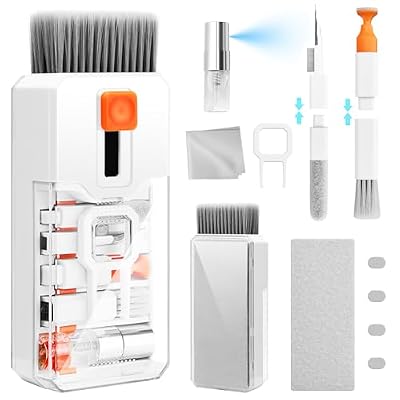
If you want everything in one place, a small AirPods cleaning kit usually includes a soft brush, a flocked sponge tip and a microfiber cloth. Pick one with soft, non-metal tips, and skip any kit whose main selling point is a metal pick.


How to Clean AirPods Step by Step
Before you start, put the earbuds in the case, check the battery, then take them out and set them on a clean cloth.
Step 1: Wipe the Earbud Shells
Use a dry lint-free cloth to wipe the outside of each earbud, including the stem. If there is sticky residue, lightly dampen a corner of the cloth with fresh water, wring it nearly dry, and wipe the plastic only, keeping it away from the mesh and microphone openings. Dry immediately with a clean section of the cloth.
Step 2: Clean the Speaker Mesh Without Pushing Debris In
Hold the earbud with the mesh facing down toward the table. Gravity then works with you, so anything you loosen falls away instead of into the driver. Brush across the mesh with short, light strokes using a dry soft brush. For the edges, roll a dry cotton swab gently around the rim.
For stubborn wax, cleaning putty can help: press it lightly onto the mesh and lift straight off, then check that no residue is left behind. Do not twist it or press hard. Apple’s guidance for the mesh on AirPods Pro is to use a dry cotton swab, so treat putty as an optional extra rather than a requirement, and stop if anything seems stuck.
Step 3: Clear the Microphone and Sensor Openings
The small grilles on the stem and top of the earbud handle calls and noise control. Brush them lightly with a dry brush. If callers say you sound muffled, dirt in these openings is a common cause, and our guide to fixing an AirPods microphone that is not working covers the software side.
Step 4: Remove and Wash AirPods Pro Ear Tips
On AirPods Pro, pull the silicone ear tip firmly straight off the base; it clicks on and off and should not be twisted. Apple’s instructions allow rinsing the tips with water, without soap, then drying them with a soft lint-free cloth.
- Remove both tips and keep track of left and right, and of size.
- Rinse under lukewarm water, rubbing gently with your fingers to loosen wax.
- Shake off water and pat dry with a lint-free cloth.
- Let them air-dry completely, inside and out, before refitting.
- Press each tip back on until it clicks into place.
Never rinse the earbud itself, and never refit a damp tip, because trapped moisture sits right over the mesh. If your tips are torn or no longer seal, replacement tips are cheap, and our AirPods Pro ear tips guide explains sizing.
Step 5: Clean the Charging Case Interior and Contacts
Open the lid and look into each earbud well. Lint and grit often collect at the bottom, right on the charging contacts. Use a dry soft brush or a dry cotton swab to lift it out. Wipe the metal contacts inside the wells and on the bottom of each earbud stem with a dry lint-free cloth or dry swab, since a thin film there can cause intermittent charging.
For the outside of the case, a dry cloth usually does the job; a barely damp cloth can handle grime on the lid, followed by immediate drying. Keep liquid away from the charging port entirely. To clear the Lightning or USB-C port, use a dry soft brush and gentle strokes, not metal. If one earbud still will not charge after cleaning, see our AirPods not charging troubleshooting steps.
How Often Should You Clean AirPods?
| Part | Light Use | Daily or Workout Use | Method |
|---|---|---|---|
| Earbud shells and stems | Weekly | After each workout | Dry lint-free cloth |
| Speaker mesh | Every 2 to 4 weeks | Weekly | Dry soft brush, dry swab, mesh facing down |
| AirPods Pro ear tips | Every 2 weeks | Weekly | Remove, rinse with water, dry fully |
| Case interior and contacts | Monthly | Every 2 weeks | Dry brush or swab, dry cloth |
| Case exterior | Monthly | Weekly | Dry or barely damp cloth, then dry |
A consistent light routine is safer than an occasional deep clean, because thin layers come off easily while hardened buildup tempts people to scrape.
Troubleshooting: Is Muffled Sound Dirt, Firmware or Fit?
Quiet or dull audio is not always a cleaning problem. Work through these checks before you get more aggressive with the mesh.
Signs It Is Dirt
Only one earbud sounds quieter, you can see a visible film or plug on its mesh, and the problem appeared gradually. Swapping which ear you wear it in does not change which bud is quiet.
Signs It Is Software or Settings
Both buds changed at once, or right after an update. Check that your AirPods firmware is current, make sure the Balance slider in your iPhone’s Accessibility audio settings is centered, and try forgetting and re-pairing the AirPods. Our walkthrough on how to update AirPods firmware shows where to find the version number, and a full AirPods reset often clears odd audio behavior.
Signs It Is Fit
Bass disappears, noise cancellation feels weak, and pressing the earbud gently into your ear makes it sound fuller. On AirPods Pro, run the Ear Tip Fit Test from your AirPods settings on iPhone and try a different tip size.
If a clean mesh, updated firmware and a good fit still leave one bud quiet, contact Apple Support, since the problem may be hardware. And if you notice ear pain, itching or discomfort while using earbuds, stop and talk to a clinician rather than trying to solve it with cleaning.
Frequently Asked Questions
Can I use rubbing alcohol to clean AirPods?
Apple’s guidance has varied by product, so check the current care page for your model before using any alcohol. As a safe default, stick to a dry lint-free cloth, and never let alcohol or any liquid touch the speaker mesh, microphone openings or charging port, where it can damage internal parts.
Is it safe to use compressed air on AirPods?
Avoid aiming compressed air at the speaker mesh or microphone grilles. The blast can drive wax and dust deeper into the earbud and may stress the delicate acoustic parts behind the grille. A dry soft brush with the mesh facing downward removes loose debris without forcing anything inward.
Can I rinse AirPods Pro ear tips under water?
Yes. Apple allows removing the silicone ear tips and rinsing them with water, without soap. Dry them with a lint-free cloth and let them air-dry completely before clicking them back on. Never rinse the earbud itself, and never reattach a damp tip over the speaker mesh.
Why is one AirPod quieter than the other after cleaning?
Debris may have been pushed against or behind the mesh, or wax is still sitting on it. Check the grille under good light and brush again with the mesh facing down. Also confirm the Balance setting is centered and firmware is current. If nothing helps, contact Apple Support about possible hardware issues.
How do I clean the AirPods case charging port?
Unplug the cable first. Use a dry, soft-bristle brush to gently lift lint out of the Lightning or USB-C port, working outward toward the opening. Do not spray cleaner into the port or insert metal objects such as pins or paper clips, which can scratch, bend or short the contacts inside.






Write Your Review
No reviews yet. Be the first to share your experience!