
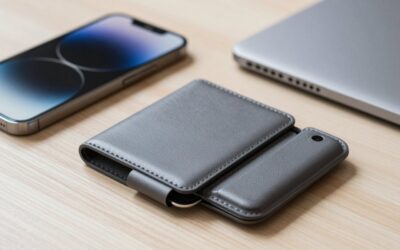
- Top Pick: Fanseesy for MagSafe Wallet, 5 Card Holder, Slim Leather Magnetic Wallet for iPhone 18/17/16/15/14/13/12 Pro Max Plus Air Series, 1 Card Slots & 1 Cash Slot,Black
- Best Value: ESR for MagSafe Wallet, 5 Card Holder for Phone Case, RFID Blocking
- Premium Choice: TWZKG for MagSafe Wallet, 3 Cards Holder for Phone Case, RFID Blocking
Choosing a MagSafe wallet looks simple until the first few days of use reveal the weak points: cards are difficult to remove, the wallet slides off in a pocket, leather stretches, or a case makes the magnetic connection unreliable. Many shoppers focus on the number of card slots and ignore the wallet’s actual thickness, grip, access design, and compatibility with their iPhone and case.
The right choice depends less on finding the wallet with the highest capacity and more on matching the design to your daily carry. A slim two-card wallet may be ideal for transit and tap-to-pay users, while a larger wallet with a cash slot makes more sense if you leave your traditional wallet at home. This guide explains how to choose a MagSafe wallet in 2026, including the specifications that matter and the marketing claims that deserve a closer look.
As an Amazon Associate we earn from qualifying purchases at no extra cost to you.
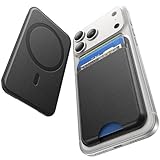


Decide These 3 Things First
- How many cards will you carry? Count the cards you actually use every week, not every card in your physical wallet. Most people are best served by two to four cards. A wallet advertised for five cards may become bulky when fully loaded.
- Will you use it with a case? MagSafe-compatible cases include a magnetic ring designed to preserve alignment. A regular thick case can weaken the connection or prevent the wallet from attaching securely.
- Do you need cash and access, or maximum slimness? A cash slot and thumb cutout add convenience but usually increase thickness. If you rarely carry bills, a flat card sleeve will be easier to pocket.
Size and Capacity
Start with the wallet’s loaded dimensions, not just its empty measurements. A practical MagSafe wallet is often about 2.5 to 2.8 inches wide, 3.7 to 4.1 inches tall, and 0.25 to 0.45 inch thick when carrying two or three cards. Designs rated for five cards can reach approximately 0.5 inch thick or more when filled.
Capacity claims are not standardized. “Holds five cards” may mean five thin identification or credit cards with no cash, while embossed cards, metal cards, and cards with raised numbers take up more room. If you carry a driver’s license, two payment cards, and an insurance card, a three- or four-card wallet is usually a more realistic fit than a model designed around its maximum rating.
Also check how the cards sit. A vertical stack generally keeps the footprint compact, while a fan-out design makes individual cards easier to retrieve but can add bulk. A thumb slot should be large enough to expose roughly one-third of the front card. If the opening is too small, you may have to remove the entire stack.
Material and Finish
Leather offers a familiar feel and can develop a patina, but its edges may soften and stretch with use. Genuine leather does not automatically mean high quality; look for a stated leather type, finished edges, and even stitching. Faux leather and polyurethane are often less expensive and easier to wipe clean. They can be a sensible choice for a wallet exposed to rain, gym bags, or frequent handling.
Metal and hard-shell wallets can resist scuffs and hold their shape, though they may feel less comfortable in a back pocket. Fabric or woven exteriors can reduce the slick feeling of a smooth plastic wallet but may collect lint. For everyday carry, a soft edge and a surface with moderate friction are more important than a glossy finish.
Pay attention to the lining. A smooth lining protects cards from abrasion, while rough seams can scratch cards over time. If the product uses adhesive construction rather than stitching or molded panels, inspect the return policy carefully; heat and moisture can affect adhesive-backed materials.
Construction and Magnetic Alignment
A MagSafe wallet should attach to the center of the phone or case without visibly shifting. The wallet should not cover the camera lenses, interfere with buttons, or protrude so far that the phone rocks when placed on a table. A wallet around 0.4 inch thick is usually easier to live with than a tall, heavily layered design.
Look for reinforced corners, closed seams, and a card compartment that does not gape when partially filled. A pull tab can improve access, but it should retract neatly rather than hang outside the wallet. For a fold-over or stand-style wallet, check whether the hinge is stitched, riveted, or molded. Hinges are high-wear points and often determine how long the wallet remains usable.
Magnetic strength is difficult to compare from product listings because brands do not use a consistent testing method. Instead of relying on a dramatic strength claim, look for a clear statement that the wallet is designed for MagSafe and read reviews mentioning movement during walking, driving, or putting the phone in a pocket. A compatible case is particularly important if the wallet will be removed frequently.
Comfort and Everyday Performance
Consider where the wallet will spend most of its time. A wallet attached to the back of a phone can make one-handed use less comfortable, especially when it is loaded with four or five cards. In a front pocket, even an extra 0.1 inch of thickness can be noticeable when combined with keys or a phone case.
For tap-to-pay, card access matters more than capacity. A wallet that requires removing the card can be inconvenient at checkout, and some contactless cards may not work reliably while buried behind multiple cards or a metal layer. If you use transit cards, hotel keys, or access badges, test the card near the reader before committing to a long-term setup.
RFID blocking is useful against certain forms of unauthorized radio-frequency scanning, but it can also prevent contactless cards from being read while they remain inside the wallet. If a listing says “RFID blocking,” check whether the entire wallet blocks signals or only a designated compartment. Do not assume the label means every type of wireless payment risk is addressed.
Price Tiers
Budget MagSafe wallets generally cost about $7 to $15. At this level, expect basic synthetic leather, plastic, or fabric construction, a simple card slot, and limited information about magnetic performance. Examples such as the under-$10 Fanseesy wallet, the under-$20 ESR model, and the under-$10 TWZKG wallet illustrate this range. Their value depends on usable capacity and return coverage rather than the printed maximum card count.
Midrange models usually cost $16 to $30. They may offer cleaner edge finishing, stronger structure, better access to cards, or a more consistent fit with compatible cases. This tier is often the sweet spot for daily use if you want a slim wallet without paying for premium branding.
Premium wallets typically cost $31 to $60 or more. The under-$40 Pelican MagSafe Wallet is an example of the entry point for this category. The extra cost should buy a meaningful improvement such as tougher materials, a better hinge, a more secure attachment, a useful stand function, or stronger warranty support. A higher price alone does not guarantee a thinner or better wallet.
Warranty and Return Coverage
Check the warranty length, what it covers, and who handles the claim. A one-year limited warranty is a reasonable baseline for a wallet that uses stitching, adhesive, or a moving mechanism. Some brands offer longer coverage, but exclusions may include cosmetic wear, overloaded compartments, damage from drops, or use with an incompatible case.
A return window of at least 30 days is valuable because magnetic performance is highly dependent on your phone and case. Confirm whether the wallet can be returned after cards have been inserted and whether the seller requires original packaging. Keep your order confirmation and photograph any damaged seams or peeling edges when the wallet arrives.
Delivery and Assembly
There is no meaningful assembly for a standard MagSafe wallet, so “easy assembly” language should not influence your purchase. Installation should involve only attaching the wallet to a compatible phone or case. A design with a removable strap, separate card insert, or stand hinge may require a few setup steps, but it should not need tools.
Check the estimated delivery window, seller location, and replacement process before ordering. A low price loses its appeal if a damaged wallet takes weeks to replace. When the package arrives, test the wallet empty, then with one card and finally with its intended load. Verify that it stays aligned while the phone is moved gently in different directions.
Spec Checklist
| Spec | Budget | Mid | Premium |
|---|---|---|---|
| Typical price | $7–$15 | $16–$30 | $31–$60+ |
| Useful capacity | 1–3 cards | 2–4 cards | 2–5 cards, depending on design |
| Loaded thickness | About 0.3–0.55 inch | About 0.25–0.45 inch | About 0.25–0.5 inch |
| Approximate footprint | 2.5–2.9 by 3.7–4.2 inches | 2.5–2.8 by 3.7–4.1 inches | About 2.5–2.8 by 3.7–4.1 inches |
| Material | PU, plastic, or basic fabric | Improved synthetic leather, fabric, or leather | Higher-grade leather, metal, or reinforced composite |
| Warranty target | At least 30-day returns | 30-day returns and approximately one-year warranty | One-year warranty or longer |
Red Flags
- No dimensions or loaded thickness: A capacity claim without measurements makes it difficult to judge pocket comfort.
- “Magnetic” without MagSafe compatibility: A generic magnetic wallet may not align correctly with an iPhone or MagSafe case.
- Unclear card capacity: Treat “five cards” as a maximum until the listing explains the card thickness and access method.
- Unusually strong promises: Claims that a wallet will never detach, block every wireless signal, or protect against all theft should be viewed skeptically.
- Visible gaps at the edges: Poorly finished seams can let cards slide out or collect dust.
- No returns: Fit and grip are personal, so a no-return policy is a significant disadvantage.
- Reviews describing phone damage or peeling: A few isolated complaints may happen, but repeated reports indicate a construction problem.
FAQ
How many cards should a MagSafe wallet hold?
Choose the smallest capacity that covers your routine. Two or three cards are usually the best balance of slimness and access. Choose a four- or five-card wallet only if you genuinely need the extra cards and the design remains comfortable when fully loaded.
Will a MagSafe wallet work with any phone case?
No. It works most reliably with an iPhone or case specifically designed for MagSafe. A thick non-MagSafe case can weaken alignment and make the wallet more likely to shift or detach. Check the phone and case compatibility before ordering.
Is RFID blocking worth paying for?
It can be useful if you want to reduce certain types of contactless scanning, but it may stop cards from communicating with a reader while inside the wallet. If you frequently use transit cards or tap-to-pay cards, prioritize easy card removal and verify how the blocking layer is positioned.
Can I wirelessly charge my phone with the wallet attached?
Most standard card wallets should be removed before wireless charging. The wallet and cards can interrupt alignment, reduce charging performance, or prevent the phone from charging at all. Remove the wallet before placing the phone on a wireless charger, and follow the charger and phone manufacturer’s instructions.
Write Your Review
No reviews yet. Be the first to share your experience!