
The Short Answer
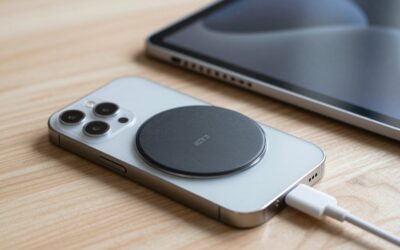
For most phones and cases, you need a MagSafe-compatible ring measuring approximately 2.2 inches (55–56 mm) across the outside and about 1.8 inches (45–46 mm) across the inside. This is the common size for adhesive metal rings designed to work with MagSafe chargers, car mounts, grips, and stands.
If your iPhone already has MagSafe built in, or your case specifically says “MagSafe compatible,” you usually do not need to add a ring. A metal sticker ring is primarily for standard phones, older iPhones, or non-MagSafe cases. Check the product description carefully: some rings are only magnetic steel plates, while others include a separate alignment ring or are designed to support wireless charging.
As an Amazon Associate we earn from qualifying purchases at no extra cost to you.


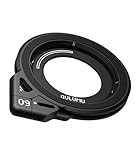
For the best fit, choose a ring with an outer diameter close to 2.2 inches, place it centrally on the back of the phone or case, and confirm that it will not cover a camera bump, logo, wireless charging coil, or built-in kickstand. In 2026, most universal adhesive rings and magnetic phone grips still follow this broadly compatible 55–56 mm format.
Standard Sizes
There is no single official universal size for every MagSafe ring accessory. However, the dimensions below cover the sizes most commonly encountered when shopping for adhesive rings, magnetic plates, and phone grips.
| Ring or accessory type | Typical outside diameter | Typical inside diameter | Approximate thickness | Best use |
|---|---|---|---|---|
| Standard adhesive MagSafe ring | 2.20 in (56 mm) | 1.77 in (45 mm) | 0.02–0.04 in (0.5–1 mm) | Most phones and cases |
| Compact adhesive ring | 2.13 in (54 mm) | 1.69 in (43 mm) | 0.02–0.04 in (0.5–1 mm) | Smaller phones and narrow cases |
| Large magnetic plate or ring | 2.36 in (60 mm) | 1.81 in (46 mm) | 0.04–0.08 in (1–2 mm) | Thick cases and heavier accessories |
| MagSafe phone grip body | 2.00–2.60 in (51–66 mm) | Not applicable | 0.25–0.75 in (6–19 mm) | Finger support, kickstand, and handling |
The 2.20-inch (56 mm) ring is the safest starting point because it corresponds closely to the circular magnetic layout used by many MagSafe accessories. A ring that is slightly smaller, such as 54 mm, may work well on a compact phone but can reduce the contact area with some magnetic mounts. A larger 60 mm plate may provide more surface area, but it can look oversized and may interfere with cameras or curved phone edges.
Keep thickness in mind as well as diameter. A thin steel ring around 0.5 mm thick is less noticeable and is less likely to affect a case’s fit. A thicker ring or a grip with a built-in magnet can sit 6–19 mm above the case, which is normal for a stand or finger holder but may prevent some wireless chargers from making proper contact.
How to Measure Your Space
- Remove the case if possible. Measure the phone and the case separately. A thick, textured, or heavily cushioned case may need a ring on the outside surface rather than directly against the phone.
- Find the usable center. Measure the phone’s height and width, then mark the midpoint on the back. On many phones, the correct MagSafe ring position is near the center of the wireless charging coil, not necessarily the visual center of the entire phone.
- Check the camera clearance. Place a paper circle measuring 2.2 inches (56 mm) on the back of the phone. Move it until it is centered, and make sure it does not overlap the camera module. Leave at least 0.12 inch (3 mm) of clearance where possible.
- Measure the flat surface. The ring needs a reasonably flat area at least 2.2 inches (56 mm) wide. If the back curves sharply near the edges, position the ring farther inward or use a smaller 2.13-inch (54 mm) ring.
- Check case thickness. For reliable magnetic attachment, a case is generally easiest to use when it is no more than about 0.12 inch (3 mm) thick. Very rugged cases may need a stronger magnetic accessory or a ring mounted on the outside.
- Test before sticking. Use removable tape to hold the ring in place. Attach your charger, car mount, or grip and confirm that it sits straight, does not block buttons, and remains comfortable in your hand.
- Clean and apply. Wipe the surface with isopropyl alcohol, let it dry completely, and press the adhesive ring firmly for 30–60 seconds. Allow adhesive products to set according to the package directions before applying substantial weight.
Do not assume that the geometric center is the charging center. Camera placement, battery size, and internal components vary by phone. If wireless charging is important, test charging with the ring in its temporary position before making it permanent.
By Room or Use Case
For a bedroom nightstand
Choose a standard 2.20-inch (56 mm) ring or a slim MagSafe-compatible grip. A compact charger or stand usually does not require a large plate. Prioritize a low-profile ring around 0.5 mm thick if the phone will lie flat on a wireless charging pad. A ring with an integrated kickstand can be useful for watching video, but allow roughly 0.5 inch (13 mm) or more of extra depth behind the phone.
For a kitchen counter
Use a secure ring or grip that is easy to handle with one hand. A magnetic phone ring holder in the approximately $14–$16 range often combines a finger loop and kickstand, while a basic adhesive metal ring may cost about $4–$8. Avoid placing the ring where wet hands will repeatedly press against an exposed adhesive edge. A protective case with a smooth back offers better long-term adhesion than a silicone or fabric surface.
For a home office desk
A 2.20-inch ring works for most desk mounts and adjustable stands. If the phone will be held upright for long periods, look for a grip or stand rated for the phone’s weight rather than choosing by ring diameter alone. Many magnetic grips weigh approximately 1.5–3.5 ounces (43–99 grams). Low-profile accessories are better if you frequently slide the phone into a pocket or place it face up on a desk.
For a car mount
Use the standard 55–56 mm ring unless the mount manufacturer specifies another size. Car vibration, heat, and repeated removal put more stress on the adhesive than normal indoor use. A rigid metal ring with a strong adhesive backing is generally more suitable than a decorative ring. Leave enough clearance around the camera and make sure the accessory does not obstruct the driver’s view or interfere with controls.
For travel and everyday carrying
Choose a thin ring or detachable MagSafe grip. Basic universal rings are often priced around $4–$10, while rotating grips commonly fall between $13 and $20. Premium aluminum grips and dual-sided magnetic designs can cost approximately $40–$50. The larger price difference usually reflects materials, hinge construction, magnets, and finish—not a different standard ring diameter.
Common Sizing Mistakes
- Buying by phone model alone: Two phones with similar dimensions can have different camera layouts and charging-coil positions. Measure the actual phone or case.
- Confusing inside and outside diameter: A ring advertised as 45 mm may refer to the opening, not the full width. Confirm that the outside diameter is close to 55–56 mm.
- Ignoring case thickness: A ring can be the correct size but too weak through a rugged case. Attach it to the outside or use a MagSafe case.
- Covering the wireless charging area: Some solid metal plates and poorly positioned rings can reduce or prevent wireless charging. Test the charger before permanent installation.
- Placing the ring too close to the edge: Curved edges reduce adhesive contact and make the ring easier to peel off.
- Assuming every metal ring is magnetic: Some products are intended to attract magnets but do not contain the same magnet arrangement as a MagSafe accessory. Follow the compatibility notes.
- Skipping the temporary test: Tape the ring in place first. A five-minute fit check can prevent a crooked installation or blocked camera.
FAQ
What is the standard MagSafe ring size?
The most common universal size is approximately 2.20 inches (55–56 mm) outside diameter, with an inside opening of about 1.77 inches (45 mm). Because manufacturers vary slightly, confirm both measurements before ordering.
Do I need a MagSafe ring for an iPhone?
You generally do not need one if the iPhone has built-in MagSafe and you are using a compatible case or accessory. You may need an adhesive ring for an older iPhone, a non-MagSafe case, or a phone that does not include built-in magnets.
Will a MagSafe ring work through a phone case?
It can, but performance depends on case thickness and material. Thin, smooth cases are easiest. For a rugged case thicker than approximately 0.12 inch (3 mm), place the ring on the outside or use a case designed with an integrated magnetic ring.
Can I use a smaller ring?
Yes. A 54 mm ring can work when the phone has limited flat space, but it may offer less contact with some mounts and grips. Use the standard 55–56 mm size unless camera clearance or the phone’s shape makes the compact option necessary.
Write Your Review
No reviews yet. Be the first to share your experience!