
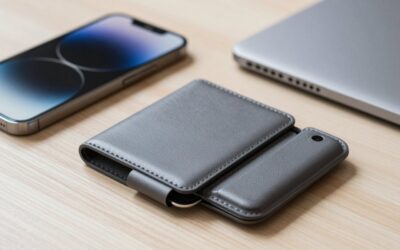
A MagSafe wallet is convenient because it snaps to the back of a compatible iPhone or case, but using one carelessly can lead to lost cards, a damaged magnetic stripe, a weak connection, or an overheated phone. An overstuffed wallet may slide off when you sit down, while a wallet left attached during wireless charging can interfere with charging or add unnecessary heat. The safest approach is to use a compatible wallet, keep its load light, check the connection regularly, and remove it whenever the phone or wallet becomes hot. These steps apply whether you are setting up a wallet in 2026 or replacing an older one.
What You Need
| Item | Why | Optional? |
|---|---|---|
| MagSafe-compatible iPhone or case | Provides the magnetic ring needed to align and hold the wallet. A non-MagSafe case may weaken the connection. | No |
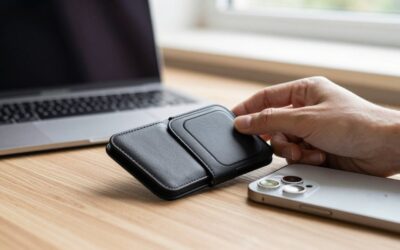
| MagSafe wallet | Holds cards and, in some designs, cash. Examples include a money-clip model such as the ExtreLife, around $30, or a slim leather-style Fanseesy model, around $7. | No |
| Two to three essential cards | A light load improves the magnetic hold and makes cards easier to remove. Check the wallet maker’s stated maximum before adding more. | No |
| Soft, dry microfiber cloth | Removes grit and moisture from the phone, case, and wallet before attachment. | Yes |
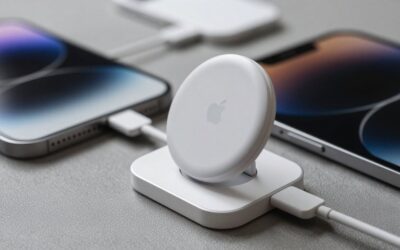
| Wireless charger or MagSafe charger | Useful for checking whether the wallet must be removed for charging. A charger rated around 15 watts is common for MagSafe-compatible charging, but actual output depends on the phone, charger, and adapter. | Yes |
Step-by-Step
1. Confirm compatibility — 2 minutes
Check that your iPhone supports MagSafe or that your case has a built-in MagSafe ring. A regular thin case without a magnetic ring may not hold a wallet securely. Thick, rugged, leather, or battery cases can also reduce magnetic strength. Remove any temporary adhesive ring, pop grip, card sleeve, or other accessory from the area where the wallet will attach.
As an Amazon Associate we earn from qualifying purchases at no extra cost to you.

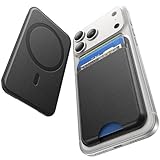
Read the wallet packaging for its supported phone models and card capacity. Product listings may mention broad compatibility, but the physical magnetic alignment and case thickness matter more than the model list alone.
2. Inspect and clean the contact surfaces — 2 minutes
Remove the case if you are unsure whether it is compatible. Wipe the back of the phone or case and the wallet’s magnetic side with a dry microfiber cloth. Small particles of sand, grit, or metal can scratch the finish or prevent the wallet from sitting flat.
Do not apply oil, water, glass cleaner, or household adhesive to the magnetic surfaces. If the phone or wallet is wet, let it dry completely before attaching it.
3. Choose the cards carefully — 3 minutes
Carry only what you need. A practical starting load is one identification card, one payment card, and one transit or access card, provided the wallet’s design supports them. Keep the total within the maker’s stated limit; a wallet advertised for five cards may become difficult to close or remove from when loaded to its maximum.
Keep magnetic-stripe cards away from the wallet’s magnets when possible. These can include older credit or debit cards, hotel key cards, gift cards, parking cards, and some access badges. Chip-and-contactless payment cards usually continue to work, but the issuer’s guidance takes priority. Do not store a medical device card or any card that specifically warns against magnetic exposure in the wallet.
4. Load the wallet evenly — 2 minutes
Insert cards fully and distribute them so the wallet remains flat. If the design includes a cash slot or money clip, use only a few folded bills rather than a thick stack. More paper increases bulk and can push the wallet away from the magnetic ring.
Close or secure the wallet, then check that no card edge protrudes. A card sticking out can catch on clothing, scratch the phone, or fall out when the wallet is removed.
5. Attach it with correct alignment — 1 minute
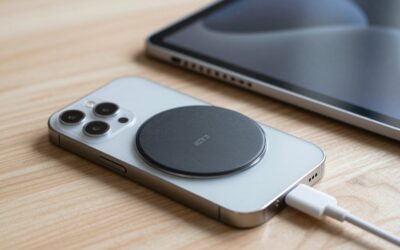
Place the wallet against the center of the MagSafe ring instead of sliding it into position from the edge. You should feel it seat against the phone or case. If the wallet has a marked front or a specific orientation, follow those instructions.
With the phone held over a soft surface, give the wallet a gentle side-to-side test. Do not yank it sharply. If it moves easily, remove the case or reduce the card load before relying on it outside the home.
6. Test normal handling — 5 minutes
Hold the phone in one hand, place it in a pocket, and set it on a table. Try common movements such as picking up a bag, sitting down, and turning the phone face up and face down. Watch for the wallet catching on fabric or sliding when the phone is placed against another magnetic object.
Do not use the wallet as a handle for swinging, tossing, or carrying the phone. MagSafe is designed for attachment, not for supporting the phone’s full weight during rough movement.
7. Remove it before wireless charging — 1 minute each time
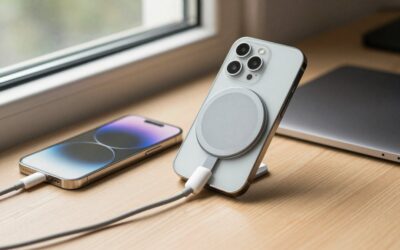
For the most reliable charging, remove the wallet before placing the phone on a MagSafe or Qi charger. This prevents the wallet from blocking proper alignment and reduces heat around the phone, cards, and magnet. Remove other metal accessories as well.
During charging, use the charger on a hard, ventilated surface. Avoid beds, sofas, direct sunlight, and temperatures above 95°F (35°C). If the phone or charger becomes uncomfortably hot, stop charging and let everything cool before trying again.
8. Check the wallet after use — 1 minute
Once a week, inspect the stitching, adhesive, card slot, money clip, and magnetic ring. Look for stretched material, loose edges, bent cards, or a magnet that feels weaker than usual. Clean away dust and confirm that all cards are still present before leaving home.
Mistakes to Avoid
- Overloading the wallet: Five cards may be the advertised maximum, not the ideal everyday load. A slimmer two- or three-card setup generally holds more securely.
- Charging with the wallet attached: Remove it before wireless charging, especially when the phone is already warm or the wallet contains metal components.
- Using a non-MagSafe case: A basic case may make the wallet appear attached while providing too little holding force for daily use.
- Storing magnetic-stripe cards without checking: Older hotel, access, gift, and payment cards can be vulnerable to magnets. Use a separate nonmagnetic holder if the card issuer warns against magnetic exposure.
- Putting cash or cards between the phone and wallet: Extra layers reduce contact and may cause the wallet to detach.
- Attaching the wallet near a pacemaker or other implanted medical device: Strong magnets can affect some devices. Follow your physician’s and device manufacturer’s distance guidance; when in doubt, keep the phone-wallet combination away and ask a medical professional.
- Ignoring a weak connection: A wallet that slips during a gentle test can fall in a pocket, car, or crowded public place.
How Often
Check the magnetic hold and card load once a week, or whenever you add a card or change cases. Wipe the contact surfaces every one to two weeks and immediately after the phone or wallet has been in a sandy, dusty, or wet environment. Remove the wallet for every wireless-charging session.
Replace cards as soon as they are bent, cracked, or repeatedly declined. Review the wallet itself every three to six months if it is used heavily. Frequent removal, a stuffed card slot, sweat, and friction can wear leather, synthetic materials, stitching, and adhesive faster than occasional use.
When to Call a Pro or Replace
Most wallet problems do not require a repair technician. Replace the wallet if the magnet has separated from its housing, the card slot no longer retains cards, the stitching is opening, or the wallet detaches during a gentle handling test. Replacement prices commonly range from about $7 for a basic slim model to roughly $30 for a wallet with a money clip, stand, or heavier construction.
Contact the phone manufacturer or an authorized service provider if the phone’s back glass is cracked, the MagSafe ring appears displaced, wireless charging repeatedly stops, or the phone becomes unusually hot with multiple known-good chargers. Do not glue a loose magnet back onto a phone or cut into the phone’s back panel. If a card or access badge stops working after exposure to the wallet, contact the card issuer or building administrator rather than trying to repair the card.
FAQ
Can I leave a MagSafe wallet on while charging?
It is better to remove it. The wallet can interfere with alignment, slow or interrupt charging, and add heat. Remove the wallet and other magnetic or metal accessories before using a wireless charger, then place the phone on a hard, ventilated surface.
How many cards should I carry?
Start with two or three cards and stay below the manufacturer’s maximum. A five-card wallet does not always hold securely when filled, especially if you also carry cash. If the wallet bulges, cards slide out, or the magnet feels weak, reduce the load.
Will a MagSafe wallet damage credit cards?
It may affect cards that rely on a magnetic stripe, including some hotel keys, access badges, gift cards, and older payment cards. Chip and contactless functions are generally less dependent on the stripe, but card issuers’ instructions vary. Keep any card labeled “keep away from magnets” in a separate holder.
Why does my MagSafe wallet keep falling off?
The most common causes are an incompatible or thick case, a dirty contact surface, too many cards, or a damaged wallet magnet. Clean both surfaces, remove extra cards, and test the wallet directly on the phone or a certified MagSafe case. If it still shifts with gentle handling, replace the wallet or case before carrying it outdoors.
Write Your Review
No reviews yet. Be the first to share your experience!