
An iPhone with a worn battery dies before lunch, shuts down in cold weather and leaves its owner hunting for a charger by mid-afternoon. A replacement cell brings that phone back to a full day of use, and the aftermarket kits below include the tools for the swap, so a careful owner can do the job at home instead of booking a repair shop. The decision is not which brand shouts loudest about capacity, but which kit matches the exact iPhone model on the desk and includes everything the job needs.


This guide is for iPhone 12 and 12 Pro owners who are comfortable opening a phone, and for owners weighing whether a do-it-yourself swap beats paying a repair shop. Each battery below was chosen from the names and specifications on its Amazon page, with capacity, model fit and included tools checked against the listing before it earned a place here.
Quick Picks
As an Amazon Associate we earn from qualifying purchases
| Product | Best for | Key spec from title |
|---|---|---|
| JUBOTY iPhone 12/12 Pro 3800mAh | A balanced capacity upgrade for iPhone 12 and 12 Pro | 3800mAh high-capacity cell |
| ElephantStory iPhone 12/12 Pro 3980mAh | The largest listed capacity for iPhone 12 and 12 Pro | 3980mAh high-capacity cell |
| GAIDEGA iPhone 12 4800mAh | The fullest tool kit for a first-time swap | 4800mAh cell with full tool kit |
How to Choose
Match the battery to the exact iPhone model
Every iPhone battery is built for one model family, and a cell for the wrong phone will not fit the connector or the battery well. Find the model number in Settings, then General, then About, and compare it with the listing. The kits in this guide list iPhone 12 models A2172, A2402, A2403 and A2404, and the iPhone 12 Pro shares the same battery as the standard iPhone 12, which is why one kit can cover both. A battery made for the iPhone 12 Pro Max or the iPhone 12 mini is a different shape entirely, so never assume that a listing for one member of the family fits the rest.
Read the capacity figure with care
Capacity, stated in milliamp hours, is the number every aftermarket brand leads with, and it deserves a sceptical read. The original iPhone 12 battery holds 2,815mAh, so a kit claiming 3,800mAh or more is promising a larger cell than Apple fitted, which is possible because third-party cells use denser chemistry. Treat the headline figure as the listing’s own claim, not a lab result, and compare kits on the same basis, model for model and cell for cell, instead of chasing the biggest number. A fresh 0-cycle cell matters as much as the headline, since a battery that has already been cycled will lose its advantage quickly.
Check what the kit actually includes
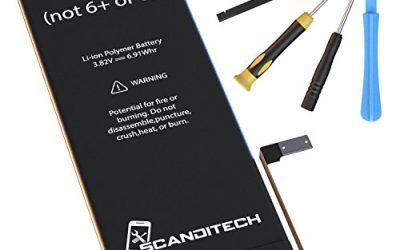
A replacement battery without tools is a half-finished job, so read the included-items list as carefully as the capacity figure, line by line. A complete kit should contain pentalobe and cross screwdrivers, plastic spudgers, a suction cup, opening picks and fresh adhesive strips, because the old adhesive cannot be reused once the screen is lifted. Some kits add a waterproof frame adhesive that reseals the display edge, which is worth having if the phone will face rain, splashes or dust. If the listing is vague about what is in the box, treat that as a warning and choose a kit that spells out every item.
Plan the swap safely, or hand it to a professional
Replacing an iPhone battery is an advanced repair, not a beginner project, and the safety planning matters more than the brand on the cell. The display is sealed with strong adhesive, the battery sits under delicate flex cables, and a lithium-ion cell must never be punctured, bent or heated, since damage can cause swelling, heat or fire. Work on a clear, well-lit table, keep metal tools away from the cell itself, and follow a video guide for the exact model before starting. Anyone unsure about any step should take the kit to a repair shop instead, since a professional swap still costs far less than a new phone.
The 3 Best Options
JUBOTY iPhone 12/12 Pro 3800mAh
The JUBOTY kit is the straightforward choice for an iPhone 12 or 12 Pro that needs a fresh cell. Its 3,800mAh lithium-ion battery is larger than the original 2,815mAh cell, and the listing describes it as a new 0-cycle cell, which means it starts life with no charge cycles behind it. The kit covers iPhone 12 and 12 Pro models A2172, A2402, A2403 and A2404, and it arrives with a professional repair tool kit so the swap can begin as soon as the box is open. For an owner who wants a capacity step up and a complete kit, this is the least complicated pick on the list.
Specs
- Capacity: 3800mAh lithium-ion cell
- Fit: iPhone 12 and 12 Pro, models A2172, A2402, A2403, A2404
- Cell condition: new 0-cycle battery
- Included: professional repair tool kit
Best for: iPhone 12 and 12 Pro owners who want a balanced capacity upgrade with tools included.
Watch out for: the listing states a higher capacity than the original cell, so treat the headline figure as the maker’s claim rather than a measured result.
ASIN: B0CW9M3NR1
ElephantStory iPhone 12/12 Pro 3980mAh
The ElephantStory kit leads this list on capacity, with a 3,980mAh cell for the iPhone 12 and 12 Pro, the largest capacity figure of the three picks here. It fits the same model numbers, A2172, A2402 and A2403, and it ships with professional repair tool kits, so the screwdrivers and prying tools for the swap are in the box. The extra capacity suits a phone that is used hard through the day, from navigation and video to long calls, where every extra milliamp hour stretches the time between charges. It is the pick for an owner who wants the most headroom the aftermarket offers for these two models.
Specs
- Capacity: 3980mAh high-capacity cell
- Fit: iPhone 12 and 12 Pro, models A2172, A2402, A2403
- Cell condition: new 0-cycle battery
- Included: professional repair tool kits
Best for: heavy users who want the largest listed capacity for an iPhone 12 or 12 Pro.
Watch out for: check the model number on the phone before ordering, since this kit lists three model numbers and not the full A2404 variant.
ASIN: B0CG1KG8N7
GAIDEGA iPhone 12 4800mAh
The GAIDEGA kit is built for a first-time swap, because its box holds the most complete tool set of the three. The 4,800mAh lithium-ion cell is the largest capacity in this guide, and the listing gives its rated voltage as 3.82V, with a 0-cycle cell that starts fresh. It fits iPhone 12 models A2172, A2402, A2403 and A2404, and the kit includes pentalobe, cross and Y-shaped screwdrivers, a metal tweezer, plastic spudgers, an ejection pin, a suction cup, opening picks, adhesive strips and a waterproof frame adhesive. An owner doing this repair for the first time gets everything in one box, including the seal that other kits leave out.
Specs
- Capacity: 4800mAh lithium-ion cell
- Rated voltage: 3.82V
- Fit: iPhone 12, models A2172, A2402, A2403, A2404
- Cell condition: new 0-cycle battery
- Included: full tool kit with screwdrivers, spudgers, suction cup, adhesive strips and waterproof frame adhesive
Best for: first-time swappers who want every tool and seal in one box.
Watch out for: this kit is made for the standard iPhone 12 only, so it does not fit the 12 Pro Max or the 12 mini.
ASIN: B0BR627VCK
Which One Fits Your Situation
You own an iPhone 12 and want a longer day
The JUBOTY 3,800mAh kit is the natural pick when the goal is simply a longer day from a standard iPhone 12. Its capacity sits comfortably above the original cell, the kit covers all four iPhone 12 model numbers without exception, and the included tools mean no extra shopping trip. It is the least fussy option for a phone that just needs to stop dying before dinner every day.
You want the largest capacity for a 12 or 12 Pro
The ElephantStory 3,980mAh kit suits an owner who runs the phone hard and wants the most headroom available for these models. Navigation, video streaming and long calls drain a battery fast on a busy day, and the extra capacity over the JUBOTY kit buys a little more time between charges. Confirm the model number first before ordering, since this kit lists three of the four model variants.
You are doing the swap for the first time
The GAIDEGA kit is the one to choose when the repair itself feels daunting. Its 4,800mAh cell is the largest capacity here, and the box holds every tool the job needs, from three screwdriver types to the suction cup, the spudgers and the waterproof frame adhesive that reseals the display. A first-timer who follows a video guide for the exact model will find nothing missing halfway through the job.
You plan to keep the phone for another year
Any of these three kits can revive a phone for another year, since all three list a 0-cycle cell. A fresh cell restores the phone to a full day of use, and pairing the swap with fresh adhesive keeps the display sealed against dust and splashes. If the screen is also cracked, fix that first, since opening a damaged display makes the battery swap harder than it needs to be.
Common Mistakes
- Ordering a battery without checking the iPhone model number in Settings first
- Trusting the biggest capacity number on the listing without comparing what it actually includes
- Reusing old adhesive strips instead of fitting the fresh ones from the kit
- Prying at the battery with a metal tool, which can puncture a lithium-ion cell
- Skipping the battery health check in Settings after the swap to confirm the new cell reads correctly
Frequently Asked Questions
Will an aftermarket battery show full maximum capacity?
A new aftermarket cell usually reads a full maximum capacity in Settings after installation. The phone may show a message saying it cannot verify a genuine Apple battery, which is normal for a third-party cell. If the reading stays stuck or the phone shuts down, the connector may not be seated properly and the phone should be checked again.
Can I replace an iPhone battery myself?
A careful owner can replace an iPhone battery at home, but it is advanced work, not beginner work. The display is sealed with strong adhesive, the battery sits under delicate cables, and the cell must never be punctured or bent. A video guide and the kit tools are needed. Anyone unsure should hand the kit to a repair shop instead.
How do I know which battery fits my iPhone?
Open Settings, then General, then About, and read the model number. Compare that number with the model numbers on the listing, such as A2172, A2402, A2403 or A2404. The iPhone 12 and 12 Pro share a battery, but the 12 Pro Max and the 12 mini use different cells, so the model number is the reliable check.
Do these kits include the tools I need?
Each kit in this guide includes a repair tool set, with screwdrivers, plastic spudgers, a suction cup and adhesive strips in the box. The GAIDEGA kit goes further, adding a Y-shaped screwdriver, a metal tweezer, an ejection pin, opening picks and a waterproof frame adhesive. Check the included-items list on the listing before ordering, since the exact tools vary between kits.

Write Your Review
No reviews yet. Be the first to share your experience!