


Prime
Limited Time
Ailun Screen Protector for iPad Mini 7 & 6, 2 Pack, 8.3 Inch, Case Friendly | Mini 7 A17 Pro 7th Gen 2024, Mini 6th Gen 2021 Release, Tempered Glass, 2.5D Edge


iPad Pro screen discoloration is an alarming display issue that can severely compromise your media editing, reading, and viewing experience. When you invest top-tier capital into a flagship Apple tablet, expecting flawless performance is only natural. This in-depth evaluation inspects the root causes of color shifting and helps you determine if the display remains a dealbreaker in 2026.
Quick Overview and Key Screen Tech of the iPad Pro
Before we dive into the frustrating realities of iPad Pro screen discoloration, we must examine the underlying hardware architecture of these elite panels. Apple has pushed the envelope of mobile screen technology, moving from classic IPS LCD and Liquid Retina XDR displays to cutting-edge dual-stack OLED setups. Understanding how these screens function is vital to identifying why color anomalies occasionally crop up during daily use.
As an Amazon Associate we earn from qualifying purchases at no extra cost to you.



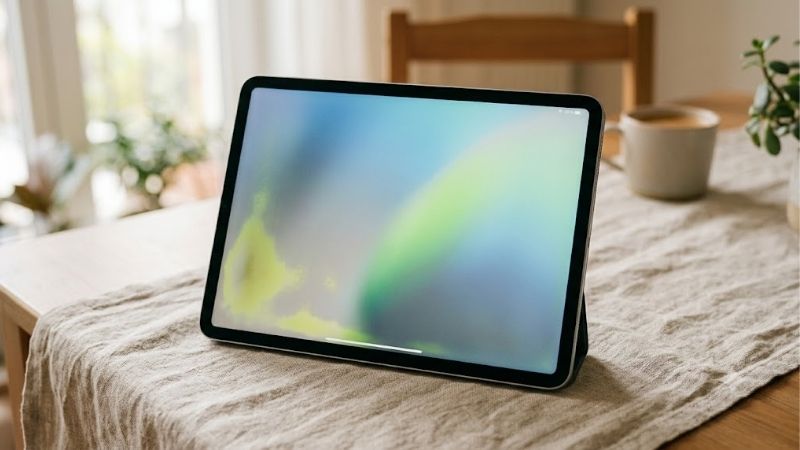
The Revolutionary Tandem OLED on the iPad Pro M4
The introduction of the iPad Pro M4 marked a monumental shift in tablet display technology by deploying a breakthrough dual-stack design known as Tandem OLED. Unlike traditional OLED panels that use a single emissive layer, this system stacks two organic light-emitting layers on top of each other to deliver incredible full-screen brightness. This innovative design allows the screen to hit up to 1,000 nits of sustained brightness and an astonishing 1,600 nits of peak HDR brightness, offering unrivaled contrast ratios.
However, running two emissive layers simultaneously generates significant heat and introduces complex voltage distribution challenges. When the display controller struggles to balance current across both layers, it can result in subtle iPad Pro screen discoloration, particularly in low-light environments. While Tandem OLED provides unmatched visual depth, this complex dual-layer composition is structurally more prone to manufacturing variances that manifest as uneven color output.
Color Accuracy and Calibration Standards
Creative professionals choose Apple tablets because of their industry-leading color calibration, supporting the wide P3 color gamut. Just as the iPhone 17 Pro Max manages dynamic range, the tablet utilizes advanced ambient light sensors for True Tone adjustments. The system dynamically reads the color temperature of your surrounding room and alters the display’s balance to match, ensuring a paper-like viewing experience. Under normal operating conditions, these calibration steps make the display incredibly accurate for professional photo grading and video editing.
Unfortunately, if your device starts suffering from iPad Pro screen discoloration, the built-in system-wide calibration can actually exacerbate the visual variance. True Tone and Night Shift may attempt to shift the color spectrum warmer, highlighting localized yellow blotches or green corners rather than masking them. This makes early detection of color shifting essential for anyone performing color-critical creative work on their tablet.
Bright Outdoor Visibility and Anti-Reflective Nano-Texture
To combat harsh reflections during outdoor use, Apple introduced an optional nano-texture glass coating on high-storage models of the latest Pro line. This chemically etched glass scatters ambient light rather than reflecting it directly back at your eyes, allowing you to work under direct sunlight with ease. The physical contrast remains exceptionally sharp, making it an excellent upgrade for digital illustrators who frequently work on site.
Despite these outdoor visibility advancements, some users report that the matte finish alters the perceived uniformity of light passing through the glass. This diffusion can mimic the appearance of iPad Pro screen discoloration by creating a slightly hazy, grainy overlay over bright backgrounds. Distinguishing between a physical optical trick caused by the nano-texture glass and an actual organic layer failure is critical before seeking an expensive hardware repair.
Real-World Experience and Screen Discoloration Diagnostics
Analyzing iPad Pro screen discoloration requires a pragmatic approach that separates normal display characteristics from genuine hardware degradation. Many users panic at the first sign of a warm tint, unaware of how various software features, thermal stresses, and external factors influence display output. In this section, we will establish clear diagnostic criteria to help you determine if your screen is actually failing or simply behaving as designed.
Identifying Genuine iPad Pro Screen Discoloration vs. Normal OLED Glow
One of the most challenging aspects of evaluating display health is distinguishing normal off-axis color shifts from genuine iPad Pro screen discoloration. All OLED and LCD displays exhibit some degree of color shifting when viewed from sharp angles, typically appearing as a subtle blue or green tint. This is an inherent physical property of light refraction through the screen’s protective glass and does not indicate a defective unit.
In contrast, real iPad Pro screen discoloration presents as localized, static spots of yellow, green, or pink that do not change position when you tilt the tablet. These blemishes are usually most visible when viewing a solid gray or off-white background in a dark room. If you notice a persistent, asymmetrical patch of color that remains locked in one area of the panel, your display is likely suffering from physical layer degradation or localized adhesive failure.
Thermal Performance and Ecosystem Interoperability with MacBook Air M3
Heavy processing workloads naturally generate high internal temperatures, especially when rendering complex projects or utilizing intensive Apple Intelligence features on modern chips. If you run your tablet as a secondary display alongside a MacBook Air M3, the constant video feed and high brightness can push the thermal envelope to its limits. Over time, this concentrated heat can dry out display adhesives or unevenly wear down organic layers, triggering localized iPad Pro screen discoloration near the processor.
To minimize thermal degradation, ensure your tablet is placed on a well-ventilated stand and avoid running intensive workflows at maximum screen brightness for hours on end. Using ecosystem features like Universal Control instead of high-latency sidecar mirroring can also reduce the processing overhead on the internal chip. Keeping the device cool is one of the easiest ways to preserve the long-term color uniformity of your premium panel.
What Real Amazon Buyers Are Saying: Synthesizing the Reviews
When we analyze consumer feedback across major retail channels like Amazon, a clear picture emerges regarding the real-world durability of Apple’s flagship panels. On one hand, many five-star reviews praise the screen as the single best display on any portable device, citing its incredible brightness and life-like contrast. Users note that when the panel works correctly, it completely transforms their media consumption and creative illustration workflows.
Conversely, critical two-star and three-star complaints frequently focus on structural durability, yellow tints along the edges, and customer service hurdles. Several buyers report experiencing sudden iPad Pro screen discoloration after just a few months of light ownership, prompting frustrating repair attempts. This honest review of user feedback highlights that while the vast majority of units are flawless, QA oversights do occur, leaving some buyers with uneven panels.
Buying Guide: Is the iPad Pro Screen Worth the Gamble?
If you are planning to purchase a high-end tablet, you must weigh the incredible benefits of Apple’s display engineering against the potential risk of iPad Pro screen discoloration. Deciding whether to invest in these premium devices requires looking closely at real-world pros and cons, target audiences, and broader market realities. Let’s analyze the practical facts to see if this hardware is a smart financial investment for your specific daily workflow.
Evaluating the Pros and Cons of Apple’s Premium Displays
Analyzing the technical benefits alongside the physical limitations of these displays is essential before making a significant investment. Below, we have organized a comprehensive list of pros and cons to highlight the strengths and weaknesses of Apple’s flagship tablet screens. This summary will help you visualize what you are gaining and what potential compromises you must accept.
Understanding how to mitigate the risk of iPad Pro screen discoloration can save you hundreds of dollars in out-of-warranty screen replacements. By balancing the extraordinary visual capabilities of these screens against their physical vulnerabilities, you can make a highly informed purchasing decision.
✅ Pros:
- Outstanding Tandem OLED contrast with absolute black levels and stunning HDR peak brightness
- Superior wide P3 color accuracy that is perfect for professional creative design work
- Excellent outdoor visibility when paired with the nano-texture glass option
- Seamless software integration with iPadOS, offering smooth ProMotion 120Hz refresh rates
❌ Cons:
- Susceptible to physical iPad Pro sc
- iPad Pro screen discoloration
- Ipad pro burn-in
- Iphone 15 pro max vs iphone 16 pro max
- Magnetic keyboard
- Laptop with red backlit keyboard
- reen discoloration under extreme heat or constant high brightness
- Highly expensive screen replacement parts that can cost hundreds of dollars out-of-warranty
- Potential for subtle yellow tinting along the edges due to manufacturing variances
- Lacks compatibility with older Apple accessories, requiring newer peripheral investments
Who Should Buy vs. Who Should Skip: Our Honest Review
You should buy this tablet if you are a professional photographer, visual illustrator, or video editor who requires absolute color accuracy and unmatched portability. The sheer visual horsepower of the Tandem OLED panel combined with the processing power of the system makes it a stellar workstation. If your daily workflow thrives on HDR content creation, this device is absolutely worth buying in 2026.
However, you should skip this model if you primarily use your tablet for basic web browsing, word processing, or social media. For these casual tasks, the expensive screen tech is a massive financial overkill, and the small risk of iPad Pro screen discoloration is simply not worth the premium price tag. In these cases, opting for a standard iPad or even a portable MacBook Air M3 might be a far more comfortable and cost-effective alternative.
Repair Realities and Hardware Market Trends in 2026
Should you buy a new device or repair your old one? In 2026, laptop and component prices are trending upward, which has direct consequences for anyone seeking screen repairs. Replacement displays for premium tablets have skyrocketed in cost, meaning that fixing a localized iPad Pro screen discoloration issue out of warranty could set you back over $500. This structural price increase makes purchasing AppleCare+ almost mandatory for new buyers.
Additionally, geopolitical shifts in hardware markets—such as the US approving Nvidia H200 chip sales to China—highlight how critical silicon and display manufacturing supply chains are to global tech availability. As component costs fluctuate, repair turnarounds can stretch for weeks due to limited parts distribution. If you encounter screen anomalies, check your warranty status immediately to secure a replacement before market costs rise even further.
If you want to protect your investment from accidental drops that can damage these delicate display layers, check out high-quality screen protectors and rugged cases.
Check the latest price on Amazon →
- Ipad pro burn-in
- Iphone 15 pro max vs iphone 16 pro max
- Magnetic keyboard
- Laptop with red backlit keyboard
Conclusion
Ultimately, iPad Pro screen discoloration is a rare but notable defect that can affect even the most premium Tandem OLED and liquid Retina displays. While the overwhelming majority of consumers will enjoy a flawless, vibrant viewing experience, understanding the causes of uneven yellowing and thermal stress helps protect your device over time. If you decide to take the plunge on this exceptional screen, protecting it with AppleCare+ and high-quality accessories is the smartest way to safeguard your investment.
See today’s deal on Amazon →
Frequently Asked Questions
Is iPad Pro screen discoloration always a defect?
No. Many reported cases trace back to True Tone shifting white balance, Night Shift warming the display, or the laminating adhesive still curing on a brand new unit. Adhesive related warmth usually settles within a few days of normal use. Persistent patches or bands after that point suggest a genuine panel fault.
How do I test whether the discoloration is real?
Turn off True Tone and Night Shift in Settings under Display and Brightness, set brightness to about seventy percent, then open a plain white image in full screen. Photograph the result in a neutral room. Comparing that photo against another iPad of the same model makes uneven regions obvious.
Does Apple replace iPads for uneven color?
Apple allows a tolerance for panel variation, so a very slight overall tint is rarely replaced. Clearly uneven zones, yellow bands along an edge, or pink corners generally qualify for service while under warranty or AppleCare Plus. Return window replacements are usually easier than warranty claims, so act quickly.
Can a case or screen protector cause discoloration?
A poorly fitted case that clamps the bezel can create localized pressure marks that read as discoloration, and a low quality protector with degrading adhesive can produce yellowing along its edges. Remove both accessories and inspect the bare display before concluding that the panel underneath is at fault.
Will the discoloration get worse over time?
Discoloration from adhesive curing improves rather than worsens. Discoloration from backlight or panel bonding failure tends to expand slowly across months. Track it with dated photos under identical brightness so you can demonstrate progression at a service appointment, which strengthens a warranty case considerably.










Write Your Review
No reviews yet. Be the first to share your experience!