
For most Mac mini owners, the Dell 27 S2725QS is the safest buy in this group: a 27-inch 4K IPS panel with roughly 163 pixels per inch and HDMI, DisplayPort and USB-C all named in its title. Prefer a bigger canvas and color features, and the 32-inch BenQ MA320U is the premium pick. Prefer low cost, and the Dell S2725DC trades sharpness for a faster QHD panel and built-in speakers. A Mac mini has no screen of its own, so the monitor decides how everything looks. Below are eight screens, with plain notes where listings overlap or fall short.
Eight monitors side by side

Dell 27 Monitor S2725QS, 4K UHD IPS, 120Hz, 5ms, FreeSync Premium | 350 cd/m2 Brightness, 1,500:1 Contrast, 99% sRGB, Anti-Glare, HDMI, DisplayPort, USB‑C, Height Adjustable, Swivel, Pivot




As an Amazon Associate we earn from qualifying purchases. Product prices and availability are accurate as of the date/time indicated.

Dell 27 Monitor S2725QC, 4K UHD IPS, 120Hz, 99% sRGB, 4ms, FreeSync Premium | 3840x2160, 163 PPI, USB-C, HDMI, DisplayPort, Anti-Glare, Eye Comfort Technology, LED Edgelight System


As an Amazon Associate we earn from qualifying purchases. Product prices and availability are accurate as of the date/time indicated.

Dell 27 Plus QHD USB-C Monitor - S2725DC - 27-inch QHD (2560x1440) 144Hz 1ms Display, 2 x 3W Speakers, USB-C/HDMI/DisplayPort 1.4 Connectivity, Height/Tilt/Pivot/Swivel, AMD FreeSync - Ash White


As an Amazon Associate we earn from qualifying purchases. Product prices and availability are accurate as of the date/time indicated.

Anyuse 15.6" FHD IPS USB-C HDMI Portable Monitor | 1080P 60Hz FHD, IPS, Ultra-Slim ,USB-C/HDMI, Second External Monitor, for PC/Mac/Phone/PS/Xbox/Switch


As an Amazon Associate we earn from qualifying purchases. Product prices and availability are accurate as of the date/time indicated.

INNOCN 32" 4K 120Hz / FHD 240Hz HDR400 USB-C 90W Monitor for MacBook/PC | Work with MacBook / Mac Mini, Editing, Design, IPS, DeltaE<1, DP1.4, HDMI 2.1, Pivot Stand, CB32U1


As an Amazon Associate we earn from qualifying purchases. Product prices and availability are accurate as of the date/time indicated.

BenQ MA320U 32” 4K 3840x2160 Monitor for MacBook® Pro/Air, Dual USB-C, 90W Power Delivery, Mac Color Match, USB Hub, Brightness & Volume Control on Mac, Height & Tilt Adjustable Stand, P3 Color Gamut


As an Amazon Associate we earn from qualifying purchases. Product prices and availability are accurate as of the date/time indicated.
Dell 32 Monitor S3225QS, 4K UHD VA, 120Hz, FreeSync Premium, Eye Comfort | 3840x2160, 31.5in, 3000:1 Contrast, 300 cd/m2 Brightness, 4ms, 99% sRGB, Anti-Glare, HDMI, DisplayPort


As an Amazon Associate we earn from qualifying purchases. Product prices and availability are accurate as of the date/time indicated.

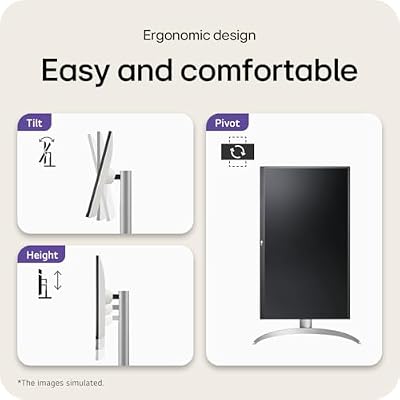
LG 27UP850K-W 27-inch UltraFine 4K UHD IPS DisplayHDR 400 Computer Monitor | (3840 x 2160), Built-in Speaker with Maxx Audio, DCI-P3 95% (Typ), 60Hz, USB Type-C 90W PD, DP, HDMI, Tilt/Height/Pivot Stand




As an Amazon Associate we earn from qualifying purchases. Product prices and availability are accurate as of the date/time indicated.
| Model | Key point from title | Price tier | Best for |
|---|---|---|---|
| Dell 27 S2725QS | 27-inch 4K IPS, 120Hz, USB-C, 99% sRGB | Mid-range | Best all-round Mac mini match |
| Dell 27 S2725QC | 27-inch 4K IPS, 120Hz, 163 PPI, USB-C | Mid-range | Alternative to the S2725QS |
| Dell 27 Plus S2725DC | 27-inch QHD, 144Hz, speakers, USB-C | Mid-range | Speed and built-in audio |
| Dell 32 S3225QS | 32-inch 4K VA, 120Hz, no USB-C named | Mid-range | Large, high-contrast workspace |
| LG 27UP850K-W | 27-inch 4K IPS, 60Hz, USB-C 90W, speaker | Mid-range | Mac mini plus a MacBook |
| BenQ MA320U | 32-inch 4K, dual USB-C, Mac Color Match | Premium | Creators who want Mac-specific controls |
| INNOCN CB32U1 | 32-inch 4K 120Hz or FHD 240Hz, HDMI 2.1 | Premium | Mixed work and fast refresh |
| Anyuse 15.6-inch portable | 1080p IPS, 60Hz, USB-C and HDMI | Budget | A second, small side screen |
The monitors in detail
Dell 27 Monitor S2725QS
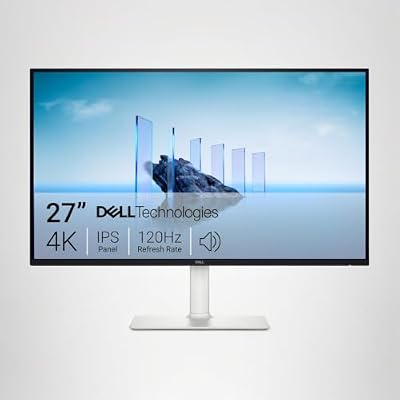
This one earns the top spot because its title lines up with what a Mac mini needs. It lists a 27-inch 3840 x 2160 IPS panel, 120Hz, 5ms, FreeSync Premium, 350 cd/m2 brightness, 1,500:1 contrast, 99% sRGB, anti-glare coating, and HDMI, DisplayPort and USB-C inputs. The stand is named as height adjustable, swivel and pivot. At 27 inches, 4K delivers about 163 pixels per inch, so macOS text looks smooth. USB-C power delivery wattage is not in the title, and the Mac mini does not need power from a monitor anyway. Because it is a 4K 120Hz panel, it also leaves room to grow if you later add a console or a PC.
Pros
- Crisp 163 PPI at a size that suits a desk
- Three input types and a flexible stand
Cons
- No speakers or webcam named
- The 120Hz mode depends on your port and cable
Who it’s for: most home and office Mac mini setups.
Dell 27 Monitor S2725QC
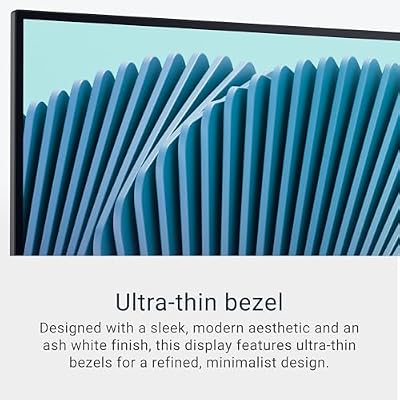
Treat this as a close relative of the S2725QS rather than a distinct choice. The title shows the same 27-inch 4K IPS class, 120Hz, 99% sRGB and FreeSync Premium, with 4ms, 163 PPI, anti-glare coating, an Eye Comfort label and an LED edgelight system, plus USB-C, HDMI and DisplayPort. Stand adjustments and brightness are not listed. Because the two overlap so heavily, compare the live listings for USB-C details, stand, and price, then buy whichever lists more of what you need. Dell’s codes differ by a single letter, so match the model code on the order page. The Eye Comfort label is a feature name, not a health claim.
Pros
- Same sharp 27-inch 4K density
- Full set of video inputs
Cons
- Stand adjustability is not stated
- Nearly duplicates the S2725QS
Who it’s for: buyers who find this variant at a better price than the S2725QS.
Dell 27 Plus QHD USB-C Monitor S2725DC
The odd one out in the Dell trio: a 27-inch 2560 x 1440 panel at 144Hz with a 1ms claim, two 3W speakers, USB-C, HDMI and DisplayPort 1.4, plus height, tilt, pivot and swivel in an ash white finish. QHD at 27 inches is about 109 pixels per inch, so text is noticeably less crisp than on 4K. Its strengths are speed and the speakers, which spare a Mac mini owner a separate audio purchase. Bandwidth is easy at this resolution: 1440p at 144Hz needs about 12.7 Gbit/s of raw pixel data. FreeSync matters mainly if a Windows PC shares the screen, so check Apple’s documentation before counting on it with a Mac.
Pros
- Built-in speakers for a Mac mini desk
- 144Hz needs less bandwidth than 4K
Cons
- About 109 PPI looks softer than 4K
- 1ms is a seller claim
Who it’s for: budget-conscious users who also play fast games.
Dell 32 Monitor S3225QS
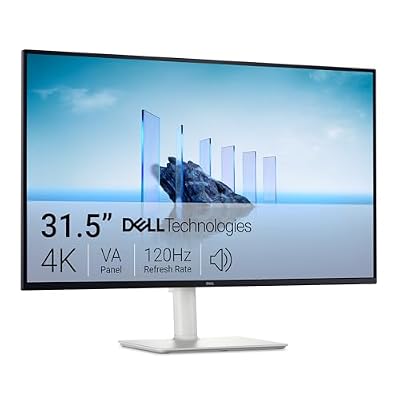
A 32-inch 4K screen at about 138 pixels per inch with a different panel type than the other Dells: VA, per the title, with 3000:1 contrast, 300 cd/m2, 4ms, 120Hz, 99% sRGB, FreeSync Premium, anti-glare, HDMI and DisplayPort. The title does not name USB-C or stand adjustments. VA panels generally have deeper blacks but narrower viewing angles than IPS, so sit centered. At this size you can scale macOS to a roomy workspace. If you need USB-C, choose another screen, since it is not named here. Eye Comfort is another feature label, so read it as marketing wording, not a medical claim.
Pros
- Large 4K canvas for side-by-side windows
- High contrast from the VA panel
Cons
- No USB-C named in the title
- Off-center viewing angles can fade colors
Who it’s for: people who want size and contrast and connect by HDMI or DisplayPort.
LG 27UP850K-W
The same 27-inch 4K density as the Dell S2725QS, with a few extras: IPS, DisplayHDR 400, 95% DCI-P3 (typical), a Maxx Audio speaker, USB Type-C with 90W power delivery, DisplayPort, HDMI and a tilt, height and pivot stand. The catch is a 60Hz rating. For a Mac mini the 90W USB-C port is less about power and more about sharing the screen with a MacBook, since one cable can charge the laptop and carry its video. For most Mac mini desk tasks, 60Hz is fine. Because the panel class matches the S2725QS, the real choice is USB-C power and a P3 figure against 120Hz.
Pros
- USB-C 90W suits a shared Mac mini and MacBook desk
- Lists a DCI-P3 gamut figure, which the Dells do not
Cons
- 60Hz only
- Speaker quality is unknown, so check the listing
Who it’s for: households with both a Mac mini and a laptop.
BenQ MA320U
This 32-inch 4K screen is the most Mac-focused of the group. The title lists dual USB-C, 90W power delivery, Mac Color Match, a USB hub, brightness and volume control from the Mac, a P3 color gamut, and a height and tilt stand. It names MacBook Pro and Air, but the features read as useful for a Mac mini too. Mac Color Match is a seller feature name, so confirm in the listing what it does. At 32 inches, 4K is about 138 pixels per inch. The cost sits at the premium end of this set. Hub ports help most when the Mac mini’s own ports are already full of drives and accessories.
Pros
- Hub ports reduce the Mac mini’s cable clutter
- Brightness and volume controls from the Mac keyboard are claimed
Cons
- Highest price in the group
- No refresh rate is stated in the title
Who it’s for: creators who want a Mac-first monitor with built-in hub ports.
INNOCN CB32U1
A dual-mode 32-inch IPS screen: the title says 4K 120Hz or FHD 240Hz, with HDR400, USB-C 90W, DisplayPort 1.4, HDMI 2.1 and a pivot stand. It also states it works with MacBook and Mac mini. The DeltaE under 1 figure appears with a full-width less-than symbol, so read it as a seller color-accuracy claim and verify the listing. The dual-mode wording is also ambiguous: the 240Hz mode is at 1080p, and the 4K 120Hz mode depends on the source supporting it. Check what your specific Mac mini port can send.
Pros
- HDMI 2.1 and DisplayPort 1.4 give high-refresh headroom
- USB-C 90W for a laptop
Cons
- Unverified color-accuracy claim and ambiguous dual-mode wording
- Second-highest cost here
Who it’s for: buyers who split time between editing and fast-refresh play.
Anyuse 15.6-inch portable monitor
This one is a different class and not a primary display. The title lists a 15.6-inch 1080p IPS panel, 60Hz, ultra-slim, USB-C and HDMI, marketed as a second external monitor for PC, Mac, phone and consoles. The pixel density is about 141 per inch, which is sharp, but the physical area is tiny beside a 27-inch screen. As a main Mac mini monitor it would feel cramped. As a small side screen for chat, reference or monitoring, it is cheap and flexible. Check what the USB-C port needs for power or video.
Pros
- Lowest cost in the set
- Portable and sharp for its size
Cons
- Too small as a main screen
- May need external power; check the listing
Who it’s for: anyone who wants a compact companion display next to a larger monitor.
How we picked these
The Editorial team compiled this guide from published specifications, manufacturer documentation and buyer reviews. Nobody on the team used or measured these units. We kept listings that either name Mac or Mac mini compatibility or offer a modern digital connection, grouped them by panel class, and quoted only what titles state. Where a claim is vague, such as dual mode, color accuracy or a response time, we call it a seller claim. Price tiers are relative within this set, and live prices can differ.
What matters when the computer has no screen
Pixel density and macOS scaling
macOS prefers either very high density or clean scaling. At about 163 pixels per inch, a 27-inch 4K panel shows 1920 x 1080 workspace at exact 2x, or a roomier setting if you scale it. Estimates, assuming the standard scaled modes are offered: a 27-inch 4K at “looks like 2560 x 1440” gives about 109 logical pixels per inch, while a 32-inch 4K at “looks like 3008 x 1692” lands near the same text size with about 17 percent more horizontal workspace. A 27-inch QHD sits at 109 pixels per inch natively, which works but looks softer. See also our iMac versus Mac mini comparison if you are still deciding on the computer.
Worked example: the refresh-rate budget
Raw pixel data, 24-bit color, before blanking: 4K at 60Hz is about 11.9 Gbit/s, 1440p at 144Hz about 12.7, and 4K at 120Hz about 23.9. HDMI 2.0 carries roughly 14.4 Gbit/s usable, while DisplayPort 1.4 carries about 25.9. So 4K 120Hz needs a DisplayPort 1.4 or HDMI 2.1 path from the Mac, and the Mac mini model decides whether it sends that. Check Apple’s technical specifications for your exact model and use the cable that came with the monitor.
Color claims and ports
The Dell titles quote 99% sRGB, the LG quotes 95% DCI-P3 (typical), and the BenQ lists a P3 gamut. These are different yardsticks, so do not compare the percentages directly. For photo and video work a P3 figure is the more relevant claim, while sRGB coverage is plenty for office and web use. No title promises calibration. On the Mac side, Thunderbolt or USB4 ports on some models can carry a DisplayPort signal over USB-C, and the HDMI port differs by generation.
Cables and the desk
USB-C is only useful if the cable carries video, and a charge-only cable will not. If you run short of ports, a dock stand such as the one in our Baozee Mac mini M4 dock review can add more. Before using a monitor arm, confirm the VESA pattern and the weight limit, since these are not in the titles. Speakers and webcams are separate decisions; our guide to the best webcam for Mac covers that.
Mistakes buyers make
- Choosing 27-inch 1080p. At about 82 pixels per inch, macOS text looks fuzzy. Start at QHD, and 4K if you can.
- Assuming every USB-C cable carries video. Charge-only cables fail silently. Use the cable in the box.
- Expecting 120Hz by default. The monitor, port, cable and Mac model all have to agree.
- Ignoring weight and mounts. A 32-inch panel is heavy, so check the VESA pattern and arm weight limit before buying a mount.
- Forgetting built-in audio. A Mac mini has no real speakers, so factor in audio.
- Assuming the Mac controls brightness. Many third-party monitors need their own buttons, and only the BenQ title claims Mac-side control.
Verdict
Pick the Dell S2725QS for the best balance of sharpness, ports and cost, or its near twin S2725QC if the price is better. Choose the BenQ MA320U for a Mac-first creator desk and the Dell S2725DC for a budget with speed and speakers. The LG 27UP850K-W is right if a MacBook shares the screen, and the Dell S3225QS suits big canvases without USB-C. Treat the Anyuse portable screen as an add-on, not a main display. Confirm port versions on whichever you choose, because the cable decides the refresh rate.
Frequently asked questions
What size and resolution suit a Mac mini best?
A 27-inch 4K screen is the safest starting point. It lands near 163 pixels per inch, which macOS can scale cleanly and which keeps text sharp. A 32-inch 4K panel is about 138 pixels per inch, giving larger text or more workspace, depending on the scaling you choose. A 27-inch QHD screen works but looks less crisp, because it sits near 109 pixels per inch.
Do I need an Apple display or a 5K monitor?
No. Every screen in this guide is a 4K, QHD or 1080p panel from another brand, and macOS drives them well. A 5K 27-inch panel reaches about 218 pixels per inch and looks sharper, but it costs more and no 5K model appears in this set. For most desk work, a good 4K screen is a sensible and cheaper step.
Can a Mac mini run a 120Hz monitor?
Possibly, but it depends on the Mac mini generation and the port you use. The arithmetic helps: 4K at 120Hz needs roughly 24 Gbit/s of raw pixel data, far above what HDMI 2.0 carries. Check Apple’s technical specifications for your model to see which ports support which refresh rates at 4K, and use a cable rated for the mode.
Should I connect by USB-C or HDMI?
Either can work, but USB-C offers one cable for video plus extra ports on monitors that act as a hub. HDMI is simple and widely compatible, though refresh-rate limits depend on the version on both ends. Whichever you choose, avoid a charge-only USB-C cable, because it will not carry a picture. Check the listing for what the monitor’s USB-C port actually supports.
Does the monitor need a webcam or speakers for a Mac mini?
The Mac mini has no built-in display, camera or large speakers, so you add them yourself. Only two monitors in this set, the Dell S2725DC and the LG 27UP850K-W, list speakers in their titles, and none lists a webcam. Many people pair a separate webcam and a headset or desk speakers, so plan that small extra purchase alongside the screen.
Top picks from this guide
DellDell 32 Monitor S3225QS, 4K UHD VA, 120Hz, FreeSync Premium,…$329 \xc2\xb7 98/100DellDell 27 Monitor S2725QS, 4K UHD IPS, 120Hz, 5ms, FreeSync…$280 \xc2\xb7 98/100DellDell 27 Monitor S2725QC, 4K UHD IPS, 120Hz, 99% sRGB,…$330 \xc2\xb7 98/100BenQBenQ MA320U 32” 4K 3840x2160 Monitor for MacBook® Pro/Air, Dual…$650 \xc2\xb7 98/100




Write Your Review
No reviews yet. Be the first to share your experience!