



Understanding the Anatomy of a Premium Custom Keyboard
Building a high-quality custom keyboard requires a deep understanding of structural aesthetics and physical acoustics. Every individual component, from the heavy case down to the smallest stabilizer screw, works in harmony to deliver an exquisite typing experience that off-the-shelf boards simply cannot hope to replicate today.
As an Amazon Associate we earn from qualifying purchases at no extra cost to you.


Selecting the Ideal Case Material
Aluminum remains the undisputed king of case materials for modern premium builds, providing a dense and rigid structure. Heavy metal options like brass and copper are often integrated as internal weights to eliminate unwanted hollow sounds, ensuring that each keystroke produces a solid and highly satisfying acoustic response.
On the other hand, polycarbonate cases offer a lighter alternative that beautifully diffuses vibrant RGB lighting. These plastic materials absorb vibrations differently than metal, yielding a deeper sound profile that appeals to enthusiasts who prefer a softer, more cushioned bottom-out feel when typing for extended periods.
The Importance of Mounting Styles
Gasket mounting has solidified its place as the standard for comfortable writing, suspended by soft silicone tabs. This design prevents direct contact between the switch plate and the rigid outer case, allowing the assembly to flex slightly under heavy impact, which successfully reduces fatigue in your fingers during long sessions.
Conversely, top mount designs secure the internal plate directly to the upper frame, offering a highly consistent feel. While this mounting method reduces flex, it provides a very uniform bounce across the entire surface, making it a favored choice among classical typists who demand immediate physical feedback from their keys.
Deciding Between Hot-Swap and Soldered
Hot-swap printed circuit boards have democratized the hobby by eliminating the tedious requirement of soldering. Enthusiasts can easily swap out damaged switches or experiment with new designs in just a matter of minutes, utilizing simple pulling tools without the risk of damaging delicate electronic circuits on the board.
However, traditional soldered assemblies still hold a special place in custom keyboard communities due to structural stiffness. Soldering your switches directly onto the plate creates a permanent connection that minimizes key wobble, ensuring that your layout remains completely stable and strong over years of intense daily usage.
Acoustic Dampening Solutions inside Cases
Porous foams like Poron and IXPE are frequently packed inside the case to fine-tune the signature sound profile. These advanced acoustic dampening materials absorb high-frequency pinging noises, converting a harsh, metallic typing racket into a clean, concentrated sound that feels incredibly premium to the user’s ears.
Furthermore, the tape mod has gained widespread popularity as an affordable way to modify sound signatures at home. Applying a few layers of simple painter’s tape to the back of your circuit board acts as a low-pass filter, resulting in a deeper, more rounded sound that many hobbyists compare to the popping of bubble wrap.
Weight Bars and External Weights
Adding external weight bars to the bottom of your case is an excellent way to elevate both stability and prestige. Heavy materials such as polished stainless steel or sandblasted brass ensure that the unit remains firmly planted on your desk, preventing any sliding or shifting during intense, fast-paced work or gaming sessions.
These physical weights also play a hidden role in absorbing desk vibrations that travel through the workstation. By decoupling the mechanical assembly from the wooden surface of your table, you achieve a cleaner auditory experience, allowing the pure sound of your hand-lubed switches to take center stage without interference.
Exploring Key Switches and Keycap Profiles for Customization
Every custom keyboard enthusiast understands that tactile feel and keycap textures define your daily interactions with technology. The combination of switch dynamics and plastic characteristics creates a highly personalized sensory loop, ensuring that every command you input feels incredibly precise and satisfying in 2026.
Linear Switches for Butter Smooth Typing
Linear switches are highly prized for their smooth, uninterrupted travel from the top of the press down to the bottom. Without any tactile bump or click to overcome, these mechanisms allow for exceptionally fast, fluid keystrokes, making them the absolute default option for professional gamers who require instantaneous inputs.
Modern linears often use self-lubricating plastics like POM or specialized blends to reduce friction over time. This technological advancement ensures that the keys remain buttery smooth even after millions of presses, maintaining a quiet sound profile that is perfectly suited for shared corporate office environments.
Tactile Switches for Pronounced Feedback
For those who crave positive confirmation of a successful keypress, tactile custom keyboard builds are the ideal solution. These switches feature a distinct physical bump along the travel path, providing clear haptic feedback to your fingertips just before the actuation point is reached, preventing unnecessary bottoming out.
The shape of the tactile bump can range from a round, gentle hill to a sharp, aggressive snap right at the top. Typists often prefer this feedback because it mimics the classic feel of vintage typewriters, allowing them to establish a comfortable, rhythmic writing pace that significantly reduces finger fatigue over time.
Clicky Switches for satisfying Auditory Clack
Clicky switches combine a sharp tactile sensation with a crisp, audible sound that announces every single press. Utilizing specialized click bars or click jackets, these mechanisms generate a loud, musical clack that many writers find deeply motivating, though they are generally too noisy to be used in polite public spaces.
Despite their loud nature, clicky variants remain popular among solo authors who work in dedicated home studios. The immediate acoustic validation of their typing speed creates a satisfying feedback loop, turning a mundane data entry chore into a lively, engaging performance that makes hours of desk work feel effortless.
Comparing ABS and PBT Keycap Plastics
The debate between ABS and PBT plastics continues to shape the decisions of enthusiasts when selecting keycap sets. ABS keycaps are famous for their vibrant, accurate colors and crisp legends, but they tend to develop a shiny texture over time as the oils from your fingers slowly wear down the outer surface of the material.
Conversely, PBT plastic is highly resistant to wear and maintains a textured, matte finish even after years of use. This material produces a deeper, lower-pitched sound profile upon impact, which is highly sought after by enthusiasts looking to create a warm acoustic signature for their personalized typing setups.
| Material | Sound Profile | Texture | Durability | Color Options |
| ABS Plastic | High-pitched | Smooth | Moderate | Vibrant |
| PBT Plastic | Deep/Thocky | Matte/Textured | High | Pastel/Muted |
Sculpted Profiles versus Uniform Layouts
Keycap profiles dictate the physical shape and height of each individual row, altering the angle of your fingers. Sculpted layouts like Cherry and OEM profiles tilt forward to match the natural curvature of your hands, making them incredibly comfortable for traditional touch typists who rarely look down at their fingers.
On the other hand, uniform profiles like XDA or DSA maintain the exact same height and shape across the entire board. This flat design provides a modern, clean aesthetic and allows for complete flexibility in key placement, which is perfect for users who experiment with alternative layouts like Dvorak or Colemak.
Optimizing Ergonomics and Performance for Power Users
Optimizing physical layout ergonomics is crucial for maintaining long-term physical health in modern digital workspaces. By exploring advanced custom keyboard options, users can easily adapt their input devices to match their body’s natural geometry, preventing repetitive strain injuries while maximizing physical performance.
Split Layouts for Better Shoulder Posture
Split mechanical layouts physically divide the keys into two separate halves, allowing you to position them at shoulder width. This separation prevents your wrists from bending inward, promoting a neutral forearm posture that significantly reduces tension in your neck, back, and shoulders during long typing sessions.
Furthermore, many split designs offer tenting capabilities, which tilt the inner edges of the boards upward to match your hands. This ergonomic adjustment mimics the natural handshake position of your wrists, completely eliminating pronation and allowing you to work comfortably without experiencing painful muscle cramps.
The Emergence of Magnetic HE Switches
Magnetic Hall Effect switches have emerged as a revolutionary technology, replacing physical contacts with magnetic sensors. This allows users to customize the exact actuation point of each key down to the millimeter, creating a responsive interface that adapts instantly to your specific typing pressure and speed.
Additionally, these advanced switches offer a rapid trigger feature that resets the key the instant your finger begins to rise. This feature is a game-changer for competitive gaming, where rapid, repeated inputs are necessary, providing a massive advantage over traditional mechanical systems that rely on fixed reset points.
Open Source Firmware for Advanced Layouts
Open-source firmware tools like QMK and VIAL give users absolute control over their key mapping and macro creation. You can easily program multiple functional layers, allowing a compact layout to retain all the utility of a full-sized setup by accessing navigation keys through convenient modifier holds.
By tailoring these layers to your specific software shortcuts, you can streamline your workflow and minimize hand movement. This level of customization ensures your custom keyboard behaves exactly how you want, transforming your hardware into an intuitive extension of your mind that responds instantly to your daily needs.
Lubricating Switches and Stabilizer Tuning
Applying high-grade lubricants like Krytox 205g0 to switch housings is the ultimate way to eliminate scratchiness and rattle. This meticulous maintenance process smooths out the slide of the stem against the housing, resulting in a refined keystroke that feels incredibly premium and quiet in any workspace environment.
Stabilizer tuning is equally important, as it prevents larger keys like the spacebar from wobbling or ticking. By adding grease to the wire and applying band-aid mods, you can achieve a uniform sound across the entire layout, ensuring that your spacebar sounds just as deep and solid as your standard alphabetical keys.
Wireless Connectivity in Premium Builds
Premium wireless setups now use low-latency 2.4GHz connections alongside versatile Bluetooth options for multi-device pairing. This enables enthusiasts to maintain a clean, cable-free desk aesthetic without sacrificing the instantaneous input speeds required for competitive gaming or fast-paced programming work.
To protect these wireless signals from interference, modern cases often feature small glass or plastic accent windows in their aluminum bodies. This clever engineering allows radio waves to escape easily while maintaining the heavy, premium metal chassis that enthusiasts demand from high-end workspace accessories.
Find out more:
Recommended Products

AULA
AULA F75 Pro Wireless Mechanical Keyboard,75% Hot Swappable Custom Keyboard with Knob,RGB Backlit,Pre-lubed Reaper Switches,Side Printed PBT Keycaps,2.4GHz/USB-C/BT5.0 Mechanical Gaming Keyboards
Womier
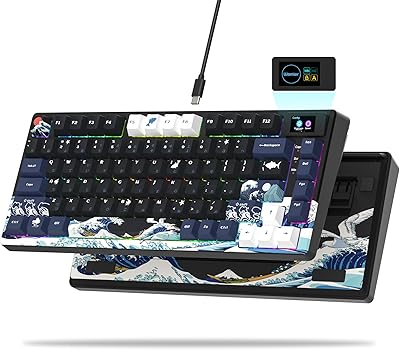
Womier SK80 75% Keyboard with Color Multimedia Display Mechanical Gaming Keyboard Creamy Sound, Wired Hot Swappable Gasket Mount RGB Custom Key Board, Pre-lubed Stabilizer for Mac/Win, Black Kanagawa

AULA
AULA 99 Wireless Keyboard, Custom Computer Keyboard, Tri-Mode Bluetooth 5.0/2.4GHz/USB-C Cute Creamy Gaming Keyboards with Number Pad, RGB Backlit Media Knob Programmable Keybaord for PC Gamer – Grey
As an Amazon Associate we earn from qualifying purchases. Product prices and availability are accurate as of the date/time indicated.
Custom Keyboardsystems have completely transformed the tech landscape in 2026, offering users unmatched tactile feedback and aesthetic personalization. By selecting the right mounting style, high-quality keycaps, and finely tuned switches, enthusiasts can easily design a functional masterpiece that maximizes productivity.
Conclusion
Ultimately, investing in a custom keyboard is a highly rewarding way to upgrade your physical workspace and improve daily productivity. By carefully choosing your switches, case materials, and layouts, you can build a personalized tool that protects your physical health and makes typing a truly joyful experience throughout 2026.
Frequently Asked Questions
What does hot swap actually mean?
A hot swap PCB has small sockets that grip each switch pin, letting you pull switches out and press new ones in without a soldering iron. It makes experimenting with different switch feels trivial and lets you replace a single failed switch in seconds, which is why beginners should insist on it.
What is gasket mount and why does everyone want it?
Gasket mount suspends the plate and PCB assembly between strips of soft material rather than screwing it rigidly to the case. The result is a slightly softer typing feel with less harsh bottom out and a deeper, more muted sound profile compared with older tray mount designs.
How do I program the layout?
Most enthusiast boards run QMK firmware with the VIA or Vial configurator, which lets you remap every key, build multiple layers, and record macros through a graphical interface without recompiling anything. Changes save to the keyboard, so your layout follows the board between a Mac, PC, and iPad.
Are custom keyboards compatible with Apple devices?
Yes. They appear as standard USB or Bluetooth keyboards on macOS and iPadOS. Because you can remap in firmware, a custom board is arguably the best cross platform option, since you can build a layer that swaps command and option automatically when connected to an Apple machine.
Is building one harder than it looks?
A hot swap barebones build takes about an hour and needs no special skills beyond patience. The genuinely fiddly parts are lubricating and tuning stabilizers so the spacebar does not rattle, and seating switches straight so no pins bend. Soldered builds add real difficulty and are best avoided initially.










Write Your Review
No reviews yet. Be the first to share your experience!