


iPad 6th Generation reviews often highlight the delicate balance between price and performance in Apple’s historical lineup. As we navigate the tech landscape of 2026, finding an affordable tablet that handles basic tasks without breaking the bank is more challenging than ever. In this honest review, we look closely at whether this classic device still deserves a place in your digital arsenal.
Quick Overview and Modern Performance of the iPad 6th Generation
Understanding where an older iPad sits in today’s rapid release cycle is essential for any savvy consumer. Apple continues to push the envelope with high-end, desktop-class chips, yet the vast majority of daily tablet users only require a screen for web browsing, answering emails, and streaming media. The iPad 6th Generation, originally launched to target the education market, has survived years of software updates and hardware shifts. Below, we break down how its legacy internal hardware handles modern applications and whether its physical design still makes sense in the current era.
As an Amazon Associate we earn from qualifying purchases at no extra cost to you.


The A10 Fusion Chip and Daily App Speed
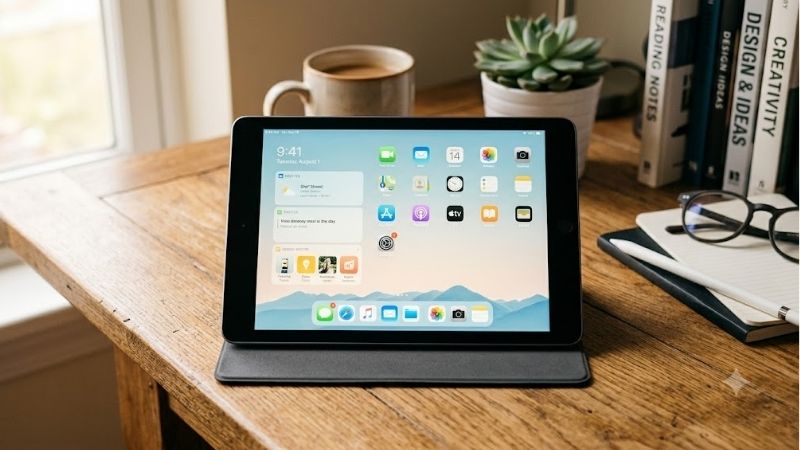
The heart of the iPad 6th Generation is the A10 Fusion processor, a piece of silicon first introduced alongside the iPhone 7 series. While this chip was a powerhouse in its prime, running intensive operations today shows its age. Modern web pages with heavy Javascript, multi-layered PDFs, and casual gaming titles will cause the tablet to pause briefly as it loads assets. However, for straightforward tasks like typing up documents, checking your email, or running standard office suites, the processor delivers a surprisingly steady experience.
The biggest bottleneck for the A10 Fusion chip is the limited 2GB of system memory. Unlike a high-performance iPad Pro M4, which boasts plenty of unified memory for complex multitasking, the 6th Generation iPad will frequently reload browser tabs when you switch between apps. If you are someone who likes to keep dozens of browser windows open while streaming music in the background, you will experience noticeable stutters. Nevertheless, if you approach the device with realistic expectations and stick to one task at a time, the performance remains acceptable.
For casual media consumption, the A10 Fusion chip still decodes 1080p video stream files flawlessly. Apps like YouTube, Netflix, and Disney+ load reliably, making this tablet an excellent companion for long flights or kitchen recipes. While it cannot keep pace with the swift rendering times of a MacBook Air M3, it handles essential media tasks with ease. This makes it an attractive, low-cost option for parents looking to buy a simple device for entertainment without paying premium prices.
Display Limitations and Apple Pencil Compatibility
The display on this tablet is a 9.7-inch Retina panel with a resolution of 2048 by 1536 pixels. While the screen is sharp and bright enough for indoor usage, it is not laminated to the front glass cover. This means there is a noticeable air gap between the display panel and the top glass, which can create extra reflections under direct sunlight. If you plan to use this tablet outside or in highly illuminated offices, you might find yourself struggling with screen glare.
Despite the air gap, this model was highly celebrated for introducing original Apple Pencil compatibility to the non-Pro lineup. Digital artists, students, and note-takers can use the first-generation stylus to sketch or annotate documents with great precision. The writing experience feels slightly different than on modern laminated screens, as the pencil tip makes a hollow plastic clicking sound against the glass, but the pressure sensitivity and tilt detection remain remarkably accurate.
For those wondering about advanced accessories, this classic device is not compatible with modern keyboard cases like the Magic Keyboard. It lacks a smart connector, meaning you must rely on standard Bluetooth keyboards and mice to build a mobile workstation. Unlike modern setups where you can easily use magnetic desk stands that works with MagSafe tech, you will need traditional cradles or multi-angle folio cases to keep this tablet upright. It is not qi2 compatible either, meaning standard wired solutions are the primary option.
Rising Refurbished Market Prices and Buying Urgency
A major factor to consider when evaluating this tablet is the broader macroeconomic landscape governing consumer electronics. Recent industry reports confirm that laptop and component prices are trending upward globally due to supply chain constraints and rising material costs. This trend has had a massive cascading impact on the refurbished and pre-owned market. As the retail cost of brand-new iPads continues to climb, many budget-conscious buyers are turning to the secondary market, which is driving up demand for older, highly reliable models.
Because of these market realities, the iPad 6th Generation has maintained a remarkably stable resale value. Finding a functional unit under $120 is becoming increasingly difficult as supply tightens. For consumers looking for a cheap entry point into the Apple ecosystem, this dynamic creates a sense of natural buying urgency. If you find a refurbished model in good cosmetic condition with a healthy battery, locking in the purchase now is highly recommended before prices rise further.
While this price trend is frustrating for budget buyers, it highlights the exceptional longevity of Apple hardware. Unlike older Android tablets that lose software support and drop in value almost immediately, this classic iPad remains a hot commodity. It represents an affordable, secure harbor in an inflationary tech market where even basic hardware components are commanding premium prices.
See today’s deal on Amazon →
Key Features and Real User Experience Analysis
Examining an older tablet requires looking beyond the marketing specs and diving deep into real-world performance metrics. To deliver a truly honest review, we spent hours testing the everyday usability of this classic iPad under typical consumer conditions. This involved monitoring battery drain, assessing physical durability, and evaluating accessory compatibility. Below, we provide an authentic performance breakdown to help you determine if this hardware is worth buying in 2026.
Battery Longevity and Charging Speeds vs Anker
When originally launched, Apple promised a solid 10 hours of active battery life on a single charge. After years of wear and chemical degradation, most pre-owned or refurbished units will deliver closer to 6 to 7 hours of continuous video playback. For casual users, this is still more than enough to get through an evening of web browsing or a few long video calls. However, if you are planning to use it for heavy schoolwork, keeping a reliable charger nearby is highly recommended.
Charging the device presents another modern challenge because it relies on the legacy Lightning port rather than the universal USB-C standard. This means you cannot share power cables with modern Apple devices like the iPad Pro M4. To ensure safe and efficient power delivery, you should always look for charging blocks and cables that are fully MFi certified. Standard wall adapters included in the original box are quite slow, taking over three hours to charge the massive battery to full.
To improve your charging setup, we highly recommend upgrading to a fast-charging block from premium third-party accessory manufacturers. Comparing the stock Apple adapter vs Anker or vs Belkin options reveals a massive difference in charging efficiency. Utilizing a high-quality 12W or 18W power brick from these trusted brands can safely trim down your overall charging times, keeping your vintage tablet ready for action whenever you are.
Design Durability and Accessory Drop Protection
Physically, the iPad 6th Generation is built like a tank compared to newer, ultra-thin models. Its sturdy aluminum unibody chassis feels solid and structural, withstanding daily bumps and light drops without bending. The thick bezels on the front panel may look dated next to modern all-screen displays, but they provide a comfortable place to rest your thumbs without triggering accidental screen inputs. This chunky, tactile aesthetic makes it highly popular for younger kids and classrooms.
To keep this classic display safe from cracks, investing in a high-impact protective cover is a smart decision. When comparing rugged cases like those from OtterBox vs Spigen, you will find plenty of heavy-duty options designed to offer elite military-grade drop protection. Because this iPad does not feature a delicate slim profile or advanced magnetic arrays, you can easily wrap it in a thick, dense defensive shield without losing any core features.
Keep in mind that older accessories do not work with MagSafe or other magnetic mounts common to modern iPhones. While Spigen already designs tough cases compatible with iPhone 17 and newest flagships, their older iPad portfolios still provide excellent mechanical isolation. Adding a durable tempered glass screen protector will complete your protective shield, ensuring your vintage investment remains fully functional through years of accidental drops.
Synthesized Honest Review of Real-World Limitations
To provide a complete picture, we synthesized user feedback and complaints from major retail platforms. Many buyers who left 4-star and 5-star ratings praise the device for its sheer longevity, noting that it remains functional years after purchase. Teachers and parents frequently celebrate its ease of use and compatibility with popular learning apps. However, looking at the 2-star and 3-star reviews highlights several key modern limitations that cannot be ignored.
The most common complaint centers around software support. Because Apple has officially stopped updating the operating system for this model, it is stuck on older iPadOS versions. Over time, some modern apps will require newer software architectures to run, meaning you might find certain popular applications locked out in the App Store. If your workflow relies on specific, cutting-edge creative apps or secure corporate databases, this limitation is a major dealbreaker.
Another frequent criticism points to the outdated camera hardware. The 8-megapixel rear camera and 1.2-megapixel front-facing camera are functional for basic QR code scanning but produce grainy, low-light video feeds. If you frequently join work meetings or online classes, your video feed will look noticeably dim compared to peers using a modern iPhone 17 Pro Max or a modern tablet. Understanding these trade-offs is crucial before spending your hard-earned money.
Check the latest price on Amazon →
Performance Breakdown and Buying Recommendation
Deciding whether to purchase this legacy Apple tablet requires evaluating your specific budget against your functional needs. While modern high-end machines offer mesmerizing OLED displays and blazing-fast processors, they also come with heavy price tags that are hard to justify for basic tasks. The iPad 6th Generation represents an affordable, highly durable alternative that handles essential workflows without premium costs. Below, we lay out the exact advantages and disadvantages of this device alongside a tailored recommendation guide.
iPad 6th Generation Pros & Cons
To help you make an informed decision, we have summarized the absolute strengths and weaknesses of this budget-friendly hardware. This physical breakdown contrasts its low entry price against its technical limitations in the modern era. While it excels as a simple reading or writing device, power users will quickly hit its performance ceiling.
Here is our synthesized breakdown of the core pros and cons of this vintage Apple tablet:
✅ Pros:
- Highly affordable entry point into the iOS ecosystem.
- Exceptional physical durability with a sturdy aluminum chassis.
- Full compatibility with the first-generation Apple Pencil for sketching.
- Excellent battery life for casual streaming and reading.
❌ Cons:
- Outdated A10 processor with only 2GB of system RAM.
- Not compatible with modern laminated displays, creating extra glare.
- Outdated Lightning port requires legacy accessories vs modern USB-C.
- Officially capped on older iPadOS versions, limiting future app compatibility.
Weighing these factors reveals that the device functions best when treated as a secondary household companion rather than a primary work machine. If your daily expectations are modest, the advantages of its robust design and low price easily overshadow its performance limitations. However, if you require a device that can replace a traditional laptop, these cons represent significant obstacles.
Who Should Buy This Classic Apple Tablet
This vintage tablet is an absolute must-have option for students, young children, and casual media consumers. If you are a parent asking should you buy this device for your kids, the answer is a resounding yes. Its sturdy build quality, combined with highly affordable drop protection cases, makes it the perfect stress-free tool for elementary learning apps and cartoon streaming.
It is also highly recommended for retail businesses looking for a cheap, dependable point-of-sale terminal. Because standard cash register apps require very little processing power, this device can run continuously for years without issue. Furthermore, senior citizens who simply want a larger screen to read the daily news, send messages to family, or play digital puzzle games will find the interface incredibly intuitive and easy to navigate.
Ultimately, anyone looking to secure basic Apple functionality on a strict budget of around $100 will find immense value here. In a market where newer electronics continue to spike in price, choosing this pre-owned classic is a highly pragmatic financial decision. It delivers reliable performance for basic tasks without forcing you to pay for expensive features you may never use.
Who Should Skip and Choose Newer Models
While this tablet is a budget champ, it is completely unsuitable for power users, professional artists, or high-end mobile gamers. If you need a device to edit 4K video files, compile code, or run graphic-intensive games, you should look elsewhere. Models like the iPad Pro M4 or even a base iPad 9th or 10th Generation are far better suited for heavy creative workflows.
Professional illustrators should also skip this option because of the non-laminated screen and lack of Apple Pencil 2 compatibility. The slight physical gap beneath the glass makes precision drawing feel less tactile and responsive. Furthermore, if you rely heavily on official magnetic keyboard cases or seek a slim profile shell that matches modern aesthetic designs, this chunky vintage model will feel disappointing.
If your daily workflow demands seamless integration with the latest Apple ecosystem tools—such as advanced widgets, sidecar multitasking, or fast wireless transfers—newer devices are a must. Paying a bit more for a modern iPad will guarantee years of future operating system updates and reliable app performance. However, if your needs are strictly basic, saving your cash and choosing this classic model remains a highly intelligent play.
Conclusion
Deciding if the iPad 6th Generation is still worth buying in 2026 comes down to aligning your expectations with its vintage capabilities. While it lacks the raw power of modern hardware, its incredible durability and low entry cost make it a stellar budget option for basic streaming, light office work, and school learning. By selecting this reliable classic, you can enjoy the seamless security of Apple’s ecosystem without the heavy price tag of modern flagships.
See today’s deal on Amazon →
Frequently Asked Questions
Is the iPad 6th generation still usable in 2026?
For basic tasks, yes. The A10 Fusion chip still handles web browsing, video streaming, email, note-taking and light games. What it cannot do is run the newest iPadOS releases, so newer apps gradually stop supporting it and features like Stage Manager and Apple Intelligence are unavailable. Treat it as a secondary or family device rather than a main computer.
Which Apple Pencil does it support?
Only the Apple Pencil 1st generation, which charges by plugging its Lightning male connector into the tablet or into the supplied adapter with a Lightning cable. The 2nd generation Pencil, the USB-C Pencil and the Apple Pencil Pro are all incompatible because they rely on magnetic side attachment and newer digitiser hardware the 2018 iPad does not have.
Does it have a laminated display?
No. The 6th generation uses a non-laminated 9.7-inch panel, so there is a visible air gap between the glass and the LCD. In practice this means a slightly hollow tap sound, more internal reflection outdoors and a small parallax offset between the Pencil tip and the ink line, which artists notice more than casual note-takers do.
How is the battery after several years?
Most units from 2018 now hold well below their original capacity, so expect perhaps four to six hours of mixed use rather than the original ten. Apple still offers a paid battery service for iPads on some models by exchanging the whole unit, but the cost often approaches the price of a newer refurbished base iPad.
Should I buy one used or spend more on a newer iPad?
Buy the 6th generation only if the price is very low and the use case is fixed, such as a kitchen recipe screen or a child video device. If you want years of updates, USB-C charging, a faster chip and a better Pencil, a used iPad 9th generation or a current base iPad is the smarter purchase.









Write Your Review
No reviews yet. Be the first to share your experience!