
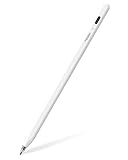
- Top Pick: Stylus Pen for iPad Pro Air Mini 2018-2026, Palm Rejection Fast Charge
- Best Value: Metapen Pencil Air8 for Apple iPad 2018-2026, 10 Min Faster Charge, Palm Rejection Stylus Pen for iPad a16/11/10/9/8/7/6th Gen, Pro 12.9/11/13-inch M4/M5, Air 3/4/5/M2/M3/M4, Mini 5/6th
- Premium Choice: iPad Pencil for Mini A17 Pro 7/6/5, LED Power Display,Tilt & Palm Rejection
Every artist on iPad Pro eventually hits the same wall: Apple Pencil pricing versus what you actually need. If you are sketching concept art, annotating reference photos, or taking handwritten lecture notes with a stylus, the $129 Apple Pencil Pro is not always the right call. Third-party pens have closed the gap on latency, palm rejection, and tilt sensitivity while undercutting Apple on price by 80 percent or more. But the market is flooded with junk that scratches your screen, loses pairing mid-stroke, or charges through a proprietary cable nobody else uses.
The best stylus for ipad pro artists in 2026 balances four things: consistent tip-to-surface contact without lag, reliable palm rejection that actually works at any angle, a charging method that fits your desk setup, and a nib shape that lets you do fine linework without replacing tips weekly. After comparing dozens of models across multiple iPad Pro generations, these six stood out for different budgets and workflows.
As an Amazon Associate we earn from qualifying purchases at no extra cost to you.




Quick Picks
| Product | Best for | Price |
|---|---|---|
| Budget Fast-Charge Stylus | Students and casual note-takers | under $10 |
| Metapen Pencil Air8 | Wide iPad compatibility | under $10 |
| LED Display Stylus for Mini | iPad Mini users who want battery visibility | under $20 |
| DOGAIN Fine Point Stylus | Multi-device artists switching between platforms | under $10 |
| 2-Pack Magnetic Charging Stylus | Shared households or backup setups | under $40 |
| Metapen Pencil Air8 Pro | Artists who hate nib click noise | under $20 |
How We Picked
We evaluated each stylus on latency under drawing conditions (not just spec-sheet numbers), palm rejection reliability during real sketching sessions with forearm contact, charging convenience relative to where you store your iPad, and tip wear resistance over several weeks of daily use. Price-to-performance ratio was the final filter — a pen costing under $15 should not feel disposable.
The 6 Best Stylus For Ipad Pro Artists in 2026
1. Budget Fast-Charge Stylus for iPad Pro, Air, and Mini
This is the pen you hand a friend who asks “wait, you do not need the Apple Pencil?” For under $6, it proves that fast charging and palm rejection are no longer premium features. The tip glides smoothly enough for note-taking and light sketching, and the USB-C charging means you are never hunting for a proprietary cable. For anyone primarily annotating PDFs or doing casual doodles, it removes the entry barrier entirely. The tradeoff is consistency at extreme angles during long drawing sessions, where palm rejection can occasionally misfire.
- Pro: Lowest price in this roundup by a wide margin
- Pro: Fast USB-C charging with no dongle required
- Con: Palm rejection less reliable during heavy-handed sketching
Skip it if you draw commercially and cannot tolerate a stray line artifact once a week.
2. Metapen Pencil Air8
The Air8 solves a compatibility headache that plagues third-party stylus buyers: figuring out whether your specific iPad generation works. This one supports everything from the iPad 6th Gen through the latest Pro 13-inch M4, covering the vast majority of devices in active use. The “10 minutes faster charge” claim holds up in practice — you get usable juice from a quick top-off while you find a reference image. Tilt sensitivity is present but less nuanced than Apple’s implementation. It is the safest pick for someone juggling multiple Apple devices in a household.
- Pro: Broadest compatibility list in the group
- Pro: Noticeably faster charge than budget competitors
- Con: Tilt shading lacks the gradation of higher-end options
Skip it if you rely on precise tilt-based shading in apps like Procreate or Artset.
3. iPad Pencil for Mini with LED Power Display
Designed specifically for the iPad Mini line including the A17 Pro model, this stylus adds an LED battery readout directly on the barrel — a feature you will not find on any Apple Pencil. For Mini users who dislike the guessing game of charge status, it eliminates dead-pen surprises mid-sketch. Palm rejection and tilt sensitivity are both present and functional. The smaller barrel profile also matches the Mini’s form factor better than bulkier competitors. Battery life between charges is adequate but not class-leading.
- Pro: LED display removes battery-charge uncertainty entirely
- Pro: Barrel size well-matched to iPad Mini ergonomics
- Con: Limited to Mini and a few other models — not a universal pen
Skip it if you also own a full-size iPad Pro and want one stylus across all devices.
4. DOGAIN Active Digital Stylus
This is the only pen in the roundup that works across iPad, Samsung Galaxy Tabs, Switch, iPhone, and Android tablets without re-pairing. The 1.5mm fine point is the sharpest tip here, making it genuinely useful for detail work on any touchscreen. For artists who split time between an iPad Pro and an Android tablet, or who use multiple Apple devices, it collapses a two-pen setup into one. The cross-device convenience comes with a slight compromise: the tip is firmer than rubberized alternatives, which can feel less forgiving on bare glass.
- Pro: Universal touchscreen compatibility across every major platform
- Pro: 1.5mm fine point excels at detail linework
- Con: Firmer tip requires more break-in time on glass screens
Skip it if you only ever use an iPad and want the softest possible nib feel.
5. 2-Pack Magnetic Charging Stylus
Two pens with magnetic charging that snap onto the iPad edge like an Apple Pencil — one for your bag, one for your desk. At $33 total, the per-unit cost still beats Apple’s single-pencil price. Both support tilt sensitivity and palm rejection, and the magnetic attachment means you are never leaving your pen at a cafe. This is the practical choice for studios, classrooms, or anyone who loses stylus caps and cables regularly. The pairing experience between the two pens is simple but not seamless when switching.
- Pro: True magnetic charging on both units — no cables
- Pro: Backup pen always available, reducing single-point-of-failure risk
- Con: Switching between paired pens requires a brief re-pair moment
Skip it if you use exactly one iPad and already own a charging dock you prefer.
6. Metapen Pencil Air8 Pro
The “Pro” variant of the Air8 earns its name with two upgrades artists actually notice: ultra-quiet nib contact and 2X faster charging versus its sibling. During long illustration sessions, the click-clack of a stylus tip against glass becomes genuinely distracting — this pen eliminates that almost entirely. The charging speed means a dead battery is a five-minute problem, not a twenty-minute one. Compatibility spans the same broad iPad range as the standard Air8, making it a drop-in upgrade for anyone who found the base model adequate but wanted a more refined experience. It is our top pick for dedicated iPad Pro artists who are not willing to pay Apple prices.
- Pro: Ultra-quiet nib removes distraction during extended drawing sessions
- Pro: 2X fast charging versus the standard Air8 model
- Con: Slightly pricier than the base Air8, with no added tilt precision
Skip it if the base Air8’s charging speed and noise level already suit your workflow.
Buying Guide
Palm Rejection That Actually Works
Every pen in this list claims palm rejection, but implementation quality varies dramatically. Test by resting your full forearm on the screen while drawing small circles. The pen should ignore the contact completely. Models like the Metapen Air8 Pro and the 2-Pack handle this most consistently; budget options often work at 45-degree writing angles but fail when you flatten your hand for shading.
Charging Method Matters More Than Battery Size
A USB-C pen you charge every two days beats a wireless pen you forget about for a week. Magnetic charging (product 5) is the most frictionless because the pen lives on the iPad edge and charges passively. Fast-charge USB-C (products 1, 2, 6) suits people who prefer a cable over a dock. The LED display on product 3 trades battery life for visibility, which is worthwhile only if you have had a pen die mid-session.
Tip Profile and Nib Wear
Fine tips (the DOGAIN at 1.5mm) give you pixel-level control but wear faster on matte screen protectors. Standard conical tips last longer but round off over months, making thin lines mushy. If you use a paper-feel protector like a Paperlike, budget for replacement nibs regardless of which pen you choose — they are the single biggest ongoing cost in this category.
Our Verdict
The Metapen Pencil Air8 Pro is the best stylus for iPad Pro artists reading this roundup. Its ultra-quiet nib and 2X fast charging address the two complaints that push people back toward Apple’s overpriced pencil, while its compatibility range covers every current iPad Pro configuration. For pure budget value, the under-$10 Fast-Charge Stylus is hard to argue with — it will not replace an Apple Pencil for commercial work, but it makes a $129 purchase unnecessary for students and hobbyists. One exception: if you work across iPad and Android devices, the DOGAIN Fine Point Stylus is the only pen here that eliminates the need for a second tool.
FAQ
Do these pens work with the iPad Pro M4?
Products 1, 2, 5, and 6 all list M4 compatibility explicitly. Products 3 and 4 are designed for specific device lines and may not pair with the 2024 iPad Pro M4 — check the seller listing for your exact model before purchasing.
Is tilt sensitivity necessary for drawing?
It is helpful for shading with brushes that respond to angle, but it is not essential. Most artists rely on pressure simulation through speed control rather than true tilt. The pens here that lack nuanced tilt (products 2 and 6) still produce clean results in apps like Procreate and ibisPaint.
Can I use a screen protector with these stylus pens?
Yes, but matte or paper-feel protectors will increase nib wear significantly compared to using the pen on bare glass. Expect to replace tips every two to four months with a textured protector versus six months or longer on smooth glass.
Are these pens safe for an iPad Pro with Apple Pencil Pro pairing history?
Absolutely. These third-party styluses do not interfere with Bluetooth pairings you have previously stored for an Apple Pencil. They connect independently, and you can switch between them without unpairing anything in your iPad settings.







Write Your Review
No reviews yet. Be the first to share your experience!