
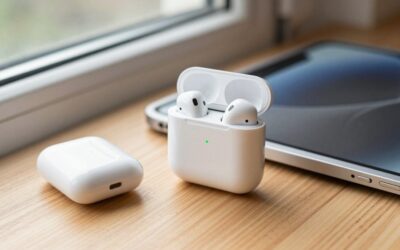
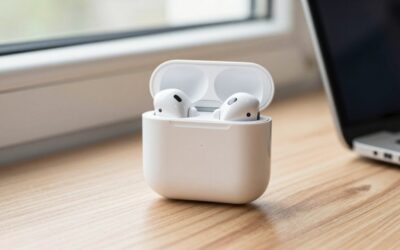
Learning how to clean AirPods charging case surfaces is simple, but the small openings and charging contacts require a light touch. The biggest risks are moisture, liquid cleaner, and debris pushed farther into the Lightning or USB-C port. A wet case can develop charging problems, while a sharp tool may damage the contacts, microphone openings, hinge, or water-resistant seals. The following method works for the outside of most AirPods charging cases, including standard, Pro, and newer USB-C models. Set aside about 10 to 15 minutes, then allow the case to dry completely before charging.
What You Need
| Item | Why | Optional? |
|---|---|---|
| Soft, lint-free microfiber cloth | Removes fingerprints, oils, and surface dust without scratching glossy plastic. | No |
| Dry, soft-bristled brush | Lifts lint from the hinge, speaker area, and charging port without forcing it deeper. | No |
| Wooden toothpick | Helps loosen compacted debris along the case’s inner rim. | Yes |
| 70% isopropyl alcohol wipe or a small amount of 70% isopropyl alcohol | Useful for stubborn grime on the exterior plastic only. | Yes |
| Bright lamp or phone flashlight | Makes lint and buildup easier to see inside the lid and port. | Yes |
| Clean, dry work surface | Prevents new dust from sticking to the case while it dries. | No |
Do not use tap water, spray cleaner, bleach, hydrogen peroxide, acetone, abrasive powder, or a soaking-wet cloth. Avoid canned or compressed air, which can drive dust into the case or force debris against sensitive components. If you use alcohol, put a tiny amount on the cloth rather than pouring it onto the case.
As an Amazon Associate we earn from qualifying purchases at no extra cost to you.


Step-by-Step
1. Disconnect, empty, and inspect the case (2 minutes)
Remove both AirPods and unplug the charging cable. If the case is on a wireless charging pad, lift it off the pad. Keep the lid open and inspect the exterior, hinge, charging port, status light, and interior wells under a bright light.
Look for compacted lint, oily residue, discoloration, or signs of liquid. Do not clean while the case is actively charging. If the case feels damp or has been exposed to a spill, stop and let it air-dry in a well-ventilated place before attempting to brush it.
2. Brush away loose debris (2 to 3 minutes)
Hold the case with the charging port facing downward. Use a clean, dry, soft-bristled brush to sweep around the port entrance, hinge, lid seam, status light, and exterior edges. Work away from the openings instead of brushing debris inward.
For the inside, brush around the circular charging wells and along the upper rim without pressing down into the metal contacts. A small electronics brush, clean makeup brush, or very soft artist’s brush can work. The bristles should bend easily; stiff bristles may scratch the finish or disturb internal components.
3. Clean the exterior with a dry microfiber cloth (2 minutes)
Close the lid and wipe the outside using short, gentle strokes. Pay special attention to the area around the lid seam, hinge, charging port, and bottom surface, where fingerprints and pocket residue tend to collect.
Use the corners of the cloth to reach around the status light and lid edge. Do not wrap the case in a wet cloth or rub liquid into the seams. If dry wiping removes the grime, stop here.
4. Treat stubborn exterior marks sparingly (1 to 2 minutes)
For sticky residue that remains, lightly dampen one corner of a microfiber cloth with 70% isopropyl alcohol. The cloth should feel barely damp, not wet enough to release drops. Wipe only the exterior plastic, then immediately buff the area with a dry section of the cloth.
Keep alcohol away from the charging port, speaker or microphone openings, interior charging wells, lid seam, and hinge. Never pour alcohol directly onto the case or use it to flood a stain. If the mark does not lift after one or two gentle passes, it may be scuffing or finish damage rather than dirt.
5. Detail the inner rim and charging wells (2 to 3 minutes)
Open the lid and brush the inner rim, then wipe the accessible plastic with a dry microfiber cloth. For a narrow strip of buildup, use a wooden toothpick very carefully along the plastic edge, keeping the tip away from metal contacts and electronic openings.
Do not scrape the bottom of the charging wells. The contacts must remain aligned and should not be bent, pushed, or coated with cleaner. Never use a metal pin, needle, paper clip, or knife. If debris is tightly packed around a contact, stop rather than applying force.
6. Clean the charging port without pushing debris inside (1 to 2 minutes)
Turn the case so the port faces downward. Use the dry brush to sweep across the entrance, moving outward. A wooden toothpick may be used along the inside sidewalls only if necessary, with almost no pressure. Keep the tip away from the center of the port and its internal contacts.
If the port still looks blocked, do not add liquid and do not insert a cotton swab. Fibers can catch inside, and pressure can damage the connector. A repair technician can remove compacted lint with the correct tools.
7. Let the case dry and test it (at least 15 minutes)
Leave the case open for at least 15 minutes in a dry room before returning the earbuds or connecting power. If any alcohol or moisture touched an opening, wait longer—ideally several hours—and do not use heat from a hair dryer.
Once completely dry, place the AirPods back inside and check that they seat normally. Connect the charging cable or place the case on its usual compatible charging pad. Confirm that the status light responds and that the case charges without unusual heat, odor, or intermittent connection.
Mistakes to Avoid
- Cleaning while connected to power: Unplug the case first to reduce the risk of a short or charging fault.
- Pouring cleaner into openings: A drop can travel farther than expected and damage internal electronics.
- Using sharp metal tools: They can scratch plastic, bend contacts, or puncture delicate components.
- Using compressed air: Forceful air may push lint deeper into the case.
- Scrubbing with paper towels: They can shed fibers and may leave fine scratches on glossy surfaces.
- Ignoring the earbuds: Dirt on the AirPods can transfer back into the clean case. Wipe the earbuds separately with a dry, lint-free cloth.
- Closing the lid before the case is dry: Trapped moisture can remain around the hinge and interior rim.
How Often
For most people, a quick dry wipe once a week is enough. Brush the port and interior wells every two to four weeks, or whenever you see pocket lint. People who carry the case loose in a bag or pocket, work outdoors, or use it while exercising may need a light exterior cleaning several times per week.
Avoid deep cleaning on a fixed daily schedule. Excessive brushing and repeated alcohol use can wear the finish. Clean when you see residue, feel grit around the lid, or notice that an AirPod does not sit smoothly in its charging well.
When to Call a Pro or Replace
Seek professional service if the case was submerged, exposed to a sugary drink, becomes unusually hot, smells burnt, swells, or will not charge after it is fully dry. Also stop using it if the lid no longer closes, the charging port is loose, or an internal contact appears bent. Do not open the case yourself; the battery and small components can be damaged during disassembly.
Replacement may be more practical when the battery holds little charge, the port is physically damaged, or repair costs approach the price of a compatible case. As a general buyer reference in 2026, compatible replacement charging cases commonly cost about $20 to $35, depending on the AirPods generation and charging features. Examples include a wireless charging case compatible with AirPods Pro 1st and 2nd generation listed for under $30 and a Wireless Charging Case for AirPods 4 listed for under $30. Confirm the exact generation, connector, and wireless-charging compatibility before purchasing; replacement cases do not include earbuds.
FAQ
Can I use alcohol to clean an AirPods charging case?
Yes, use 70% isopropyl alcohol sparingly on a cloth for exterior plastic only. Keep it out of ports, seams, charging wells, contacts, and openings. Never pour it directly onto the case.
How do I remove lint from the charging port?
Hold the port downward and brush outward with a dry, soft brush. If necessary, use a wooden toothpick along the sidewalls with minimal pressure. Do not use a metal tool, liquid, cotton swab, or compressed air.
Can I wash the charging case with water?
No. Even if a particular AirPods model has some water resistance, the charging case should not be submerged, rinsed, or soaked. Water can enter through the port, hinge, seams, and status-light area.
Why is my case still not charging after cleaning?
Check that the cable, adapter, or charging pad works with another device and that no lint remains in the port. Try a different compatible power source, then allow the case to dry fully. Persistent heat, intermittent charging, liquid exposure, or a loose port indicates a battery or hardware problem that needs service or replacement.





Write Your Review
No reviews yet. Be the first to share your experience!