
- Top Pick: SUPFINE Magnetic for iPhone 13 Case/iPhone 14 Case Black
- Best Value: TORRAS for iPhone 17 Pro Case Crystal Clear, Upgraded Anti-Yellowing, 6.3''
- Premium Choice: OtterBox iPhone 17e, 16e, 15, 14, & 13 Commuter Series Case – Black, Slim & Tough, Pocket-Friendly, with Port Protection – Thin & Protective iPhone Case, Dual-Layer, Impact Absorbing iPhone Case
Choosing an iPhone case sounds simple until you are comparing magnetic rings, drop ratings, camera lips, recycled plastics, silicone finishes, and model names that look nearly identical. The most common mistake is buying by appearance first. A slim clear case may look great but offer little grip; a rugged case may protect well but make the phone too bulky for a pocket. Another frequent error is assuming that any case listed for a nearby iPhone generation will fit. Camera openings, button placement, thickness, and MagSafe alignment can vary even when the phones look similar.
- Decide These 3 Things First
- Size and Fit Come Before Everything Else
- Material Determines Grip, Aging, and Feel
- Construction Is the Real Protection Feature
- Comfort and Performance Matter Every Day
- Price Tiers: What You Get for the Money
- Warranty and Return Terms Are Part of the Purchase
- Delivery and Installation Should Be Simple
- Spec Checklist
- Red Flags
- FAQ
The best approach is to decide how and where you use your phone, verify the exact model, and then compare protection, materials, comfort, and price. This guide explains what actually matters when shopping in 2026, with practical specifications you can check before buying.
As an Amazon Associate we earn from qualifying purchases at no extra cost to you.




Decide These 3 Things First
- Your exact iPhone model: Check Settings > General > About for the model name, then match the case listing precisely. Do not rely only on screen size. An iPhone 17 Pro case, for example, may not fit a standard iPhone 17 because the camera layout and body dimensions can differ.
- Your biggest risk: Decide whether you are mainly trying to prevent scratches, survive occasional drops, improve grip, or protect the phone from dust and debris. A thin case is suitable for careful users, while commuters, parents, and outdoor workers may need reinforced corners and covered ports.
- Your charging and carrying habits: If you use magnetic charging, a car mount, or a wallet accessory, choose a case with a correctly aligned magnetic ring. If your phone spends most of the day in a small pocket, prioritize thickness and weight over maximum armor.
Size and Fit Come Before Everything Else
A case should fit the exact iPhone generation, screen size, and camera configuration. A difference of only a few millimeters can leave buttons misaligned or allow the phone to shift inside the shell. Confirm the case listing includes your complete model name, not merely a similar number or display size.
For everyday use, compare the case’s added dimensions with the phone itself. A slim case often adds roughly 0.04 to 0.08 inches to each side and weighs about 0.8 to 1.5 ounces. A dual-layer protective case may add 0.10 to 0.18 inches per side and weigh 2 to 4 ounces. Heavy-duty cases can add more than 0.20 inches and exceed 5 ounces.
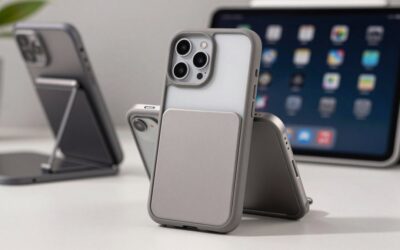
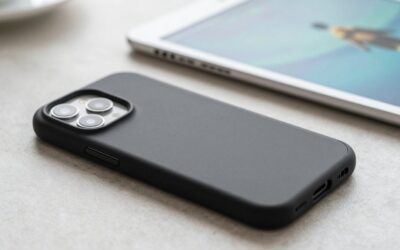
Check the camera opening carefully. It should leave the lenses unobstructed while placing a raised rim around them. A front lip of approximately 0.8 to 1.2 millimeters can help keep the display off a flat surface, although a raised edge is not a guarantee against every type of impact. If you use a screen protector, look for a case described as screen-protector compatible rather than assuming the two products will work together.
Material Determines Grip, Aging, and Feel
Polycarbonate is a firm plastic commonly used for clear backs and protective frames. It resists bending and keeps a slim profile, but smooth clear plastic can feel slippery. Clear cases may also show fingerprints and gradually develop a yellow or amber appearance, especially with frequent sunlight and heat exposure. “Anti-yellowing” is a useful feature, but it is not a promise that a clear case will remain perfectly transparent indefinitely.
Thermoplastic polyurethane, or TPU, is flexible and often used for shock-absorbing edges. It provides more grip than hard plastic and is easier to install, though soft edges can stretch or discolor over time.
Silicone feels soft and grippy, making it comfortable for one-handed use. It can attract lint and may show scuffs, particularly in dark colors. The best silicone-style cases usually combine a soft exterior with a firmer inner lining, rather than relying on a single thin layer.
Leather and leather alternatives offer a warmer, more refined feel but may cost more and develop visible wear. Fabric, aramid fiber, and recycled materials can reduce weight, but their protection depends heavily on the frame and corner construction. Focus less on the material label and more on how the case combines materials.
Construction Is the Real Protection Feature
Look for a case that protects the vulnerable areas: corners, camera lenses, screen edges, buttons, and charging ports. A two-piece design typically uses a firm back with a flexible bumper. That arrangement can spread impact better than a single wafer-thin shell, while remaining easier to handle than a bulky armored case.
Corner reinforcement is especially important because corners concentrate impact. Some cases use thicker bumpers, air pockets, or internal ribs. These features are meaningful even when a listing does not provide a drop height. Treat phrases such as “military grade” cautiously unless the seller identifies the standard, test conditions, and whether the test applies to the complete case design.
For daily protection, a raised camera rim of about 1 millimeter is a useful baseline. Port covers can help in dusty or dirty environments, but they also make charging less convenient. Button covers should press easily and provide clear tactile feedback. If a button feels stiff before the case is installed, it is unlikely to improve with use.
Magnetic cases deserve a separate check. A built-in magnetic ring should be centered around the phone’s charging coil and strong enough for the accessories you use. Magnetic compatibility does not automatically mean the case works equally well with every stand, wallet, or car mount.
Comfort and Performance Matter Every Day
Protection is only useful if you keep the case on. Hold the phone in one hand and consider whether the edges are too sharp, the sides are too slippery, or the added bulk makes typing uncomfortable. A case adding 3 to 4 ounces can make a noticeable difference on a larger iPhone, especially when combined with a wallet or battery accessory.
Check the button placement and the amount of sidewall above the display. A very tall lip can protect the screen but make edge gestures harder. A case with textured sides or a lightly patterned back may be easier to grip than a perfectly smooth case, even if both have similar dimensions.
Wireless charging performance also depends on alignment and thickness. For magnetic charging systems, choose a case specifically identified as magnetic-compatible. For regular wireless charging, a thin case under roughly 0.12 inches is generally less troublesome, but metal plates, thick wallet attachments, and magnetic accessories can interfere. Remove cards and metal inserts before charging unless the manufacturer specifically says they are compatible.
Price Tiers: What You Get for the Money
Budget: $7 to $15. This range includes basic TPU, clear, and simple magnetic cases. A product such as the under-$10 SUPFINE Magnetic case illustrates the appeal: low cost, a slim profile, and basic everyday coverage. At this price, inspect the return policy, button quality, camera lip, and customer photos carefully. Finish consistency and long-term color stability may be less predictable.
Midrange: $16 to $30. You can usually expect better grip, more consistent molding, stronger magnets, improved linings, and more thoughtful corner protection. A silicone magnetic case around $20, such as the Miracase example, fits this category. This is often the best value for people who want daily comfort plus meaningful protection without maximum bulk.
Premium: $31 to $55 or more. Premium cases may offer a slimmer protective design, better materials, port covers, reinforced corners, or a longer warranty. The under-$40 OtterBox Commuter example represents the established protective tier. You are paying partly for design refinement, brand support, and replacement policies—not necessarily for a case that is twice as protective as a $20 model.
Warranty and Return Terms Are Part of the Purchase
Read the warranty before paying more for a case. A one-year limited warranty is common, while some brands offer longer coverage or a limited replacement program. Verify what is excluded: normal scratches, yellowing, adhesive failure, accidental loss, and damage caused by accessories may not qualify.
Also check the return window and condition requirements. A case that feels slippery or causes button problems may need to be returned quickly. Keep the packaging until you have tested the fit, charging, camera access, and screen-protector compatibility. For low-cost cases, return shipping can cost more than the product, so a clear seller policy matters.
Delivery and Installation Should Be Simple
Before ordering, confirm that the listing ships the exact model and color you selected. Marketplace listings sometimes group several iPhone generations under one page, creating an easy opportunity to choose the wrong variant. Delivery estimates can also differ by color or model.
When the case arrives, clean the phone and inspect the interior for grit or molding debris. Install the phone camera-side first, then press the corners into place without forcing them. Test every button, the mute switch, speaker openings, charging cable, wireless charger, and camera lenses. If the case uses a removable magnetic ring or adhesive accessory, position it carefully once; repeated repositioning can weaken the adhesive.
Spec Checklist
| Spec | Budget | Mid | Premium |
|---|---|---|---|
| Typical price | $7–$15 | $16–$30 | $31–$55+ |
| Added weight | 0.8–1.8 oz | 1.2–3 oz | 2–5+ oz |
| Added thickness per side | 0.04–0.08 in | 0.07–0.14 in | 0.10–0.22+ in |
| Construction | Single-layer TPU or plastic | TPU bumper and firm back | Reinforced dual or multi-layer design |
| Camera rim | About 0.5–1 mm | About 0.8–1.2 mm | About 1–2 mm, often reinforced |
| Magnetic support | May be absent or basic | Built-in ring commonly included | Precisely aligned, accessory-focused design |
| Warranty | None to 1 year | 1 year is common | 1 year or longer, depending on brand |
Red Flags
- The listing says only “for iPhone” without naming the exact model and generation.
- Drop protection is advertised with a dramatic number but no test standard or conditions.
- The case blocks part of the camera, flash, speaker, USB-C port, or mute control in product photos.
- A clear case promises permanent anti-yellowing with no qualification.
- A magnetic case does not explain compatibility with magnetic charging or accessories.
- Customer reviews mention loose corners, peeling edges, weak magnets, or difficult buttons.
- The seller has unclear warranty terms, no usable return policy, or inconsistent model choices.
FAQ
Should I buy a slim or rugged iPhone case?
Choose slim protection if you rarely drop your phone and want easy pocket carry. Choose a rugged or reinforced case if the phone is used outdoors, around children, on job sites, or during frequent travel. For many people, a dual-layer case with reinforced corners is the practical middle ground.
Are clear iPhone cases a good choice?
Yes, if you want to show the phone’s color and accept that clear materials can scratch, show fingerprints, or discolor. Look for a firm back, flexible bumper, raised camera edge, and a stated anti-yellowing treatment. Treat that treatment as a delay, not a permanent guarantee.
Do magnetic iPhone cases protect the phone?
The magnetic ring itself is mainly for accessory alignment and attachment. Protection comes from the case’s back, bumper, corners, and camera and screen lips. Check that the ring is built into the case rather than attached loosely, and test it with your specific charger or mount.
How much should I spend on an iPhone case?
Spend about $10 to $20 for dependable basic coverage, $16 to $30 for a balanced everyday case, or $30 to $55 for premium construction and brand support. Pay more when you need specialized features, but do not assume a higher price automatically means better fit or stronger drop protection.



Write Your Review
No reviews yet. Be the first to share your experience!