
As an Amazon Associate we earn from qualifying purchases.
A MacBook keyboard is great for typing, but it leaves out the dedicated number block that makes spreadsheet work, accounting, and data entry fast. A wireless numeric keypad restores that full numpad without a cable, so you can place it on either side of your MacBook, use it only when numbers are on the agenda, and slip it into a bag when you are done. The picks below are all full numeric keypads, not programmable macro pads, and each one pairs wirelessly with a MacBook.
Disclosure: This article contains affiliate links. If you buy through a link on this page, we may earn a commission at no extra cost to you.
How to Choose
- Check Mac compatibility first: Look for explicit macOS support. Some Windows-focused pads lose their calculator, shortcut, or navigation keys on a Mac, even when the digits still work.
- Choose your layout: A slim 18-key pad covers digits and basic operators in the smallest footprint. A 22-key pad adds arrow keys, while a 34-key extended pad adds navigation, function, and Mac shortcut keys for heavier spreadsheet work.
- Prefer Bluetooth for a MacBook: Bluetooth connects directly with no receiver, which matters on MacBooks with only USB-C ports. A pad that also offers a USB receiver can help with older computers, but you will likely need an adapter.
- Compare power options: Rechargeable pads charge over USB-C or micro-USB and suit daily use. A pad that runs on a replaceable AAA battery can go for months, but you will need a spare when it runs out.
- Mind key feel and size: Scissor-switch keys feel closest to a MacBook keyboard and stay quiet. Check the width and weight if you plan to carry the pad with your laptop every day.
Top Picks
1. Satechi Bluetooth Extended Keypad

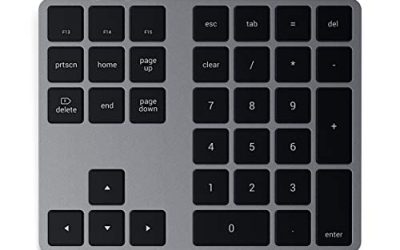
This is the closest match to a desktop Mac setup. The extended layout gives you a full number block plus navigation arrows and Mac shortcut keys, so moving around a large spreadsheet feels natural. Its slim aluminum body in a Mac-matching finish sits neatly beside a MacBook Pro or MacBook Air, and it recharges over USB-C so you can top it up with a cable you already carry.
Specs
- Brand: Satechi
- Model: ST-XLABKM (Bluetooth Extended Keypad)
- ASIN: B07YVPTY94
- Keys: 34 keys
- Connectivity: Bluetooth
- Charging: USB-C rechargeable
- Material: Aluminum
Best for: Mac users who want a full extended numpad with navigation and shortcut keys.
2. Satechi Slim Aluminum Bluetooth Keypad

If desk space and portability matter more than extra keys, this slim 18-key pad is the tidy option. It covers the digits, decimal point, and core operators in a narrow aluminum body that matches the height and feel of an Apple keyboard. It is light enough to live in a laptop sleeve and its rechargeable battery is rated for about two weeks of use between charges.
Specs
- Brand: Satechi
- Model: ST-SALKPS (Slim Aluminum Bluetooth Keypad)
- ASIN: B01J4D1KIY
- Keys: 18 keys
- Connectivity: Bluetooth
- Battery: Rechargeable lithium-ion
- Material: Aluminum, about 100 g
Best for: Travel and small desks where a compact, Mac-matching pad is enough.
3. Macally Bluetooth Wireless Number Pad

The Macally takes a practical approach: quiet scissor-switch keys, a useful set of arrow keys along the bottom, and a battery you rarely have to think about. A single AAA battery is rated for up to 400 hours of continuous use, so there is no charging cable to manage. The sloped, space gray design was made for Mac and iPad users, and it also works with other Bluetooth devices.
Specs
- Brand: Macally
- Model: BTNUMKEY22
- ASIN: B07K2P3BX2
- Keys: 22 keys, scissor-switch
- Connectivity: Bluetooth, up to 30 feet
- Battery: 1 AAA battery, up to 400 hours of continuous use
- Weight: 104 g
Best for: Long data-entry sessions without worrying about recharging.
4. Lekvey Aluminum Bluetooth Number Pad

The Lekvey gives you the wide 34-key layout in a solid aluminum shell with an ergonomic tilt. Alongside the digits you get arrow keys, Tab, Escape, and a double-zero key that speeds up financial entry. It pairs over Bluetooth with a MacBook, iMac, or iPad, and its built-in rechargeable battery charges over a Type-C cable, so it fits easily into a modern Mac desk setup.
Specs
- Brand: Lekvey
- Model: JP06B (Bluetooth Number Pad)
- ASIN: B07L139XXZ
- Keys: 34 keys
- Connectivity: Bluetooth 5.0, up to 10 metres
- Battery: 160 mAh rechargeable lithium battery, Type-C charging
- Size: 5.7 x 4.4 x 0.47 inches, 0.46 lb
Best for: Spreadsheet and finance work that benefits from a wide, full layout.
5. iClever Bluetooth Number Pad

The iClever stands out if you split work between two devices. It can connect to two Bluetooth hosts and switch between them with its BT1 and BT2 keys, which is handy for moving between a MacBook and an iPad. The 34-key aluminum pad uses scissor switches for a laptop-like feel, and a quick USB-C charge is rated for up to 100 hours of working time.
Specs
- Brand: iClever
- Model: KP10
- ASIN: B0B1CWJCS5
- Keys: 34 keys, scissor-switch
- Connectivity: Bluetooth 5.1, connects to 2 devices
- Battery: 200 mAh rechargeable, USB-C charging, up to 100 hours of use
- Size: 5.75 x 4.45 x 0.51 inches, 7.7 ounces
Best for: Switching one numpad between a MacBook and an iPad or second computer.
Final Thoughts
Start with how much layout you really need. The slim Satechi suits occasional number entry and travel, the Macally removes charging from the routine, and the 34-key Satechi Extended, Lekvey, and iClever pads suit daily spreadsheet work. Whichever you choose, confirm macOS support for the extra keys before you buy, pair it once over Bluetooth, and your MacBook gains the number block it was missing.
Write Your Review
No reviews yet. Be the first to share your experience!