

Best Wireless Keyboard setups in 2026 are designed to elevate your everyday productivity, combining tactile feedback with sleek aesthetics. Finding the perfect match for your high-end Apple workspace can transform how you interact with your devices, whether you are coding on a Mac or writing on an iPad. Let us explore the absolute finest typing options available today to supercharge your multi-device setup.
Top Picks for the Best Wireless Keyboard in 2026
Upgrading your desk setup starts with identifying how a keyboard fits into your daily routine. Modern typing tools must offer a flawless blend of tactile comfort, reliable wireless protocols, and seamless multi-device switching across all your Apple hardware. Our research focused on build quality, key switch responsiveness, and overall battery efficiency to bring you the top-tier options currently dominating the market.
As an Amazon Associate we earn from qualifying purchases at no extra cost to you.




| Category | Product | Key Feature | Price | Action |
|---|---|---|---|---|
| Best Overall | Apple Magic Keyboard | Native macOS Integration & Touch ID | $99 | See today’s deal on Amazon → |
| Best Budget | Logitech Pebble Keys 2 K380s | Ultra-Portable & Multi-Device | under $40 | See today’s deal on Amazon → |
| Best Premium | Keychron K3 Max | Low-Profile Mechanical & QMK/VIA | $110 | See today’s deal on Amazon → |
| Product Name | Connectivity | Switch Type | Battery Life | Rating | Price |
|---|---|---|---|---|---|
| Apple Magic Keyboard | Bluetooth / Lightning | Scissor Switch | Up to 1 Month | 4.8/5 | $99 |
| Logitech MX Keys S | Bluetooth / Bolt | Low-Profile Membrane | Up to 5 Months | 4.7/5 | under $150 |
| Keychron K3 Max | 2.4GHz / Bluetooth | Low-Profile Mechanical | Up to 70 Hours | 4.6/5 | $110 |
| NuPhy Air75 V2 | 2.4GHz / Bluetooth | Low-Profile Mechanical | Up to 220 Hours | 4.7/5 | under $150 |
| Logitech Pebble Keys 2 | Bluetooth | Membrane | Up to 36 Months | 4.5/5 | under $40 |
| Satechi Slim X1 | Bluetooth | Scissor Switch | Up to 45 Hours | 4.4/5 | under $70 |
[Rank 1] Apple Magic Keyboard — Best for Mac Integration
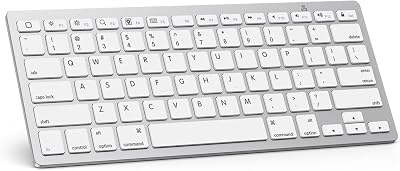
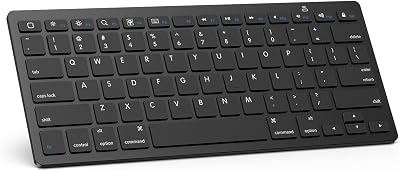
The Apple Magic Keyboard remains the undisputed champion of native integration, delivering a typing experience that feels immediately familiar to anyone who uses an Apple laptop. Featuring Apple’s signature scissor-switch mechanism, this model provides low-travel keys that strike the perfect balance between silence and clean tactile feedback. It sits beautifully flat, making it a perfect companion to place next to your sleek MacBook Air M3.
Beyond its physical layout, the true magic lies in its hardware-level features, specifically the integrated Touch ID sensor on compatible models. This allows you to securely unlock your Mac, authorize Apple Pay purchases, and auto-fill passwords with a single touch. If you are deeply invested in the macOS ecosystem, this seamless level of security and immediate wake-on-key functionality is unmatched.
Is the standard model worth buying in 2026? In our honest review of daily desktop usage, the answer is a resounding yes for those who prioritize a zero-fuss, reliable configuration. While it lacks multi-device pairing, its plug-and-play simplicity and month-long battery life make it an essential office staple.
- ✅ Pros:
- Flawless native macOS integration and functional shortcut keys.
- Highly secure Touch ID sensor for instant, secure authentication.
- Low-profile design matches the classic modern Apple aesthetic.
- ❌ Cons:
- Lacks multi-device Bluetooth switching capabilities.
- No adjustable feet or customizable backlighting.
See today’s deal on Amazon →
Who it’s for: Ideal for dedicated macOS users who want a simple, reliable typing experience with built-in biometric security.
[Rank 2] Logitech MX Keys S — Best for Multi-Device Power Users
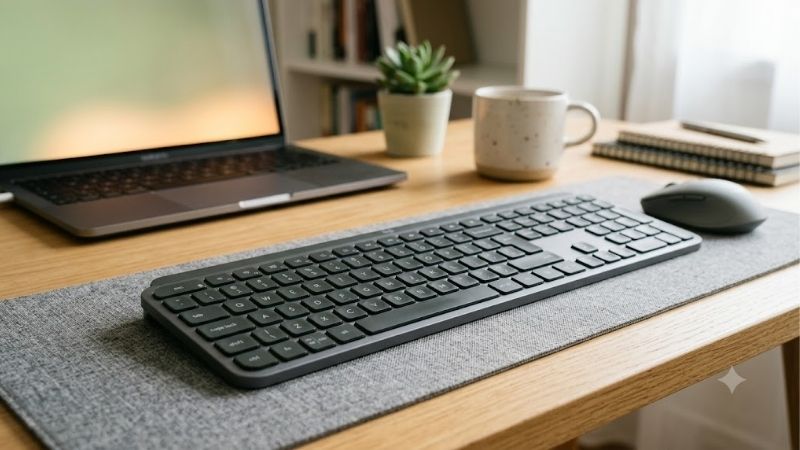
If you frequently jump between a computer, a tablet, and a smartphone, the Logitech MX Keys S represents the pinnacle of multi-device engineering. Boasting spherically dished keycaps that match the shape of your fingertips, this keyboard provides incredibly precise and comfortable tactile feedback. The solid metal backplate ensures zero deck flex, giving it a premium feel that rivals any physical workspace accessory.
What sets the MX Keys S apart is its clever smart illumination, which automatically turns on backlighting as your hands approach and dims when you walk away to save battery. Using Logitech’s Options+ software, you can program complex macro sequences called Smart Actions to execute multiple tasks with a single key press. This makes it an incredibly powerful productivity hub for high-demand workflows.
The keyboard effortlessly switches between up to three devices at the tap of a key, making it a fantastic companion to pair with your iPad Pro M4 and a desktop Mac. The slim profile feels robust and sleek, ensuring it looks elegant on any modern desktop while offering months of typing on a single USB-C charge.
- ✅ Pros:
- Spherically dished keys provide a natural, ergonomic tactile feel.
- Seamless Easy-Switch technology for up to three devices.
- Smart backlighting adapts to ambient room conditions.
- ❌ Cons:
- Software is required to unlock advanced macro features.
- Quite heavy and bulky for frequent daily travel.
Check the latest price on Amazon →
Who it’s for: Power users, programmers, and office professionals who require maximum multi-device efficiency and advanced macro capabilities.
[Rank 3] Keychron K3 Max — Best Low-Profile Mechanical Keyboard
The Keychron K3 Max is a spectacular fusion of mechanical tactility and ultra-slim physical construction. This 75% layout keyboard features low-profile mechanical switches that deliver a deeply satisfying, clicky typing experience without the bulk of a standard mechanical model. It is designed from the ground up with a custom keycap colorway that looks striking on any contemporary desk setup.
Engineered with full QMK/VIA support, the K3 Max allows you to remap every single key and customize RGB lighting effects using an intuitive web interface. Its build quality is top-tier, sporting an aluminum top frame and internal acoustic dampening foam that minimizes hollow sounds. This ensures every keypress is quiet enough for an office setting while maintaining that mechanical bounce.
So, should you buy this mechanical layout or stick to low-profile membranes? If you love the tactile joy of typing on physical switches but dislike thick keyboards, the Keychron K3 Max is a spectacular choice. It supports dual macOS/Windows layouts and connects via ultra-fast 2.4GHz wireless or multi-device Bluetooth.
- ✅ Pros:
- Highly satisfying low-profile mechanical typing experience.
- Fully customizable layout and key remapping via QMK/VIA.
- Triple-mode connectivity options including 2.4GHz and Bluetooth.
- ❌ Cons:
- Shorter battery life when the colorful RGB backlighting is fully enabled.
- Slight learning curve for configuring key layouts.
Check the latest price on Amazon →
Who it’s for: Typists and mechanical keyboard enthusiasts who want a low-profile aesthetic without sacrificing satisfying physical feedback.
Alternative Wireless Keyboards Worth Buying in 2026
While the top-tier options cater to mainstream users, the market is filled with incredible specialized alternatives that excel in specific roles. From custom-tuned acoustic mechanical switches to ultra-portable models meant for working on the go, there is a keyboard designed for every niche. Exploring these alternative brands reveals unique designs, advanced materials, and tailored feature sets that could be the perfect fit for your setup.
[Rank 4] NuPhy Air75 V2 — Best Premium Aesthetic & Customizability
The NuPhy Air75 V2 is a gorgeous, hyper-customizable mechanical keyboard that turns typing into an absolute sensory pleasure. Known for its ultra-slim aluminum housing and vibrant, pastel-accented keycaps, it instantly upgrades the visual appeal of any desk space. Under the hood, it features advanced double-shot PBT keycaps that resist finger oils, ensuring the letters never fade over time.
Typing on the Air75 V2 feels incredibly smooth, thanks to factory-lubriced low-profile switches and integrated silicone pads that absorb harsh bottom-out noises. It offers robust connectivity, supporting 2.4GHz wireless with a 1000Hz polling rate that is fast enough for intense gaming sessions. The side-mounted LED light strips serve as battery indicators while adding a futuristic ambient glow to your typing environment.
While it is compact, its weight makes it feel highly premium and stationary on your desk. To protect this beautiful device on the go, investing in a custom travel sleeve that offers robust drop protection is highly recommended, protecting your mobile kit vs OtterBox or heavy-duty travel cases.
- ✅ Pros:
- Stunning modern industrial design with beautiful pastel accents.
- Exceptional sound dampening and pre-lubed switches for silent typing.
- Ultra-fast polling rate suitable for both heavy writing and gaming.
- ❌ Cons:
- Higher price tag compared to standard wireless options.
- Thick build compared to ultra-thin membrane boards.
See today’s deal on Amazon →
Who it’s for: Writers and designers who crave an artistic, highly premium mechanical typing experience with excellent acoustic damping.
[Rank 5] Logitech Pebble Keys 2 K380s — Best Budget Ultra-Portable Option
The Logitech Pebble Keys 2 K380s is the ultimate champion of portable typing, packing incredible multi-device capabilities into an incredibly lightweight form factor. Made with recycled plastics, this keyboard features unique, round keycaps that give it a playful, modern aesthetic. The low-profile membrane keys are designed for near-silent operation, making it ideal for taking notes in quiet cafes or libraries.
This keyboard is fully compatible with iPhone 17 models for fast drafting, and it connects effortlessly to your Mac or tablet via Bluetooth. It can pair with up to three devices simultaneously, allowing you to jump from your phone to your computer with a single button press. Best of all, it boasts an incredible three-year battery life using two AAA batteries, eliminating any worries about keeping chargers on hand.
When looking at portable cases like vs Spigen or other desk protectors, you will find this slim profile fits neatly into the smallest pockets of your laptop sleeve. It represents an unbeatable value for students and remote workers who prioritize mobility and silent performance.
- ✅ Pros:
- Incredibly lightweight, slim profile makes it easy to slide into any bag.
- Whisper-silent keys are perfect for open office spaces or public cafes.
- Exceptional multi-year battery life on simple AAA batteries.
- ❌ Cons:
- Rounded keys may take some time to get used to for touch typists.
- Lacks backlighting entirely, making it hard to use in dark spaces.
See today’s deal on Amazon →
Who it’s for: Budget-conscious students and digital nomads who need an ultra-quiet, lightweight keyboard that pairs with multiple mobile devices.
[Rank 6] Satechi Slim X1 — Best Apple Magic Keyboard Alternative
The Satechi Slim X1 is a sleek, aluminum-constructed wireless keyboard designed to look and feel like an official Apple accessory at a friendlier price. Featuring a compact layout, it offers responsive, low-profile scissor-switch keys that provide a familiar crisp typing feel. The space gray finish and clean silver edges sit in absolute harmony alongside modern Apple hardware.
Unlike Apple’s official offering, the Slim X1 includes adjustable backlighting with ten distinct brightness levels, allowing you to type comfortably in low-light environments. It also supports multi-device Bluetooth connectivity, allowing you to swap between your computer and your iPad with the tap of a key. Satechi’s commitment to high-end aluminum craftsmanship shines through in this rigid, stylish chassis.
For users comparing accessory ecosystems, looking at Satechi vs Anker for premium desk accessories highlights how Satechi prioritizes design consistency. To complete your aesthetic, Satechi makes chargers that works with MagSafe, keeping your entire physical workspace beautifully organized and fully powered.
- ✅ Pros:
- Premium aluminum build quality matches space gray Mac devices.
- Multi-level backlighting is perfect for late-night typing sessions.
- Easily connects and switches between up to three Apple hosts.
- ❌ Cons:
- Battery life drops significantly when backlighting is set to maximum.
- Typing angle is fixed and cannot be physically adjusted.
Check the latest price on Amazon →
Who it’s for: Apple enthusiasts who want a backlit, multi-device keyboard that matches the visual aesthetics of official macOS hardware.
How to Choose the Best Wireless Keyboard for Your Setup
Finding the ideal keyboard requires looking past the spec sheets and analyzing how a device matches your physical habits and desk space. The market is saturated with options, making it critical to understand which features directly impact your physical comfort and daily productivity. Let’s examine the essential factors you should analyze before making your investment.
Understanding Switch Types and Key Travel Feel
The type of key switch under each cap determines the tactile feel, sound volume, and physical effort required to type. Standard membrane keyboards are quiet and affordable, but they can feel mushy and lead to finger fatigue during long writing sessions. Scissor-switch designs improve on this by utilizing a interlocking plastic mechanism to provide a crisper tactile break with very short travel.
Mechanical switches use physical springs and copper contacts to register keypresses, offering unparalleled durability and tactile variety. These range from quiet linear switches to tactile, clicky switches that provide a physical bump. If you want a comfortable mechanical experience without the physical bulk, look for a slim profile keyboard that utilizes low-profile mechanical switches for the best of both worlds.
Multi-Device Connectivity and Battery Performance
Modern workflows demand a keyboard that can jump across different screens, making multi-device Bluetooth pairing a highly critical feature. Most premium keyboards now allow you to pair with up to three distinct devices, such as a desktop, laptop, and your iPhone 17 Pro Max. This eliminates the need for multiple keyboards cluttering your desk and speeds up multi-device tasks.
Battery performance is another key variable to consider. Rechargeable models with USB-C connections offer convenience but require regular charging, especially if backlighting is enabled. Some physical desks now feature integrated qi2 compatible charging pads or advanced accessories like vs Belkin chargers that keep your peripheral ecosystem powered up without messy cords running across your workspace.
Ergonomics, Portability, and Build Quality
The physical construction of your keyboard plays a massive role in long-term typing comfort and physical fatigue. Keyboards with a slight upward incline help keep your wrists in a natural position, reducing strain during extended typing sessions. Additionally, a solid metal backplate adds structural rigidity and prevents the chassis from flexing under physical pressure, making the typing feel far more stable.
If you are a hybrid worker, portability is another major consideration. Compact layouts like 75% or 60% eliminate the number pad, saving physical desk space and allowing you to position your mouse closer to your body. Look for keyboards that offer dedicated travel cases to prevent damage during transport, ensuring your keycaps and switches remain protected.
Frequently Asked Questions About Wireless Keyboards
Choosing the right desk accessories can raise several questions about performance, compatibility, and ecosystem integration. To help you make the most informed buying decision, we have compiled answers to the most common queries regarding wireless keyboard performance.
Do wireless keyboards suffer from input lag?
Modern wireless keyboards are incredibly fast, offering latency-free performance that is virtually indistinguishable from a wired connection. Models utilizing a dedicated 2.4GHz USB receiver offer the fastest, most reliable connections, which is ideal for competitive gaming. For daily office work and heavy typing, Bluetooth protocols offer more than enough speed and stability.
Is a mechanical keyboard worth it for typing?
Yes, a mechanical keyboard is absolutely worth the investment if you spend several hours a day writing or coding. The individual mechanical switches provide clean tactile feedback that helps reduce typing errors and finger fatigue. They are also incredibly durable, typically lasting for tens of millions of keypresses more than standard membrane setups.
Can I use a Windows wireless keyboard with my Mac?
Yes, almost all Windows wireless keyboards are compatible with macOS systems over Bluetooth or USB connection. However, the Windows modifier keys (Alt and Windows) will map to the Mac keys (Option and Command), which can be confusing at first. Many modern keyboards feature dual legends on the keycaps and a physical toggle switch to adjust the layout automatically.
Conclusion
Finding the best wireless keyboard is the ultimate way to elevate your everyday productivity, physical typing comfort, and modern desk aesthetic. By choosing a high-quality model that matches your workflow, you can enjoy seamless multi-device switching, satisfying tactile feedback, and reliable wireless performance across your entire hardware setup. Choose the option that fits your typing style, keep your workspace clean, and enjoy a faster, more enjoyable writing experience.
See today’s deal on Amazon →

Write Your Review
No reviews yet. Be the first to share your experience!