
Disclosure: As an Amazon Associate, this site may earn from qualifying purchases made through links on this page.
The best premium arcade fight sticks for arcade control upgrades replace a worn or basic controller with arcade-grade parts, a rigid body, and controls that stay consistent through long sessions. An upgrade is not only about a new look. It is about a lever that returns cleanly to center, buttons that actuate the same way every time, a case that does not flex under fast inputs, and a layout that fits your hands. The four controllers below use premium parts, including Sanwa Denshi components, aircraft-grade aluminum, and leverless layouts, and each suits a different upgrade.
At a Glance
| Product | Standout feature | Best for |
|---|---|---|
| Victrix Pro FS | Single-piece aluminum body and Sanwa parts | A classic lever upgrade |
| Victrix Pro FS-12 | 12-button leverless layout | Moving from a lever to buttons |
| Qanba Q7 Obsidian 2 | Sanwa JLF lever and OBSF buttons | A heavy, tournament-ready stick |
| Razer Kitsune | Low-profile optical switches | A slim, portable leverless upgrade |
How to Choose for Arcade Control Upgrades
Start with the input style. A traditional lever stick feels closest to a cabinet, with a ball top in one hand and action buttons under the other. A leverless controller replaces the lever with directional buttons, which can give faster directional changes, but it needs an adjustment period if you have only used a lever before.
Next, check the parts, platforms, and cable. Premium sticks here use Sanwa Denshi levers and buttons, or Razer low-profile optical switches in the Kitsune, known for consistent actuation and long life. A metal body and wrist slope keep the controller stable, while platform support and cable type decide how it fits your setup: a detachable USB-C cable is easier to pack, a hardwired cable feels more secure at a fixed desk, and a heavier stick stays put while a slim stick is easier to carry.
The Picks
Victrix Pro FS
View the Victrix Pro FS on Amazon
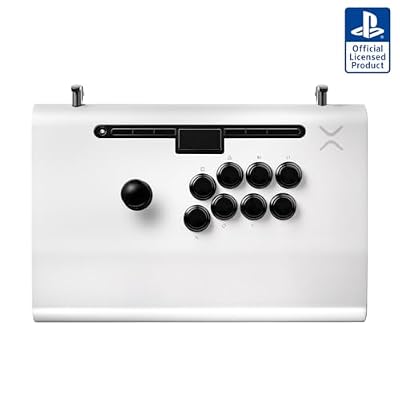
The Victrix Pro FS is the classic lever upgrade in this group, built from a single piece of aircraft-grade aluminum for a rigid, flex-free feel. It uses authentic Sanwa Denshi parts, with a detachable joystick and Sanwa buttons, and it works with PS5, PS4, and PC. A 6.28-degree wrist slope and a foam pad on the back help reduce fatigue during long sessions, while a lockable control bar helps prevent accidental inputs during play. The listing also notes a 3-meter detachable braided USB-C cable, a touchpad, and a 3.5 mm headset jack for audio and microphone use. That combination suits a player who wants a durable, tournament-ready lever stick that can travel and be serviced. The main limits are its weight and its PlayStation and PC focus: check the listing for the exact platform details, and expect a heavier controller than a plastic-bodied stick.
Victrix Pro FS-12

View the Victrix Pro FS-12 on Amazon
The Victrix Pro FS-12 is the leverless version of the Victrix Pro FS, with a 12-button all-button layout instead of a lever. It uses Sanwa Denshi parts, including 24 mm action buttons and a 30 mm up button, and it is built from a single piece of aircraft-grade aluminum. It works with PS5, PS4, and PC, and its listing notes a detachable joystick-style layout option in some descriptions, so check the listing for the exact button configuration of the variant you choose. The wrist slope, foam lap pad, lockable control bar, touchpad, and 3-meter detachable USB-C cable carry over from the Pro FS, which makes it a comfortable choice for long sets. It suits a player who wants to move to leverless inputs without giving up a premium metal body. The main limit is the change in muscle memory: directional buttons feel very different from a lever, so allow time to adjust before an important event.
Qanba Q7 Obsidian 2

View the Qanba Q7 Obsidian 2 on Amazon
The Qanba Q7 Obsidian 2 is a heavy, tournament-ready stick with official Sony licensing for PS5, PS4, and PC. It uses an authentic Sanwa Denshi JLF joystick and OBSF 30 mm buttons, which give the familiar arcade feel that many cabinet players expect. Its listing notes 16 buttons in total, a tournament lock switch, a touchpad, a 3.5 mm microphone input, an anti-slip base, and a hardwired USB cable. At 7.4 pounds and 19.1 x 10.2 x 4.6 inches, it stays firmly in place on a desk or lap, and its color-coded internal wiring helps when a button needs to be changed. That weight and size suit a fixed home setup or a player who values stability above portability. The main limits are portability and cable choice: it is heavier to carry than the slim Kitsune, and its hardwired cable is less flexible for packing than a detachable USB-C cable.
Razer Kitsune

View the Razer Kitsune on Amazon
The Razer Kitsune is a slim, all-button optical arcade controller for PS5 and PC, and it is the most portable premium pick in this group. It uses Razer low-profile linear optical switches with a precise quad movement button layout, so directional inputs sit under four buttons on the left and action buttons sit on the right. Its slim form factor, removable top plate, Chroma RGB lighting, and USB-C connection suit a player who wants a leverless controller that fits in a bag and sets up fast. The listing describes it as an official PlayStation product, which helps with PS5 compatibility. It suits players who want fast, quiet button presses and a clean, modern layout. The main limits are its platform range and its feel: it is built for PS5 and PC, so check the listing for other platforms, and players who love a physical lever will need time to adapt to an all-button layout.
Comparison Table
| Feature | Victrix Pro FS | Victrix Pro FS-12 | Qanba Q7 Obsidian 2 | Razer Kitsune |
|---|---|---|---|---|
| Input style | Lever and buttons | Leverless, 12 buttons | Lever and buttons | Leverless, all-button optical |
| Main parts | Sanwa Denshi | Sanwa Denshi | Sanwa JLF and OBSF | Razer optical switches |
| Body | Single-piece aluminum | Single-piece aluminum | Heavy arcade body | Slim portable body |
| Platforms | PS5, PS4, PC | PS5, PS4, PC | PS5, PS4, PC | PS5, PC |
| Cable | 3 m detachable USB-C | 3 m detachable USB-C | Hardwired USB | USB-C |
| Headset support | 3.5 mm jack | 3.5 mm jack | 3.5 mm mic input | Check the listing |
Which One Fits Your Situation
Choose the Victrix Pro FS for a classic lever upgrade with a premium metal body, Sanwa parts, and a detachable lever for travel.
Choose the Victrix Pro FS-12 to move to leverless play without losing the aluminum body, wrist slope, and lockable controls of the Pro FS.
Choose the Qanba Q7 Obsidian 2 for a heavy, stable stick for a fixed setup, with official Sony licensing and Sanwa JLF and OBSF parts.
Choose the Razer Kitsune for the slimmest, most portable upgrade here, with optical switches, a removable top plate, and USB-C.
FAQ
What is the difference between a lever stick and a leverless controller?
A lever stick uses a joystick for movement and buttons for attacks, matching a classic cabinet. A leverless controller uses buttons for movement as well, which can give faster directional changes, but it needs practice before it feels natural.
Are Sanwa Denshi parts worth it for an upgrade?
Sanwa Denshi levers and buttons are the standard parts in many arcade cabinets, known for consistent feel and long life, and replacement parts in the same size are widely available.
Can these fight sticks work on PC?
Yes, all four models list PC support, and the Victrix and Qanba models also list PS5 and PS4 support. Check the listing for the exact PC input mode, such as XInput or D-Input.
How do I choose between a heavy stick and a slim stick?
A heavy stick stays put and suits a fixed setup, while a slim stick is easier to carry and fits smaller desks. If you travel, weight and a detachable cable matter more; at home, stability matters more.
Final Take
The right premium fight stick depends on how you move and where you play. The Victrix Pro FS is the strongest classic lever upgrade, the FS-12 is its premium leverless version, the Qanba Q7 Obsidian 2 is the heaviest tournament-ready stick, and the Razer Kitsune is the slimmest portable leverless option. Pick the input style first, then match the body, parts, and platform support to your setup.

Write Your Review
No reviews yet. Be the first to share your experience!