
Our Short List of 3

- Brand: Keychron
- Model: K8 (K8C3)
- ASIN: B0869J8XD9
- Size/Layout: Tenkeyless, 80 percent layout, 87 keys

- Brand: Logitech
- Model: MX Mechanical Mini for Mac (920-010553)
- ASIN: B09LK63PKB
- Size/Layout: Compact mini layout, 75 percent class, no number pad
- Brand: NuPhy
- Model: Air75 V2
- ASIN: B0CMXC46KH
- Size/Layout: 75 percent layout, 84 keys
All 4 Picks at a Glance
| Product | Specs | Action |
|---|---|---|
| 1. Keychron K8 — Best Tenkeyless All-Rounder for Mac |
| Check price on Amazon |
| 2. Logitech MX Mechanical Mini for Mac — Best Compact Board Made for Apple |
| Check price on Amazon |
| 3. NuPhy Air75 V2 — Best Low-Profile Board for Customization |
| Check price on Amazon |
 5. Das Keyboard 4 Professional for Mac — Best Full-Size Wired Board |
| Check price on Amazon |
As an Amazon Associate we earn from qualifying purchases.
- 1. Keychron K8 — Best Tenkeyless All-Rounder for Mac
- 2. Logitech MX Mechanical Mini for Mac — Best Compact Board Made for Apple
- 3. NuPhy Air75 V2 — Best Low-Profile Board for Customization
- 4. Lofree Flow84 — Smoothest Low-Profile Typing Feel
- 5. Das Keyboard 4 Professional for Mac — Best Full-Size Wired Board
- How to Choose the Best Mechanical Keyboard for Your Mac
- Which One Should You Buy?
A mechanical keyboard only feels right on a Mac if the layout is right. You need Command and Option in the correct places, Mac legends on the function row for brightness, Mission Control and media, and no daily remapping just to copy, paste or take a screenshot. Many Windows-first boards work after tweaking, but the five picks below support macOS properly out of the box, with Mac keycaps, a Mac mode, or a layout designed specifically for Apple computers.
This guide covers the main desk setups Mac owners actually use. There is a tenkeyless board for a clean MacBook desk, two compact low-profile boards that travel well between a MacBook, a Mac mini and an iPad, a minimalist board made only for Apple devices, and a full-size wired board with a number pad for spreadsheet and studio work. Switch feel, size and connection type differ a lot between them, so read the notes on each model before you choose.
Disclosure: This article contains affiliate links. If you buy through them, we may earn a commission at no extra cost to you.
1. Keychron K8 — Best Tenkeyless All-Rounder for Mac
- Brand: Keychron
- Model: K8 (K8C3)
- ASIN: B0869J8XD9
- Size/Layout: Tenkeyless, 80 percent layout, 87 keys
The Keychron K8 is the easiest recommendation for most Mac users because it was designed around a Mac layout from the start. A physical toggle switches between macOS and Windows, the function row carries the Mac shortcuts you expect, and the box includes keycaps for both systems. The tenkeyless layout keeps dedicated arrow keys and a navigation cluster while leaving more room for a mouse or trackpad beside a MacBook or Mac mini.
The Gateron G Pro Brown version listed here gives a clear tactile bump without the sharp click of a blue switch, which suits long writing, coding and office work. The aluminum frame and RGB backlight make it feel substantial on the desk, and Bluetooth pairing for up to three devices means one board can move between a Mac, an iPad and a second computer without replugging cables.
Choose the K8 if you want one proven board that does almost everything well. It is taller than the low-profile picks below, so some users will prefer a wrist rest, and it has no 2.4 GHz receiver, so competitive gaming is better served by the NuPhy below. For everyday Mac productivity, though, its balance of layout, feel and multi-device Bluetooth is hard to beat.
2. Logitech MX Mechanical Mini for Mac — Best Compact Board Made for Apple
- Brand: Logitech
- Model: MX Mechanical Mini for Mac (920-010553)
- ASIN: B09LK63PKB
- Size/Layout: Compact mini layout, 75 percent class, no number pad
The MX Mechanical Mini for Mac is the only pick here made exclusively for Apple users. Its keycaps are printed for Mac, with Command and Option where your fingers expect them and Mac shortcuts across the top row, and the Pale Grey finish matches Apple accessories on the desk. There is no Windows layout to compromise the design, which is exactly the point for a Mac-only setup.
Its low-profile Tactile Quiet switches give definite mechanical feedback with restrained sound, making it a good fit for shared offices, video calls and late-night work. Smart backlighting wakes as your hands approach and adjusts to room light, and Logi Options+ lets you customize shortcuts and use Flow alongside a compatible Logitech mouse to move between Macs.
Pick this model if you live entirely in the Apple ecosystem and want the tidiest compact desk. It connects over Bluetooth rather than a cable for typing, so it is not the choice for a wired-only workstation, and the mini layout omits a number pad. For MacBook, Mac mini and iPad users who value quiet typing and a native Mac layout, it is the most polished option in this roundup.
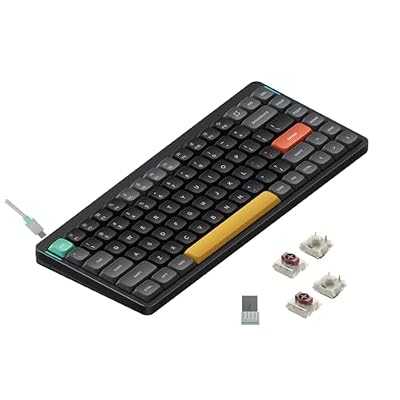
3. NuPhy Air75 V2 — Best Low-Profile Board for Customization
- Brand: NuPhy
- Model: Air75 V2
- ASIN: B0CMXC46KH
- Size/Layout: 75 percent layout, 84 keys
The NuPhy Air75 V2 packs the most flexibility into a slim 75 percent frame. It connects by Bluetooth, a 2.4 GHz receiver or USB-C cable, remembers up to four devices, and supports QMK and VIA, so Mac users can remap keys, build macros and adjust layers properly instead of accepting a fixed layout. That makes it especially useful if you split time between a Mac for work and another system at home.
Despite its thin aluminum frame and translucent base, it keeps a full function row, dedicated arrow keys and PBT keycaps. The Gateron low-profile Brown switches in this version are tactile and hot-swappable, so you can change the feel later without buying a new board. Side light bars show connection and battery status at a glance, which is a small but genuinely useful touch on a multi-device board.
Choose the Air75 V2 if you want low-profile comfort plus enthusiast-level control. It asks a little more setup than the Logitech, and its keycaps are not shine-through, so the backlight is more about ambience and status than reading legends in the dark. For tinkerers and fast typists who move between several machines, it offers the broadest feature set here.
4. Lofree Flow84 — Smoothest Low-Profile Typing Feel
Specs
- Brand: Lofree
- Model: Flow84 (OE915)
- ASIN: B0CJTTX3JH
- Size/Layout: 75 percent layout, 84 keys
- Switch Type: Kailh Phantom tactile, full-POM low-profile mechanical, hot-swappable
- Connectivity: Bluetooth, USB-C wired
- Mac Support: Windows and Mac OS support, with a dedicated Mac and iOS function mode
The Lofree Flow84 is built around one idea: typing feel. Its gasket-mounted design, all-aluminum body and full-POM Kailh switches produce a soft, cushioned and unusually smooth keystroke for a low-profile board. The Black version listed here uses Phantom tactile switches, so you still get a defined bump, but the landing feels quieter and more damped than on most compact mechanical keyboards.
On a Mac desk it is simple to live with. Bluetooth covers wireless use with your MacBook or Mac mini, USB-C covers wired use, and a key combination switches the function row into Mac and iOS mode. The 84-key layout keeps the function row and arrow keys while staying small enough for a laptop bag or a narrow desk, and the dye-sublimated PBT keycaps resist shine through daily use.
Pick the Flow84 if how the keys feel matters more to you than software and extra wireless modes. It has no 2.4 GHz receiver and no remapping software, so it is a focused typing tool rather than a customizable command center. For writers and anyone who types for hours on a Mac, that focus is its strength.
5. Das Keyboard 4 Professional for Mac — Best Full-Size Wired Board
- Brand: Das Keyboard
- Model: 4 Professional for Mac (DASK4MACSFT)
- ASIN: B00TU7UA86
- Size/Layout: Full-size layout, 104 keys with number pad
The Das Keyboard 4 Professional for Mac is the traditionalist choice in this group, and the only full-size wired board. It gives you a proper number pad, dedicated media controls and an oversized volume knob, all on a Mac-specific layout with Command, Option and Mac function keys in the right places. If your work involves spreadsheets, audio, video timelines or data entry on an iMac, Mac Studio or Mac mini, that extra width earns its desk space.
Cherry MX Brown switches deliver a soft tactile response built for long, accurate typing sessions, with full N-key rollover over USB for fast typists. The anodized aluminum top panel feels rigid and stays planted, and the two-port USB 3.0 hub is genuinely practical for plugging in a receiver, drive or cable without reaching behind your Mac.
Choose this model if you want a permanent wired workstation board and do not need Bluetooth or portability. It has no backlighting and its cable is fixed, so it belongs on a main desk rather than in a bag. For a Mac desktop setup where reliability, a number pad and a volume knob come first, it remains a distinctive and capable pick.
How to Choose the Best Mechanical Keyboard for Your Mac
Start with the layout printed on the keys. A true Mac board puts Command next to the space bar, labels Option correctly, and maps the function row to Mac actions such as brightness, Mission Control, Launchpad and media playback. Boards with a Mac and Windows toggle and spare Mac keycaps, like the Keychron and NuPhy here, are the next best thing and are better if you also use a Windows machine.
Next, pick a size that matches your desk and work. A full-size board suits number-pad work but pushes your mouse further away. Tenkeyless keeps navigation keys while freeing desk space, and a 75 percent board is the best travel and small-desk compromise because it keeps the function row and arrow keys in the least space. Low-profile models such as the Logitech, NuPhy and Lofree sit flatter and need less wrist bend, while a standard-height board such as the Keychron K8 or Das Keyboard gives a deeper, more traditional keystroke.
Then decide on switches and connections. Tactile switches give feedback for typing accuracy, linear switches feel smooth and consistent, and clicky switches are satisfying but loud for calls and shared rooms. For connections, Bluetooth is cleanest for a MacBook desk and multi-device switching, 2.4 GHz adds a low-latency wireless option, and wired USB is the most dependable for a fixed desktop, FileVault login screens and firmware updates. Finally, check the details you will notice daily: PBT keycaps for durability, hot-swappable switches if you like to experiment, and backlighting only if you regularly work in low light.
Which One Should You Buy?
Buy the Keychron K8 if you want the safest all-round answer. It has a proper Mac layout, a comfortable tenkeyless size, tactile switches and multi-device Bluetooth, and it suits almost any Mac desk without special requirements.
Buy the Logitech MX Mechanical Mini for Mac if your setup is Apple-only and you want a compact, quiet board that looks and behaves like it was made alongside your Mac. Buy the NuPhy Air75 V2 instead if you want that compact low-profile idea with more connections, hot-swappable switches and full remapping for a mixed Mac and Windows workflow.
Buy the Lofree Flow84 if typing feel is your top priority and you spend your day writing or coding on a Mac. Its cushioned, smooth keystrokes are the highlight of this roundup. Buy the Das Keyboard 4 Professional for Mac if you need a full-size wired board with a number pad, a volume knob and a built-in USB hub for a permanent Mac desktop. Match the board to your layout, switch and connection needs first, and any of these five will feel like a real upgrade over a membrane keyboard.
Write Your Review
No reviews yet. Be the first to share your experience!