
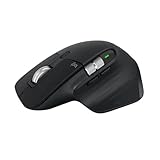
The Logitech MX Master 3S has a strong claim to being the best productivity mouse for Mac users, and after weeks of daily driving it alongside a MacBook Pro and a Mac mini, it is easy to see why. It combines a sculpted ergonomic shape, near-silent clicks, and a scroll wheel that shifts between ratcheted and free-spinning modes, all while pairing to multiple Macs and switching between them with a keypress.
This review digs into how the 3S actually feels for long workdays on macOS, how its 8,000 DPI sensor tracks on glass and desks, and where the newer MX Master 4 and compact MX Anywhere 3S fit if the flagship is not quite right for you. If you spend hours in Final Cut, spreadsheets, or code, this is a mouse worth understanding.
As an Amazon Associate we earn from qualifying purchases at no extra cost to you.




⚡ Save on Your Next PC — Amazon Prime
Prime members get fast free shipping on the systems above, plus early access to Prime Day & Black Friday PC deals. New members get a 30-day free trial.
Watch: Review: Logitech MX Master 3S Mouse for Mac Users — Video Review
Design & Build
The MX Master 3S is unmistakably built for a right hand, with a tall arch that fills the palm and a dedicated thumb rest hiding gesture controls. It is a substantial mouse at around 141 grams, which feels planted rather than heavy. The standout is the quiet-click mechanism: the primary buttons are roughly 90 percent quieter than the previous model, a genuine relief in shared offices and late-night sessions. A Space Grey finish sits handsomely next to Apple hardware, and the whole thing charges over USB-C.
Performance
The 8,000 DPI Darkfield sensor tracks flawlessly, including on glass, so you are not tied to a mousepad. The MagSpeed wheel is the headline feature, ratcheting for precise line-by-line scrolling then flicking into free-spin to fly through long documents; the electromagnetic mechanism is fast and quiet. Logi Options+ software lets you assign app-specific actions, so a gesture can trigger Mission Control on macOS or a scrub in your editor. Flow lets one mouse control multiple Macs and even copy-paste between them. Battery life stretches to weeks, and a one-minute charge yields hours of use.
Pros & Cons
- Exceptional ergonomics for all-day comfort
- Near-silent clicks that suit shared spaces
- MagSpeed wheel with instant ratchet and free-spin
- Multi-device pairing and Flow across Macs
- Tracks on glass and lasts weeks per charge
- Shaped only for right-handed users
- Large size is less suited to small hands or travel
- Best features require installing Logi Options+
Alternatives to Consider
If you want the latest, the Logitech MX Master 4 adds haptic feedback and refined performance, and the MX Master 4 for Mac in Space Black is tuned specifically for macOS, iPadOS, and Windows. For travel or smaller hands, the MX Anywhere 3S is a compact wireless mouse with the same fast scrolling and 8K DPI tracking, and its Mac-specific Space Grey version matches Apple gear nicely.
Frequently Asked Questions
Does the MX Master 3S work fully with macOS?
Yes. It pairs over Bluetooth or the Logi Bolt receiver, and installing Logi Options+ unlocks app-specific gestures, smooth scrolling, and Flow. Core clicking and scrolling work out of the box without any software.
Can I use the MX Master 3S with multiple Macs at once?
You can pair it with up to three devices and switch between them with a button, and Logitech Flow lets the cursor move between two computers and even transfer files and text seamlessly across them.
Is the MX Master 3S or MX Master 4 better?
The MX Master 4 adds haptic feedback and small refinements, but the 3S remains excellent and often cheaper. If you want the newest features and a Mac-specific model, choose the 4; if value matters most, the 3S is still a top pick.
Does the scroll wheel really work on glass desks?
The Darkfield sensor tracks on virtually any surface including glass at least 4mm thick, so you can use the mouse directly on a glass desk without a mousepad, something most mice cannot manage.
Verdict
The Logitech MX Master 3S is the productivity mouse to beat for Mac users, blending superb ergonomics, silent clicks, and a scroll wheel that transforms how you move through long documents. Unless you need a left-handed shape or a travel-sized body, it is an easy recommendation, and pairing it with Logi Options+ unlocks its full potential on macOS.





Write Your Review
No reviews yet. Be the first to share your experience!