
- Top Pick: 7-in-1 USB C Hub with 4K@60Hz HDMI, 2 USB-A, 1 USB-C, 100W PD Charging, SD 3.0 /TF 3.0 Card Reader, Compatible with MacBook Pro/Air/Neo, iPad Pro, iMac, iPhone 15-17 (Blush)
- Best Value: Selore USB C Hub HDMI Adapter for MacBook Pro/Air/Neo, USB C Donle | USB C to HDMI Adapter with 4K@60Hz HDMI, 100W PD, 5Gbps USB-C/2 USB-A, SD/microSD, USB C Hub Multiport Adapter for Laptop
- Premium Choice: USB C Hub Adapter for MacBook Pro/Air M5 M4 M3 M2 M1 2026-2018 13" 15" 16", Mac Multiport Adapter, 8 in 2 MacBook Accessories Dongle with HDMI 4K@60hz, Thunderbolt, USB C&A Data Ports, SD Card Reader
The MacBook Air M3 is a remarkably capable laptop, but its two Thunderbolt ports fill up fast once you add a monitor, a charger, and an external drive. A good USB-C hub solves that bottleneck in 2026, turning a single port into HDMI output, extra USB-A slots, card readers, and pass-through charging without draining performance.
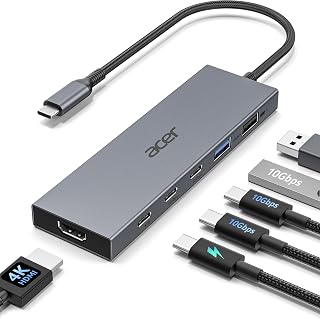
This roundup gathers the best USB-C hubs matched to the M3 Air, from ultra-slim two-port docks like the Anker 7-in-2 to full multiport adapters such as the Acer 6-in-1 and the VENTION magnetic dock. We focus on real specs that matter: HDMI refresh rate, data transfer speed, and how much wattage each hub passes back to keep your Air charged.
As an Amazon Associate we earn from qualifying purchases at no extra cost to you.




⚡ Save on Your Next PC — Amazon Prime
Prime members get fast free shipping on the systems above, plus early access to Prime Day & Black Friday PC deals. New members get a 30-day free trial.
Watch: Best USB-C Hubs for MacBook Air M3 for Expanded Connectivity — Video Review
How to Choose
- Display support: For a 4K monitor you want 4K@60Hz HDMI; older hubs cap at 4K@30Hz, which looks choppy for cursor movement. High-end docks reach 4K@240Hz or 8K.
- Data speed: Look for 10Gbps (USB 3.2 Gen 2) ports for fast external SSDs; 5Gbps is fine for flash drives and peripherals.
- Pass-through charging: Choose 85-100W PD so the hub powers the Air and your accessories at once. Below 60W the laptop may charge slowly under load.
- Form factor: Dual-connector hubs like the Anker 7-in-2 sit flush against the Air’s side; single-cable hubs are more flexible with other laptops.
- Port mix: Count exactly what you need (HDMI, USB-A, USB-C data, SD/TF, Ethernet) and buy the smallest hub that covers it to save desk space.
The Best Picks Reviewed
Anker USB-C Hub for MacBook (7-in-2)
Purpose-built for MacBooks, this dual-connector hub plugs into both ports and stays flush with the chassis. It delivers 4K@60Hz HDMI, two USB-A 5Gbps ports, an SD/TF reader, and 100W Thunderbolt-compatible pass-through, making it the cleanest all-round match for the M3 Air.
Acer 6-in-1 USB-C Hub (10Gbps)
The Acer hub leans into speed with 10Gbps data across its USB-C and USB-A ports plus 4K@60Hz HDMI and 100W PD. It is the pick if you regularly move large files to an external SSD and want future-proof throughput.
VENTION 8K Magnetic USB-C Dock
With a detachable magnetic cable, 80Gbps bandwidth, 4K@240Hz (or 8K) HDMI, and 140W PD, this is the premium option for creators driving high-refresh or 8K displays. It is overkill for casual use but unmatched for demanding setups.
Selore 9-in-1 USB-C Hub
Offering nine ports including 4K HDMI, Gigabit Ethernet, three USB 3.1 ports, and card readers, the Selore is the do-everything travel dock. The wired Ethernet jack alone makes it valuable for stable video calls where Wi-Fi wavers.
intpw P9 USB-C Multiport Adapter
A budget-friendly 7-in-1 with 4K@60Hz HDMI, 100W PD, and a mix of USB-A and USB-C ports, the intpw P9 covers the essentials without a premium price. It is the value pick for students and anyone who just needs a monitor plus a few peripherals.
Frequently Asked Questions
Will a USB-C hub slow down my MacBook Air M3?
No. A quality hub passes data at its rated speed. Just match the port speed (10Gbps for SSDs) to your fastest device to avoid a bottleneck.
Can the M3 Air drive an external 4K monitor at 60Hz through a hub?
Yes, as long as the hub explicitly supports 4K@60Hz HDMI. The M3 Air natively supports one external display, so single-monitor setups work well.
How much charging wattage do I need from the hub?
Pick a hub with 85-100W pass-through. The M3 Air’s charger is 30-35W, so 100W leaves plenty of headroom for the laptop plus connected accessories.
Do dual-connector hubs work with other laptops?
Dual-connector hubs like the Anker 7-in-2 are spaced for MacBook ports specifically. For mixed devices, a single-cable hub is more universally compatible.
Final Thoughts
For most M3 Air owners the Anker 7-in-2 hits the sweet spot of clean design, 4K@60Hz output, and 100W charging. Creators pushing high-refresh displays should step up to the VENTION magnetic dock, while budget buyers get everything they need from the intpw P9. Match the port mix to your desk and you will never fight for a free Thunderbolt port again in 2026.



Write Your Review
No reviews yet. Be the first to share your experience!