
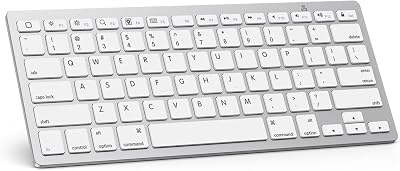


65 Keyboard designs represent the absolute sweet spot for Apple enthusiasts who want to reclaim desk real estate without sacrificing dedicated arrow keys. If you are struggling with a cramped desktop setup or mushy, unresponsive membrane keys, this specific form factor might be your ideal solution. Let us dive into this honest review to find out if transitioning to a compact mechanical layout is worth buying in 2026.
Quick Overview of the Compact Keyboard Layout
Choosing the perfect input peripheral for your macOS workstation can be challenging, especially when balancing ergonomics, physical footprint, and visual style. The 65 Keyboard has surged in popularity because it strikes an exceptional design compromise, preserving a dedicated physical arrow cluster while completely shedding the bulky number pad. This layout acts as an incredibly efficient bridge between ultra-minimalist setups and traditional desktop computing comfort.
As an Amazon Associate we earn from qualifying purchases at no extra cost to you.


What Makes This Layout Different from Full-Sized Decks
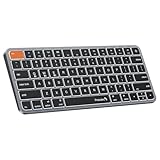
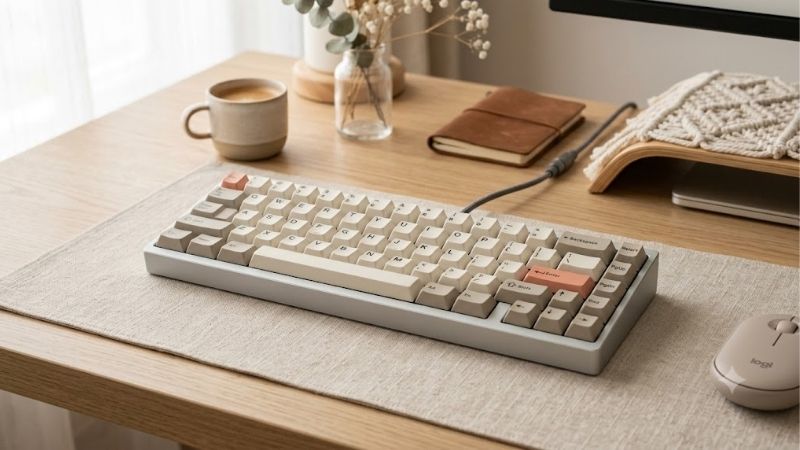
When compared to traditional 100% full-sized layouts or even tenkeyless form factors, a 65 Keyboard offers a much smaller footprint by stripping away non-essential inputs. By eliminating the function row at the top and the numeric pad on the right, it packs the remaining essential keys closely together. This design retains the dedicated arrow keys that are absolutely crucial for navigating spreadsheets, text documents, and lines of code.
The beauty of this configuration lies in its sheer efficiency, allowing you to execute common shortcuts without moving your hands far from the home row. While you do lose separate physical keys like Home, End, and Page Up, these are easily accessible through logical combinations involving the Fn key. This makes a 65 Keyboard highly functional for developers and writers who need to move quickly through text without constant hand adjustments.
For users who find the ultra-compact 60% layout too restrictive due to the lack of dedicated arrows, this slightly larger design acts as the perfect middle ground. It provides the essential navigation keys you need for daily multitasking while keeping your hands in a natural, ergonomically sound position.
Portability and Desktop Space Efficiency
One of the primary reasons to consider upgrading to a 65 Keyboard is the immediate, positive impact it has on your overall workspace. By removing unnecessary plastic housing, this compact typing deck leaves ample room on your desk for a high-end mouse or trackpad. This physical freedom promotes better posture by allowing your hands to sit closer together, preventing chronic shoulder strain.
Portability is another major advantage of this form factor, as its slim frame easily slips into a commuter backpack or messenger bag. While a 65 Keyboard might be heavier than standard membrane alternatives due to its robust internal components, it provides a far superior typing experience on the go. Whether you are commuting to a co-working space or working from a coffee shop, this layout travel companion is highly convenient.
Integration with macOS and Apple Ecosystems
For Apple power users, finding a mechanical layout that natively supports macOS can be surprisingly difficult, but many 65 Keyboard models are built with Apple hardware in mind. Many of the top-rated configurations feature physical toggles to switch between Windows and Mac layouts, ensuring that your Command and Option keys map correctly. This makes it a seamless companion for a MacBook Air M3 or a high-end desktop workstation.
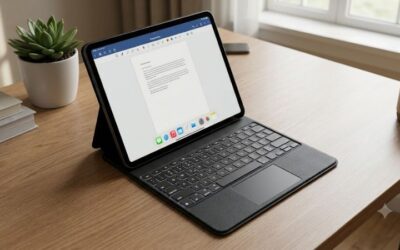
Furthermore, with wireless connectivity becoming standard, these keyboards integrate beautifully across multiple Apple devices. You can effortlessly pair your setup with an iPad Pro M4 or use it as a highly responsive input device compatible with iPhone 17. The ability to switch between three bluetooth devices with a simple hotkey ensures your daily workflow remains uninterrupted.
Key Hardware Features and Component Customization
The true magic of owning a custom mechanical peripheral lies in your ability to choose, swap, and tune every physical component to your exact liking. When you select a high-quality 65 Keyboard, you are not just buying a static piece of plastic; you are investing in a modular chassis that can be customized to match your acoustic preferences. Let us take a closer look at the core hardware components that define this premium mechanical typing experience.
Mechanical Switches and Hot-Swappable Sockets
The tactile sensation of your mechanical peripheral is entirely determined by the switches residing underneath each individual keycap. When configuring your 65 Keyboard, you can opt for linear switches for a smooth and quiet keystroke, tactile switches for a noticeable physical bump, or clicky switches for loud acoustic feedback. Modern enthusiasts highly favor pre-lubricated switches, which glide effortlessly and eliminate scratchy metallic sounds.
Crucially, you should look for a board equipped with hot-swappable sockets, which let you pull out and replace switches without any soldering. This level of customization ensures that if a single switch fails, or if you simply want to try a new typing feel, you can update your setup in under an hour. It adds immense longevity to your investment, protecting you from having to buy a whole new deck if a single key stops registering.
Case Materials and Acoustic Tuning Features
The structural housing of your typing deck plays a massive role in both its durability and its acoustic profile. Premium 65 Keyboard cases are typically milled from solid blocks of CNC aluminum, which gives them a heavy, anchored feel that prevents them from sliding around your desk. Alternatively, you can opt for frosted polycarbonate cases that allow customizable RGB backlighting to diffuse beautifully across your workspace.
Inside the case, advanced dampening techniques like gasket-mounting are used to soften the impact of your typing. By suspending the interior plate within silicone gaskets, the board provides a cushioned feel that reduces hand fatigue during long writing sessions. Combined with internal layers of Poron foam, these boards ensure your 65 Keyboard produces a deep, satisfying sound signature—often referred to by enthusiasts as a “thocky” sound.
Keycap Profiles and Apple-Specific Legends
Because keycaps are the actual touchpoints for your fingers, their physical shape and material composition are vital to your daily comfort. High-end 65 Keyboard builds utilize PBT plastic keycaps instead of cheap ABS plastic, as PBT is much denser and resists the greasy shine that accumulates from finger oils over time. The texture remains pleasantly matte and slightly rough, providing a secure grip.
Additionally, you can choose from various keycap profiles—such as Cherry, OEM, or DSA—to alter the height and angle of the keys. For Mac users, finding keycap sets that feature Mac legends like Command and Option is incredibly satisfying. This level of detail keeps your desktop looking clean, intentional, and fully aligned with your overall Apple aesthetic.
Real User Experience and Amazon Community Verdict
While technical specifications on paper can sound impressive, the true test of any peripheral is how it handles daily typing tasks under pressure. To give you an objective assessment of what to expect, we analyzed hundreds of real-world reviews and synthesized feedback from actual users who bought a 65 Keyboard. By evaluating both high-tier praise and lower-tier criticisms, we can paint an accurate picture of what it is like to live with this layout.
Analysis of Positive Reviews and Ergonomic Comfort
Buyers who left high ratings on Amazon frequently highlight the incredible transition from flat, membrane-style keyboards to a tailored mechanical deck. Users write that the physical feedback from a premium 65 Keyboard makes typing feel like an enjoyable activity rather than a tedious chore. Many professional writers and software developers report that their hand fatigue and wrist strain noticeably decreased after making the switch.
Another common point of praise is how much cleaner a desktop looks after downsizing to a 65 Keyboard. Users love the extra space they gain for their mouse, which is particularly helpful for graphic designers and video editors who make large, sweeping arm movements. The overall build quality and premium weight of these keyboards leave a lasting positive impression.
See today’s deal on Amazon →
Critical Feedback and Software Limitations
Despite the overwhelming praise, some users have expressed frustration when adapting to this compact form factor, particularly regarding key remapping. Configuring custom macros or changing key layouts often requires specialized software like VIA or QMK, which can have a steep learning curve for non-technical buyers. Getting your custom shortcuts to work flawlessly on macOS sometimes requires a bit of troubleshooting.
Additionally, some buyers on Amazon noted that transitioning to a 65 Keyboard takes a few days of adjustment. Muscle memory can cause you to miss-key when reaching for the arrow keys or the missing function row. There are also occasional complaints about minor stabilizer rattle on budget models, which can require manual lubrication or tuning to fix completely.
Final Assessment of Pros, Cons, and Buying Value
When analyzing the overall landscape of compact inputs, we must weigh the direct advantages against the minor pain points to decide if you should buy this style of deck. For the vast majority of users, the benefits of premium materials, custom acoustics, and ergonomic comfort far outweigh the initial learning curve. While a mechanical deck is too thick to say it works with MagSafe accessories, its wireless convenience allows it to sit cleanly alongside your other Apple gear on your desk.
To help simplify your purchasing decision, let us look at a direct breakdown of the core benefits and drawbacks of this compact mechanical form factor:
✅ Pros:
- Highly compact footprint that saves massive desk space.
- Dedicated arrow keys and navigation cluster remain easily accessible.
- Premium structural materials like CNC aluminum and durable PBT keycaps.
- Seamless multi-device pairing with macOS, iOS, and iPadOS setups.
❌ Cons:
- Missing the physical function row and numeric keypad.
- Key remapping software like VIA can have a tricky initial setup.
- Higher initial price tag compared to mass-produced vs Anker or membrane keyboards.
If you are seeking a highly durable, ergonomic, and customizable typing deck that elevates your daily productivity, a 65 Keyboard is undoubtedly an excellent choice.
Check the latest price on Amazon →
Conclusion
Ultimately, investing in a high-quality 65 keyboard will yield massive dividends for your productivity, posture, and daily typing enjoyment. While there is a brief adjustment period if you are transitioning from a full-sized membrane layout, the modular design and tactile premium feel are completely unmatched. If you are ready to upgrade your workspace with a highly functional, compact peripheral that will last for years to come, choosing this layout is an outstanding decision.
See today’s deal on Amazon →
Frequently Asked Questions
What is a 65 percent keyboard?
It is a compact layout that keeps the alphanumeric block, a dedicated arrow cluster and a short column of navigation keys such as Delete, Page Up and Page Down, while dropping the function row and number pad. That gives you arrow keys, which 60 percent boards lack, in a footprint only slightly wider than a 60.
Do I lose the function keys?
Not their functionality, only their dedicated positions. F1 through F12 move to a layer accessed by holding the Fn key and pressing the number row. On macOS this means brightness, Mission Control and volume become two-key combinations. Most people adapt quickly, but developers who use function keys for debugging shortcuts often prefer a 75 percent layout instead.
Does a 65 percent keyboard work well with a Mac?
Yes. Choose a board with Mac-compatible firmware or QMK and VIA support so you can place Command next to the space bar and map the Fn layer to macOS functions. Many compact boards ship with both Mac and Windows keycap sets and a toggle switch, which handles the modifier arrangement automatically without any software.
Why choose 65 percent over a full-size board?
The main benefit is desk space and mouse ergonomics. Removing the number pad lets your mousing hand sit closer to the centreline, which reduces shoulder strain over long sessions. It also travels far better in a bag. The obvious cost is losing rapid numeric entry, which matters for accounting and data work.
Are keycap sets harder to find for this layout?
Slightly. The 65 percent layout usually uses a shortened right shift and a non-standard bottom row, so some keycap sets lack the required sizes. Look for sets advertised as including 65 percent or compact kits, and check the width of your right shift and bottom row modifiers before buying an expensive set.








Write Your Review
No reviews yet. Be the first to share your experience!