
Turning an iPad into a real productivity device usually starts with a great keyboard, and Logitech has built a reputation for some of the best iPad keyboard case options on the market. From backlit trackpad models to lightweight folios, the right Logitech iPad keyboard makes typing emails, essays, and spreadsheets genuinely comfortable. This guide compares the top picks for 2026 and helps you match one to your iPad and workflow.
As an Amazon Associate I earn from qualifying purchases.
As an Amazon Associate we earn from qualifying purchases at no extra cost to you.
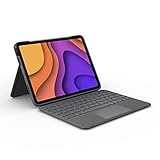


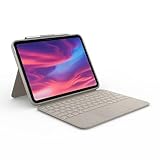


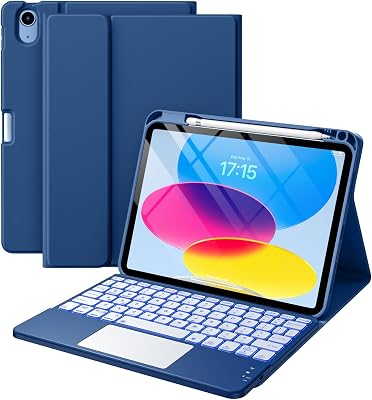
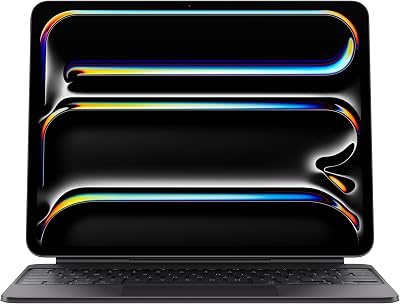
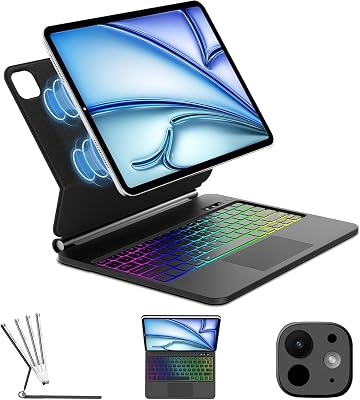


Best Logitech iPad Keyboard Case Picks at a Glance
| Product | Best For | Standout Feature | Rating |
|---|---|---|---|
| Logitech Combo Touch | Full productivity | Detachable backlit trackpad | 4.7/5 |
| Logitech Slim Folio | Long battery life | Integrated Bluetooth keys | 4.5/5 |
| Logitech Rugged Combo | Students and durability | Drop-tested spill-proof shell | 4.6/5 |
| Logitech Folio Touch | Pro iPad users | Smart Connector trackpad | 4.6/5 |
| Logitech Keys-To-Go 2 | Ultra-portable typing | Slim standalone cover | 4.4/5 |
Choosing the Right Logitech iPad Keyboard Case
The best Logitech iPad keyboard for you depends on how much you type and how you carry your tablet. Heavy writers benefit from a full keyboard with a trackpad, which brings cursor control to iPadOS and reduces reaching for the screen. Lighter users who just fire off the occasional message may prefer a slim folio that keeps weight down. If you are still assembling your kit, our guide to essential iPad productivity accessories gives helpful context.
Connection type matters too. Smart Connector keyboards draw power directly from the iPad, so there is no pairing or charging to manage, while Bluetooth models like the Slim Folio last months on a coin cell but need occasional battery swaps. Trackpad support is the other big divide, and adding one meaningfully changes how you work. Compare these against our roundup of iPad keyboards for every budget.
Logitech Combo Touch: Best Logitech iPad Keyboard Overall
The Combo Touch is the flagship, offering a backlit, detachable keyboard with a large trackpad and a versatile kickstand that adjusts to nearly any angle. It connects through the Smart Connector, so there is no charging. It is heavier than a simple folio and the case adds bulk when you just want a tablet, but for serious productivity it is the one to beat.
Logitech Slim Folio: Best Logitech iPad Keyboard for Battery Life
The Slim Folio integrates a Bluetooth keyboard into a protective folio and runs for many months on a replaceable battery. The keys have a satisfying travel for the folio class. It lacks a trackpad and the Bluetooth pairing occasionally needs a nudge after sleep, but for distraction-free writing with marathon battery life it is a dependable pick.
Logitech Rugged Combo: Best Logitech iPad Keyboard for Students
Built for classrooms, the Rugged Combo pairs a spill-resistant keyboard with a drop-tested shell that survives backpack chaos. The Smart Connector means no charging worries during a school day. It is thick and utilitarian rather than sleek, and it targets specific education iPad models, but for durability per dollar it is outstanding. It suits families reading our back-to-school iPad gear guide.
Logitech Folio Touch: Best Logitech iPad Keyboard for Pro Users
The Folio Touch brings a precise trackpad and backlit keys to Pro-class iPads through the Smart Connector, wrapping the whole tablet in a stand that flexes to many angles. Typing feel is excellent. It is on the premium side of the price range and only fits specific Pro sizes, so confirm your model, but for power users it turns the iPad into a capable laptop alternative.
Logitech Keys-To-Go 2: Best Logitech iPad Keyboard for Portability
The ultra-slim Keys-To-Go 2 is a standalone Bluetooth keyboard with a built-in cover, ideal when you want to type but hate carrying bulk. It slips into any bag and pairs with multiple devices. The flat, low-travel keys take adjustment and there is no trackpad or kickstand, but as a featherweight travel typer it is genuinely liberating.
Matching a Logitech iPad Keyboard to Your Needs
Your ideal Logitech iPad keyboard comes down to priorities. If you write all day and want laptop-style control, choose a Combo Touch or Folio Touch with a trackpad. If battery life and simplicity matter more, the Slim Folio delivers months of use. Students should lean rugged, and frequent travelers who value packing light will love the Keys-To-Go 2. For the full picture, pair your choice with the tips in our iPad-as-a-laptop setup guide.
Above all, confirm the keyboard is made for your exact iPad model and generation. Smart Connector and magnetic keyboards are keyed to specific dimensions and connector placement, so a keyboard for last year’s iPad may not align correctly. Favor listings that clearly state supported models and offer a return window over generic keyboards that promise universal fit but deliver a frustrating mismatch.
Frequently Asked Questions
Do Logitech iPad keyboards need to be charged?
It depends on the model. Smart Connector keyboards like the Combo Touch draw power directly from the iPad and never need charging or pairing. Bluetooth models such as the Slim Folio and Keys-To-Go run on their own batteries, which last from weeks to months depending on backlight use before needing a recharge or replacement.
Which Logitech iPad keyboard has a trackpad?
The Combo Touch and Folio Touch both include precise trackpads that bring cursor control to iPadOS, letting you point, scroll, and use gestures without reaching for the screen. If a trackpad is a priority for productivity, choose one of these Smart Connector models rather than the trackpad-free Slim Folio or Keys-To-Go.
Are Logitech keyboards better than Apple’s Magic Keyboard?
They serve different priorities. Logitech options are usually more affordable and often more protective, with kickstands and rugged shells, while Apple’s Magic Keyboard offers a floating design and premium feel at a higher price. For value, durability, and versatility, many iPad owners find a Logitech keyboard the smarter everyday choice.
Will a Logitech iPad keyboard fit my specific iPad?
Only if it is designed for your exact model and generation. Smart Connector and magnetic keyboards align to specific dimensions and connector positions, so a keyboard built for a different iPad may not attach or function correctly. Always check the product listing for supported models and confirm your iPad’s generation before purchasing.









Write Your Review
No reviews yet. Be the first to share your experience!