
Shoulder surfing is the lowest-tech data breach there is, and a privacy screen protector shuts it down at the glass level. In 2026 these filters are sharper and less dim than earlier generations, and this guide explains how to pick one you will not regret.
![Ailun 3 Pack Screen Protector for iPhone 17 / iPhone 16 Pro [6.3 inch] with Installation Frame, Dynamic Island Compatible, Case Friendly[Not for iPhone16/16Plus/16Pro Max/17Pro/17Pro Max/Air]](https://m.media-amazon.com/images/I/711tQq-VhOL._AC_SL1500_.jpg)
![Ailun Screen Protector for iPhone 16 Plus/iPhone 15 Plus/iPhone 15 Pro Max [6.7 Inch] Display 3 Pack Tempered Glass, Dynamic Island Compatible, Case Friendly[Not for iPhone 16 Pro Max 6.9 Inch]](https://m.media-amazon.com/images/I/71S7Ej-DfQL._AC_SL1500_.jpg)
![Ailun 2 Pack Screen Protector for iPad Pro 12.9 Inch Display [2022 & 2021 & 2020 & 2018 Release] Tempered Glass [Face ID & Apple Pencil Compatible] Ultra Sensitive Case Friendly](https://m.media-amazon.com/images/I/81AXdJIrJPL._AC_SL1500_.jpg)
![Ailun Screen Protector for iPad Air 11 Inch 2026/2025/2024 [8/7/6th Gen M4/M3/M2], iPad Pro 11 inch 2025/2024 [6/5th Gen M5/M4],Tempered Glass Face ID Apple Pencil Compatible Case Friendly 2 Pack](https://m.media-amazon.com/images/I/81ZGvLCk-3L._AC_SL1500_.jpg)
![Ailun Screen Protector for iPad 11th A16 2025 [11 Inch] / 10th Generation 2022 [10.9 Inch], Tempered Glass [Face ID & Apple Pencil Compatible] Ultra Sensitive Case Friendly [2 Pack]](https://m.media-amazon.com/images/I/71Km-MVfzvL._AC_SL1500_.jpg)
Recommended Products

Microsoft Surface Pro Keyboard with Pen Storage, Compatible with Copilot+ (11th Edition), Surface 9 and 8, Alcantara Material, Black

PrimeMicrosoft Surface Keyboard (2nd Edition)

PrimeSurface Pro Keyboard, Bluetooth Wireless Type Cover for Microsoft Surface Pro 7 Plus 7/6/5/4/3 12.3 inch, Ultra-Slim Portable Magnetic Keyboard with 7 Color Backlit, Trackpad, USB-C Recharge, Black
As an Amazon Associate we earn from qualifying purchases. Product prices and availability are accurate as of the date/time indicated.
How Privacy Screen Protectors Work
Privacy protectors embed a micro-louver layer, essentially microscopic window blinds, inside tempered glass. Light from the display passes straight out to the person holding the phone but is blocked at side angles, so anyone beyond roughly thirty degrees off-center sees a dark panel instead of your messages. Most current models are two-way filters, darkening from left and right viewing, which suits phones held in portrait; four-way versions also block from above and below for tablets and landscape use. The louver layer rides inside an otherwise normal tempered glass sandwich with 9H-rated scratch resistance and an oleophobic top coating, so you keep standard protector benefits while gaining the visual shield.
The Brightness Trade-Off, Honestly
Every privacy filter costs you some light, and pretending otherwise leads to returns. Expect the screen to appear somewhat dimmer head-on and to require a higher brightness setting, which nudges battery consumption upward. Quality matters enormously here: well-made filters in 2026 lose noticeably less brightness than the murky early generations, maintain color accuracy, and avoid the rainbow shimmer cheap louvers create. OLED iPhones tolerate the dimming better thanks to their high peak brightness. If you often use your phone outdoors in direct sun, weigh the trade carefully or choose a premium filter specifically reviewed for outdoor legibility. For commuters and office workers, the dimming becomes unnoticeable within a few days.
Fit, Sensors, and Installation
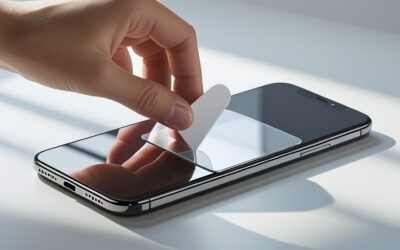
Privacy glass installs like any tempered protector, and the better kits include an alignment frame, dust stickers, and wipes. Pay special attention to sensor compatibility: under-display fingerprint readers need protectors validated for them, and Face ID phones need precise top cutouts so the louver layer never crosses the sensor window. Case-friendly sizing matters as much as ever, since privacy glass is typically a touch thicker than standard protectors and edge lift from a tight case is more visible on the darker material. After installation, re-check auto-brightness behavior; the ambient light sensor occasionally needs the protector’s pre-cut window aligned exactly. A careful ten-minute install pays off across the protector’s whole life.
Who Genuinely Benefits from Privacy Glass
Privacy filters earn their keep for anyone who handles sensitive content in public: commuters reading work email on trains, healthcare and legal professionals bound by confidentiality, executives reviewing deals in airports, and anyone entering banking codes around strangers. They are also surprisingly valuable as anti-distraction tools, keeping seatmates’ eyes off your screen. The trade-offs mean they are not for everyone; photographers and video watchers who share their screen socially will find the angle restriction annoying, and shared family devices are poor candidates. Many people split the difference, running privacy glass on the work phone and standard glass on the personal one. Decide based on where your screen spends its day.
Related guides on our site:Best MagSafe Compatible Cases in 2026: Strong Magnets, Real Charging·Best iPhone 12 Cases in 2026: Keep an Older iPhone Going Strong·Best Women’s Apple Watch Bands in 2026: Style for Every Wrist·Best Apple Pencil 2nd Generation Deals & Alternatives in 2026·Best Tempered Glass Screen Protectors in 2026: Real Protection.
Frequently Asked Questions
Does a privacy screen protector make the display harder to see for me?
Head-on visibility stays clear, though slightly dimmer. You may raise brightness a notch. Only side angles beyond roughly thirty degrees go dark, which is the intended effect.
Do privacy protectors work with Face ID and fingerprint sensors?
Yes, when properly designed. Choose protectors with precise sensor cutouts for Face ID, and models explicitly validated for under-display fingerprint readers if your phone uses one.
Two-way versus four-way privacy filters, which should I get?
Two-way filters block left and right viewing and suit phones used in portrait. Four-way filters also block vertical angles, better for tablets and people who rotate to landscape often.
Write Your Review
No reviews yet. Be the first to share your experience!