
Top Apple Pencil 2Nd Generation Deals Picks for 2026
Here are our current top apple pencil 2nd generation deals picks, compared on real Amazon owner reviews, price, and features. Live prices update below.
- Top Apple Pencil 2Nd Generation Deals Picks for 2026
- Recommended Products
- Which iPads Use the Pencil 2
- What Still Makes It Great
- Worthy Alternatives for Less
- Buying Smart in 2026
- Pencil 2 vs Pencil Pro: Do You Need to Upgrade?
- Getting the Most From Your Pencil 2
- Related Guides
- Frequently Asked Questions
- Related Articles
- Related Guides


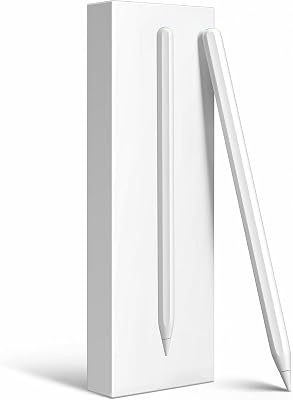


The second-generation Apple Pencil remains the go-to stylus for a huge range of iPads, with magnetic charging, double-tap tool switching, and pixel-perfect precision. Here’s who should still buy it in 2026 — and which alternatives deserve a look.
As an Amazon Associate we earn from qualifying purchases at no extra cost to you.





Recommended Products
Which iPads Use the Pencil 2
The Pencil 2 pairs with the iPad Pro 11-inch (1st-4th gen), Pro 12.9-inch (3rd-6th gen), Air 4 and 5, and iPad mini 6. If you own a newer iPad with USB-C-era Pencil Pro support, the Pencil Pro supersedes it; if you own the base iPad, you need the USB-C or 1st-gen Pencil instead. Always match the Pencil to your exact iPad model before buying. The quickest way to check is to look at the top edge of your iPad: if it has a flat magnetic strip where a Pencil clicks on and charges, the Pencil 2 is your stylus. If the Pencil rests there but a small settings badge mentions Pencil Pro features like the squeeze gesture, your iPad has moved on to the newer model.
What Still Makes It Great
Magnetic attach-and-charge solved the original’s silly charging posture, double-tap switches between pen and eraser mid-stroke, and latency remains imperceptible for note-taking and drawing. Palm rejection is flawless. For students and artists on compatible iPads, it remains the most integrated stylus experience available. Tilt shading, pressure sensitivity and pixel-level accuracy all still hold up against anything on the market, and because the Pencil 2 has been around for years, app support is universal — every major drawing, note and PDF app treats it as a first-class citizen with no setup quirks.

Worthy Alternatives for Less
Third-party styluses now offer tilt support, palm rejection, and magnetic attachment for a third of the price. They skip pressure sensitivity — fine for notes, a real loss for art. If you mostly handwrite, annotate PDFs, and sketch casually, a quality alternative saves real money; serious illustrators should stay with Apple. Brands like the HATOKU and similar magnetic styluses now attach and wireless-charge from the same strip as the real Pencil 2, and add nice touches like a battery-level readout. The catch is always the same: without genuine pressure sensitivity your line weight stays uniform, which handwriting hides but shading and inking expose immediately.
Buying Smart in 2026
With the Pencil Pro headlining, the Pencil 2 sees frequent discounts and solid refurbished stock. Buy sealed or Apple-certified refurbished — used Pencils have unknown battery wear and non-replaceable batteries. Grab spare tips at the same time. Watch for counterfeit units on marketplace listings: a genuine Pencil 2 pairs instantly on the magnetic strip and shows a battery widget, whereas fakes often fail to pair, charge erratically, or feel slightly lighter. Paying a few dollars less for an unverified seller is rarely worth the risk of a non-working or short-lived unit.

Pencil 2 vs Pencil Pro: Do You Need to Upgrade?
The Pencil Pro adds a squeeze gesture for quick tool menus, barrel roll for shaped brushes, haptic feedback and Find My support. Those features are genuinely useful for professional illustrators, but they only work on the newest iPads — you cannot bolt Pencil Pro functionality onto an iPad that supports the Pencil 2. If your current iPad is on the Pencil 2 list, the sensible move is to buy the Pencil 2 and enjoy an identical drawing experience for less, rather than chasing the Pro and its iPad requirement. The core writing and sketching feel is effectively the same between the two.
Getting the Most From Your Pencil 2
A few habits extend the life and usefulness of the stylus. Keep it attached to the magnetic strip when not in use so it stays charged and doesn’t roll away. Add a paper-feel screen protector if you handwrite often, but expect to replace tips more frequently as the textured surface wears them faster. Turn off double-tap in settings if you keep triggering it by accident, or reassign it to the tool you switch to most. Finally, keep the tip snug — a loose tip introduces a tiny wobble that reads as inaccuracy but is fixed in seconds.
Related guides on our site:Best Fast iPhone Chargers in 2026: Top High-Speed Plugs·Best iPhone 16 Pro Cases in 2026: Top Slim and Tough Picks·Best USB-C Ethernet Hubs in 2026: Top Wired Adapters·Best 10000mAh Power Banks in 2026: Top Compact Chargers·Best Solar Power Banks in 2026: Top Outdoor Chargers.
Frequently Asked Questions
Does the Apple Pencil 2 work with the newest iPads?
The newest iPad Pro and Air models moved to the Apple Pencil Pro and no longer pair with the Pencil 2, so compatibility depends entirely on your exact iPad generation. The Pencil 2 still works perfectly with its long list of supported models, including the iPad Air 4 and 5, iPad mini 6, and several iPad Pro generations. Check your model before buying to avoid a mismatch.
Is the Apple Pencil 2 worth it just for notes?
It is excellent for notes, with flawless palm rejection and imperceptible latency, but a cheaper palm-rejection stylus delivers most of that note-taking experience without pressure sensitivity. If handwriting and PDF markup are all you do, an alternative can save real money. The Pencil 2 mainly earns its higher price through pressure and tilt, which matter for drawing and shading rather than plain writing.
Why won’t my Pencil 2 pair?
First confirm your iPad model actually supports the Pencil 2, since that is the most common reason pairing fails. Then attach the Pencil to the flat magnetic strip on the side of the iPad with Bluetooth switched on, and wait for the pairing card to slide up. If nothing appears, restart the iPad, make sure the magnetic edge is clean, and check the Pencil has charge.
Can I use the Apple Pencil 2 while it charges?
Yes. Because the Pencil 2 charges wirelessly by resting on the magnetic strip along the edge of a compatible iPad, you simply lift it off and keep working whenever you need it, then place it back to continue topping up. A short attachment quickly restores enough charge for hours of use, so in practice you rarely notice charging as a separate step at all.
How long does the Apple Pencil 2 battery last?
A full charge delivers roughly 12 hours of active use, and because it recharges any time it sits on the magnetic strip, most owners never run it flat during normal use. A 15-second attach adds around 30 minutes of writing. The battery is not user-replaceable and degrades over years, which is the main reason we recommend buying new or certified-refurbished rather than used units of unknown age.







Write Your Review
No reviews yet. Be the first to share your experience!